Media Files that Spread Spyware updated January 3, 2005

Users have a lot to worry about when downloading and playing media files. Are the files legal? Can their computers play the required file formats? Now there’s yet another problem to add to the list: Will a media file try to install spyware?

When Windows Media Player encounters a file with certain “rights management” features enabled, it opens the web page specified by the file’s creator. This page is intended to help a content providers promote its products — perhaps other music by the same artist or label. However, the specified web page can show deceptive messages, including pop-ups that try to install software on users’ PCs. User with all the latest updates (Windows XP Service Pack 2 plus Windows Media Player 10) won’t get these popups. But with older software, confusing and misleading messages can trick users into installing software they don’t want and don’t need — potentially so many programs that otherwise-satisfactory computers become slow and unreliable.
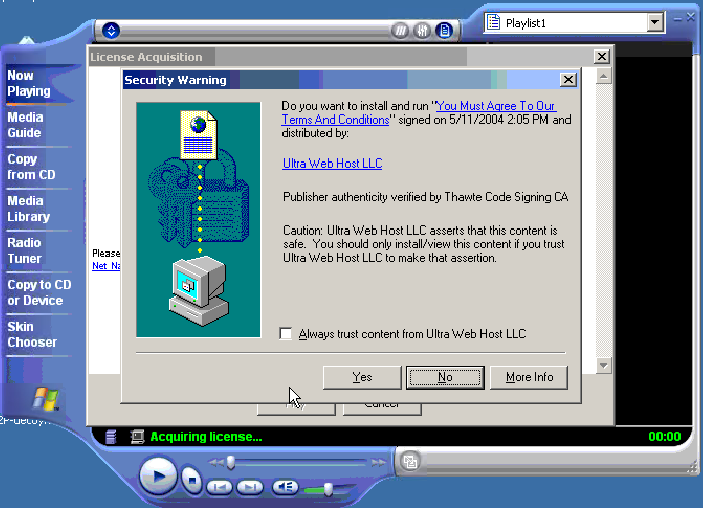
Screen-shot of the initial on-screen display. If users press Yes, scores of unwanted programs are installed onto their PCs. Click to enlarge.Screen-shot of the initial on-screen display. If users press Yes, scores of unwanted programs are installed onto their PCs.

I recently tested a Windows Media video file, reportedly circulating through P2P networks, that displays a misleading pop-up which in turn attempts to install unwanted software onto users’ computers. I consider the installation misleading for at least three reasons.

  1. The pop-up fails to name the software to be installed or the company providing the software, and it fails to give even a general description of the function of the software.
  2. The pop-up claims “You must agree to our terms and conditions” — falsely suggesting that accepting the installation is necessary to view the requested Windows Media video. (It’s not.)
  3. Even when a user specifically requests more information about the program to be installed, the pop-up does not provide the requested information — not even in euphemisms or in provisions hidden mid-way through a long license. Clicking the pop-up’s hyperlink opens SpiderSearch’s Terms and Conditions — a page that mentions “receiving ads of adult nature” and that disclaims warranty over any third-party software “accessed in conjunction with or through” SpiderSearch, but that does not disclose installation of any third-party software.
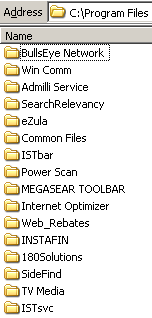
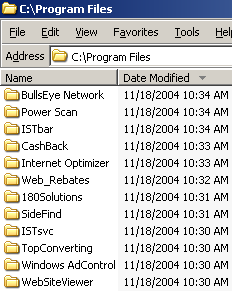
Screen-shot of my Program Files folder, showing some of the programs installed on my test computer.Screen-shot of my Program Files folder, showing some of the programs installed on my test computer.

On a fresh test computer, I pressed Yes once to allow the installation. My computer quickly became contaminated with the most spyware programs I have ever received in a single sitting, including at least the following 31 programs: 180solutions, Addictive Technologies, AdMilli, BargainBuddy, begin2search, BookedSpace, BullsEye, CoolWebSearch, DealHelper, DyFuca, EliteBar, Elitum, Ezula, Favoriteman, HotSearchBar, I-Lookup, Instafin, Internet Optimizer, ISTbar, Megasearch, PowerScan, ShopAtHome Select, SearchRelevancy, SideFind, TargetSavers, TrafficHog, TV Media, WebRebates, WindUpdates, Winpup32, and VX2 (Direct Revenue). (Most product names are as detected by Lavasoft Ad-Aware.) All told, the infection added 58 folders, 786 files, and an incredible 11,915 registry entries to my test computer. Not one of these programs had showed me any license agreement, nor had I consented to their installation on my computer.

I retained video, packet log, registry, and file system logs of what occurred. As in my prior video of spyware installing through security holes, my records make it possible to track down who’s behind the installations — just follow the money trail, as captured by the “partner IDs” within the various software installation procedures. When one program installs another, the second generally pays the first a commission, using a partner ID number to track who to pay. These numbers make it possible to figure out who’s profiting from the unwanted installations and, ultimately, where the money is going.

Figuring Out Who’s Responsible

Most directly responsible for this mess is ProtectedMedia — the company that caused my computer to display the initial misleading pop-up shown above. ProtectedMedia invited the installation of some unwanted programs, which in turn installed others, but ProtectedMedia could readily stop these behaviors, e.g. by disabling its misleading pop-up installation attempts.
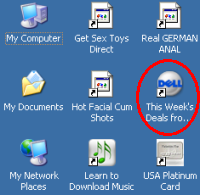
Screen-shot of the icons added to my test computer's desktop. Note a new link to Dell -- an affiliate link such that Dell pays commissions when users make purchases after clicking through this link.Screen-shot of the icons added to my test computer’s desktop. Note a new link to Dell — an affiliate link such that Dell pays commissions when users make purchases after clicking through this link.

But who pays ProtectedMedia? As I started to follow the money trail, I was surprised to see that some of the unrequested programs receive funds from respected online merchants. Several of the spyware installations added new toolbars to my computer’s browser and new icons to my desktop. If users click through these links, then make purchases from the specified merchants, the merchants pay commission to the affiliates who placed these toolbars and icons on users’ PCs. Even large, otherwise-reputable companies pay commissions through these systems, thereby funding those who install unwanted software on users’ computers. In my testing, I received affiliate links to Amazon, Dell, Hotwire, Match.com, Travelocity, and others. Many of these links pass through affiliate tracking networks LinkShare and Commission Junction.

Of course, these merchants may not have intended to support spyware developers. For example, merchants may have approved the affiliates without taking time to investigate the affiliates’ practices, or the affiliates’ actions may be unauthorized by the merchants. (That’s what Dell said when I previously found Dell ads running on Claria.) In future work, I’ll look in greater detail at which merchants pay affiliate commissions to which spyware programs, and I’ll also further document which merchants purchase advertising from companies whose software sneaks onto users’ computers.

Other companies partially responsible for these practices are the providers of the unwanted software — companies that pay commissions to distributors foisting their software onto users’ computers. In general there’s no reason to expect honorable behavior by providers of unwanted software. But some of the programs I received come from big companies with major investment backing: 180solutions received $40 million from Spectrum Equity Investors; Direct Revenue received $20 million from Insight Venture Partners; and eXact Advertising (makers of BargainBuddy and BullsEye) received $15 million from Technology Investment Capital Corp. With so much cash on hand, these companies are far from judgment-proof. Why are they paying distributors to install their software on users’ computers without notice and consent?

The problematic installations ultimately result from the “feature” of Windows Media Player that lets media files open web pages. But most users will only receive the contaminated files if they download files from P2P filesharing networks. Of course, rogue media files are but one way that P2P networks spread spyware. For example, users requesting Kazaa receive a large bundle of software (including Claria’s GAIN), after poor disclosures that bury key terms within lengthy licenses, without even section headers to help readers find what’s where. Users requesting Grokster receive unwanted software even if they press Cancel to decline Grokster’s installation (details).

Ed Bott offers an interesting, if slightly different, interpretation of these installations. Ed rightly notes that users with all the latest software — not just Windows XP Service Pack 2, but also Windows Media Player 10 — won’t get the tricky pop-ups described above. Ed also points out that Windows Media Player displays of ActiveX installation prompt pop-ups are similar to deceptive methods users have seen before, i.e. when web sites try to trick users into installing software. True. But I think Ed gives too little weight to the especially deceptive circumstances of a software installation prompt shown when users try to watch a video. For one, legitimate media players actually do use these prompts to install necessary updates (i.e. the latest version of Macromedia Flash), and Windows Media Player often shows similar prompts when it needs new codecs or other upgrades. In addition, the unusually misleading (purported) product name and company name make it particularly easy to be led astray here. Users deserve better.
Video: eBates Installed through Security Holes

I’ve long been a fan of online shopping site Ebates. Sign up for their service, visit their web site, click through their special links to merchants (including merchants as distinguished as Dell, Expedia, IBM, and L.L. Bean), and earn a small cash back, generally a few percent of your purchase.

But another side of Ebates’ business has become controversial: Ebates uses a software download called “Moe Money Maker” (MMM) to automatically claim merchants’ affiliate commissions, then pay users rebates — even if users don’t visit Ebates’ web site, and even if users don’t click through Ebates’ special links.

Why the controversy? I see at least two worries:

1) Aggressive software installations.

  • Partial screen-shot taken from video of Ebates installation through a security hole, without any notice or consent.Partial screen-shot taken from video of Ebates installation through a security hole, without any notice or consent.
    Users visiting ebates.com can receive MMM software merely by filling out a form and failing to uncheck the “I would like to download MMM” checkbox (checked by default).

  • Users downloading certain third-party programs (screen-savers and the like) receive MMM as part of the bundle — disclosed, in my testing, but often with a long license in a small box, such that many users don’t fully understand what they’re getting.
  • Most troublingly, there have been persistent allegations of Ebates installed without any notice or consent whatsoever. I had always discounted these allegations until I saw the proof for myself earlier last month. See video of Ebates MMM installed through security holes.

2) Claiming affiliate commissions that would otherwise accrue to other affiliates. Many web sites receive affiliate commissions when users make purchases through special links to merchants’ web sites. (See e.g. Lawrence Lessig‘s “Get It Here” page.) Network rules (Commission Junction , Linkshare) prohibit Ebates from interceding in these transactions; instead, the independent web sites are to receive the commissions for purchases through their links. But Ebates’ software sometimes claims commissions anyway — specifically contrary to applicable rules. These behaviors have been alleged and reported for years, and recently documented in a series of videos (videos of particular interest. Apple, Cooking.com, Diamonds International, JJill, Lillian Vernon, Sharper Image, Sony). If Ebates’ prohibited interventions were only temporary, they would be easy to sweep away as mere malfunctions. But when problems continue for years, to Ebates’ direct financial benefit and to others’ detriment, the behavior becomes harder to disregard.

Meanwhile, Ebates has inspired copy-cat programs with similar business models but even more controversial execution. I’ve recently made literally scores of videos of eXactAdvertising‘s CashBack by BargainBuddy installed through security holes, and also of TopRebates/WebRebates installed through security holes — always without any notice or consent whatsoever. These programs remain participants in the Commission Junction and LinkShare networks — presumably receiving commissions from these networks and their many merchants (CashBack merchants, TopRebates merchants). I’m surprised that so many merchants continue to do business with these software providers — including so many big merchants, who in other contexts would never consider partnering with software installed without notice and consent.

I think the core problem here is skewed incentives. Affiliate networks (CJ and LinkShare) have no financial incentive to limit Ebates’ operation. Instead, the more commissions claimed by Ebates, the more money flows through the networks — letting the networks charge fees of their own. In principle we might expect merchants to refuse to pay commissions not fairly earned — but merchants’ affiliate managers sometimes have secondary motives too. In particular, affiliate managers tend to get bonuses when their affiliate programs grow, which surely makes them particularly hesitant to turn away the large transaction volume brought by MMM’s automatic commission system. That’s not to say some merchants don’t knowingly and intentionally participate in Ebates — some merchants understand that they’ll be paying Ebates a commission on users’ purchases even when users type in merchants’ web addresses directly, and some merchants don’t mind paying these fees. But on the whole I worry that Ebates isn’t doing much good for many merchants, even as its software comes to be installed on more and users’ PCs, with or without their consent.

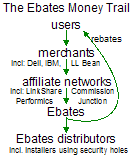
The Ebates Money trail: users -> merchants -> affiliate networks -> Ebates -> Ebates distributors”>The Ebates Money trail: users -> merchants -> affiliate networks -> Ebates -> Ebates distributors</p>
</div>
<p><a name=For users who share my continued interest in following the money trail, the diagram at right summarizes Ebates’ complicated business model. Users make purchases from merchants, causing merchants to pay affiliate commissions (via affiliate networks such as LinkShare and Commission Junction) to Ebates. Ebates in turn pays commissions to those who cause its software to be installed, including those installers who install Ebates’ software through security holes, without notice or consent.

Ebates Terms & Conditions Allow Removing Other Programs

Finally, note that Ebates has joined the ranks of software providers who, in their EULAs, claim the right to remove other software programs. Ebates’ MMM Terms & Conditions demand:

“Ebates may disable or uninstall any other product or software tool that might interfere with the operability of the Moe Money Maker Software or otherwise preempt or render inoperative the Moe Money Maker Software … In installing the Moe Money Maker Software, you authorize Ebates to disable, uninstall, or delete any application or software that might, in Ebates’ opinion nullify its function.”

Ebates is right to worry that a user can only successfully run a single automatic commission-claiming program. But this license language allows Ebates to delete far more than competing commission programs. For example, if Ad-Aware removes MMM as spyware, thereby “interfering with the operability” of MMM, then the license purports to give Ebates the right to remove Ad-Aware.

Update (December 15): Ebates staff wrote to me to report that they have narrowed the clause quoted above. Ebates’ current Terms allow disabling only “shoping or discount software,” not general-purpose software removal tools like Ad-Aware. Ebates staff further note that they have never exercised the rights granted under the prior Terms text. However, Archive.org reports that Ebates’ Terms included the broad “any application or software” language as long ago as August 2003.

Thanks to Ian Lee, Internet Marketing Strategist & Affiliate Manager of ADS-Links.com, for recommendations on video production methods.

Who Profits from Security Holes? updated November 24, 2004

I’ve written before about unwanted software installed on users’ computers via security holes. For example, in July I mentioned that 180solutions software was being installed through Internet Explorer vulnerabilities. (See also 1, 2, 3) More recently, researchers Andrew Clover and Eric Howes (among others: 1, 2) have described increasing amounts of unwanted software being installed through security holes.

Malware installed through a single security exploit

How bad is this problem? How much junk can get installed on a user’s PC by merely visiting a single site? I set out to see for myself — by visiting a single web page taking advantage of a security hole (in an ordinary fresh copy of Windows XP), and by recording what programs that site caused to be installed on my PC. In the course of my testing, my test PC was brought to a virtual stand-still — with at least 16 distinct programs installed. I was not shown licenses or other installation prompts for any of these programs, and I certainly didn’t consent to their installation on my PC.

In my testing, at least the following programs were installed through the security hole exploit: 180solutions, BlazeFind, BookedSpace, CashBack by BargainBuddy, ClickSpring, CoolWebSearch, DyFuca, Hoost, IBIS Toolbar, ISTbar, Power Scan, SideFind, TIB Browser, WebRebates (a TopMoxie distributor), WinAD, and WindUpdates. (All programs are as detected by Ad-Aware.) I have reason to believe that numerous additional programs were also installed but were not detected by Ad-Aware.

See a video of the installations. The partial screen-shot at left shows some of the new directories created by the security exploit.

Other symptoms of the infection included unwanted toolbars, new desktop icons (including sexually-explicit icons), replacement desktop wallpaper (“warning! you’re in danger! all you do with computer is stored forever in your hard disk … still there and could broke your life!” (s.i.c.)), extra popup ads, nonstandard error pages upon host-not-found and page-not-found error conditions, unrequested additions to my HOSTS file, a new browser home page, and sites added to my browser’s Trusted Sites zone.

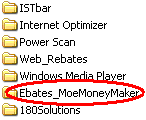
I’ve been running similar tests on a daily basis for some time. Not shown in the video and screen-shot above, but installed in some of my other tests: Ebates Moe Money Maker, EliteToolBar, XXXtoolbar, and Your Site Bar.

Installation of 180solutions software through security holes is particularly notable because 180 specifically denies that such installations occur. 180’s “privacy pledge” claims that 180 software is “permission based” and is “programs are only downloaded with user consent and opt-in.” These claims are false as to the installation occuring in the video linked above, and as to other installations I have personally observed. Furthermore, 180’s separate claim of “no hiding” is false when 180 software is installed into nonstandard directories (i.e. into C:Windows rather than a designated folder within Program Files) and when 180 software is installed with a nonstandard name (i.e. sais.exe) rather than a name pertaining to 180’s corporate name or product names.

What’s particularly remarkable about these exploits is that the bad actors here aren’t working for free. Quite the contrary, they’re clearly expecting payment from the makers of the software installed, payments usually calculated on a per-install basis. (For example, see a 2003 message from 180solutions staff offering $0.07 per installation.) By reviewing my network logs, I can see the specific “partner” IDs associated with the installations. If the installers want to get paid, they must have provided accurate payment details (address, bank account number, etc.) to the makers of the programs listed above. So it should be unusually straightforward to track down who’s behind the exploits — just follow the money trail. I’m working on passing on this information to suitable authorities.

Note that the latest version of Internet Explorer, as patched by Windows XP Service Pack 2, is not vulnerable to the installations shown in my video and discussed above.

CFP Presentation on Search Engine Omissions; Spyware Workshop Comments updated June 3, 2004

Today I presented Empirical Research on Search Engine Omissions at Computers, Freedom, and Privacy (CFP) in Berkeley, CA. My presentation focused on two prior empirical projects in which I documented sites missing from Google search results: Localized Google Search Result Exclusions (documenting 100+ controversial sites missing from google.de, .fr, and .ch) and Empirical Analysis of Google SafeSearch (documenting thousands of unobjectionable and non-sexually-explicit sites missing from google.com when users enable Google’s SafeSearch feature to attempt to omit sexually-explicit content).

On Monday I was in DC for the FTC‘s Spyware Workshop. I thought the final panel, Governmental Responses to Spyware, did a fine job of explaining the legislative options on the table, and of noting the pressure to address the problem of spyware for the large and growing number of affected users. But I was dismayed that the first panel (Defining Spyware) classified as fine and unobjectionable certain programs that, in my experience, users rarely want, yet often find installed on their computers. Key among these undesired programs are software from Claria (formerly Gator) and WhenU. The technical experts on the second and third panels agreed that these programs pose major problems and costs for users and tech support staff. Yet the first panel seemed to think them perfectly honorable.

Also puzzling was a new position paper from the Consumer Software Working Group recently convened by CDT. Examples of Unfair, Deceptive or Devious Practices Involving Software (PDF) purports to offer a listing of bad behaviors that software ought not perform. It certainly lists plenty of behaviors that so outrageous as to be beyond dispute. But what it misses — indeed, ignores — are the harder cases, i.e. the programs that make spyware a more complicated issue, and the programs that affect the most users. For example, the Examples document condemns software installed without any notice to the user. It is silent about — and thereby is taken to endorse — the far more typical practice of showing a user a license agreement and/or disclosure that describes the software in euphemisms, but admittedly does provide at least some notice of the software’s purpose.

What to make of the document’s failure to consider the methods actually used by the controversial software with highest installation rates? Perhaps one explanation is that Claria and WhenU helped draft the report! (See the signators listed on page five.) That said, the document doesn’t purport to be comprehensive. Perhaps a future version will address the problems of drive-bys and euphemistic, lengthy, or poorly-presented licenses.

For more on the workshop, and another critical reaction, see other attendees’ notes on dslreports.com forums (especially a recent post by Eric Howes). See also impressive studies from PC Pitstop showing that more than 75% of Gator users don’t even know they have Gator (PDF) (not to mention consenting to Gator’s license agreements) and more than 85% for WhenU (PDF).

See also a transcript of the workshop (PDF).


Spyware, Adware, and Malware: Research, Testing, Legislation, and Suits

A number of firms currently design and offer so-called “spyware” software — programs that monitor user activities, and transmit user information to remote servers and/or show targeted advertisements. As distinguished from the design model anticipated by whatis.com’s definition of adware (“any software application in which advertising banners are displayed while the program is running”), these spyware programs run continuously and show advertisements specifically responding to the web sites that users visit. Companies making programs in this latter category include Gator (recently renamed Claria), WhenU, and 180Solutions. Other spyware programs include keystroke recorders, screen capture programs, and numerous additional software systems that surreptitiously monitor and/or transmit users’ activities. As programs and practices shift and terms evolve, some practices are more naturally termed “adware” or “malware” — especially if their tracking is secondary to an advertising purpose.

These programs have prompted a number of legal challenges, as described in the pending suits section, below. They have also attracted attention from legislators, who have proposed laws to rein in the problem.

I have followed these developments generally, I have written about the programs and their effects, and I have been retained as an expert in certain of these suits. This page indexes my research and my work in selected cases.

Spyware, Adware, and Malware: Research, Testing, Legislation, and Suits