Yahoo’s Overture (recently renamed Yahoo Search Marketing) allocates pay-per-click (PPC) ads among Yahoo’s network of advertisers. When users run searches at yahoo.com, Yahoo’s advertisers are assigned placements at the top, right, and bottom of search results. Advertisers pay Yahoo a fee when users click on their ads.
But Yahoo doesn’t just show advertisers’ ads on yahoo.com; Yahoo also distributes advertisers’ ads to Yahoo’s various syndication partners. Many of these partners are entirely legitimate: For example, most advertisers will be happy to show their ads to users running searches at washingtonpost.com, where Yahoo sponsored links complement searches of Post articles.
However, serious concerns arise where Yahoo syndicates advertisers’ ads to be shown by advertising software installed on users’ PCs — software typically known as spyware or adware. In my testing, Yahoo’s funding of spyware is widespread and prevalent — an important source of revenue for many spyware programs installed on millions of users’ PCs. Were it not for Yahoo’s funding of these programs, the programs would be far less profitable — and there would be fewer such programs trying to sneak onto users’ PCs.
Yahoo’s funding of spyware is not unique. I’ve recently written about Google’s funding of similar bad actors (1, 2). Earlier this year, FindWhat disclosed related problems, admitting that terminating its dubious distributors would reduce revenues by at least 5%. But in my hands-on testing of various spyware-infected PCs, I find that I receive Yahoo-syndicated ads more frequently than I receive such ads from any other single PPC network.
This article proceeds in three parts. First, I show examples of Yahoo ads supporting Claria, eXact Advertising, Direct Revenue, 180solutions, and various others; I also review the objectionable practices of each of these vendors. (Numerous additional examples on file.) Second, I review Yahoo’s disclosures to advertisers — finding that Yahoo has failed to tell advertisers about its controversial syndication partners, even in general terms. I conclude with recommendations to Yahoo (and other PPC search engines that allow syndication), as to how to put an end to this mess and avoid such problems in the future.
Claria (Gator / GAIN): SearchScout Popunders of Yahoo Sponsored Links
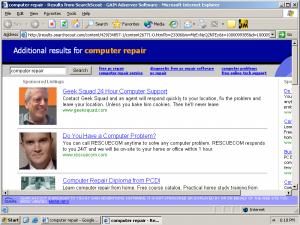 A Yahoo Overture popunder, delivered by Claria, targeting a Google search for the same phrase. Shown after activating the popunder.
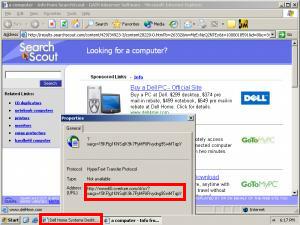 A Yahoo Overture popunder, delivered by Claria, showing sponsored results for “computer” when users visit Dell.com. Shown after activating the popunder and right-clicking the ad to show its destination.
money

 viewers
Yahoo Overture
money
viewersClaria (Gator / GAIN)
The money trail – how funds flow from advertisers to Yahoo Overture to Claria.
Likely Yahoo’s largest single advertising software syndicator, Claria shows Yahoo Overture pay-per-click ads in popunders triggered by users’ web browsing.
Before showing Yahoo ads, Claria software must first become installed on users’ computers. Claria’s installation often proceeds without meaningful user consent. For example, Claria often gets installed through software bundles — where a user seeks one program but gets Claria too. Historically, Claria’s bundles have featured lengthy license agreements (as long as 5,900+ words and 63 on-screen pages), broken license formatting (missing line breaks, making section headings hard to find), and substantively unreasonable terms (including restrictions on how users can remove Claria software). Claria also promotes its software through banner ads — including ads on kids sites, claiming to fix computer clocks or improve computer security, showing a license only after installation has begun and cannot be cancelled. Some Claria uninstallers don’t work — leading users in circles rather than actually removing Claria software.
Claria’s core business is showing pop-up ads specifically purchased by advertisers. (See my 2003 listings, including well-known advertisers. See also PC Pitstop listing based on Claria 2003 disclosures.) But Claria also shows popunders of Yahoo Overture sponsored links. Search for “computer repair” at any major search engine, and Claria adds a popunder giving Yahoo Overture ads for that same term. Sponsored link popunders also target specific web sites. Visiting Dell often yields a Claria popunder of Yahoo Overture ads for “computer.”
Claria’s provision of Yahoo Overture sponsored links raises clear questions of business benefit for affected advertisers. In the second screenshot at right, the user was already at the Dell.com site. (Indeed, Dell might have just paid several dollars to reach that user, via a pay-per-click ad at Yahoo, Google, or elsewhere.) Claria’s popunder risks drawing the user’s attention away from Dell — but if the user then clicks on the prominent Dell ad in Claria’s Overture listing, Dell has to pay again for the same user who was already at the Dell site. Why pay Yahoo and Claria to get the user back, when it was they who took the user from Dell in the first place?
Claria’s provision of Yahoo Overture sponsored links also presents ethical concerns. Many advertisers dislike Claria’s practices — including its aggressive methods of becoming installed on users’ PCs, its serious effects on privacy, and its harm to computer performance. Indeed, when I previously revealed that, through another channel, Dell was advertising with Claria in mid 2004, Dell staff sought to distance Dell from Claria, commenting “[T]oday we do not do business with anyone like Claria.” But despite Dell’s stated dislike of Claria, Dell does help fund Claria when Dell purchases pay-per-click ads from Yahoo: Payment flows from Dell to Yahoo to Claria, as shown in the diagram at right. Same for thousands of other Yahoo Overture advertisers.
In the future, Claria purports to plan to shut down its popup business. That’s a move I applaud — it’s been a bad business from the start. But at present Claria still serves lots of popups — including Yahoo Overture popunders as frequently as every few minutes. These ads are big money: Claria’s 2003 SEC S1 discloses receiving $31 million from Yahoo in 2003 alone — despite a relationship only in place for 9 months of that year. Annualizing the payment and taking account of the dramatic increase in pay-per-click fees, Yahoo might now be paying Claria $50 million or more per year. (It’s hard to know for sure because Claria hasn’t filed more recent financial disclosures, and Yahoo doesn’t include this level of detail in its financial reports.)
eXact Advertising – Popups and Sidebars of Yahoo Sponsored Links
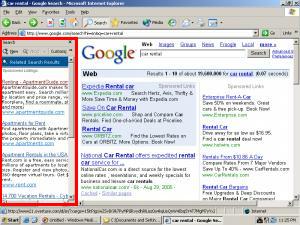 A Yahoo Overture auto-opening sidebar, delivered by eXact Advertising, targeting Google search results.
money
viewersYahoo Overture
money
viewerseXact Advertising
The money trail – how funds flow from advertisers to Yahoo Overture to eXact Advertising.
Claria claims to always install with consent — however tricky or ill-gotten, per my testing and documentation. But other Yahoo Overture syndicators can’t even make this claim. On dozens of occasions, I have observed and recorded software from eXact Advertising installed through security holes, with no notice or consent. (Some examples: 1, 2.) I’ve also seen eXact installed by tricky popups claiming to be required to view sexually-explicit videos, and by unrequested popups claiming to offer “browser enhancements.” Others have reported eXact bundled by P2P-distributed videos purporting to offer child pornography, and even by instant messenger worms. In short, when a user has software from eXact, the user is unlikely to have granted meaningful informed consent to the installation, and the user may not have granted any consent at all. Reporters tell me that eXact claims to have fixed these problems, but that’s just not true: I’ve received nonconsensual installations of eXact software this very week. Videos on file.
Despite its poor installation practices, eXact receives Overture sponsored links, shows these advertisements to users, and presumably is paid by Yahoo for doing so.
See screenshot at right, showing an eXact auto-opening sidebar that appeared as I ran a search at Google. The sidebar shows Yahoo Overture links, and clicking a link sends users to Overture and on to the advertiser (without passing through any other search intermediary). Notice the Overture reference in the browser status bar as I hold my mouse over a sponsored link.
To typical users, the eXact-delivered Yahoo Overture sidebar appears to be an integrated part of search results — presumably delivered by Google (or whatever other search engine the user had requested). Notice the absence of any distinctive branding, logo, disclosure, or other identification that the sidebar comes from eXact and Overture. To find such a disclosure, a user must scroll to the bottom of the sidebar. Even there, the disclosure is truncated and hard to read. Screenshot.
eXact’s BullsEye service also shows sponsored link listings in freestanding windows. Here too, results are obtained from Yahoo Overture. Screenshot.
Direct Revenue – Popups and Popunders of Yahoo Sponsored Links
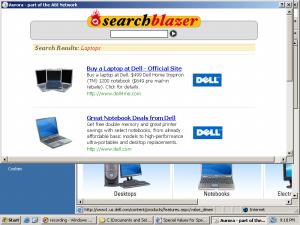 A Yahoo Overture popunder, delivered by Direct Revenue, targeting Dell. Shown after activating the popunder.
money
viewersYahoo Overture
money
viewersInfoSpace
money
viewersDirect Revenue
The money trail – how funds flow from advertisers to Yahoo Overture to Direct Revenue.
Direct Revenue installations are at least as poor as eXact. I have numerous videos on file showing DR installed without consent (one such video on my public site). DR also uses various other tricky methods to get installed — like tricky popups, bundles, etc. But DR is perhaps worse than other advertising software in its unusual difficulty of removal (requiring downloading a special uninstaller from DR’s web site). DR is also unusual in its ability to disable and delete other software on a user’s PC.
Despite these troubling practices, DR also shows Yahoo Overture ads. See e.g. the example ad at right. The searchblazer results appeared when I browsed to Dell.com. Notice Direct Revenue’s “Aurora” branding in the upper-left corner and title bar. Although the ad’s body lacks any Direct Revenue branding or logo, the ad was loaded from the search.offeroptimizer.com server, a server under DR’s control. (Offeroptimizer.com is a well-known DR domain.) Furthermore, clicking on a sponsored link within the ad caused traffic that first passed through search.offeroptimizer.com en route to Overture. In short, this ad is not a rogue advertiser buying traffic from Direct Revenue. Rather, these sponsored links were specifically placed by Direct Revenue itself.
When I clicked on the first sponsored link shown at right, traffic flowed as listed below. See also full packet log.
http://xadsj.offeroptimizer.com/c/click.php?c=48685&s=5261&…
http://msxml.infospace.com/_1_B2HUEF099WI63__dirrev.feed.pu1/…
http://www10.overture.com/d/sr/?xargs=…
http://landingstrip.dell.com/landingstrip/ls.asp?CID=8278&LID=230157&…
As indicated in the diagram at right and in the traffic flow above, Yahoo Overture syndicates its ads to InfoSpace, and InfoSpace in turn syndicates these ads to Direct Revenue. This series of relationships makes it particularly hard for Yahoo Overture to know where its advertisers’ ads will appear: Yahoo must count on InfoSpace to assure the quality, ethics, and compliance of InfoSpace’s partners.
This is not the first instance of InfoSpace partners with questionable practices. In June I documented Google ads syndicated to the IBIS Toolbar (also known to become installed without consent). Like Overture ads passing through InfoSpace en route to Direct Revenue, these Google ads were passed from Google InfoSpace to IBIS.
As in the Claria examples above, Direct Revenue syndications of Yahoo Overture ads often ask advertisers to pay for visitors already at their sites. In the example above, Dell was targeted by a list of sponsored links that places Dell in both of the top two positions. If a user clicks on one of these links, Dell pays Yahoo (and ultimately Direct Revenue) for a user who was already at the Dell site. Screenshot.
180solutions – Popups of Yahoo Sponsored Links
 A Yahoo Overture popup delivered by 180solutions.
money
viewersYahoo Overture
money
viewersInfoSpace
money
viewers180solutions
The money trail – how funds flow from advertisers to Yahoo Overture to 180solutions.
When I first posted this piece, I included no mention of 180solutions. My rationale: They’ve been involved in so many widely-publicized spyware scandals — from installing without consent, to installing with euphemisms (but no EULA) at kids sites, to installing at child porn sites — that undisclosed syndication of Yahoo Overture ads seemed like the least of their problems. Perhaps that’s right. But multiple readers asked me whether 180 wasn’t involved also, and why 180 wasn’t included in my write-up. So make no mistake about it: 180 shows Yahoo Overture ads too.
The screenshot at right shows a popup of Yahoo Overture ads delivered by 180solutions. In testing, I click on the ad, and traffic flows to InfoSpace, then to Overture, then to the advertiser. See traffic log below, and full packet log. See also a video of this click, showing the cookies created as a result of the click.
http://searchresults.180searchassistant.com/clicks.php?p==…
http://msxml.infospace.com/_1_YWCU9J03JUL8FV__180sol.feed/…
http://www10.overture.com/d/sr/?xargs=…
http://www.driverloans.com/app/2p1a?x=seoyahoo:value
Other Advertising Software Installed Improperly – Showing Yahoo Sponsored Links
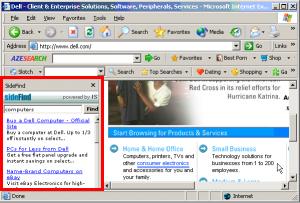 Yahoo Overture ads in an auto-opening sidebar delivered by Sidefind, showing Dell sponsored links in response to type-in requests for the Dell.com site.
money
viewersYahoo Overture
money
viewers81.201.104.136
money
viewerstrafficengine.net
money
viewersSideFind
The money trail – how funds flow from advertisers to Yahoo Overture to SideFind.
Claria, eXact Advertising, Direct Revenue, and 180solutions are all relatively well-known programs — each installed on millions (or tens of millions) of PCs, and each backed by major investors. But Yahoo also helps to fund vendors who are far less well-known.
Earlier this summer, in the course of documenting Google funding IBIS, I also prepared detailed proof showing how Yahoo ads get syndicated to IBIS too. Video and packet logs on file.
Just this past week, I happened to test a computer infected with a variety of unwanted software (a few disclosed in license agreements; most not). I observed that traffic was sent to Yahoo from both “Slotchbar” (an unrequested toolbar added to my test PC’s browser without my consent) and “SideFind” (an auto-opening browser sidebar, also installed without consent). I have video and packet logs on file, showing these nonconsensual installations as well as their syndication of PPC advertisements from Yahoo Overture. The screenshot at right shows the auto-activating SideFind sidebar, targeting a type-in request for Dell with various sponsored links, largely pointing back to Dell.
These are just a few of the additional examples I have observed and recorded.
In some instances, Yahoo’s dealings with these smaller spyware vendors entail traffic passing through multiple levels of intermediaries. For example, when SideFind sends traffic to Yahoo Overture, the traffic passes through trafficengine.net and then through an unnamed server at IP address 81.201.104.136 (reportedly operated by Copernic/Inktomi) before reaching Overture. See diagram at right, traffic log below, and full packet log.
http://www.sidefind.com/ist/scripts/log_clicks.php?account_id=…
http://feeds.trafficengine.net/click.ashx?key=computers…
http://81.201.104.136/fast-cgi/bsc?context=redir…
http://www6.overture.com/d/sr/?xargs=…
http://landingstrip.dell.com/landingstrip/ls.asp?CID=8278…
In principle, these many levels of intermediation might make it especially hard for Yahoo to know where traffic begins. However, Yahoo ultimately has a direct relationship with some final source who sends the traffic to Yahoo. (In this example, Yahoo has a direct relationship with the operators of the 81.201.104.136 server.) So Yahoo can require that that final source take steps to keep Yahoo’s ads out of spyware. Furthermore, syndicated traffic often includes a HTTP Referer header that gives the name of the originating site. For example, in the Sidefind packet log, Yahoo’s servers receive a HTTP Referer header bearing the domain name sidefind.com, making it easy for Overture to see where traffic began. With its servers specifically receiving the name and URL of the traffic’s source, Yahoo cannot claim not to know where its ads are being shown.
If Yahoo’s advertisers were fairly advised of Yahoo’s plan to syndicate their ads to spyware programs, Yahoo might claim to be acting solely as their agent; perhaps advertisers want to buy advertising from Claria, eXact, DR, 180, and other such vendors. But in fact Yahoo fails to tell advertisers what will occur — so Yahoo’s syndication of advertisers’ ads cannot be claimed to occur with advertisers’ authorization.
Yahoo’s marketing materials are silent on the risk of spyware syndication, even where Yahoo’s syndication relationships are large and longstanding (i.e. Claria). Within Yahoo’s marketing materials to solicit new advertisers, Yahoo’s “Publisher Network” page mentions various syndicators of Yahoo ads, but Yahoo fails to mention even a single “adware”-type program. Yahoo’s formal Advertiser Terms and Conditions doesn’t mention adware either, and this document discloses advertisement syndication only to say that Yahoo syndicates ads to “various third parties who may be authorized by Overture to make the Sponsored Listings Marketplace Results available as a link from, an add-on service to, or otherwise in connection with Third Party Products.” Yahoo defines these third-party products broadly, as “Web sites, content, applications and/or e-mails.” “Applications” alludes to spyware — but makes no mention of the specific nature of these applications, nor of the likelihood that these applications install by security exploits, trickery, or taking advantage of users’ naivete.
Only at Yahoo’s privacy page does Yahoo make specific mention of any of its advertising software syndicators. Even there, Yahoo mentions only Claria, and Yahoo calls Claria an “ad network” — without mention of its adware, its software download, and its substantial privacy consequences. Furthermore, Yahoo’s privacy page states only that Yahoo has a “relationship” with Claria — but says nothing about the nature or scope of that relationship, i.e. that Claria shows Yahoo Overture ads. In any event, advertisers are unlikely to look to a page about consumer privacy in order to learn where their ads will be shown.
Given the perceived importance and value of Yahoo’s pay-per-click advertising network, some advertisers might choose to advertise with Yahoo despite the blemish of Yahoo’s dealings with spyware companies. Others might decide not to advertiser with Yahoo at all, if advertising with Yahoo necessarily entails supporting spyware. But where Yahoo fails to disclose these relationships, advertisers are denied this choice.
In my view, Yahoo — and other PPC networks facing similar problems — should begin by developing and distributing clear rules for who may syndicate their ads. Last year a Yahoo spokesperson told eWeek that “Overture screens its distribution partners to make sure they gain user permission before downloading software.” “Permission” may sound clear-cut, but in practice it’s a surprisingly imprecise concept. What about “permission” obtained under false pretenses — like promising to fix a user’s clock or to improve security, but actually adding advertising software? What about “permission” obtained from a user at a kids site? What about syndicators that buy traffic from advertising software installed without consent, but that don’t make such software of their own? PPC networks need rules that speak to these situations — presumably forbidding all these methods of trickery and deception.
After clarifying their stance on spyware syndicating their ads, PPC networks need to redouble their efforts at enforcement. Tellingly, even Yahoo’s “permission” standard is violated by the frequent nonconsensual installations of Direct Revenue and eXact Advertising (links above). Nonconsensual installations of these programs are well known to those who test and study spyware, and they’re frequently reported at spyware news sites like Spyware Warrior. PPC network staff need to become familiar with these basic industry sources and testing methods, and they need to enforce their rules accordingly.
At present, Yahoo has many PPC syndicators — apparently hundreds or thousands. (Yahoo does not disclose all its syndicators.) Finding all rogue syndicators may prove hard, especially if Yahoo’s syndicators have further partners of their own (as in the Direct Revenue / InfoSpace and SideFind examples, above). In this article, I’ve focused on a few large and well-known syndicators who rely on software installed on millions of PCs, but smaller players are often harder to find and identify. Nonetheless, I’ve found dozens of rogue PPC syndicators using only a single off-the-shelf PC in my lab. (See above.) With all their resources, big PPC networks (like Yahoo) can surely do far better.
Enforcement also needs to include real penalties for those who break the rules. Merely ejecting a rogue syndicator does not deter future violations: Others see that they can make money from PPC syndication through spyware, anticipating only a slap on the wrist when these practices are discovered. A better enforcement strategy would seek to recapture fees previously paid to rogue syndicators — then refund advertisers for ads shown improperly. If a PPC network adopted this strategy and sued its rogue syndicators where necessary, other rogues would be less anxious to follow.
Beyond advertiser backlash and consumer demand, PPC networks face regulatory pressure to avoid supporting spyware through PPC syndication. For example, in the course of their investigation of Intermix, staff of the New York Attorney General revealed that Yahoo contributed 10% of Intermix’s revenue. NYAG staff say they’re “not ruling out” litigation against Yahoo for funding Intermix. More recently, rumors indicate a possible NYAG investigation of Direct Revenue. Given Yahoo’s past support for Intermix, I wonder how NYAG will react to seeing Yahoo funding Direct Revenue too.
If a PPC network can’t or won’t eliminate rogue syndicators, it could at least grant advertisers the ability to opt out of particular unwanted syndications. Others have offered this suggestion on various occasions (e.g. Kraft seeking to avoid syndicating its ads to white supremacy groups), as to both Yahoo Overture and Google. Affiliate networks all offer this level of granularity — letting each affiliate merchant decide what affiliates may earn fees for promoting it. But to my knowledge, no major PPC search engine offers this level of advertiser control.
Ultimately, PPC syndication offers savvy PPC networks a valuable opportunity — a chance to lead industry efforts to stop the spread of unwanted advertising software. Earlier this week, Azoogle launched its new “MPORT” network with the promise of keeping the network entirely adware-free. With a bit of effort and a renewed commitment to stopping spyware, Yahoo could bring MPORT’s no-adware benefit to Overture advertisers too.
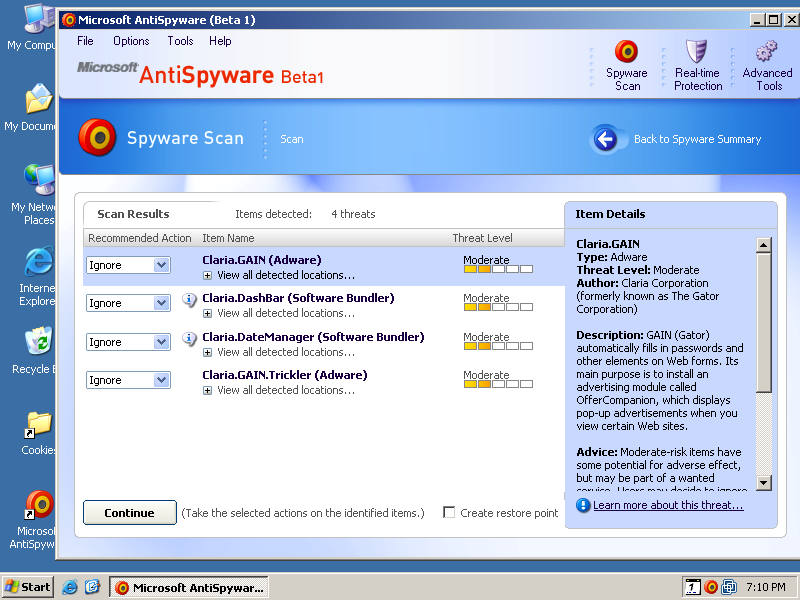


 Screen-shot of my Program Files folder, showing some of the programs installed on my test computer.
 Screen-shot of the icons added to my test computer’s desktop. Note a new link to Dell — an affiliate link such that Dell pays commissions when users make purchases after clicking through this link.