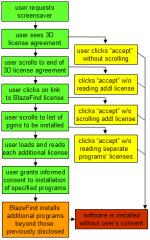
Affiliate networks offer an appealing promise for supporting free, independent content on the web: Any ordinary user can sign up to promote any interested merchant via a special affiliate tracking link. When a user clicks the link and makes a purchase from the merchant, the referring web site (“affiliate”) gets a payment from the merchant. Since merchants only pay affiliates when users actually make purchases, merchants feel free to partner with smaller affiliate sites — sites that might otherwise be too small or quirky to get advertisers’ attention. See one merchant’s diagram of the canonical affiliate relationship.
Despite the promise of affiliate marketing, haphazard marketing arrangements entail serious risks. If merchants sign up affiliates without investigation or monitoring, merchants risk accepting partners with undesirable business practices. Consider an affiliate who sends spam, or whose site is so controversial that no reasonable merchant would want to be seen there. So, experienced merchants have learned, they must monitor their affiliates for these kinds of dubious behaviors.
(i.e. Dell, Gateway, eLuxury, J&R)
money

 viewers
Affiliate Networks
(i.e. LinkShare, Commission Junction)
money
viewersAffiliates
money
viewersSpyware Vendors
(i.e. 180solutions, Direct Revenue, eXact Advertising)
The money trail – how funds flow from merchants to affiliate networks to affiliates to spyware vendors.
Even more serious for most merchants, some affiliates promote merchants via unwanted advertising software — “spyware.” Some affiliates cause merchants’ ads to cover competitors’ sites — a merchant’s ad might appear through spyware without the merchant knowing about, intending, or requesting this result. Worse, affiliates can use spyware to steal commissions they haven’t earned — making tracking systems think users arrived at a merchant’s site via an affiliate link, when users actually just typed in a merchant’s domain name (such that no commission should be paid).
Because any affiliate can pay a spyware vendor to open the affiiliate’s links in spyware-delivered popups, catching these affiliates is not a trivial task. Enforcement cannot merely examine on affiliates’ names or stated practices: Affiliates’ names will not generally match the names of known “adware” vendors, and rogue affiliates are unlikely to describe their practices truthfully in their affiliate network applications. Instead, enforcement must entail actual examination of affiliates’ behavior — examination that most merchants and networks appear ill-equipped to perform.
There have been numerous reports of affiliates buying traffic from spyware — reports on my site (1, 2, 3, 4, 5) and elsewhere (1, 2, 3, 4). But to date, affiliate networks have failed to make substantial progress at stopping affiliate-spyware scams: These practices continue, affecting merchants with all major affiliate networks.
This piece proceeds in three parts. First, I show five specific examples of particular affiliates currently employing spyware to claim affiliate commissions, in apparent violation of applicable rules. (1, 2, 3, 4, 5) Second, I offer recommendations to concerned merchants. I conclude with recommendations for networks — suggesting technology and policy to stop this problem in the long run.
Example: Unknown Commission Junction Affiliate Targeting Dell with Gateway Popunders via Direct Revenue
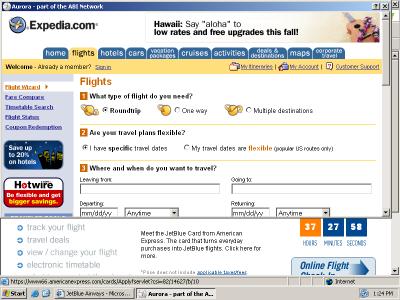
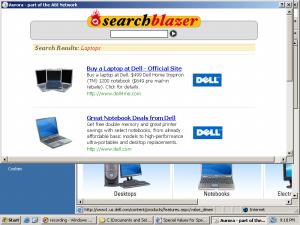
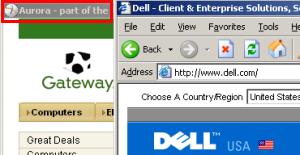 A popunder promoting Gateway, purchased from Direct Revenue by a rogue affiliate. If a user ultimately makes a purchase from Gateway, the popunder causes Gateway to pay commissions to the affiliate, via Commission Junction. Gateway pays these commissions even though it did not know of or approve the affiliate’s decision to place advertising with Direct Revenue.
When users visit Dell.com on PCs infected with Direct Revenue, users may receive Gateway popunders. See screenshot at right, showing the Gateway popunder in a window marked Aurora (a Direct Revenue product name).
This advertising for Gateway does not occur because Gateway has requested that Direct Revenue advertise Gateway when users visit Dell’s site. Rather, a Gateway affiliate has purchased these ads. If a user subsequently makes a purchase from Gateway, the affiliate gets a commission, and these commissions let the affiliate pay Direct Revenue for showing the ad in the first place.
The ad at right is loaded via the following excerpted DirectRevenue targeting code (as recorded by my network monitor / packet sniffer). Yellow highlighting marks the targeting (to dell.com), while red highlighting marks the affiliate ID number and green highlighting marks the command to open the popunder. Extraneous code is omitted for brevity.
GET /imp/servlet/ImpServe?urlContext=http%3A%2F%2Fwww.dell.com%2F&domainContext=dell.com … HTTP/1.1
…
Host: xadsj.offeroptimizer.com …
HTTP/1.1 200 OK…
<BODY>
<title>—</title>
<SCRIPT LANGUAGE=”JavaScript”>
…
url=”http://service.bfast.com/bfast/click?bfmid=37919389&siteid=41294023 &bfpage=bf_advanced&bfurl=http%3A%2F%2Fwww.gateway.com%2Fhome”;
…
winad=window.open(url, “_blank”, attrib);
This action by the Gateway affiliate violates multiple Commission Junction policies: Direct Revenue software sometimes installs invisibly and without consent. Direct Revenue-delivered affiliate popups constitute forced clicks, invoking affiliate links without any affirmative end user action. The affiliate at issue is buying traffic from adware it did not design and does not control. The affiliate’s behavior also serves to overwrite cookies set by other affiliates, reducing others’ commissions. Each of these behaviors violates CJ’s Publisher Code of Conduct.
Example: Unknown Commission Junction Affiliate Targeting Dell via Direct Revenue
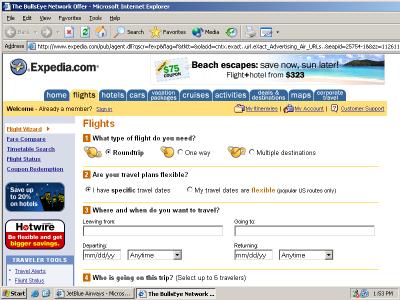
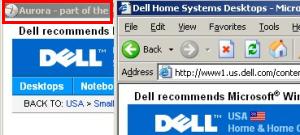 A popunder of Dell, purchased by a rogue affiliate and delivered via Direct Revenue as a user browses Dell.com. If a user ultimately makes a purchase from Dell, the popunder causes Dell to pay commission to the affiliate, via Commission Junction. So Dell ends up paying affiliate commissions even when users have requested its site specifically and by name — a situation that would not otherwise entail paying affiliate commission.
When users visit Dell.com on PCs infected with Direct Revenue, users may receive Dell popunders. See screenshot at right, showing such a popunder.
Here again, a rogue affiliate has placed ads through spyware — again without the merchant’s knowledge or approval. But notice the difference: In the Gateway example (above), the popup ad promoted a competitor of the site the user requested, whereas here the ad promotes the same site the user had already requested. What’s going on? Targeting Dell with Dell’s own affiliate link reveals an affiliate’s understanding that a user at Dell.com would probably most prefer to purchase from Dell, not Gateway. So the affiliate opens a Dell affiliate link — setting cookies such that if the user ultimately does purchase from Dell, the affiliate will get a commission. But the affiliate did nothing to facilitate the purchase or to fairly earn a commission; the users was already at Dell.com! Beyond cheating Dell, this affiliate also violated the CJ Publisher Code of Conduct for the reasons set out in the prior example.
Direct Revenue targeting code follows. Yellow highlighting marks the targeting (to dell.com), while red highlighting marks the affiliate ID number and green highlighting marks the command to open the popunder.
GET /imp/servlet/ImpServe?urlContext=http%3A%2F%2Fwww.dell.com%2Fcontent%2Fdefault.aspx%3Fc%3Dus%26cs%3D19%26l%3Den%26s%3Ddhs&domainContext=dell.com … HTTP/1.1
…
Host: xadsj.offeroptimizer.com
…
HTTP/1.1 200 OK
…
<BODY>
<title>—</title>
<SCRIPT LANGUAGE=”JavaScript”>
…
url=”http://service.bfast.com/bfast/click?bfmid=37628499&siteid=41115962&bfpage=banner1″;
…
winad=window.open(url, “_blank”, attrib);
Example: Unknown LinkShare Affiliate Targeting eLuxury via 180solutions
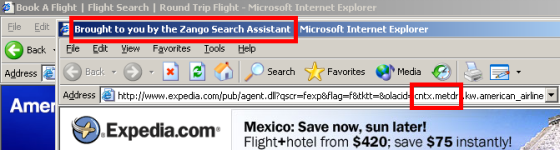
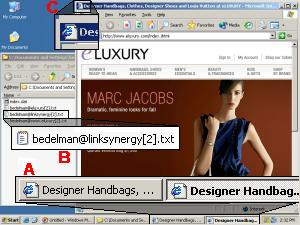 A ‘double’ popup of eLuxury.com, purchased by a rogue affiliate and delivered via 180solutions as a user browses eLuxury. The popup claims commissions from eLuxury, via LinkShare, if a user ultimately makes a purchase from eLuxury. So eLuxury ends up paying affiliate commissions even when users have requested its site specifically and by name — a situation that would not otherwise entail paying affiliate commission.
When users visit eLuxury.com on PCs infected with 180solutions, users may receive popunders of the eLuxury site as reached through affiliate links. See screenshot at right, showing such a popup. Notice the resulting duplicate entries in the status bar (flagged at A), the creation of LinkShare cookies (B), and the second window just barely visible behind the new popup (C). (The usual 180solutions branding (in the browser title bar) was erased in the course of the LinkShare redirect.) See also a video of this popup, which presents the duplicate window particularly clearly.
As in the preceding examples, this affiliate has purchased ads through spyware — targeting the merchant’s web site with its own affiliate links. If a user browses to eLuxury on an infected computer, receives this popup, and makes a purchase, tracking systems at eLuxury and LinkShare will indicate that the affiliate has earned a commission — though in fact the affiliate did nothing to facilitate the purchase.
This affiliate’s actions entail multiple violations of the LinkShare Shopping Technologies Addendum (PDF). The affiliate has altered the user’s access, view, and usage of the merchant’s site, in violation of requirement 1.(i). The affiliate has purchased network traffic keyed to particular keywords in users’ requests, in violation of provision 6.5.(ii). Furthermore, 180solutions can trigger on traffic originating with other affiliates, thereby reducing their commissions in violation of 1.(ii).
180solutions targeting code follows, as observed via my network monitor. Yellow highlighting marks the targeting (to dell.com), while red highlighting marks the affiliate ID number.
POST /showme.aspx?keyword=eluxury&…
…
Host: tv.180solutions.com
…
HTTP/1.1 200 OK
…
<HTML>
…
ad_url: <input id=ad_url name=ad_url value=http://click.linksynergy.com/fs-bin/click?id=DSOXp2QDjbg&offerid=31266.10000067&type=4&subid=0>
Example: MyGeek (LinkShare Affiliate) Targeting J&R via Direct Revenue
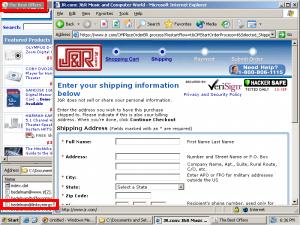 A popunder of J&R, purchased by MyGeek and delivered via Direct Revenue as a user browses jr.com. If a user ultimately makes a purchase from J&R, the popunder causes J&R to pay commission to the affiliate, via LinkShare. So J&R ends up paying affiliate commissions even when users have requested its site specifically and by name — a situation that would not otherwise entail paying affiliate commission.
When users visit jr.com on PCs infected with Direct Revenue, users may receive J&R popunders. See screenshot at right, showing such a popunder.
Like the examples above, the popunder here is a popunder of the merchant’s own affiliate link — designed to claim affiliate commission from purchases that would have occurred even without the popunder. But here the popunder targeting is routed through an intermediary, MyGeek. Direct Revenue targeting code reveals what is occurring: First Direct Revenue opens a popunder (green highlighting) of a MyGeek URL (blue) (referencing MyGeek via IP address 66.179.234.169, which Whois confirms is indeed a MyGeek host). Then MyGeek redirects to LinkShare (red).
GET /a/Drk.syn?adcontext=http://www.jr.com/images/cart/btn_proceed_to_scheckout.gif& … HTTP/1.1
…
Host: btg.btgrab.com
…
HTTP/1.1 200 OK
…
adurl=http://66.179.234.169/cpv.jsp?s=7453&c=53491&p=110077&adultfilter=on&aid=586& …
…
GET /cpv.jsp?s=7453&c=53491&p=110077&adultfilter=on&aid=586& …
…
Host: 66.179.234.169
…
HTTP/1.1 302 Found
…
Location: http://click.linksynergy.com/fs-bin/stat?id=OAfBJvRKlyk&offerid=58654
That MyGeek performs such targeting is not entirely unknown. See a recent discussion at ABestWeb, with multiple participants reporting such observations. See also a cached MyGeek page (Google Cache copy, local copy) disclosing 180solusions and “OfferOptimizer” (Direct Revenue) as syndication partners. Nonetheless, MyGeek’s use of LinkShare affiliate links seems to entail multiple violations of LinkShare rules, exactly as set out in the preceding section.
Example: Wholesalingonline (LinkShare Affiliate) Targeting Hickory Farms via eXact Advertising
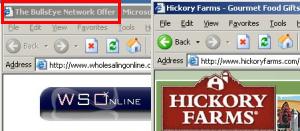 A popunder of Wholesalingonline.com, delivered by eXact Advertising’s BullsEye as a user browses hickoryfarms.com. The Wholesalingonline popunder uses tricky cookie-stuffing methods to set Hickoryfarms cookies automatically. So if a user ultimately makes a purchase from Hickory Farms, the popunder causes Hickory Farms to pay commission to Wholesalingonline, via LinkShare. So Hickory Farms ends up paying affiliate commissions even when users have requested its site specifically and by name — a situation that would not otherwise entail paying affiliate commission.
When users visit hickoryfarms.com on PCs infected with eXact Advertising, users may receive Wholesalingonline.com popunders. See screenshot at right, showing such a popunder.
At first glance, the Wholesalingonline popunder looks innocuous — just a random web site hoping to reach visitors who requested Hickory Farms. But the Wholesalingonline page at issue is specifically designed to set Hickory Farms affiliate cookies, despite the lack of any visible Hickory Farms content within the site. (For background on such practices, see my cookie-stuffing page, reporting dozens of such examples, all occurring without the use of spyware or adware.)
The Wholesalingonline page at issue sets cookies in the following way: First, Wholesalingonline delivers a page of encoded gibberish JavaScript, instructing use of the JavaScript “unescape” command to recover JavaScript code from hex-encoded ASCII. A snipped of the encoded original:
<HTML><HEAD><TITLE>Cut Out the Middle Man with Warehousing Direct</TITLE><SCRIPT type=”text/javascript”><!–
document.write(unescape(“%3C%53%43%52%49%50%54%20%74%79%70%65%3D%22%74%65%78%74%2F%6A …
Decoding this block of code yields the following secondary decoder function, “q()”
<SCRIPT type=”text/javascript”><!– function q(s){var o=””,a=new Array(),w=””,e=0;for(i=0;i<s.length;i++){c=s.charCodeAt(i);c=c^30;w+=String.fromCharCode(c);if(w.length>80){a[e++]=w;w=””}}o=a.join(“”)+w;return o}//–></SCRIPT>
Using the q() function to decode the remainder of the page yields the following HTML contents:
<frameset rows=”0,100%” onLoad=”top.mainFrame.location=’http://www.wholesalingonline.com’ …>
<frame src=”http://208.55.59.48/41128/268749.htm” …>
<frame src=”about:blank” …>
Notice that the page creates a frameset with two rows. The first, suspiciously set to be invisible (0 pixels in height), loads content from a server at 208.55.59.48. The second, the only visible frame, loads the wholesalingonline.com home page.
Sure enough, my packet sniffer confirms that the 208.55.59.48 page was indeed loaded immediately thereafter. That page offers an extremely lengthy (88KB) encoded JavaScript of its own, but decoding reveals the cookie-stuffing code copied below. Yellow highlighting flags the creation of an array of LinkShare affiliate links (IDs in red). Green highlighting flags random selection of a one of the affiliate links (chosen based on the current time). Finally, an IFRAME (blue) embeds the affiliate link within the page — thereby invoking the affiliate link and setting cookies accordingly.
link = new initArray(
“http://click.linksynergy.com/fs-bin/click?id=7o6JnHbjuWM&offerid=6562.10000190&type=3&subid=0″,
“http://click.linksynergy.com/fs-bin/click?id=7o6JnHbjuWM&offerid=6562.10000190&type=3&subid=0″,
“http://click.linksynergy.com/fs-bin/click?id=7o6JnHbjuWM&offerid=6562.10000171&type=3&subid=0″,
“http://click.linksynergy.com/fs-bin/click?id=7o6JnHbjuWM&offerid=6562.10000148&type=3&subid=0″,
“http://click.linksynergy.com/fs-bin/click?id=7o6currJnHbjuWM&offerid=6562.10000036&type=3&subid=0″,
“http://click.linksynergy.com/fs-bin/click?id=7o6JnHbjuWM&offerid=6562.10000190&type=3&subid=0″
);
var currentdate = new Date();
var core = currentdate.getSeconds() % link.length;
var ranlink = link[core];
document.write(‘<DIV align=center><IFRAME SRC=”‘ +ranlink+ ‘” WIDTH=0 HEIGHT=0 FRAMEBORDER=0 scrolling=”no”></IFRAME></a></DIV>’);
Examination of my packet log confirms that a LinkShare affiliate link was ultimately invoked in exactly the way that this code specifies. Notice HTTP Referer header, bearing the suspect 208.55.59.48 referring URL identified above (green).
GET /fs-bin/click?id=7o6JnHbjuWM&offerid=6562.10000036&type=3&subid=0 HTTP/1.1
…
Referer: http://208.55.59.48/41128/268749.htm
Wholesalingonline’s methods are clearly more sophisticated than the other affiliates shown above; the multiple levels of encoding, obfuscation, framesets, randomization, and other trickery reveal Wholesalingonline’s desire not to get caught. But ultimately Wholesalingonline’s strategy is identical to the others: To make a merchant’s tracking system think that a user arrived at a merchant through its affiliate tracking link, such that a commission should be paid, when in fact no such commission is in order.
I have been documenting examples of this behavior since spring 2004, and I have literally hundreds of examples on file, reflecting targeting of most major affiliate merchants. The examples above happen to focus on targeting using notorious advertising software from Direct Revenue, 180solutions, and eXact Advertising, but similar targeting remains widespread using pop-ups from ContextPlus, Kvmedia, and numerous others.
The commissions at issue are ultimately paid by merchants. Sophisticated, dedicated merchants can detect these fraudulent claims — and refuse to pay the commissions at issue.
Some merchants look to networks to identify and block improper affiliate actions. But as shown in the examples above and as discussed below, networks have failed to address this problem. In addition, independent merchants (those who recruit affiliates directly, without using an afiliate network) have no network to assist them in fraud prevention — meaning they’re all the more vulnerable to rogue affiliates.
As a first step in preventing affiliates from buying traffic from spyware vendors, merchants should specifically prohibit this practice, via new provisions in their affiliate terms & conditions. Merchants should also examine the affiliates who apply to their affiliate programs. But even careful screening of affiliates’ applications and sites can’t detect all rogue affiliates; some affiliates are entirely legitimate but for their use of spyware. Where an affiliate combines a legitimate affiliate web site with additional traffic purchased from a spyware vendor, mere examination of the affiliate’s web site will not reveal the spyware traffic.
Some merchants seek out rogue affiliates by looking for transactions with missing HTTP Referer headers. When a user clicks from one web site to another, the second server generally receives the URL of the originating page on the first server — the “HTTP Referer.” But when a page is loaded by spyware, i.e. as an unrequested popup, the referrer field is blank. So affiliates with blank refererrs often turn out to be getting traffic from popups rather than from bona fide clicks within affiliates’ web pages. (That said, this method is imperfect too: Some popups submit fake referrer header data.)
These days, savvy merchants conduct testing of various spyware programs to identify rogue affiliates. It’s remarkably cheap to buy a few spare machines and infect them with a mix of spyware. For best results, merchants need to add packet sniffers or other detailed network logging, and all infected machines should be kept outside the corporate firewall. But with this equipment on hand, finding spyware-driven affiliates can require only a bit of browsing.
Other merchants hire outsiders to do this work. I provide this service to a few merchants, but there are plenty of other choices too. Some merchants even offer bounties (example: provision 3.b) to those who detect and report affiliates buying spyware traffic.
Affiliate networks frequently boast of the quality of their affiliates. Commission Junction claims to “continually screen the network” for rogue affiliates, and to “monitor … all activity for signs of non-compliant client activity.” LinkShare claims that its network features “appropriate” affiliates. But in fact affiliate networks are plagued by affiliates whose practices defraud merchants rather than benefit them. Furthermore, despite their claims of quality, networks could do far more to eliminate rogue affiliates.
Stopping affiliates’ use of spyware must begin with comprehensive testing. In hands-on testing in my lab, I have documented literally hundreds of rogue affiliates — often dozens of different such affiliates in a single week. (See the examples above, as well as ten examples I posted during summer 2004.)
Beyond hands-on testing, efficient compliance requires special software to identify rogue affiliates automatically. I wrote such software earlier this year, and when I run this software against major adware programs, I often uncover dozens or scores of new rogue affiliates. In May, I posted summary results — analyzing 157,083 pop-up ads then shown by 180solutions, and finding that 686 claimed commissions via Commission Junction. (Others claimed commission via LinkShare, Performics, and numerous smaller or independent affiliate programs.) With automated testing methods now available, affiliate networks cannot credibly claim that large-scale testing is impractically difficult or unreasonably time-consuming.
It’s hard to know what testing methods affiliate networks actually use to conduct their testing: Networks usually treat their testing methods as confidential, either for competitive reasons or to avoid assisting would-be fraudsters. I sense that networks do do some hands-on testing, but their efforts may be less than merchants hope (especially given the size of networks’ fees). I don’t hear talk of affiliate networks running any automated testing of spyware programs. In any event, the scope of the spyware-affiliate problem reflects networks’ failure to resolve this issue: If networks were predictably catching affiliates who buy traffic from spyware, and if networks were predictably canceling any commissions claimed via such methods, scores of affiliates wouldn’t be continuing to attempt these methods.
Affiliate networks also need to impose tough penalties on those affiliates caught breaking the rules. For one, networks should take action promptly, not allow further commissions to be paid. But it’s not enough just to cancel current commissions: If breaking the rules yields only a slap on the wrist, then affiliates will continue the spyware assault, earning large profits until they’re ultimately caught. Instead, affiliate networks should get tough on spyware — demand repayment of commissions previously paid, to eliminate affiliates’ incentive to attempt to buy spyware traffic.
The more affiliate merchants pay out in commission, the larger merchants’ fees to affiliate networks. So networks have a clear incentive to look the other way, allowing spyware fraud to continue, with merchants paying the bill. But networks should not overplay their hand. It is at best unseemly for networks to profit when merchants are defrauded by rogue affiliates. Furthermore, the perception of spyware fraud in leading affiliate networks has created an opportunity for spyware and adware-free networks — Kowabunga, ShareASale, and others, as well as newcomer MPORT (which recently launched its network with the promise of blocking adware).
Last week’s announcement of LinkShare’s acquisition by Japanese portal Rakuten recalls the underlying promise of affiliate marketing. There is real value in affiliate relationships, and Rakuten certainly doesn’t intend to pay $425 million for a share in the spyware business. But does Rakuten understand the extent to which LinkShare funds payments to vendors who install advertising software without users’ consent? The extent to which LinkShare has failed to put a check on these behaviors? I’m not sure. Rakuten should demand better — and so should the merchants who ultimately pay for this mess.
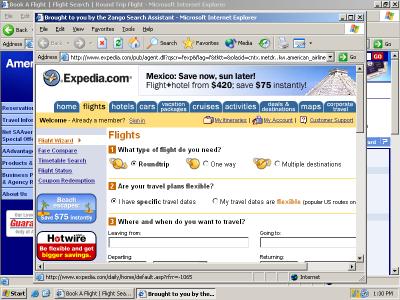
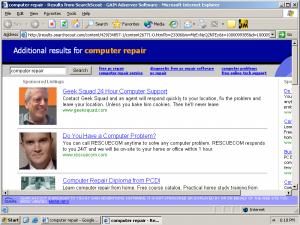
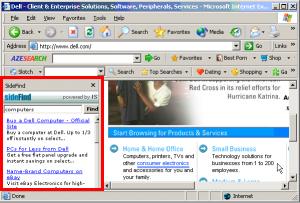
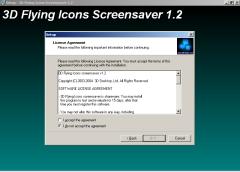
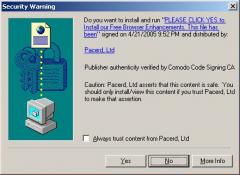
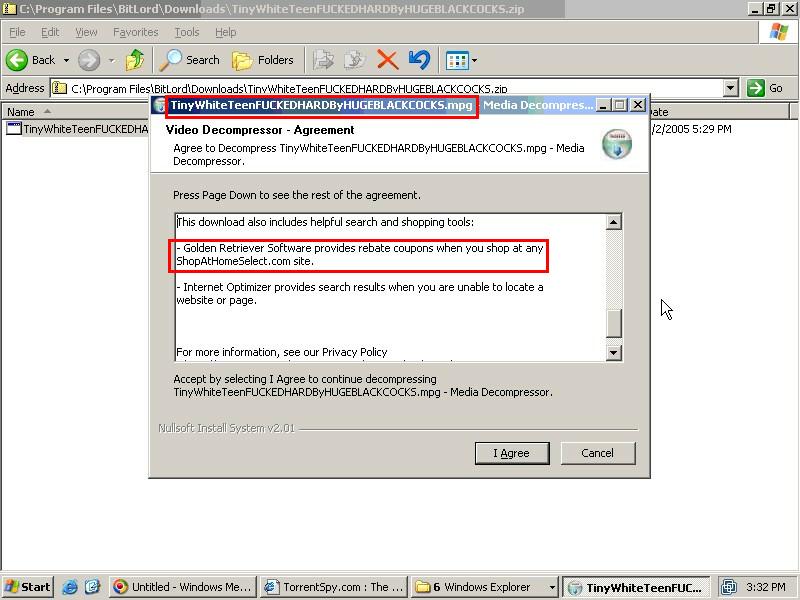
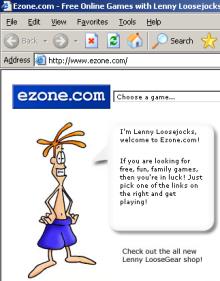 Can we say that a user “consents” to an installation if the installation occurred after a user was presented with a misleading advertisement that looked like a Windows dialog box? If that advertisement was embedded within a site substantially catering to children? If that advertisement offered a feature known to be duplicative with software the user already has? If “authorizing” the installation required only that the user click on an ad, then click “Yes” once? If the program’s license agreement was shown to the user only after the user pressed “Yes”? These are the facts of recent installations of Claria software from ads at games site Ezone.com.