Debunking Zango’s "Content Economy" updated May 29, 2008

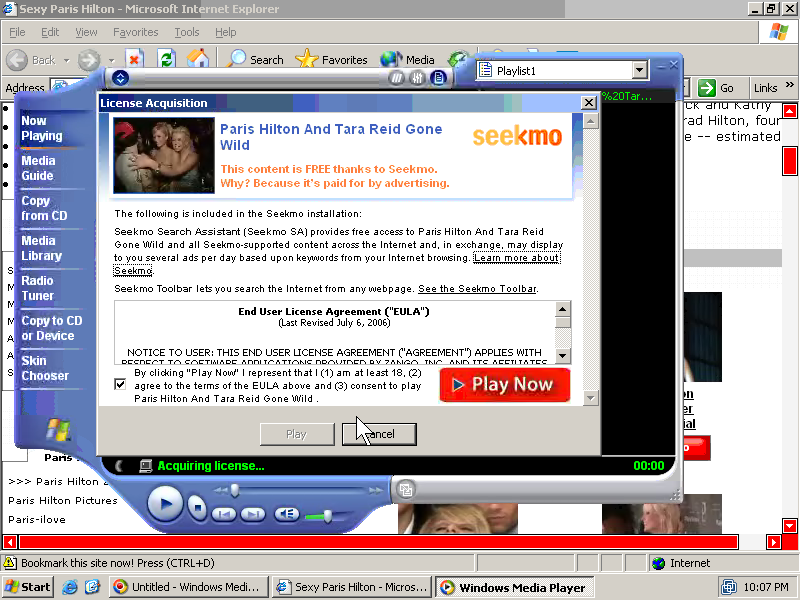
Zango often touts its so-called “content economy” — purportedly providing users access to media in exchange for accepting Zango’s popup ads. After four years of debunking Zango’s claims, I’ve come to suspect the worst — and my investigations of Zango’s media offerings confirm that Zango’s media library is nothing to celebrate. This article reports the results of my recent examinations. I show:

  • Widespread copyrighted video content presented without any indication of license from the corresponding rights-holders. Details.
  • Widespread sexually-explicit material, including prominent explicit material nowhere labeled as such. Details.
  • An audio library consisting solely of prank phone calls to celebrities (without the “music” Zango promises). Details.
  • Widespread material users can get elsewhere for free, without any popups or other detriments. Details.
  • Widespread material that content creators never asked to have included in any Zango library. Details.

Widespread copyrighted video content presented without any indication of license from the corresponding rights-holders

Many of the videos in of Zango’s video library are the work of major movie studios, TV networks, and other third parties that own and assert copyright in their respective works. These videos consistently appear without any statement of authorization (e.g. “used with permission”) or even the ordinary copyright notice. I therefore conclude that Zango’s site features these videos without authorization from the corresponding rights-holders.

Zango Offers Daily Show with Guest Chris Rock Zango Offers Daily Show w/ Chris Rock

Zango Offers 'Borat' Zango Offers Borat

For many videos in Zango’s library, it is trivially easy to determine the video’s source. For example, text in the corner of Zango’s “Ashley Judd Nude Photoshoot” indicates the video comes from “Norma Jean & Marilyn” (1996, released on DVD by HBO Home Video). The title of Zango’s “Wild Things” suggests the video comes from the 2004 Sony Pictures movie by the same name; watching the video confirms the match. Zango’s “Girls Next Door Nude Compilation” begins with the distinctive Playboy logo. Zango’s “Chris Rock on the Daily Show” reproduces a video clip from Comedy Central’s Daily Show. It’s easy to find scores of other examples plainly labeled as well-known copyrighted works.

Other videos in Zango’s library are harder to identify — at least those without extensive entertainment industry experience. For example, I cannot easily determine the specific movie that included the scenes shown in Zango’s “Paris Hilton Striptease” or “Rachel Hunter in the Bathtub.” But the clips leave little doubt that they were filmed professionally and that the respective studios hold copyright in the resulting works. Similarly, I cannot easily determine the specific source of Zango’s “Branding Beat Down.” However, every frame of the video bears the distinctive Fox logo — indicating that the video originated with the Fox Broadcasting Company.

As to at least eight of the files in Zango’s library, I have specifically confirmed that Zango’s reproduction occurs without authorization from the underlying rights-holders. (Details below.) As to selected other files, I have sent inquiries to the corresponding rights-holders. I will update this page if I confirm whether Zango has properly licensed the content at issue.

Infringing videos are remarkably prominent in Zango’s video library. For example, as of May 27, Zango’s home page linked to “Borats First Trip To An American Gym” (s.i.c.). This clip was listed as the second most popular video in Zango’s entire content library, and it was placed in the top-center of Zango’s main www.zango.com web page, “above the fold” (within the portion of the page visible without using scroll bars). Yet the title of the video plainly indicates that the video contains the copyrighted work of others. Moreover, the video features the “DIVX Video” logo, indicating that DivX software was used to extract (“rip”) the video from a DVD. No authorized reproduction would be provided with a DivX overlay, so the presence of the DivX marker confirms that this video was reproduced without permission from the creators of Borat.

Other online video sites have been the target of major copyright litigation. For example, Viacom last year sued Google, alleging that “YouTube appropriates the value of creative content on a massive scale for YouTube’s benefit without payment or license.” In defense, Google points out that YouTube receives videos from independent — potentially granting Google immunity for these infringements due to the Digital Millennium Copyright Act‘s safe harbor for infringements occurring at the direction of users (17 USC 512(c)(1)).

Unlike YouTube, Zango’s video library offers no prominent “upload” function. Some of Zango’s videos arrive through the Revver video-sharing service (discussed below), probably originating with a variety of independent users. But many of the copyrighted videos Zango offers reside on Zango’s servers, not on Revver servers. (For example, all eight of the sexually-explicit videos linked in the first paragraph of the next section are hosted on Zango servers.) Because Zango offers no “upload” function by which ordinary users could have put videos onto Zango’s site, it therefore appears that these videos were provided by Zango or its agents, not by independent users. If so, Zango will not find protection in the DMCA’s safe harbor for infringements caused by users.

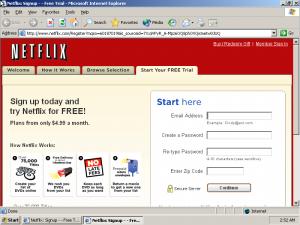
Moreover, even if Zango’s videos were provided by independent users, the circumstances of the reproduction seem to render Zango ineligible for the DMCA safe harbor. For one, the safe harbor requires that Zango lack actual knowledge of the infringements. But the infringing videos were obvious and self-evident, not just from their titles and contents, but also from their prevalence in featured results Zango chose to highlight. In addition, the safe harbor requires that Zango not receive a financial benefit directly attributable to the infringements. But Zango used these videos to induce users to download its popup-generating software, a financial benefit that is directly attributable to the infringing videos. (Consider the case of a user who installs Zango in response to solicitation offering a specific copyrighted video clip. Example.) Furthermore, Zango has the right and ability to control the infringement (e.g. by removing the infringing videos). Because Zango’s financial benefit can be directly tracked to a specific infringement, and because Zango has the right and ability to prevent such infringement, Zango seems to fail the test in 17 USC 512(c)(1)(B).

Zango may claim that its videos are fair use. The Copyright Act sets out a four-factor test for determining whether reproduction of a copyrighted work is permissible, despite lack of authorization from the rights-holder. The fair use test calls for considering 1) the purpose and character of the use (e.g. whether commercial or nonprofit), 2) the nature of the copyrighted work, 3) the amount and substantiality of the portion used, and 4) the effect of the use upon the potential market for the work. Factor one is easy: Zango’s use is clearly commercial, which tends to cut against a finding of fair use. Zango might claim that its presentation of excerpts (rather than entire movies) supports a finding of fair use under the third test — but Zango exactly chooses what it views as highlights (e.g. the explicit portions of full-length movies), yielding clips with a greater than usual effect on the potential market for the underlying works. In short, a fair use defense is at best uncertain.

Wide-scale copyright infringement could expose Zango to substantial liability. The Copyright Act provides for statutory damages of “not less than $750” per violation. My examination indicates Zango is reproducing (at least) hundreds of copyrighted videos without any statement of authorization. Furthermore, such videos have surely been downloaded repeatedly — giving rise to potential statutory damages that could easily reach seven digits or more.

Widespread sexually-explicit material, including prominent explicit material nowhere labeled as such

Celebrity Videos Featured by Zango Celebrity Videos Featured by Zango

Prominent Video - Explicit but Unlabeled
Prominent Video – Explicit but Unlabeled

Browse Zango’s video library, and it’s easy to find sexually-explicit video. As shown in the first inset image at right, the bottom-right corner of each Zango “Browse” page gives a list of celebrities — each of them female, each featured in various states of undress. Among other explicit videos of these celebrities, Zango offers “Britney Spears See Thru“, “Britney Spears Black Dress Upskirt“, “Paris Hilton Striptease“, “Rachel Hunter in the Bathtub“, “Jessica Alba’s Chest and You“, “Jessica Simpson Nipple Slip“, “Anna Kournikova Panties Oops“, and “Angelina Jolie Sex Scene.”

The titles and descriptions of many of Zango’s videos suggest that their subjects were unwilling participants. See e.g. “nipple slip” and “upskirt” above, as well as additional videos like Zango’s “Arab wife’s sexy dance secretly taped” and Zango’s “Girlfriend Finds Hidden Camera.”

Through its placement and labeling of sexually-explicit videos, Zango creates a substantial risk that users will receive explicit materials they did not seek. For example, on May 24, I clicked “Browse” to flip through Zango’s content library. Using Zango’s default sort, the third video was entitled “the pool” with comment “havin fun in the pool” (s.i.c.). (Screenshot of the link from within Zango’s video library.) This title and comment give no indication that the resulting material is explicit. But clicking the “Watch” button immediately yields a large video showing two male adults swimming nude, then exiting the pool (entirely disrobed). As best I can tell, Zango did nothing to alert users to this explicit material, nor does Zango prevent (or even discourage) children from viewing such material.

Zango’s May 24 “the pool” video was not a mere anomaly. The same video remained linked in the same way in my tests on May 25 and 26, and on portions of May 27.

In litigation documents, Zango last week claimed that it never distributes explicit material to those do not want it. In particular, Zango argues: “Zango never sends unwanted links to pornography web sites” and “Zango only directs adult-oriented advertisements to a user after that user, by his own behavior, has demonstrated interest in such content.” I disagree. The preceding paragraphs offer a counterexample — Zango prominently providing a link to sexually-explicit materials, and provideing that links to users who never demonstrated interest in any such content. Zango may claim that these links tout videos — not a “web site” as in the first quoted sentence. Alternatively, Zango may claim that the links are not “advertisements” — hence beyond a strict reading of the second quoted sentence. But the underlying contradiction remains: Zango says it doesn’t provide pornography except when users seek it; yet in fact Zango does sometimes deliver explicit materials unrequested.

That Zango funds and distributes sexually-explicit materials is well-known. See e.g. the Sunbelt Blog’s February 2008 conclusion that “80% of [Zango’s] business comes from Seekmo, the porn side of its business.” See also Sunbelt’s off-hand November 2006 remark that “hardcore porno videos [are] funded through Zango Seekmo installs.”

But the scope of explicit materials within Zango’s video library is quite striking. Consider the first page of Zango’s library listings for Angeline Jolie. Beyond the “sex scene” video linked above, the listings also include “Angelina Jolie Taking a Bath”, “Angelina Jolie Under the Sheets”, “Angelina Jolie in Bra & Panties”, “A fairly long nude scene staring Angelina Jolie” (s.i.c.), “Angeline Jolie Getting It On”, “Angelina Jolie Nip Slip”, “Angelina Jolie Hardcore”, and “Angelina Jolie Dominatrix”, and “Angelina Jolie Hot On The Runway.” That’s ten explicit results out of twenty links — suggesting that explicit materials are remarkably widespread on Zango’s site.

The initial version of this article also flagged Zango’s “Nice But” (s.i.c.), a video that on May 27 occupied the fourth-most prominent position in Zango’s “Browse” listings. The thumbnail image of this video appeared to feature a full-screen display of a man’s naked buttocks, filling the entire screen. In a follow-up, Zango points out that in fact, the video shows an extreme close-up zoom of of two hands. So this image and video are not actually explicit. Yet a viewer merely flipping through Zango’s listings would nonetheless see an image that is, by all indications, explicit. The title “but” (s.i.c.) and the keyword “naked,” both adjacent to the thumbnail, reinforce the user’s perception of having seen an unrequested explicit image. Although the image is not actually explicit, the image’s content, placement, and labeling make it likely to leave users with the same feeling as an unrequested image that is actually sexually explicit: In both instances, a viewer who merely sees the image and does not watch the video will think he has seen an unwanted explicit image. In my view, Zango errs in mocking this harm. To the users who Zango tricks, the harm is perfectly real.

Zango’s audio library consists solely of prank phone calls to celebrities

Zango Offers Prank Phone Call Recordings Zango Offers Prank Phone Call Recordings

Zango’s content library offers three types of media: Videos, screensavers, and audio. Despite Zango’s much-touted “content economy,” Zango offers just eight audio clips. And although Zango’s “About Zango” description promises to provide free access to “music,” in fact all eight of these audio files are recordings from talk radio — just voices, with no music at all.

All eight of Zango’s audio recordings share a common theme: Prank phone calls to celebrities. In each, a caller pretends to be someone famous (e.g. the Prime Minister of Canada), and calls a celebrity (e.g. Bill Gates) under the guise of a bona fide discussion. The caller proceeds to berate the celebrity (e.g. by criticizing the features and reliability of Windows).

A comment in several of the videos reveals the source of the recordings: The Masked Avengers, which Wikipedia describes as “a Canadian radio duo … of disk jockeys and comedians Sebastien Trudel and Marc-Antoine Audette, known for making prank calls to famous persons by pretending to be government officials or officers in charitable organizations.” I wrote to Mr. Trudel, who confirmed to me that he has not granted Zango any license to use or reproduce these clips.

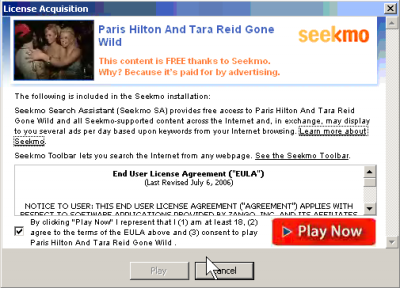
After placing these recordings in its content library, Zango further syndicates the materials onto Zango’s partner sites. For example, celebsprankd.com (screenshot) features all eight recordings, but requires users to install Zango before listening. Whois reports that Celebsprankd comes from the Vancouver, B.C. advertising firm Neverblue Media — a conclusion confirmed by the presence of the Neverblue.com web server at the same IP address. Neverblue describes itself as a “leading … online marketing company” offering “premier” advertising and “solid business leads” — claims arguably inconsistent with distributing and profiting from prank phone calls, not to mention distributing Zango. (But these recordings aren’t Neverblue’s only tie to Zango. This month alone, my Automatic Spyware Tester found eleven incidents of Neverblue affiliates buying popup traffic from Zango. I’ve also found dozens more incidents as to Neverblue affiliates buying traffic from other spyware.)

What of Zango’s distribution of these prank call recordings? With so few clips yet such prominent placement (including five of these eight audio recordings featured on Zango’s home page), senior Zango staff surely know what the files contain. Does Zango support prank phone calls? Wasting celebrities’ time under false pretenses? Recording phone calls without permission, even in states that specifically require such permission? It’s hard to reconcile these practices with Zango’s supposed reforms.

Widespread material users can get elsewhere for free, without any popups or other detriments

Much of Zango’s content is available elsewhere without charge and without installing any software that tracks online behavior or shows popup ads. For example, clicking Zango’s “Browse” tab and retaining defaults, every single video on the first page of results is syndicated from Revver. Users could just as easily get these videos directly from Revver, as receive them from Zango. But if users watched these videos at Revver, Zango’s software would not track their web browsing and searching, and users would not receive Zango’s popup ads.

Zango Falsely Claims that Uninstallation Eliminates Content Access Zango Falsely Tells Its Users:
“Uninstallation … eliminates content access”

Furthermore, Zango makes untrue claims about the necessity of its software. For example, Zango claims that “uninstallation … eliminates content access.” It does not. For files hosted at Revver, installation of Zango is not necessary to watch the videos in the first place, and uninstallation does not interfere with watching the videos later. Moreover, even many Zango-hosted files can be accessed without installing Zango, or after uninstalling Zango. For example, Zango’s “Chris Rock on the Daily Show” is actually just a standard Windows Media Video (WMV) distributed from the following URL: preview.licenseacquisition.org/123/1054944882.36393/yikers_chris_rock_on_the_daily_show.wmv . Zango’s “Borats First Trip To An American Gym” (s.i.c.) is preview.licenseacquisition.org/123/1054944854.02531/yikers_borats_first_trip_to_an_american_gym.wmv . Similarly, Zango’s “Bill Gates Gets Pranked” is a WMA hosted at preview.licenseacquisition.org/13/12295/12295.wma . Any user who knows these URLs can easily receive the corresponding files — without ever installing Zango, or after uninstalling Zango. Zango ought not claim otherwise.

Presenting material that content creators never asked to have included in any Zango library

By syndicating videos from Revver, Zango causes its video library to feature materials that content creators never asked to have associated with Zango in any way.

Zango’s syndication of Revver videos has prompted numerous complaints content creators who post videos to Revver. For example, Chris Pirillo asked why his videos are appearing on Zango. (“I don’t remember giving Zango permission to push crapware on my behalf.”) Revver forum user JPPI pointed out the irony of Zango claiming his videos were “FREE, thanks to Zango” when in fact the videos were free all along (even before Zango syndicated them). Revver forum user David complained that it is “kinda deceptive” (s.i.c.) “to make it sound like Zango was the one who made the video free.”

In response, Revver Vice President Asi Behar agreed to ask Zango to remove any Revver videos that Revver authors specifically so designate. But such removals do nothing to cure the deception of Zango requiring that users install its software before watching materials widely available elsewhere for free. Furthermore, such removals do nothing to protect Revver content creators who are unaware of Revver’s relationship with Zango. The word “Zango” appears nowhere on Revver’s official web site (as distinguished from Revver’s forums and some Revver-hosted videos). Thus, a Revver content creator has no easy way to learn about Revver’s relationship with Zango — not to mention learn of the option to request exclusion from Zango.

Zango’s syndication of Revver videos risks tainting the good name of Revver content creators. Consider a user who searches for a Revver video and finds that video hosted at Zango (just as Chris Pirillo did last year). The user may mistakenly conclude that installing Zango is in fact necessary to watch the video. If so, the user is likely to end up with a negative view of the underlying content creator — mistakenly concluding that, e.g., Chris Pirillo has partnered with Zango or endorses Zango’s activities. Revver forum complaints indicate that numerous Revver users share this concern. Yet Revver continues to syndicate videos to Zango without first checking with content creators.

Zango’s problems in context

Last week, Zango was one of four finalists for the Software & Information Industry Association’s CODiE Best Video Content Aggregation Service. In my view, that award is misguided: Far from deserving praise, Zango should be criticized and shunned for reproducing others’ copyrighted work without any apparent license to do so, showing sexually-explicit material unrequested, and offering users a lousy value by bundling extra ads with content users could get elsewhere for free.

Meanwhile, Zango continues litigation with Kaspersky. Recall: Kaspersky blocked Zango’s software from installing; Zango sued; Kaspersky successfully defended on the grounds that the Communications Decency Act, 47 USC 230, immunizes Kaspersky’s behavior because Kaspersky is an “interactive computer service provider” blocking material that, in its subjective opinion, is “objectionable.” In Zango’s appeal, Zango claims its software is not “otherwise objectionable” (brief pages 12-15; PDF pages 17-20). If it’s not objectionable to show explicit material unrequested — not to mention to infringe copyrights on a massive scale, and to insert extra ads around material available elsewhere without such ads – then I don’t know what is.

Finally, I’m often asked whether Zango continues the behaviors I previously reported. Installing through sneaky fake-user-interface pop-up ads that mimic the appearance of official Windows dialog boxes (as I reported last summer)? Yes. I made a fresh video showing such installations just last week.Defrauding advertisers through popups that cover merchants’ sites with their own affiliate offers(as I reported last spring, in September 2005, in summer 2004, and otherwise)? Definitely. This month alone, I reported six Zango incidents to just one of my advertiser clients — not to mention scores of other incidents targeting other web sites and advertisers. Zango repeatedly claims its problems are all in the past, but my hands-on testing continues to indicate otherwise.

Critiquing C-NetMedia’s Anti-Spyware Offerings and Advertising Practices

Not every “anti-spyware” program is what it claims to be. Some truly have users’ interests at heart — identifying and removing bona fide risks to privacy, security, stability, or performance. Others resort to a variety of tricks to confuse users about what they’re getting and why they purportedly need it.

This article reports the results of my examination of anti-spyware software from C-NetMedia. I show:

  • Deceptive advertising, deceptive product names, and deceptive web site designs falsely suggest affiliation with security industry leaders. Details.
  • The use of many disjoint product names prevents consumers from easily learning more about C-Net, its reputation, and its practices. Details.
  • High-pressure sales tactics, including false positives, overstate the urgency of paying for an upgraded version. Details.

Note that C-NetMedia is unrelated to the well-known technology news site CNET Networks. Details.

Deceptive advertising, deceptive product names, and deceptive web site design falsely suggest affiliation with security industry leaders.

Some C-NetMedia products are marketed using practices, keywords, labels, and layouts that falsely suggest they come from security industry leaders. This suggestion comes from both the actions of C-Net itself, as well as from the actions of C-Net’s marketing partners.

Google Shows Deceptive Ads for C-Net's Products
Google Shows Deceptive Ads for C-NetMedia’s Products

Consider the top three ads for a Google search for “Spybot”, a popular early anti-spyware program (full name “Spybot Search & Destroy”). As shown at right, the top three ads each specifically mention “Spybot” — the first two, in directory names; the third, in its domain name. Furthermore, all three ads also include the distinctive and original phrase “Search & Destroy” that specifically describes the genuine Spybot product. Yet in fact each of these three ads takes users to the unrelated site spywarebot.com (emphasis added) (screenshots: 1, 2, 3). Clicking the first ad immediately takes a user to spywarebot.com via the ClickBank advertising network. As to the second and third ads, traffic flows through independent “landing page” sites which in turn show ClickBank links to promote Spywarebot. These landing pages are hosted on the deceptively-named domains named spybot-sd-info.com and www-spybotcom.com — each further (but falsely) suggesting an affiliation with the genuine “spybot” product.

C-NetMedia partners similarly fill top ad spots for a search for “Ad-Aware”, another well-known anti-spyware program. The top ad promotes C-Net’s adwarealert.com — a name particularly likely to confuse users because the ad’s title and domain differ from the user’s request by just a single letter. The first ad takes the user to adwarealert immediately, while the second ad takes users to a www-ad-ware.com landing page which also promotes adwarealert.com (again via ClickBank).

Other deceptive C-NetMedia partners pervade search results for spyware-removal search terms. See e.g. “Spybot-free.com” using distinctive “Spybot” “Search & Destroy” marks to promote C-Net’s spywarebot.com. See also C-Net’s Registrysmart.com advertising with ad title “Microsoft Antispyware” in Google results for searches on “Microsoft Spyware”. Because the Registrysmart ad title touts “Microsoft Antispyware”, users might reasonably think the ad will yield an official Microsoft site that actually provides the free “Microsoft Antispyware” product. But in fact the link leads only to a C-Net site with paid products.

C-NetMedia may claim that these ads were placed by affiliates. But the actions of these affiliates are prominent — occurring on search terms as well-known as “Spybot” and “Ad-Aware.” These actions are also longstanding: My October 2006 False and Deceptive Pay-Per-Click Ads shows that some of these ads have continued for more than a year. Furthermore, these affiliates act for C-Net’s benefit, and C-Net has the right and ability to monitor them, to oversee their activities, and to limit their efforts as it sees fit. Finally, FTC litigation confirms that companies can be liable for the actions of their affiliates and marketing partners. See e.g. US v. APC Entertainment (advertiser liable for sexually-explicit unsolicited commercial email sent by its affiliates), In the Matter of Zango, Inc. (advertising software company liable for nonconsensual and deceptive installations of its software by its partners), In the Matter of Direct Revenue LLC (same).

C-NetMedia’s involvement in these advertising practices is heightened by C-Net’s own selection of product names. C-Net, not its affiliates, chose product names so close to established market leaders — names that invite consumer confusion. C-Net furthers the confusion by calling its products “official” (e.g. “The Official Ad-Ware Client“, emphasis added) when there is no meaningful sense in which C-Net’s products are more “official” than any other. Indeed, when users arrive at C-Net sites after requesting similarly-named better-known competitors, C-Net’s offerings are exactly not the official products users specifically requested by name.

Some C-Net sites are also deceptive in that their titles and graphic design falsely suggest they are an official part of Windows. Consider antispyware.com. The site’s heading presents the generic title “AntiSpyware For Windows” — without mentioning any company name or showing any other prominent indication that the product is not actually part of Windows. Furthermore, antispyware.com shares numerous graphic design elements with official Microsoft sites: Like official Microsoft sites, antispyware.com features a broad blue bar across the top of the page, bold white type at top-left with smaller white type at top-right, a grey navigation bar down the left edge (with thin black lines as section separators, and with simple black text), a grey nav bar down the right edge (with broad grey bars to separate sections, and with blue bulleted text), a grey background, a skewed 3D rendering of a product screen at page center, and a vivid colored bubble at top-center, linking to a product download. See the two screenshots below — antispyware.com on the left, and the official Microsoft Windows Defender download page on the right. These many visual similarities make it especially likely that a user at antispyware.com will mistakenly believe the site is an official Microsoft offering.

 
C-NetMedia’s Antispyware.com
 
Microsoft Windows Defender

Some C-NetMedia sites give users the false impression that they are bona fide informational sites rather than commercial advertisements. For example, Remover.org presents itself as a general-purpose spyware information site, but Remover.org actually promotes only one product — C-Net’s “AntiSpyware For Windows.” Furthermore, Remover.org claims to have “one goal and one purpose: to win the war on spyware” — suggesting a non-commercial purpose, when in fact Remover charges a fee for its removal program. The totality of these practices suggests that a user at Remover.org may reasonably think he is viewing an ordinary informational site and/or a source of unbiased reviews, when in fact the site is a C-Net advertisement.

Hindering Consumer Investigations through Use of Numerous Product Names and Domains

C-Net uses exceptionally many product names and domain names. My analysis indicates that the following products and domains all come from C-NetMedia:

Site Whois IP Address Trademark
adware.pro Whois-Proxy 72.32.100.197  
ad-warealert.com Domains By Proxy (GoDaddy) 72.32.242.170 – C-Netmedia 77047467 – November 20, 2006 – C-Netmedia
adwarealert.com Domains By Proxy (GoDaddy) 72.32.29.230 77047467 – November 20, 2006 – C-Netmedia
adwarearrest.com Syber Corporation
8400 East Prencitce Avenue, Ste 1500  
Greenwood Village CO 80111
72.32.134.197  
adwarebot.com Domains By Proxy (GoDaddy) 72.32.242.171 – C-Netmedia  
antispyware.com Domains By Proxy (GoDaddy) 72.32.26.195 77073855 – December 30, 2006 – C-Netmedia
antispywarebot.com    Domains By Proxy (GoDaddy) 72.32.48.186 77047469 – November 20, 2006 – C-Netmedia
errorkiller.com C&C Networks
3630 County Ct S
Mobile, AL 36619  
72.32.242.171 – C-Netmedia    77047443 – November 20, 2006 – C-Netmedia   
errorsmart.com Domains By Proxy (GoDaddy) 73.32.26.195  
errorsweeper.com Domains By Proxy (GoDaddy) 73.32.48.186 77047440 – November 19, 2006 – C-Netmedia
evidenceeraser.com  Domains By Proxy (GoDaddy) 73.32.29.230 77073969 – December 31, 2006 – C-Netmedia
free-pc-repair.com Ofer Shoshani
747 Durshire Way
Sunnyvale, CA 94087
72.32.100.197  
free-registrysmart.com    Domains By Proxy (GoDaddy) 72.32.242.171 – C-Netmedia 77047441 – November 20, 2006 – C-Netmedia
macrovirus.com Domains By Proxy (GoDaddy) 72.32.242.171 – C-Netmedia  
malwarebot.com Domains By Proxy (GoDaddy) 72.32.242.169 – C-Netmedia 77047470 – November 20, 2006 – C-Netmedia
privacycontrol.com Domains By Proxy (GoDaddy) 73.32.48.186 77073857 – December 31, 2006 – C-Netmedia
privacycontrols.com Domains By Proxy (GoDaddy) 73.32.48.186 77073859 – December 31, 2006 – C-Netmedia
regclean.com Domains By Proxy (GoDaddy) 73.32.48.186  
regrecall.com Domains By Proxy (GoDaddy) 73.32.90.213  
registrybot.com Domains By Proxy (GoDaddy) 72.32.242.169 – C-Netmedia 77047445 – November 20, 2006 – C-Netmedia
registryclear.com Bruce Cope
3630 County Ct S
Mobile, AL 36619
72.32.134.197  
registrysmart.com PrivacyPost (Dotster) 73.32.29.230 77047441 – November 20, 2006 – C-Netmedia
regsweep.com Domains By Proxy (GoDaddy) 73.32.26.195 77047438 – November 19, 2006 – C-Netmedia
remover.org Domains By Proxy (GoDaddy) 72.32.26.195  
restore-pc.com Domains By Proxy (GoDaddy) 73.32.29.230  
spywarebot.com Domains By Proxy (GoDaddy) 73.32.134.197  
spywareremover.com C&C Networks
3630 County Ct S
Mobile, AL 36619
64.49.219.215  

The United States Patent and Trademark Office’s Trademark Search provides the brunt of my evidence that the listed sites are associated with C-Netmedia. Other evidence comes from the 73.32.242.168-175 network block that C-Net uses at Rackspace. (Rackspace also hosts all of the other listed C-Net sites. The 64.49.219.215 server is indeed a Rackspace server, despite its distant IP address.) My conclusion is bolstered by the many other similarities among these sites, including their common substantive theme, structure, layout, registration method, and advertising relationships and suppliers. Furthermore, the sites’ programs are largely similar — with identical detections, false-positives, and user interfaces.

An ordinary user would face substantial difficulty in determining that a given site is operated by C-NetMedia or in finding C-Net’s contact information. At a few of the sites, a user would at least find a street address in Whois. But the other domains all lack useful Whois data. Furthermore, while the listed web sites offer email and/or chat support, they all lack a phone number, mailing address, or even a legal name or place of incorporation. A user seeking to send a formal complaint therefore has no clear means to do so. Savvy users might notice a reference to C-NetMedia within a program’s license agreement. But these references appear only in the licenses shown by programs’ installers — not in the license agreements linked from the corresponding web sites. So these references to C-Net are especially hard to find after a user has already received C-Net software.

A user who manages to identify the C-Net company name, e.g. from trademark applications, is still substantially stymied in learning more about the company. The name “C-NetMedia” immediately suggests an association with CNET Networks, Inc., the well-known news site at www.cnet.com. In fact C-NetMedia and CNET Networks are entirely unrelated. But by choosing a name that matches an existing company, C-Net hinders attempts to learn more about its practices: Searches for “C-Net” overwhelmingly yield references to CNET Networks.

C-Net’s use of many names brings valuable benefits to C-Net but real costs to users: The numerous names prevent users’ unfavorable views of specific C-Net products (examples: 1, 2, 3, 4, 5) from easily spreading to other C-Net products. If C-Net had only a single product, users searching for that product would easily find the complaints of prior dissatisfied users. But by shifting from name to name, C-Net can abandon product names with unfavorable coverage, in each instance starting fresh with a new name. In this regard, C-Net’s approach is strikingly similar to Direct Revenue’s use of dozens of company and product names.

It seems C-Net sometimes uses the name 2squared to describe its offerings. The 2squared.com site claims to be the maker of at least some of C-Net’s products (including ErrorSweeper and RegClean). While C-Net’s trademark applications list one address in Mobile, Alabama (590 B Schillinger Road South, Suite 8), 2squared provides the adjacent suite 10.

C-Net’s trademark applications all list Erik Mv. Pelton as their attorney of record. Mr. Pelton’s tm4smallbiz.com site indicates that he is a bona fide trademark attorney with an office in Arlington, Virginia.

High-Pressure Sales Tactics and False Positives

C-NetMedia SpywareBot False Positives C-NetMedia SpywareBot False Positives

Once a user installs C-NetMedia’s free trial software, C-Net resorts to high-pressure tactics to encourage users to make a purchase.

I tested C-Net’s SpywareBot on a clean PC running Windows XP with no service packs,. My test PC was supplemented only by the ordinary analysis tools I use to study spyware and adware infections. SpywareBot detected Regsnap, my registry change-tracking tool, as the “Absolute Keylogger.” Bold red “Warning” messages repeatedly alerted me to the supposed “43 parasites” on my computer, and a “toast”-style slider arose from the bottom-right corner of my screen. Perhaps this was just an ordinary false positive — a mistake that any security program can make. But C-Net’s error was unusually self-serving in that C-Net requires users to pay a fee — in this case $19.95 — before removing any of the items it detects.

C-Net’s many products mean extended further investigation would be required to fully determine the effectiveness and error rates of C-Net’s various programs. Due to the seriousness of the advertising practices described above, I have chosen to post this article without fully testing for such false positives or other deficiencies across all of C-Net’s programs and across a variety of test computers. I will update this article to link to any such research performed by others.

Other Anomalous Marketing Practices: Affiliate Programs, Certifications, and Logos

C-NetMedia’s marketing programs are striking in their generosity: C-Net offers its affiliates 70% commissions on users’ purchases. Such large commissions tend to suggest that charges to users bear little relationship to the underlying cost of providing the service. In particular, when a user arrives at C-Net’s site through an affiliate link, at least 70% of the user’s payment goes towards marketing costs. But if marketing receives 70% of revenue, relatively little remains to fund product design or other core business functions. A user might be better off with a free product — such as the free products with names nearly identical to the names C-Net selected.

Many C-Net sites feature McAfee Hacker Safe certifications.C-NetMedia sites systematically and prominently tout certifications that are substantially irrelevant to the true attributes of C-Net software. For example, C-Net’s Adwarealert site boasts a McAfee HackerSafe logo. When this logo appears on a site offering security software, a user might reasonably think the logo means the site’s software will keep the user safe from hackers. But in fact HackerSafe signifies nothing of the kind: HackerSafe has merely checked the Adwarealert web server for a set of known security problems. C-Net’s use of the HackerSafe certification thus has the tendency to deceive, i.e. to leave users with an untrue impression of the certification’s significance.

Update (February 14, 11:30am): I notice that McAfee has withdrawn HackerSafe certification of C-NetMedia sites. C-NetMedia sites now show blank space where the logo previously appeared.

Adwarealert also features a Microsoft “Certified for Windows Vista” seal. Microsoft’s certification list confirms that Adwarealert did receive this certification. But it seems Adwarealert does not truly qualify for this certification because Adwarealert violates rule 1.11 of the Microsoft certification requirements, namely the requirement that a certified program comply with all applicable guidelines from the Anti-Spyware Coalition. The ASC’s Risk Model negatively characterizes incomplete or inaccurate identifying information; obfuscation; and misleading, confusing deceptive or coercive messaging or false claims to induce users to take action. By failing to readily provide accurate contact information, by using misleading product names, and by reporting false positives with a request for payment, Adwarealert violates each of these requirements. I therefore conclude that Adwarealert is ineligible for the “Certified for Windows Vista” certification.

C-NetMedia’s sites also feature unsubstantiated claims of product benefits. C-Net sites feature the following logos: “Guaranteed – 100% No Adware or Spyware”, “#1 Most Advanced Privacy Software”, “#1 Registry Cleaner”, “100% Safe and Secure”, “Total Privacy Protection,” “Most Advanced Anti-Spyware Detection,” and “World’s #1 Spyware Remover.” None of these claims contains, references, or links to any substantiation, documentation, or other supporting details. Some of these claims are presented in graphical form, i.e. in logos that appear to be endorsements or certifications. But C-Net gives no indication of any bona fide third party offering these endorsements; instead, the graphics seem to be C-Net’s own creation.


Work To Be Done

My analysis shows ample room for online advertising and security vendors to better protect users from C-NetMedia’s deceptive advertising practices:

  • Google and other search engines could block the widespread deceptive ads from C-NetMedia and its marketing partners. C-Net and its partners have continued these practices for more than a year. Google claims to be tough on malware, and Google does exclude some harmful organic search results. But Google has been ineffective in removing the false and deceptive ads shown above, among many others, despite ample complaints from users and security researchers.
     
  • McAfee could remove its Hacker Safe certification from C-NetMedia sites. At present, the McAfee logo gives users the false impression that McAfee endorses C-Net and the McAfee vouches for the effectiveness of C-Net’s software. I gather neither is truly the case. Indeed, McAfee’s HackerSafe certifies some C-Net sites at the same time that McAfee’s SiteAdvisor characterizes rates those same sites as red. In my view, the SiteAdvisor rating better describes the view of security experts and better serves typical users. (Disclosure: I serve as a member of the Board of Advisors of McAfee SiteAdvisor.) (Update, February 14, 11:30am: McAfee has withdrawn HackerSafe certification of C-NetMedia sites.)
     
  • Microsoft could withdraw its Certified for Windows Vista certification on the basis of C-NetMedia’s violations of various ASC rules, as cited above. Anticipating this kind of harmful marketing practices, Microsoft’s certification rules provide ample basis for excluding C-Net on the basis of its deceptive advertising. Microsoft’s concern should be particularly acute because C-Net copied the layout and format of the Microsoft Antispyware site, because C-Net marketing partners trade on Microsoft’s brand name and product names, and because C-Net products worsen the experience of Windows users (i.e. by charging a fee for security software, when Microsoft provides similar software for free).
     
  • ClickBank could eject C-NetMedia from ClickBank’s affiliate network due to the pattern and practice of false and misleading ads placed by ClickBank affiliates in their promotion of C-Net offers. ClickBank’s Client Contract specifically prohibits fraudulent, deceptive, false or misleading information in advertising messages (clause 7.n.), and Clickbank reserves the right to immediately suspend violators (9.d.). But at present, C-NetMedia seems to remain a ClickBank clent in good standing.

Thanks to security researcher Janie Whitty for references on C-NetMedia’s trademark registrations.

The Sears "Community" Installation of ComScore

Late last month, Benjamin Googins (a senior researcher in the Anti-Spyware unit at Computer Associates) critiqued a ComScore installation performed by Sears’ “Sears Holdings Community” (“My SHC Community” or “SHC”). After reviewing the installation sequence, Ben concluded that the installation offered “very little mention of software or tracking” and otherwise fell short of CA and industry standards. I agree.

I write today to add my own critique. I begin by presenting the entire installation sequence in screenshots and video. I then explain why the limited notice provided falls far short of the standards the FTC has established. Finally, I show that Sears’ claims of adequate notice are demonstrably false.

The SHC Installation Sequence

The SHC installation proceeds in four steps:

1) An email from Sears after a user provides an address at Sears.com. In seven paragraphs plus a set of bullet points, 582 words in total, the email describes the SHC service in general terms. But the paragraphs’ topic sentences make no mention of any downloadable software, nor do the bullet points offer even a general description of what the software does. The only disclosure of the software’s effects comes midway through the fourth paragraph, where the program is described as “research software [that] will confidentially track your online browsing.” Sophisticated users who notice this text will probably abandon installation and proceed no further. But novices may mistakenly think the tracking is specific to Sears sites: SHC is a research program offered by Sears, so it is difficult to understand why tracking would occur elsewhere. Furthermore, the quoted text appears midway through a paragraph — in no way brought to users’ attention via topic sentences, headings, section formatting, or other labels. So it’s strikingly easy to miss.

2) If a user presses the “Join” button in the email, the user is taken to a SHC web-based installation sequence that further details SHC’s offerings. The first page describes some aspects of SHC in reasonable detail — with six prominent and clear bullet points. Yet nowhere does this text make any mention whatsoever of downloadable software, market research, or other tracking.

3) Pressing “Join” in the SHC screen takes a user to a “Welcome to My SHC Community” page which requests the user’s name, address, and household size. The page then presents a document labeled “Privacy Statement and User License Agreement” — 2,971 words of text, shown in a small scroll box with just ten lines visible, requiring fully 54 on-screen pages to view in full. The initial screen of text is consistent with the “privacy statement” heading: The visible text indicates that the document describes “what information [SHC] gather[s and] how [SHC] use[s] it” — typical subjects for a privacy policy. But despite the title and the first screen of text, the document actually proceeds to an entirely different subject, namely downloadable software and its far-reaching effects: The tenth page admits that the application “monitors all of the Internet behavior that occurs on the computer on which you install the application, including … filling a shopping basket, completing an application form, or checking your … personal financial or health information.” That’s remarkably comprehensive tracking — but mentioned in a disclosure few users are likely to find, since few users will read through to page 10 of the license.

    Within the Privacy Statement section, a link labeled “Printable version” offers users a full-screen version of the document, requiring “only” ten on-screen pages on my test PC. But nothing in the Privacy Statement caption or visible text suggests that the document merits such thorough review. Due to the labeling and the first screen of text, few users will see any need to click through to the full-screen version.

4) A user next arrives at a screen labeled “You’re almost finished!” Clicking “Next” triggers an ActiveX screen offering an unnamed program, signed by a company called TMRG, Inc. (nowhere previously mentioned in the installation sequence), authenticated by Thawte (part of VeriSign). Pressing Yes in the ActiveX yields an installation program with no further opportunity to cancel installation. Packet sniffer analysis confirms that ComScore software is installed.

See also a video of the installation sequence.

Relevant FTC Rules

The FTC’s recent settlements with Direct Revenue and Zango explain the disclosure and consent required before installing tracking software on users’ computers. To install such software on users’ PCs, vendors must obtain “express consent” — defined to require “clear[] and prominent[] disclos[ure of] the material terms of such software … including the nature and purpose of the program and the effects it will have … prior to the display of, and separate from, any final End User License Agreement.” “Clear[] and prominent[]” installations are defined to be those that are “unavoidable”, among other requirements.

The Sears SHC installation of ComScore falls far short of these rules. The limited SHC disclosure provided by email lacks the required specificity as to the nature, purpose, and effects of the ComScore software. Nor is that disclosure “unavoidable,” in that the key text appears midway through a paragraph, without a heading or even a topic sentence to alert users to the important (albeit vague) information that follows.

The disclosure provided within the Privacy Statement and User License Agreement also cannot satisfy the FTC’s requirements. The FTC demands a disclosure prior to … and separate from” any license agreement, whereas the only disclosure on this page occurs within the license agreement — exactly contrary to FTC instructions. Furthermore, users can easiliy overlook text on page ten of a lengthy license agreement. Such text is the opposite of “unavoidable.”

The SHC/ComScore violation could hardly be simpler. The FTC requires that software makers and distributors provide clear, prominent, unavoidable notice of the key terms. SHC’s installation of ComScore did nothing of the kind.

Other Installation Deficiencies

Beyond the problems set out above, the SHC installation also falls short in other important respects.

Failure to provide the promised additional information. Sears’ initial email promises that “during the registration process, you’ll learn more about this application software.” In fact, no such information is provided in the visible, on-screen installation sequence. Based on this false promise and users’ general experience, users may reasonably expect that the download link in step 4 will offer additional information about the software at issue, along with an opportunity to cancel installation if desired. In fact no such information is ever provided, nor do users have any such opportunity to cancel.

Choosing little-known product names that prevent users from learning more. The initial SHC email refers to the ComScore software as “VoiceFive.” The license agreement refers to the ComScore software as “our application” and “this application” without ever providing the application’s name. The ActiveX prompt gives no product name, and it reports company name “TMRG, Inc.” These conflicting names prevent users from figuring out what software they are asked to accept. Furthermore, none of these names gives users any easy way to determine what the software is or what it does. In contrast, if SHC used the company name “ComScore” or the product name “RelevantKnowledge,” users could run a search at any search engine. These confusing name-changes fit the trend among spyware vendors: Consider Direct Revenue’s dozens of names (AmazingMerchants, BestDeals, Coolshopping, IPInsight, Blackone Data, Tps108, VX2, etc.).

Critiquing Sears SHC’s Response

To my surprise, Sears defends the practices described above. In a reply to CA’s Ben Googins, Sears SHC VP Rob Harles claims that SHC “goes to great lengths to describe the tracking aspect.” In particular, Harles says “[c]lear notice appears in the invitation”, “on the first signup page”, and “in the privacy policy and user licensing agreement.”

I emphatically disagree. The email invitation provides vague notice midway through a lengthy paragraph that, according to its topic sentence, is otherwise about another topic. The first signup page makes no mention at all of any downloadable software. The privacy policy and license agreement describe the software only in the tenth page of text (where few users are likely to find the disclosures), and even then it fails to reference the program by name.

Harles further claims that the installer provides “a progress bar that they [users] can abort.” Again, I disagree. The video and screenshots are unambiguous: The SHC installer shows no progress bar and offers no abort button.

The Installation in Context

In June 2007, I showed other examples of ComScore software installing without consent — including multiple installations through security exploits. TRUSTe responded by removing ComScore’s RelevantKnowledge from TRUSTe’s Trusted Download Program for three months. Now that more than five months have elapsed, I expect that ComScore is seeking readmission. But the installation shown above stands in stark contrast to TRUSTe Trusted Download rules. See especially the requirement that primary notice be “clear, prominent and unavoidable” (Schedule A, sections 3.(a).(iii) and 1.(hh)).

Why so many problems for ComScore? The basic challenge is that users don’t want ComScore software. ComScore offers users nothing sufficiently valuable to compensate them for the serious privacy invasion ComScore’s software entails. There’s no good reason why users should share such detailed information about their browsing, purchasing, and other online activities. So time and time again, ComScore and its partners resort to trickery (or worse) to get their software onto users’ PCs.

A Closer Look at Coupons.com updated September 24, 2007

I recently examined software from Coupons.com. At first glance their approach seems quite handy. Who could oppose free coupons? But a deeper look reveals troubling behaviors I can’t endorse. This piece summarizes my key concerns:

  • Installing with deceptive filenames and registry entries that hinder users’ efforts to fully remove Coupons’ software. Details.
  • Failing to remove all Coupons.com components upon a user’s specific request. Details.
  • Assigning each user an ID number, and placing this ID onto each printed coupon, without any meaningful disclosure. Details.
  • Allowing third-party web sites to retrieve users’ ID numbers, in violation of Coupons.com’s privacy policy. Details.
  • Allowing any person to check whether a given user has printed a given coupon, in violation of Coupons.com’s privacy policy. Details.

The Coupons.com business

Coupons.com offers users coupons which they can print at home, then redeem at retailers.

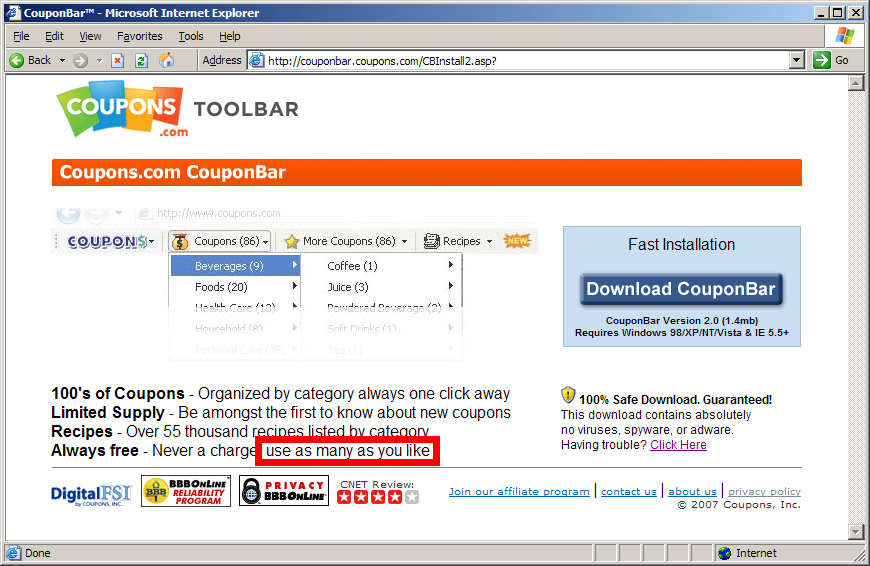
Coupons.com specifically promises users that they may "use as many [coupons] as [they] like." But in fact, Coupons.com takes great pains to limit how many coupons users can print. Rather than simply letting users print GIF or JPG coupons from an ordinary web page, Coupons.com requires that users install a coupon-printing ActiveX control. Coupons.com also customizes each coupon with information about who printed it and when. These design decisions increase the complexity of Coupons.com’s business — giving rise to the serious consent and privacy issues set out below.

Installing with deceptive filenames and registry entries

On an ordinary test PC that had never previously run any software from Coupons.com, I installed Coupons.com’s Coupon Bar 5.0 software. I requested a coupon to be printed, then ran an "InCtrl" comparison of changes made to my computer. InCtrl revealed the following new files and registry entries:

c:\windows\uccspecc.sys
c:\windows\WindowsShellOld.Manifest.1
HKEY_LOCAL_MACHINE\SOFTWARE\ClassesManifest.Template.1
HKEY_LOCAL_MACHINE\SOFTWARE\Microsoft\Windows\CurrentVersion\uccspecc
HKEY_LOCAL_MACHINE\SOFTWARE\Microsoft\Windows\CurrentVersion\Controls Folder\Presentation Style
HKEY_LOCAL_MACHINE\SOFTWARE\Microsoft\Windows\CurrentVersion\Explorer\EnableAutoTrayHistory
HKEY_LOCAL_MACHINE\SOFTWARE\Microsoft\Windows\CurrentVersion\Internet Settings\URLDecoding

Each of these entries consisted of a 30 to 90-letter string of gibberish. For example, the contents of uccspecc.sys exactly matched the contents of the first three registry entries: HtmWSrewvuaCGtKrVlXxMKdbMkLfgHq.

Others have also noticed these oddly-named files. For example, McAfee SiteAdvisor reports every file and registry entry Coupons.com creates.

These Coupons.com filenames and registry keys are deceptive, for at least three different reasons.

1) The labels falsely suggest that the components are part of Windows, rather than third-party add-ins. For example, the files and registry keys are placed in locations reserved for Windows itself, not for third-party applications. Furthermore, Coupons.com’s choice of filename and registry keys affirmatively misrepresents the function of the specified components.

2)The labels falsely suggest that the components are system files. For example, the .SYS file extension has a special meaning to Windows (e.g. for device drivers and other system components), but the Coupons.com file serves no such "system" function. Registry keys as to (supposed) Explorer AutoTray, URL encoding, and folder presentation settings all suggest intuitive meanings. But Coupons.com goes on to use these keys for a purpose unrelated to their names.

3) The labels are confusingly similar to genuine Windows components. For example, WindowsShell.Manifest is a bona fide Windows file, but Coupons.com’s "WindowsShellOld.manifest.1" (emphasis added) has no relationship whatsoever with that file (and is certainly not an "old" version of that file). Similarly, the HKLM\Software\Microsoft\Windows\CurrentVersion\Internet Settings\URLEncoding registry key is required by Internet Explorer, making Coupons’ choice of the similar URLDecoding (emphasis added) especially likely to confuse typical users.

Coupons.com’s choice of registry keys and filenames has a clear purpose and effect: To deter users from deleting the specified keys and files. Even among users sophisticated enough to manually delete unwanted files and registry keys, the chosen registry keys and filenames look so official that removal appears unwise. The typical result is that users will elect to retain these files, mistakenly concluding that these files are part of Windows.

Coupons.com’s deceptive filenames flout industry norms. For example, the Anti-Spyware Coalition’s Best Practices invite anti-spyware vendors to consider whether a program’s “files have easy-to-understand names and are easy for users to find on their computers” — a test Coupons.com clearly fails. Anti-spyware statutes in Texas and Arkansas specifically prohibit deceptively-named files and registry entries that prevent users from removing software, and TRUSTe Trusted Download rules (which bind Coupons.com as a Trusted Download sealholder) also prohibit deceptive naming to avoid removal. These Texas, Arkansas, and TRUSTe requirements admittedly limit their prohibitions to deceptively-named "software" and to deception that hinders program removal. Perhaps Coupons.com manages to escape these rules by deceptively naming its configuration files (rather than its executable code) or by making its executable code (though not its configuration files) easy to remove. Nonetheless, these authorities reveal the public’s discomfort with deceptive naming. If users are to know what is on their computers and why, vendors must name their files in a way reasonable users can understand. Yet Coupons.com intentionally does exactly the opposite..

Failing to remove all Coupons.com components when users request uninstall

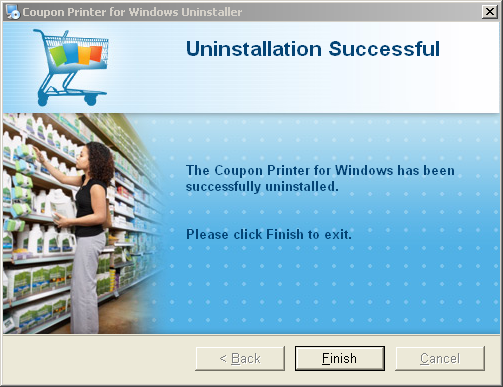
On my test PC, I attempted to uninstall the Coupons.com software in the usual way: Control Panel – Add/Remove Programs – Coupon Printer. The uninstaller claimed to have run successfully. Yet my computer retained the two files and five registry entries set out in the prior section. These files and registry entries remained even after I restarted my test PC.

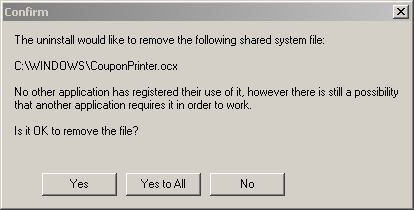
I had requested an "uninstall" of Coupons.com software — not a partial uninstall, but (for lack of any instruction or indication to the contrary) a complete uninstall. The Coupons.com uninstaller had even paused to ask about a specific "shared system file" it wanted special confirmation to delete — further suggesting a thorough removal procedure. The uninstaller ultimately reported that the uninstall was "successful." Nonetheless, the specified components were left on my computer after uninstall.

Coupons.com’s privacy policy fails to disclose that these files and registry keys — embodiments of a user’s ID number, as explained in subsequent sections — are left behind even after uninstall. The privacy policy discusses cookies (a more common way to store user information) in a full paragraph, including three sentences about "persistent cookies" and how users can remove them. The privacy policy therefore seems to cover all user information that Coupons.com stores on users’ PCs. Yet the privacy policy is entirely silent as to the files and registry entries set out above, and as to their retention even after a user attempts to remove Coupons.com software. Neither does Coupons.com’s software license agreement mention these hidden files — neither their existence nor their retention.

The TRUSTe Trusted Download certification agreement requires "an easy and intuitive means of uninstallation" (provision 7). TRUSTe instructs that uninstallation "must remove the Certified Software from the User’s computer." TRUSTe does not specifically speak to the possibility of a program leaving data files behind after uninstall. But where TRUSTe offers an exception to the requirement of complete removal, that exception is tightly limited to serving a user’s direct and immediate interest. (Namely, TRUSTe allows a program to leave behind a shared component that other programs also rely on, since removing that component would disable the other programs.) Furthermore, TRUSTe’s requirement summary demands that "[u]ninstallation must remove all software associated with the particular application" (emphasis added) — broad language suggesting little tolerance for files intentionally left behind. Since TRUSTe offers only a single exception to the requirement of complete removal, and since that exception is so narrow, I believe TRUSTe will likely take a dim view of certified software intentionally failing to uninstall any of its components.

Printing users’ ID numbers onto coupons

Coupons.com Prints a User's ID Number on Each Coupon Coupons.com Prints a User’s ID Number on Each Coupon

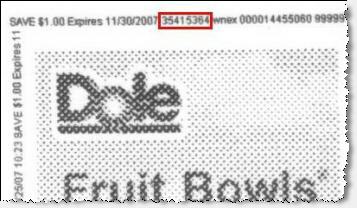
Every coupon printed from Coupons.com bears a series of small numbers. These numbers include the user ID of the user who printed the coupon. See an example coupon printed from my computer, repeatedly reporting my user ID: 35415364.

Coupons.com’s privacy policy does not prominently warn users that Coupons.com will include their user IDs on each printed coupon. As best I can tell, after multiple careful readings of the privacy policy, the only relevant provision is as follows:

Coupons, Inc. discloses "automatically collected" data (such as coupon print and redeem activity) to its Clients and third-party ad servers and advertisers. These third parties may match this data with information that they have previously collected about you under their own privacy policies, which you should consult on a regular basis.

I believe Coupons.com considers user ID numbers to be "automatically collected data," and Coupons.com seems to use the word "Clients" to include product manufacturers as well as retail merchants. On such an interpretation, the quoted language might let Coupons.com print user ID numbers on coupons that are given to retailers and ultimately to merchants. But even if consumers read the quoted language, most consumers will be unable to figure out what it means because the wording is so convoluted and vague.

In lieu of the quoted wording, Coupons.com could simply explain: "We include your user ID on each coupon you print." Such a warning would be clear, concise, and easy to understand. But such a warning would also raise privacy concerns for typical users — perhaps one reason why Coupons.com might prefer more complicated wording.

Allowing third-party web sites to retrieve user ID numbers, in violation of Coupons.com’s privacy policy

Coupons.com Allows Third-Party Sites to Retrieve User ID Numbers Coupons.com Allows Third-Party Sites to Retrieve User ID Numbers

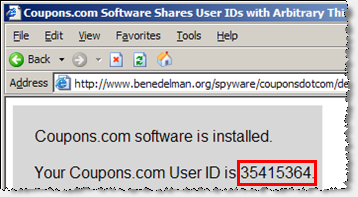
Examining JavaScript code on Coupons.com’s web site, I noticed an apparent design flaw. Testing confirmed my suspicion: Any web page can invoke the "GetDeviceID" method of Coupons.com’s coupon-printing software. The web page then receives the user ID associated with the user’s installation of Coupons.com software.

To confirm this data leakage, see my Coupons.com Software Shares User IDs with Arbitrary Third Parties testing page. If a computer runs current Coupons.com software, this page will display the associated Coupons.com user ID. (However, no information is sent to my web server or otherwise stored or preserved.) This is the exact same ID number that is printed onto users’ coupons. (Screenshot.)

Although Coupons.com user ID numbers appear to be assigned arbitrarily, distribution of these ID numbers raises at least three privacy concerns:

1) This distribution is not permitted under Coupons.com’s privacy policy. Coupons.com’s privacy policy specifically limits the circumstances in which Coupons.com will share user information, and this is not among the circumstances users accept. In particular, Coupons.com says it will disclose certain information to "clients and third-party ad servers and advertisers." But in fact, Coupons.com’s program code makes user IDs available to anyone — even to sites with absolutely no relationship to Coupons.com.

2) Coupons.com user IDs are widespread. As explained in the prior section, a user’s ID is printed onto each coupon the user prints. Broad distribution of user IDs increases the unpredictable consequences of further sharing of ID numbers. For example, a merchant’s web site could cross-check users’ computers against coupons — conceivably even connecting users’ computers back to users’ retail purchase histories. Retailers could similarly use Coupons.com ID numbers to connect a user’s online activity to the user’s in-store shopping habits.

3) Coupons.com user IDs are persistent. Unless a user carefully removes the filenames and registry entries set out in the preceding section, uninstalling and reinstalling Coupons.com software will retain the same user ID. A Coupons.com user ID is therefore highly likely to continue to identify the same user over time. In contrast, other identifiers tend to change over time. For example, many ISPs reassign user IP addresses often. Some users their cookies in an attempt to increase their online privacy. Because Coupons.com user IDs are unusually hard to remove, Coupons.com user IDs are a particularly effective way for sites to track users over an extended period.

This violation of Coupons.com’s privacy policy occurred despite Coupons.com’s membership in the TRUSTe Web Privacy Seal Program, the TRUSTe Trusted Download Program, and the BBBOnLine Reliability Program. Knowing that Coupons.com software assigns each user an ID number and that Coupons.com accesses these ID numbers through its web site, the prospect of leakage to other web sites (in specific violation of Coupons.com’s privacy policy) was obvious and intuitive. Yet it seems TRUSTe and BBBOnLine failed to check for this possibility. This failure is particularly disappointing since TRUSTe’s Trusted Download program claims to specialize in software testing.

Allowing any person to check whether a given user has printed a given coupon

Coupons.com Confirms that a Given User Has Printed a Given Coupon Coupons.com Confirms that a Given User Has Printed a Given Coupon

Coupons.com Reports that a User Has Not Printed a Given CouponCoupons.com Reports that a User Has Not Printed a Given Coupon

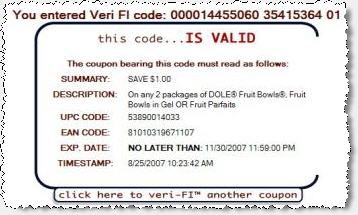
Coupons.com’s Veri-fi service, veri-fi.com, lets any interested person determine whether the coupon is (in Coupons.com’s view) "counterfeit [or] fraudulently-altered." But this same mechanism also lets any person check whether a given Coupons.com user (identified only by the user’s Coupons.com user ID) has printed a given coupon — potentially revealing significant information about the user’s purchasing interests.

To confirm the effect of Coupons.com’s Veri-fi service, I entered the codes from the example coupon shown above. I received the first confirmation shown at right — indicating that the specified user ID (me) had printed the specified coupon.

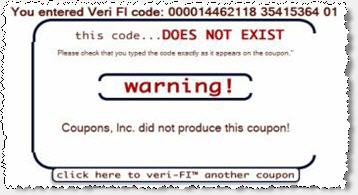
I then entered the same user ID, but a different coupon code. In particular, I chose a coupon code associated with a valid Coupons.com coupon that I had never printed using the specified user ID. As shown in the second screenshot at right, Veri-fi reported that this second code was invalid. That is, Veri-fi reported that the specified user ID had never printed the specified coupon.

Veri-fi seems to work just as Coupons.com intended. However, combining the Veri-fi verification system with the widespread distribution of Coupons.com user IDs (both in print and through JavaScript), Coupons.com reveals detailed information about which users have requested which coupons. Via the JavaScript interface, a web site can easily extract a user’s Coupons.com user ID. Then, via Veri-fi, the web site can check which coupons the user has printed. The web site can thereby build a rich profile of the user’s purchasing interests — despite the promise in Coupons.com’s privacy policy that such information would be distributed only to Coupons.com’s clients, ad servers, and advertisers.

Strikingly, Coupons.com fails to limit Veri-fi to bona fide coupon validators (e.g. retailers and manufacturers). In fact, Veri-fi lacks even a Terms of Service document or a license agreement to attempt to limit who uses the site.

Update (August 28, 2007 – 3:35pm): Coupons.com has contacted me to report that the Veri-fi site no longer allows the data retrieval described above.

Implications & Consequences

A user visiting Coupons.com reasonably expects to get free coupons. Unfortunately, Coupons.com’s practices far exceed anything described in marketing materials, EULA, or privacy policy. Would users join Coupons.com if they knew they had to receive deceptively-named files? That uninstall would leave files behind for possible use later? That every printout would carry a user ID that could be linked to a user’s full coupon-printing history? That Coupons.com’s software and web site would distribute user information in ways even Coupons.com probably didn’t anticipate? We can’t know the answers to these questions because Coupons.com never gave users the opportunity to decide. But with full disclosure, users might well choose to get their coupons elsewhere.

Coupons.com prominently touts its certifications from TRUSTe (including TRUSTe’s new Trusted Download Program) and BBBOnLine. But when these organizations learn of Coupons.com’s specific practices, I doubt they’ll be impressed. Coupons.com’s practices are in tension with various TRUSTe rules, including a Trusted Download prohibition on certain deceptive filenames and registry keys, as well as TRUSTe’s general prohibition on privacy policy violations. More generally, it’s hard to call a program "trusted" when it uses deceptive names to hide some of its key files, when it fails to remove itself fully upon a user’s specific request, and when it makes available users’ identifying information despite privacy policy promises to the contrary. Retaining the credibility of Trusted Download probably requires that TRUSTe take action either to correct Coupons.com’s practices or to sever TRUSTe’s ties to Coupons.com.

Coupons.com could easily fix some of these bad practices. A new version of Coupons.com’s software could prevent arbitrary web sites from retrieving user ID numbers. Coupons.com could stop printing users’ ID numbers on each coupon, or could prominently tell users that each coupon bears a user ID. Coupons.com could limit Veri-fi access to retailers and manufacturers.

With effort, Coupons.com could track users’ coupon-printing without underhanded tactics like deceptive files and registry entries. For one, Coupons.com could label its files and registry keys appropriately — treating its users with dignity and respect, rather than assuming users will try to cheat. Alternatively, Coupons.com could use recognize computers on which it has previously been installed, without resorting to deceptive files or registry entries. (Direct Revenue built such a system — checking a user’s ethernet address, Windows product key, etc. in order to identify repeat installations.) Simpler yet, Coupons.com could request users’ email addresses, and use duplicate addresses to recognize repeat users. Coupons.com may worry that email addresses offer inadequate security, but eBay (Paypal), Google, and others have used this method even for larger offers (as large as $5 – $10).

Coupons.com’s practices fit the historical problems with digital rights management (DRM) software that attempts to constrain what users can do with their own computers. Compare Coupons.com’s approach to the notorious Sony CDs which used a rootkit to conceal Sony’s DRM software. Just as Sony had to rely on a rootkit to hide its DRM software from users who otherwise would have chosen to remove it, Coupons.com hides user IDs in obscure files and registry keys. Just as Sony’s disclosures were less than forthright, so too does Coupons.com fail to tell users what it is doing and how. Based on their examination of software to constrain access to digital music, Ed Felten and Alex Halderman previously explained the core problem: So long as users don’t want a given piece of code on their computers, vendors are forced to conceal their efforts to put it there and to keep it there. As to Coupons.com, some users do want the core functionality. But tracking users after uninstall is sufficiently noxious that Coupons.com knows it must cover its tracks lest users notice. Coupons.com thus finds itself in the same DRM predicament that ensnared Sony.

FullContext Spyware Injects Coupons.com Ads Into Google FullContext Spyware Injects Coupons.com Ads Into Google

Coupons.com is currently suing John Stottlemire, who Coupons.com claims told users "how to beat the limitation imposed by the software provided by coupons.com." (Complaint paragraph 20.) Coupons.com alleges that Stottlemire "created and used software that purported to remove Plaintiff’s security features, for the purpose of printing more coupons than [Coupons.com’s] security features allow." (Paragraph 21) Coupons.com claims that Stottlemire’s practices violate the Digital Millennium Copyright Act, among other causes of action. I can’t speak to the merits of Coupons.com’s claim. But perhaps Coupons.com would do better to focus on protecting users’ privacy and on complying with its privacy policy.

Coupons.com’s behaviors are particularly notable because they extend to multiple coupon-printing programs distributed by literally thousands of web sites. Although I primarily tested Coupons.com’s Coupon Bar software (version 5.0), it seems Coupons.com’s Coupon Printer 4.1 shares all relevant characteristics. (These are the two Coupons.com programs that have been certified by TRUSTe’s Trusted Download.) In addition to distribution at the Coupons.com web site, these programs are also offered by numerous partner sites. Coupons.com’s marketing materials claim more than 1500 such sites, including the LA Times, Washington Times, and Philly.com.

Coupons.com’s online advertising strategy raises trust and privacy questions similar to those presented by Coupons.com’s coupon-printing software. Twice this year I’ve seen and recorded Coupons.com ads shown through spyware: First through the FullContext ad injector (which put Coupons.com ads into the top of Google.com, above Google’s logo), and later through Targetsaver full-screen pop-up ads. Screenshots. Both programs are widespread and known for installing without consent, among other anti-consumer practices. To be a respected player in the online advertising economy, Coupons.com must do more to avoid funding these spyware vendors and the unsavory ecosystem they represent.

Update on Coupons.com’s Response, My Critique, and TRUSTe’s Decision (September 23, 2007)

After I posted the article above, Coupons.com circulated a two-page response. Among other claims, the response argues that the specified registry keys and filenames are "not deceptive." I emphatically disagree. The components are intentionally named to look like they’re part of Windows, and they’re placed in locations where Windows components ordinarily appear. These practices are exactly intended to mislead users as to the components’ purpose. That’s the essence of deception.

Coupons further claims the "user ID" I describe is in fact a "device ID." As a threshhold matter, that would change none of my analysis. But the word "user" comes directly from Coupons.com’s own source code. Coupons’ JavaScript code references a function called "GetUserCode()" (emphasis added) and passes a OBJECT PARAM tag with value USERID (emphasis added). Elsewhere, Coupons.com uses the abbreviation "txtUID" — i.e. a text field storing a user ID. With these repeated "user" references appearing in code written by Coupons.com, Coupons.com cannot credibly claim I err in my use of that same term.

Coupons.com goes on to argue it ought not be responsible for third parties using Coupons.com’s software to obtain user IDs. Coupons says "it is hard to imagine how a third party’s unauthorized use of our software — a sort of trespass … — constitutes our violation of our own privacy policy." I disagree. Perhaps Coupons.com should begin by rereading its privacy policy. Within the heading "our commitment to data security," Coupons.com specifically promises to "use[] commercially reasonable physical, managerial, and technical safeguards to preserve the integrity and security of your personal information." Coupons.com cannot in good conscience claim it is a "commercially reasonable" "technical safeguard" to allow any web site to invoke a simple JavaScript method of Coupons.com’s software. Quite the contrary, this is poor design — falling far short of industry norms for data protection.

Meanwhile, Coupons.com has updated its installer to show a new license agreement. If a user scrolls to the second screen of the license agreement, the user is told of "License Keys" to be placed on the user’s computer. To Coupons.com’s credit, the installer now discloses that these files will not be removed upon uninstall. But the files continue to be placed in deceptive locations in the user’s Windows directory and in the dedicated Windows section of the user’s registry — a fact nowhere disclosed to users.

On August 31, I filed a watchdog complaint with TRUSTe as to the Coupons.com practices set out above. In response, TRUSTe told me it will require Coupons.com to change its naming system "to avoid looking like … other popular software" (i.e. Windows). TRUSTe will also require Coupons.com to offer a new version of its software that removes deceptive files and registry entries leftover from prior versions. (TRUSTe’s blog describes these same requirements, albeit in terms less stark than the email TRUSTe sent me.) These are certainly steps in the right direction. Were the decision mine to make, I doubt I’d keep Coupons.com on the Trusted Download whitelist during a period when the company’s practices are known to fall short. But that’s a topic for another day.

Meanwhile, Coupons.com continues litigation against John Stottlemire. I’ve been in touch with John. I’ve learned that his software — which would have removed Coupons.com’s deceptive files and registry entries upon a user’s specific request — was actually never distributed to anyone but Coupons.com. (John’s web server detected Coupons.com’s IP addresses and granted them access, even before John was prepared to make the software available to anyone else.) This fact leaves me all the more doubtful of Coupons.com’s litigation strategy. John’s software was never used by even a single user. And John’s software would have done nothing more than remove the deceptively-named components TRUSTe is now ordering Coupons.com to remove itself. I remain hopeful that Coupons.com will withdraw this ill-fated attempt to silence a critic. Pending that, I’ve added John’s plight to my spyware threats page.

Finally, Coupons.com’s sneaky tactics continue to undermine its standing in the security community. Some top anti-spyware programs now detect Coupons.com — and rightly so, in my view. Users with Coupons.com software deserve extra information — not forthcoming from Coupons.com — about what the software does and why users might not want it.

Zango’s Compliance Problems

Last November, Zango and the FTC announced a settlement of the FTC’s investigation of Zango’s practices. Among the key requirements: Zango agreed to install only after “clearly and prominently disclos[ing] the material terms [of its software] prior to the display of, and separate from, any [EULA].” Zango further agreed to label each of its ads with a “clear[] and prominent[]” marking as to the source of the ad, as well as a hyperlink to removal and complaint procedures.

Some of Zango’s installations do some of what the settlement requires. But others don’t. Today I’m posting a critique. In a series of screenshots, I show widespread Zango installations with no disclosure outside of a EULA. I also present numerous Zango ads appearing with no labeling at all. Details:

Zango Practices Violating Zango’s Recent Settlement with the FTC

ComScore Doesn’t Always Get Consent updated July 26, 2007

This past Wednesday, ComScore raised $82 million in an IPO that jumped 42% in its first day of trading. Some investors clearly like ComScore’s business, but I wonder whether they fully understand ComScore’s business model, privacy implications, and poor track record of nonconsensual installations.

ComScore’s tracking software is remarkably invasive. The privacy policy for ComScore’s RelevantKnowledge tracking program purports to grant ComScore the right to track users’ name and address, browsing, shopping, and even “online accounts … includ[ing] personal financial [and] health information.” Based on these privacy concerns, well-respected security researchers have long warned about ComScore’s software. For example, in 2004 Cornell University began blocking all communications with ComScore’s MarketScore tracking servers. Multiple other universities (including Columbia University and Indiana University) followed up with special warnings to their users.

At least as serious are ComScore’s installation practices. ComScore pays independent distributors to install ComScore software onto users’ computers. Predictably, some of these distributors install ComScore software without getting user consent. Some specific examples:

  • On Wednesday (June 27, 2007), I browsed ExitExchange, a well-known banner farm widely loaded in popups and popunders by various sites (as well as some spyware programs). ExitExchange showed several ads, one of which performed a security exploit that installed ComScore’s RelevantKnowledge. See video proof. Notice the exploit beginning at 0:12. When I ran a HijackThis scan to check for infections (0:29), I found RelevantKnowledge’s “rk.exe” already running (1:10), even though I had not granted permission for it to install. Packet log analysis indicates that the installation was performed by Topinstalls and by Searchclickads. The installation was predicated on two simultaneous attempted exploits — one using a Java vulnerability, another using a Microsoft MSXML vulnerability. Also installed (all without my consent): Deskwizz/Searchingbooth, Look2me, and WebBuying, among others not yet identified.
  • I previously observed and recorded a substantially similar nonconsensual installation of RelevantKnowledge (by these same distributors) on April 26, 2007.
  • Spyware researchers at Sunbelt Software observed a nonconsensual installation of RelevantKnowledge, seemingly by these same distributors, earlier in June 2007. Sunbelt staff browsed FirstStolz and received an exploit that installed TopInstalls and Searchclickads, which in turn installed RelevantKnowledge.
  • In August-September 2006, I repeatedly observed RelevantKnowledge installed by DollarRevenue, a notorious spyware bundler (subsequently shut down by Dutch law enforcement). In my testing, DollarRevenue installed RelevantKnowledge software without users’ consent. ComScore staff later admitted they had “engaged in partnership negotiations with DollarRevenue.” ComScore claims it never paid DollarRevenue — but I personally observed and recorded DollarRevenue installing ComScore software onto my testing systems.
  • In November 2005, I observed ComScore’s MarketScore software installed by PacerD, a notorious spyware bundler that installed through widespread exploits syndicated through ad networks. PacerD installed RelevantKnowledge without user consent.
  • In April 2007, I observed ComScore’s MarketScore software installed when users request and install a media converter program. The inclusion of MarketScore was disclosed only if users scrolled to page four of a box simply labeled “License Agreement.” No on-screen label indicated that multiple documents were concatenated into that single scroll box, nor did any short notice or other prominent text make any mention of RelevantKnowledge’s presence or effects. These omissions stand in stark contrast to recent FTC precedent requiring “clear and prominent disclosure of material terms prior to and separate from any end user license agreement.”

ComScore’s nonconsensual installations are particularly notable because TRUSTe’s Trusted Download program recently granted a certification (albeit “provisional”) to ComScore’s RelevantKnowledge software. I’ve previously criticized other TRUSTe certifications — concerned that TRUSTe-certified sites may be no safer than other sites, and arguably less safe. That said, to TRUSTe’s credit, Integrated Search Technologies’ Vomba is no longer on TRUSTe’s Trusted Download list — albeit a result that TRUSTe attributes to Vomba’s financial concerns rather than to security researcherscritique of Vomba’s practices and lineage. Whatever the reasons for IST’s removal, perhaps ComScore’s MarketScorecould stand for an equally thorough review.

ComScore also boasts a “WebTrust” seal from Ernst & Young. See the associated Audit Report. Ernst & Young indicates that it “test[ed] and evaluat[ed] the operating effectiveness” of ComSCore’s internal controls but concedes that “error or fraud may occur and not be detected.”

Update – TRUSTe’s Response (July 26, 2007)

On Friday July 20 — well after the close of the East Coast business day, and fully three weeks after I first reported the nonconsensual installs described above — TRUSTe announced that ComScore’s RelevantKnowledge has been removed from the Trusted Download whitelist for three months.

I have mixed views about this outcome. On one hand, it’s certainly an improvement from prior TRUSTe practice, during which companies as notorious as Direct Revenue were allowed to continue to hold TRUSTe privacy seals despite widespread nonconsensual installations. But a comment from Sunbelt Software’s Eric Howes offers compelling concerns. Eric explains:

[TRUSTe has] essentially decided to continue working with ComScore, provided ComScore spends a token amount of time in the “naughty corner.” … Who loses as a result? Consumers and web surfers ultimately, as ComScore will be allowed to continue plying its trade of surreptitious, underhanded installs of its RelevantKnowledge software to support some very aggressive and intrusive data collection on unsuspecting users’ machines, all with PR cover from TRUSTe.

Eric also cites a June 27 exchange between Sunbelt CEO Alex Eckleberry and TRUSTe’s Colin O’Malley. Transcribing from the audio recording of the Anti-Spyware Coalition‘s public workshop :

Alex Eckelberry: “So what if you have an application that is installing through an exploit? Do those guys go through a probationary process, or do they just get cut off? Are they just gone?”

Colin O’Malley: “If they’re installing through an exploit, that’s covered in what’s described in what we describe as our prohibited activities. That’s not an activity that is acceptable by any level of notice, and so they’re terminated immediately.”

Alex Eckelberry: “Good. OK.”

Remarkably, TRUSTe’s spokesperson now claims Colin promised termination only when a vendor itself uses exploits, but not when its distributors do so. Reports Vnunet: “‘Colin [O’Malley]’s remarks were specifically about a company that is directly responsible,’ the spokesperson explained. ‘In this case, it was the affiliate that was exploiting the flaw.'”

I’ve read and reread the exchange, and listened repeatedly for good measure. On my interpretation, Colin plainly promised to terminate any vendor whose software is becoming installed through exploits — no matter whether the vendor itself performs the exploit, or whether the exploit is performed by one of the vendor’s distributors. I reach this conclusion for two separate reasons:

1) The plain language of Alex’s question is intentionally inclusive as to who is doing the installation. Notice the broad “that is installing” — vague as to how exactly the installation is occurring.

2) Distributor-perpetrated exploit installs have been standard practice in the “adware” industrry. That’s what I widely observed as to 180solutions, Direct Revenue, eXact Advertising, and so many others. Meanwhile, vendor-perpetrated exploit installs are few and far between — common only among little-known companies, and even then usually comingled with installing third parties’ software. So if Colin had wanted to remark only on the (unusual or unprecedented) vendor-perpetrated exploits, he would have needed to say that specifically.

Perhaps TRUSTe regrets the breadth of Colin’s promise. But Colin made a tough commitment for good reason: As Colin spoke to dozens of anti-spyware researchers already suspicious of Trusted Download, his big promises helped bolster TRUSTe’s credibility. Had Colin told the ASC what now seems to be TRUSTe’s policy — that some exploit-based installs yield only a temporary suspension — I gather Alex would have questioned Colin further to emphasize the need for a tougher response. Other meeting attendees would probably have done the same.

In any event, if Colin’s goal was to build support among anti-spyware researchers, his efforts don’t seem to be succeeding. Eric continues:

Th[is] case was significant in that it was the first big public test of how well TRUSTe would perform when called to defend the standards that allegedly undergird the Trusted Download program. When push came to shove, though, TRUSTe demonstrated itself to be lacking the backbone to deliver on its word. [This is] another illustration of why we at Sunbelt place no value whatsoever in TRUSTe’s whitelisting and certifications.

Added FaceTime’s Chris Boyd:

For Gods sake, when are we going to stop gimping around and actually break out some actual punishments for people? Either kick someone from your program and be done with it, or … just give up already.

TRUSTe’s extreme delay further compromises the standing of Trusted Download: Three weeks elapsed before TRUSTe responded to my documentation and proof of nonconsensual ComScore RelevantKnowledge installations. Throughout that period, the Trusted Download whitelist continued to list RelevantKnowledge — falsely suggesting that RelevantKnowledge was in good standing. Internet users deserve better: When TRUSTe learns of an infraction of such seriousness, all applicable web pages ought to be updated promptly, lest the Internet community mistakenly proceed in reliance on TRUSTe’s supposed diligence.

Spyware Still Cheating Merchants and Legitimate Affiliates updated May 22, 2007

Spyware vendors are trying to clean up their images. For example, Zango settled a FTC investigation, then last week sued PC Tools for detecting and removing Zango software. Meanwhile, Integrated Search Technologies (makers of a variety of software previously widely installed without consent) introduced a new “Vomba” client that even received “provisional” TRUSTe Trusted Download certification.

But these programs’ core designs are unchanged: They still track user behavior, still send browsing to their central servers, and still show pop-up ads — behaviors users rightly disfavor due to serious effects on privacy and productivity.

Putting aside users’ well-known dislike for pop-ups, these programs also continue to interfere with standard online advertising systems. In particular, these programs show ads that overcharge affiliate merchants — especially by claiming commission on organic traffic merchants would have received anyway. This article presents six specific examples, followed by analysis and strategies for enforcement.

The Self-Targeting Scam and an Initial Example: Zango, Roundads, and Performics Claiming Commissions on Blockbuster’s Organic Traffic

Putting spyware vendors’ practices in the best possible light, they perform a comparative advertising function — offering a competitor when a user browses a merchant’s site. But suppose a spyware vendor instead shows a “competitor” that is actually just a commission-earning link to the very site the user had specifically requested. Then, if the user buys from that merchant (through either the original window or the new pop-up, in general), the merchant has to pay a commission to the spyware vendor (or its advertiser or affiliate).

Zango, Roundads, Performics Targeting Blockbuster Zango, Roundads, Performics Targeting Blockbuster

For concreteness, consider the events shown in the screenshot at right and in video. On May 13, my automated testing system browsed Blockbuster. Observing the requested traffic to Blockbuster, Zango opened a popup sending traffic to Roundads.com. Roundads redirected to Performics and then back to Blockbuster. To a typical user, this pop-up is easy to ignore — just a second copy of the Blockbuster site, which users had requested in the first place. But the pop-up has serious cost implications for Blockbuster: If the user signs up with Blockbuster, through either window, then Blockbuster concludes it should pay a $18 commission to Roundads via Performics. That’s a sham: Were it not for Zango’s intervention, Blockbuster could have kept the entirety of the user’s subscription fee, without paying any commission at all.

Zango’s activity here doesn’t even meet the definition of advertising (“attracting public attention to a product or business”). After all, the user was already at Blockbuster — and hence can’t be said to have been “attract[ed]” to that site by Zango’s action.

Unless Blockbuster installs Zango’s software and runs its own tests, Blockbuster is likely to conclude (mistakenly) that Roundads has provided a bona fide lead to a new customer. Indeed, since Blockbuster’s preexisting web site visitors are likely to “convert” to buyers at a high rate (compared to visitors who only arrive thanks to advertising), Blockbuster’s advertising metrics (and Performics’ tracking measurements) are likely to consider Roundads an unusually high-quality affiliate thanks to Roundads’ likely high conversion rate. Blockbuster might even pay Roundads a bonus — when in fact this Roundads traffic is worthless.

URL log of the traffic at issue:

http://tvf.zango.com/showme.aspx?…CD=www.blockbuster.com…
http://ads.roundads.com/ads/clickcash.aspx?keyword=.blockbuster.com
http://clickserve.cc-dt.com/link/tplclick?lid=41000000005307215&pubid=…
https://www.blockbuster.com/signup/rp/regPlan/p.25216/c.firstMonth999F…

For more on these self-targeting pop-ups, targeting merchants’ sites with their own affiliate links, see my earlier The Effect of 180solutions on Affiliate Commissions and Merchants (2004).

On these facts, Blockbuster might reasonably blame Roundads — the entity that purchased the traffic from Zango and put in motion the self-targeting scheme. Investigating Roundads’ identity, Blockbuster will notice Roundads.com’s footer — which states that Roundads is one and the same as Thermo Media / Affiliate Fuel, which credit reporting agency Experian acquired in April 2005. (Update, May 22: Joey Flores, Director of Operations for Affiliate Fuel, wrote to me to report that Roundads has no affiliation with Affiliate Fuel, Thermo Media, or Experian. Joey suggests that Roundads “‘borrowed’ from [Thermo Media’s] site design … and their designers got a little copy happy, including [copying] our copyright information on[to] their site.”)

Blockbuster might also blame Performics. Performics specifically touts its affiliate network as offering “cost-effective” advertising. But in this example, the cost was a total waste, yielding no benefit whatsoever. Performics further promises “quality affiliates” — an important benefit to merchants who might not otherwise know which affiliates to accept. But in this instance, by all indications Performics failed to protect Blockbuster from Roundads’ bad actions and improper charges.

Finally, Blockbuster might blame Zango — whose pop-up generating software made it remarkably easy for Roundads to target Blockbuster’s organic traffic.

Example 2: Vomba, Ccg360, Lynxtrack (Hydra Network), Adrevolver (Blue Lithium) Claiming Commissions on Blockbuster’s Organic Traffic

Vomba, Ccg360, Lynxtrack (Hydra), Adrevolver (BlueLithium) Overcharging Blockbuster Vomba, Ccg360, Lynxtrack (Hydra), Adrevolver (BlueLithium)

Blockbuster’s online advertising is widespread, and the preceding example is but one of many schemes that charge Blockbuster commission it ought not have to pay. This section shows another.

In the screenshot shown at right, reflecting testing of May 11, my automated testing system requested the Blockbuster site. Vomba spyware observed that I was at Blockbuster, and sent traffic to Ccg360 (purportedly Nelson Cheung of Markham, Canada). Ccg360 redirected to Lynxtrack.com (Hydra Network of Beverly Hills, California), which redirected to Adrevolver (BlueLithium of San Jose, California) and finally back to Blockbuster.

As in the prior example, the net effect was to claim commission on Blockbuster’s organic traffic. If the user signs up with Blockbuster, Blockbuster will pay a commission to the sequence of companies that forwarded the Vomba-originating traffic. But had those parties not intervened with that pop-up, Blockbuster would still have closed the sale — without incurring a commission expense. So as in the prior example, this is self-targeting, charging Blockbuster a commission without providing any bona fide value in return.

URL log of the traffic at issue:

http://services.vombanetwork.com/vomba/popup.php
http://blockbuster.med.ccg360.com
http://www.lynxtrack.com/afclick.php?o=3318&b=zm00z1tf&p=11566&l=1&s=med
http://track.adrevolver.com/service.php/16520/1893/11566
https://www.blockbuster.com/signup/s/reg/p.26715/pc.blwm9.99/r./

Example 3: Vomba and LinkShare Claiming Commissions on Netflix’s Organic Traffic

Vomba and LinkShare Claiming Commission on Netflix's Organic Traffic Vomba, LinkShare Claiming Commission on Organic Traffic

Netflix has repeatedly promised to sever ties with spyware vendors, even claiming that incidents that I and others observed were “unique and random.” But through its LinkShare affiliate program, Netflix continues to get ripped off by spyware — needlessly paying commissions to receive the same kind of traffic Netflix long since promised to reject. This section and the three that follow shows four separate examples of such traffic.

In testing of April 11, my automated testing system browsed Netflix. AutoTester found traffic flowing from Vomba to LinkShare, then back to Netflix. URL log:

http://services.vombanetwork.com/vomba/popup.php
http://click.linksynergy.com/fs-bin/click?id=9SOCNdxbJKg&offerid=78684…
http://www.netflix.com/Signup?mqso=60187019&ls_sourceid=9SOCNdxbJKg-O9…

Example 4: Look2me, MyGeek (AdOn Network), Tcshoppingdeals, Apluswebdeals, and LinkShare

Look2me, MyGeek (AdOn Network), Tcshoppingdeals, Apluswebdeals, LinkShare Claiming Commissions on Netflix's Organic Traffic Look2me, MyGeek (AdOn Network), Tcshoppingdeals, Apluswebdeals, LinkShare Overcharging Netflix

In testing of April 25, my automated testing system browsed Netflix. AutoTester found traffic flowing from Look2me (from Minnesota-based NicTech Networks) (widely installed without consent) to MyGeek (AdOn Network of Phoenix, Arizona) to Tcshoppingdeals (purportedly of Buffalo, New York) to Apluswebdeals (location unknown) to LinkShare, then back to Netflix. See screenshot at right and video. URL log:

http://www.ad-w-a-r-e.com/cgi-bin/UMonitorV2
http://url.cpvfeed.com/cpv.jsp?p=110250&ip=…&url=http://www.netflix….
http://www.tcshoppingdeals.com/r/link.php?id=12
http://www.a-pluswebdeals.com/visit/featured/?id=6
http://click.linksynergy.com/fs-bin/click?id=7XxjiVPyR/A&offerid=78684…
http://www.netflix.com/Signup?mqso=60187019&ls_sourceid=7XxjiVPyR_A-Mp…

Example 5: Web Nexus, Mediatraffic, Ccg360, and LinkShare

Web Nexus, Mediatraffic, Ccg360, LinkShare Claiming Commissions on Netflix's Organic Traffic Web Nexus, Mediatraffic, Ccg360, LinkShare – Netflix

In testing of May 12, my automated testing system browsed Netflix. AutoTester found traffic flowing from Web Nexus (widely installed without consent) to Mediatraffic (one-and-the-same as Integrated Search Technologies and Vomba) to Ccg360 (purportedly Nelson Cheung of Markham, Canada) to LinkShare, and back to Netflix. See screenshot at right. URL log:

http://stech.web-nexus.net/cp.php?loc=295&cid=…
http://stech.web-nexus.net/mtraff.php/9951709/295/527/…
http://cpvfeed.mediatraffic.com/feed.php?ac=1239&kw=netflix&ip=…
http://cpvfeed.mediatraffic.com/redir.php?ac=1239&sac=&dat=…
http://netflix.med.ccg360.com
http://click.linksynergy.com/fs-bin/click?id=kic1Ixnq*SQ&offerid=…
http://www.netflix.com/Signup?mqso=60187019&ls_sourceid=kic1Ixnq.SQ-D…

Example 6: Zango, Roundads, and LinkShare

Zango, Roundads, LinkShare Claiming Commission on Netflix's Organic Traffic Zango, Roundads, LinkShare – Netflix

In testing of May 20, my automated testing system browsed Netflix. AutoTester found traffic flowing from Zango to Roundads to LinkShare and back to Netflix. See screenshot, video, and URL log:

http://tvf.zango.com/showme.aspx?…CD=www.netflix.com…
http://ads.roundads.com/ads/dvd.aspx?keyword=.netflix.com/Register
http://click.linksynergy.com/fs-bin/click?id=AnCa4QMGFR4&offerid=786…
http://www.netflix.com/Signup?mqso=60187019&ls_sourceid=AnCa4QMGFR4-…

In each of these four Netflix examples, spyware sent traffic to LinkShare and then onwards to Netflix — all predicated on users first requesting Netflix directly. So as in the two Blockbuster examples, the spyware provides no bona fide advertising benefit. Instead, the spyware vendors simply claim payments from Netflix without providing any service in return — a glaring reason why Netflix should refuse to pay them. Aside from reducing wasteful advertising spending, Netflix might also want to sever these relationships because the underlying spyware imposes serious costs on consumers: Sneaking onto users’ computers, reducing performance, and diminishing both reliability and privacy.

Netflix might reasonably blame LinkShare for the actions of these affiliates. LinkShare specifically touts its “high quality network” with “better affiliates,” whereas these affiliates are the very opposite of high quality. Furthermore, LinkShare prominently claims its service is “cost-efficient” — even as these examples entail Netflix paying for traffic it could have received for free.

Additional Examples on File

The preceding five examples are only a portion of my recent records of spyware advertising fraud and of other spyware advertising. My AutoTester collects dozens of examples per day, and I’ve documented literally hundreds of rogue affiliates during the past year — including dozens of affiliates through each of Commission Junction, LinkShare, and Performics, as well as various affiliates using smaller networks. Any affiliate merchant without a specific plan for detecting and blocking spyware-originating traffic is virtually certain to be receiving — and paying for — this bogus self-targeting spyware-originating traffic.

Winners and Losers

The clearest effect of self-targeting pop-ups is to overcharge merchants. Self-targeting pop-ups ask merchants to pay affiliate commissions on their organic traffic — traffic they should receive for free, thanks to advertising in other media, word of mouth, and repeat buyers. But if merchants fail to take action to protect themselves, they needlessly pay commissions on this organic traffic. Merchants then also pay affiliate network fees and, often, affiliate manager fees too — making the waste that much larger.

Secondarily, self-targeting pop-ups skim commissions from other affiliates. Consider a bona fide rule-following affiliate sending traffic to a targeted merchant. If a spyware self-targeting pop-up intercedes to drop its own affiliate cookies, it overwrites the cookies of the initial affiliate. Affiliate merchants pay commissions on a “last cookie wins” basis — so the first affiliate gets nothing, even though its link truly sent the user to the merchant’s site and actually put the sale in motion. (Examples: 1, 2, 3, 4)

But self-targeting does have beneficiaries. The clearest beneficiaries are the spyware vendors that show self-targeting pop-ups — whether showing these ads directly (with the spyware vendor acting as an affiliate) or indirectly (with some affiliate buying spyware traffic and sending it onwards to a network and a merchant). The resulting revenues fund spyware vendors’ infections, installations, and other expenses.

At least in the short run, self-targeting also benefits affiliate networks. Affiliate networks typically charge merchants a percentage of each commissionable sale. So the more commissions a merchant pays out, the higher the revenues of the merchant’s network. Self-targeting pop-ups convert non-commissionable organic traffic into supposedly-commissionable supposedly-affiliate-originating traffic — expanding networks’ fee base. In the long run, self-targeting fraud could reduce merchants’ interest in affiliate marketing, but in the short run it provides networks with additional revenue. This conflict surely explains at least a portion of networks’ failure to effectively eliminate self-targeting spyware. (Further discussion.)

Nonetheless, I’ve long thought that self-targeting and other spyware traffic present a substantial opportunity for networks seeking to offer increased value to sophisticated merchants. A savvy network could stand behind the quality of its affiliates, exercising real diligence in catching fraud and in protecting merchants from the risk of wasteful, unnecessary payments. Networks can implement protections more efficiently and at lower cost than merchants, because networks can kick out affiliates across their entire network, rather than merely from a single a single merchant’s program. That said, to date the largest three affiliate networks all still receive substantial spyware-originating traffic, including self-targeting traffic.

Revenue Counterfactual

The self-targeting profit opportunity ultimately arises out of mismeasurement of merchants’ own traffic. Networks’ tracking systems encourage merchants to consider the counterfactual labeled #1 in the diagram at right — comparing the sales they made (point C in the diagram) against the supposed counterfactual of not paying commissions and hence not receiving the specified sales (point A). That’s the right comparison for many kinds of advertising, but in these self-targeting examples, it’s entirely misguided. Here, the only appropriate comparison is #2 — comparing the sale that was made with payment of the specified commission (C), versus the very same sale without any commission (B). The difference is stark: In #1, the merchant is pleased to have made a sale at a reasonable marketing expense. But in #2, the true state of affairs, the merchant is paying out commissions without any business benefit whatsoever.

Responses & Next Steps

In Netflix’s 2007 Q1 earnings call, CFO Barry McCarthy noted that Netflix’s recent “word-of-mouth subscriber growth was weak.” There are multiple plausible explanations for that change, but advertising fraud is an important additional factor to consider: In the examples set out above, Netflix would mistakenly pay Look2me, Vomba, Web Nexus, and Zango even if a consumer in fact signed up thanks to a word-of-mouth recommendation rather than as a result of those vendors’ advertising. With marketing costs already consuming more than 23% of Netflix’s revenues, any reduction seems both overdue and welcome.

What will Netflix, Blockbuster, and other affiliate merchants do in response to these examples? One immediate action item is to sever their ties with the specific affiliates I have identified. Merchants could also demand repayment of any commissions previously paid out — a challenging task with small affiliates, but probably possible for some larger affiliates.

More generally, merchants must decide how to protect themselves from the many cheating affiliates not reported here. As usual (1, 2), I think the answer is auditing and enforcement. Merchants can run tests themselves, hire a consulting service (like AffiliateFairPlay), or build an automating testing system to find violations. But ignoring these scams is unpalatable because inaction means wasting merchants’ advertising budgets, penalizing rule-following affiliates, and helping support spyware vendors.

Introducing the Automatic Spyware Advertising Tester

I’ve repeatedly shown how spyware programs claim commissions from affiliate merchants. If spyware programs and their affiliates truthfully labeled the resulting traffic as coming from spyware, networks and merchants could reject that traffic — avoiding showing merchants’ sites in unwanted pop-ups, and refusing to pay commissions on any sales that result. But in practice, spyware affiliates’ traffic is not labeled as such, and is therefore hard to separate from legitimate affiliates. With hundreds of different affiliates reselling spyware-originating traffic, even the most determined merchants face difficulty in finding all their bad affiliates.

In How Affiliate Programs Fund Spyware (September 2005), I offered one way merchants and networks can uncover spyware-using affiliates: Hands-on testing. Infect a set of computers (or virtual machines) with spyware, browse the web, and track what happens. If an affiliate is found buying spyware traffic, then punish that affiliate by refusing to pay it commissions it purportedly “earned,” or even by demanding repayment of prior-period commissions.

For more than three years, I’ve run extensive hands-on tests of spyware programs, in large part to observe and record what ads were shown. But as I take on new obligations, hands-on testing becomes infeasible.

Earlier this year, I wrote a program I call the “Automatic Spyware Advertising Tester” (“AutoTester”). On a set of virtual machines infected with a variety of spyware, the AutoTester browses a set of test scenarios — viewing web pages, running searches, and even adding items to shopping carts at retailers’ sites. The AutoTester keeps a full log of what happens — including a video of what pop-ups appear, and a packet log of what network transmissions occur. If the AutoTester observes any improper traffic (such as an unexpected and unrequested affiliate link), it records that event in a log file, and it tags the video and packet log accordingly.

The AutoTester has already proven helpful for finding bad affiliates (like the six affiliates I present in today’s Spyware Still Cheating Merchants and Legitimate Affiliates, among dozens of others). But the AutoTester can equally well detect other kinds of advertising fraud. I’ve recently used the AutoTester to record widespread click fraud against “second-tier” PPC vendors, and to monitor the sequences of redirects behind syndicated display advertising. The AutoTester can even test for cookie-stuffing. So it’s a handy addition to my toolkit and an efficient way to reduce time-consuming hands-on tests. Look for more automatically-generated reports in the future.

US patent pending.

How Spyware-Driven Forced Visits Inflate Web Site Traffic Counts

The usual motive for buying spyware popup traffic is simple: Showing ads. Cover Netflix’s site with an ad for Blockbuster, and users may buy from Blockbuster instead. Same for other spyware advertisers.

But there are other plausible reasons to buy spyware traffic. In particular, cheap spyware traffic can be used to inflate a site’s traffic statistics. Buying widespread “forced visits” causes widely-used traffic measurements to overreport a site’s popularity: Traffic measurements mistakenly assume users arrived at the site because they actually wanted to go there, without considering the possibility that the visit was involuntary. Nonetheless, from the site’s perspective, forced visits offer real benefits: Investors will be willing to pay more to buy a site that seems to be more popular, and advertisers may be willing to pay more for their ads to appear. In some sectors, higher reported traffic may create a buzz of supposed popularity — helping to recruit bona fide users in the future.

Yet spyware-originating forced-visit traffic can cause serious harm. Harm may accrue to advertisers — by overcharging them as well as by placing their ads in spyware they seek to avoid. Harm may accrue to investors, by causing them to overpay for sites whose true popularity is less than traffic statistics indicate. In any event, harm accrues to consumers and to the public at large, through funding of spyware that sneaks onto users’ PCs with negative effects on privacy, reliability, and performance.

Others have previously investigated some of these problems. In December 2006, the New York Times reported that Nielsen/NetRatings cut traffic counts for Entrepreneur.com by 65% after uncovering widespread forced site visits. But forced-visit traffic is more widespread than the four specific examples the Times presented.

This article offers six further examples of sites receiving forced visits — including the spyware vendors and ad networks that are involved. The article concludes by analyzing implications — suggested policy responses for advertisers and ad networks, as well as ways of detecting sites receiving forced visits.

Example 1: IE Plugin and Paypopup Promoting Bolt.com

IE Plugin Promoting Bolt.com IE Plugin Promoting Bolt.com

In testing of April 23, I browsed Google and received the popunder shown at right (after activation) and in video. Packet log analysis reveals that traffic flowed as follows: From IE Plugin (purportedly of Belize), to Paypopup (of Ontario, Canada), to Paypopup’s multi-pops.com ad server, to Bolt (of New York). URLs in the sequence:

http://66.98.144.169/redirect/adcycle.cgi?gid=9&type=ssi&id=396
http://paypopup.com/adsDirect.php?cid=1133482&ban=1&id=ieplugin&sid=10794&pub…
http://service.multi-pops.com/adsDirect.php?ban=1&id=ieplugin&cid=1133482&sid…
http://service.multi-pops.com/links.php?data=rSe_2%2F%FE%2F1%285%FE1%2F%2B%24…
http://service.multi-pops.com/linksed.php?sn=851177371957&uip=…&siteid=iepl…
http://www.bolt.com/

As shown in the packet log, this traffic originated with IE Plugin’s Adcycle.cgi ad-loader. This ad-loader sends traffic to a variety of ad networks, as best I can tell without any targeting whatsoever. Users therefore receive numerous untargeted ad windows, typically appearing as popups and popunders.

The resulting Bolt window appears without any attribution or branding indicating what spyware caused it to appear. This lack of labeling makes it particularly hard for users to figure out what program is responsible or to take action to stop further unwanted ads. IE Plugin’s unlabeled ads are particularly harmful because users may not have authorized the installation of IE Plugin in the first place: I have repeatedly seen IE Plugin install without user consent, including via bundles assembled by notorious spyware distributor Dollar Revenue.

The packet log indicates that Bolt purchased traffic not from IE Plugin directly, but rather from Paypopup. But Paypopup’s name and product descriptions specifically indicate the kind of ads that Paypopup sells forced visits — popups that appear without an affirmative end-user choice. The inevitable result of such traffic purchases is to inflate the measured popularity of the beneficiary web sites. So even if Bolt did not know it was buying spyware-originating advertising, Bolt must have known it was receiving forced visit traffic.

The packet log also shows that Paypopup specifically knew it was doing business with IE Plugin. Notice the repeated references to IE Plugin in the Paypopup and Multi-pops ad-loader URLs (“id=ieplugin”).

Bolt’s “About” page includes a claim of “reach[ing] 14.9 million unique visitors each month.” Taking this claim at face value, Bolt’s relationship with Paypopup and IE Plugin begs the question: How many of Bolt’s visitors are forced to see Bolt because spyware took them there, rather than because they affirmatively chose it?

Meanwhile, Bolt boasts top-tier advertisers including Verizon (shown in part in the screenshot above), Coca-Cola, Nike, and Sony. These brand-conscious advertisers are unlikely to want their ads to appear through spyware-delivered popups.

Example 2: Yourenhancement, Adtegrity, Right Media Exchange, and AdOn Network (MyGeek) Promoting PureVideo Networks’ GrindTV

Yourenhancement Promoting GrindTV Yourenhancement Promoting GrindTV

In testing of April 29, I browsed the web and received the full-screen popup shown at right. The popup was so large and so intrusive that it even covered the Start Menu, Taskbar, and System Tray — preventing me from easily switching to another program.

Packet log analysis reveals that traffic flowed as follows: From Yourenhancement (of Los Angeles), to Adtegrity (of Grand Rapids, Michigan), to the Right Media Exchange, to AdOn Network (previously MyGeek/Cpvfeed) (of Phoenix, Arizona) to Grind TV (of El Segundo, California). URLs in the sequence:

http://63.123.224.168/mbop/display.php3?aid=19&uid=…
http://ad.adtegrity.net/imp?z=0&Z=0x0&s=4670&u=http%3A%2F%2F63.123.224.168…
http://ad.yieldmanager.com/imp?z=0&Z=0x0&s=4670&u=http%3A%2F%2F63.123.224….
http://ad.adtegrity.net/iframe3?AAAAAD4SAADV5AMAtnIBAAIADAAAAP8AAAABEwACAA…
http://ad.yieldmanager.com/iframe3?AAAAAD4SAADV5AMAtnIBAAIADAAAAP8AAAABEwA…
http://campaign.cpvfeed.com/cpvcampaign.jsp?p=110459&campaign=Mortgage&aid…
http://www.grindtv.com/p/hs444/mygeek/

Yourenhancement’s display.php3 ad-loader sends traffic to a variety of ad networks, by all indications without any targeting whatsoever. Users therefore receive numerous untargeted popups and popunders. As in the prior example, the resulting window lacks any branding to indicate what spyware caused it to appear or how users can prevent future popups from the same source.

Yourenhancement’s unlabled ads are particularly harmful because users may not have authorized the installation of Yourenhancement in the first place: I have repeatedly seen Yourenhancement install without user consent — including in bundles assembled by DollarRevenue, in WMF exploits served from ExitExchange, in misleading ActiveX bundles packaged by IE Plugin, and in a CoolWebSearch exploit served from Runeguide.

The packet log indicates that GrindTV purchased traffic not from Fullcontext directly, but rather from AdOn Network. However, advertising professionals should know that buying advertising from AdOn Network inevitably means receiving traffic from spyware. For example, Direct Revenue’s site previously disclosed that Direct Revenue shows AdOn ads, while AdOn’s site admitted showing ads through both Direct Revenue (“OfferOptimizer”) and Zango (180solutions). My site has repeatedly covered AdOn’s role in spyware placements (1, 2, 3, 4). I continue to observe traffic flowing directly to MyGeek from various spyware installed without user consent, including Look2me and Targetsaver. With voluminous documentation freely available, advertisers cannot reasonably claim not to know what kind of ads AdOn sells.

The GrindTV site is operated by PureVideo Networks. I have previously seen spyware-originating forced visits to other PureVideo sites, including Stupidvideos.com and Hollywoodupclose.com.

PureVideo’s “News” page specifically touts the company’s reported popularity (“among top 10 US video sites by market share”, “top growing sites”, “StupidVideos Climb Charts”, etc.). In March, ComScore even announced that PureVideo sites were the ninth-fastest growing properties on the web. But in that same month, I observed widespread forced-visit promotion of multiple PureVideo sites. Forced visits can easily cause a dramatic traffic jump — the same occurrence ComScore reported. It’s hard to know whether PureVideo’s forced visits inflated ComScore’s measurements of PureVideo’s popularity, but that seems like a plausible possibility, particularly in light of Nielsen/NetRatings’ 2006 cut of Entrepreneur’s traffic (after Entrepreneur had used similar tactics).

PureVideo’s Investors & Advisors page indicates that PureVideo has received outside investment, including a $5.6 million investment from SoftBank Capital.

Example 3: Yourenhancement, Adtegrity, Right Media Exchange, and AdOn Network (MyGeek) Promoting Broadcaster.com

Yourenhancement Promoting GrindTV Yourenhancement Promoting Broadcaster

In testing of April 29, I browsed the web and received the popup shown at right.

Packet log analysis reveals that traffic flowed as follows: From Yourenhancement (widely installed without consent, as set out above) to Adtegrity, to the Right Media Exchange, to AdOn Network to Broadcaster (of Las Vegas). URLs in the sequence:

http://63.123.224.168/mbop/display.php3?aid=18&uid=…
http://ad.adtegrity.net/imp?z=0&Z=0x0&s=113743&u=http%3A%2F%2F63.123.224.1…
http://ad.yieldmanager.com/imp?z=0&Z=0x0&s=113743&u=http%3A%2F%2F63.123.2….
http://ad.adtegrity.net/iframe3?AAAAAE-8AQBJ6wQARMcBAAIACAAAAP8AAAABEwACAA…
http://ad.yieldmanager.com/iframe3?AAAAAE-8AQBJ6wQARMcBAAIACAAAAP8AAAABEwA…
http://campaign.cpvfeed.com/cpvcampaign.jsp?p=110495&campaign=121kwunique&…
http://url.cpvfeed.com/cpv.jsp?p=110495&aid=501&partnerMin=0.0036&…
http://www.broadcaster.com/tms/video/index.php?show=trated&bcsrtkr=a85d2&u…

As in the preceding example, traffic originated with Yourenhancement’s display.php3 ad-loader, and lacked any branding to indicate its source. The preceding example reports some of the many contexts in which Yourenhancement has become installed on my test PCs without my consent.

The packet log indicates that GrindTV purchased traffic from AdOn. But as the preceding example explains, Broadcaster should reasonably have known that buying traffic from AdOn means receiving forced-visit traffic as well as spyware-originating traffic.

Broadcaster has recently issued press releases to promote its increased traffic (“Broadcaster traffic rankings soar … one of the fastest growing online entertaining communities”; “88% increase in month-over-month website traffic”; “Tremendous audience growth”; etc.). So Broadcaster clearly views its traffic statistics as important. Yet nowhere in Broadcaster’s press releases does Broadcaster mention that its reported visitor counts include visitors who arrived involuntarily.

Broadcaster is a publicly traded company (OTC: BCSR.OB). Broadcaster’s December 2006 SEC 10KSB/A disclosure does briefly discuss Broadcaster’s purchase of “online advertisements … to attract new users” to its service. But the word “advertisements” tends to suggest mere solicitations (e.g. banner ads), not full impressions that cause a loading of Broadcaster’s site (and hence a tick in reported traffic figures). In my review of this and other Broadcaster financial documents, I could find no direct admission that Broadcaster buys cheap forced visits, then counts those involuntary visits towards records of site popularity. It appears that investors may be buying shares in Broadcaster without understanding the true origins of at least some of Broadcaster’s traffic.

This is not Broadcaster’s first run-in with spyware. Broadcaster’s Accessmedia subsidiary was named as a co-defendant in FTC and Washington Attorney General 2006 suits against Movieland et al., alleging that defendants’ software “barrages consumers’ computers with pop-up windows demanding payment to make the pop-ups go away.” According to the FTC’s complaint, Broadcaster’s Accessmedia subsidiary served as the registrant and technical contact for Movieland.com, and also shared telephone numbers and customer service with Movieland.

Example 4: Web Nexus Promoting Orbitz’s Away.com

Web Nexus Promoting Orbitz's Away.com Web Nexus Promoting Orbitz’s Away.com

In testing of April 29, I browsed the web and received the full-screen popup shown at right. As in Example 2, the popup even covered the Start Menu, Taskbar, and System Tray — preventing me from easily switching to another program. Meanwhile, the ad appeared substantially unlabeled — with a small Web Nexus caption at ad bottom, but with the caption’s letters more than half off-screen.

Packet log analysis reveals that traffic flowed as follows: From Web Nexus (purportedly of Bosnia and Herzegovina) directly to Orbitz’s Away.com. URLs in the sequence:

http://stech.web-nexus.net/cp.php?loc=295&cid=9951709&u=bmV0ZmxpeC5jb20v&e…
http://stech.web-nexus.net/sp.php/9905/28779/295/9951709/527/
http://travel.away.com/District-of-Columbia/travel-sc-hotels-1963-District…

The packet log indicates that Away.com received traffic directly from Web Nexus. Web Nexus is well-known to be unwanted advertising software: The first page of Google search results for “Web Nexus” includes five references to spyware, four to adware, one to viruses, and six to user complaints seeking assistance with removal. I have personally observed Web Nexus becoming installed through a WMF exploit and through the DollarRevenue bundler, among other methods.

Orbitz’s Away.com popup provides three distinct business benefits to Orbitz. First, the popup promotes Orbitz’s own services (e.g. its hotel booking services). Second, the popup promotes Orbitz’s advertisers (here, Verizon, despite Verizon’s repeatedlystated policy of not advertising through spyware). Finally, the popup inflates traffic statistics to Away.com — likely increasing advertisers’ future willingness to pay for ads at Away.com.

Example 5: WebBuying and Exit Exchange Promoting Roo TV

WebBuying Promoting Roo TV WebBuying Promoting Roo TV

In testing of April 23, I browsed the web and received the full-screen popup shown at right. As in Example 2 and 4, the popup covered the Start Menu, Taskbar, and System Tray, and lacked readable labeling of its source.

Packet log analysis reveals that traffic flowed as follows: From WebBuying (a newer variant of Web Nexus) to ExitExchange to Roo TV. URLs in the sequence:

http://s.webbuying.net/e/sp.php/5ers7+aSiObv7uvm7e_v6e7o6e3m6erk
http://count.exitexchange.com/exit/1196612
http://ads.exitexchange.com/roo/?url=http://www.rootv.com/?channel=pop&f…
http://www.rootv.com/?channel=pop&fmute=true&bitrate=56

The packet log indicates that Roo TV received traffic directly from Exit Exchange — traffic that Exit Exchange reasonably should have known would include spyware-originating traffic. Exit Exchange widely receives spyware-originating traffic, passing from a variety of spyware to Exit Exchange, and onwards to Exit Exchange’s advertisers. (For example, in June 2006 I showed Exit Exchange receiving traffic from Surf Sidekick spyware, widely installed without consent. Meanwhile, SiteAdvisor rates Exit Exchange red for delivering exploits to users’ PCs — behavior I documented in February 2006 and observed twice last week alone.)

The Roo TV landing page URL leaves no doubt that Roo TV knew it was receiving forced visits. Notice the “channel-pop” tag in the URL log above — specifically conceding that the traffic at issue was not requested by users.

Roo TV’s “About” page reveals Roo’s emphasis on traffic quantity: The page’s first sentence boasts that “Roo is consistently ranked as one of the world’s ten most viewed online video networks.” But, as in the preceding examples, forced visits raise questions about how Roo got so popular. Is Roo a top-ten site in users’ minds, or only a destination users are frequently forced to visit, against their wishes?

Example 6: WebBuying Promoting Diet.com

WebBuying Promoting Diet.com WebBuying Promoting Diet.com

In testing of April 23, WebBuying also served a full-screen popup of Diet.com — again covering the Start Menu, Taskbar, and System Tray, and again lacking readable labeling to disclose its source. Screen-capture video.

Packet log analysis reveals that traffic flowed from WebBuying directly to Diet:

http://c.webbuying.net/e/check.php?cid=13352451&lid=327&cc=US&u=aHR0cDov…
http://s.webbuying.net/e/sp.php/6+rv6uaSiObv7uvm7e_v6e7o6e3m6erk
http://www.diet.com/tracking/index.php?id=1052

As in the Away.com example, Diet.com receives several benefits from this popup: Promoting its own content, showing ads for third parties (here, Nutrisystem), and inflating its traffic statistics.

Alexa’s traffic statistics show a 5x+ jump in Diet traffic in early March — the same period in which I began observing forced visits to Diet.com.

Additional Examples on File

The preceding six examples are only a portion of my recent records of spyware-originating forced-visit I have recently observed. Under euphemisms that range from “audience development” to “push traffic,” these tactics have become widespread and, by all indications, continue to grow. I have seen other popups from each of these sites on numerous other occasions, and I have seen similar popups from other sites delivered via similar methods.

Implications & Policy Responses

Video sites are strikingly prevalent in the preceding examples and in other forced-visit traffic I have observed. Why? Google’s $1.65 billion acquisition of YouTube inspired others hoping to receive even a fraction of YouTube’s valuation. So far no competitor has gained much traction. But the expectation that video sites grow virally creates an incentive to try to jump-start traffic by any means possible — even spyware-originating traffic.

When forced-visit sites show ads, they tend to promote well-known advertisers. For example, two of the preceding examples (1, 4) feature Verizon, despite Verizon’s stated policy against spyware advertising. While concerned advertisers have generally added anti-spyware policies to their ad contracts, they still tend to ignore the problem of web sites buying spyware traffic. Verizon staff will probably take the position that it is not permissible for a Verizon ad to be shown in a site that receives widespread spyware traffic. But then Verizon’s ad contracts and other policy statements probably need to say so. Same for ad networks seeking to avoid reselling spyware inventory. In practice, few ad policies prohibit intermediary sites buying spyware-originating traffic.

Low-cost spyware-originating traffic can vastly increase a site’s reported popularity. Consider Alexa’s plot of Roo TV traffic. During April 2007 (when I first began to observe spyware-originating forced visits of Roo TV), Alexa reports that Roo’s reach and page views both jumped by an order of magnitude. It is difficult to know how much of this jump results from spyware-originating forced-visit traffic — rather than other kinds of forced visits, or conceivably bona fide user interest. But the New York Times piece reported that when ComScore last year adjusted Entrepreneur’s statistics to account for forced visits, traffic was reduced by 65%. A similar reduction may be required for the sites set out above.

When forced-visit sites show banner ads, the sites raise many of the same concerns as banner farms — including overwhelming advertising, unrequested popups, automatic reloads, opaque resale of spyware-originating traffic, and an overall bad value to advertisers. Particularly prominent among spyware-delivered banner farms is India Broadcast Live’s Smashits — which buys widespread spyware-originating forced-visit traffic, and shows as many as six different banner ads in a page that otherwise lacks substantial content. In some instances, Smashits’ page hijacks users’ browsers: Spyware removes the page a user had requested, and instead shows only the Smashits site. (Video example.) These practices may lead concerned advertisers and ad networks to avoid doing business with Smashits, including Smashits’ many alter egos and secondary domain names. But at present, Smashits continues to show ads from top advertisers and ad networks (particularly FastClick, Google, and TribalFusion). Same for other banner farms still in operation.

Detection

Sophisticated advertisers and ad networks rightly want to know which sites are buying spyware-originating forced-click traffic. But they can’t answer that question merely by examining individual sites: Bolt, GrindTV, and kin all look like ordinary sites, without any obvious sign that they get traffic from spyware. So advertisers and networks’ can’t catch spyware-originating traffic. using their usual techniques for evaluating publishers (such as browsing publishers’ sites in search of explicit or offensive materials).

Advertisers and ad networks might look for unusual changes in sites’ reported traffic rank — on the view that extreme spikes probably indicate forced-visit traffic. But there can be legitimate reasons for traffic spikes. Furthermore, an unexpected traffic jump will often prove an insufficient reason to block a prospective advertising relationship. Finally, if advertisers and ad networks distrusted sites with traffic spikes, sites could start their forced-click campaigns more gradually, to avoid tell-tale jumps. So checking for traffic spikes is not a sustainable strategy.

With help from traffic measurement vendors, advertisers and ad networks could attempt to measure visit length rather than visit count. But even visit length measurement might not prevent miscounting of spyware-originating forced visits. Some spyware opens sites off-screen — where JavaScript or other code could extend traffic indefinitely to inflate measured visit length as needed, without users noticing and closing the resulting windows.

The only robust way to detect spyware-originating forced visits is through testing of actual spyware-infected PCs — by watching their behavior and seeing what sites they show. Historically, I’ve done this testing manually, as in the examples set out above. Fortunately, detecting widespread spyware-originating traffic is easy — because, by hypothesis, the traffic is common and hence likely to appear even in brief testing. That said, a scalable automated system might be preferable to my hands-on testing. I’ve recently built an automatic tester that performs this function, among others. I’ll describe it more in a coming piece. US patent pending.