Honey’s Dieselgate: Detecting and Tricking Testers

MegaLag’s December 2024 video introduced 18 million viewers to serious questions about Honey, the widely-used browser shopping plug-in—in particular, whether Honey abides by the rules set by affiliate networks and merchants, and whether Honey takes commissions that should flow to other affiliates.  I wrote in January that I thought Honey was out of line.  In particular, I pointed out the contracts that limit when and how Honey may present affiliate links, and I applied those contracts to the behavior MegaLag documented.  Honey was plainly breaking the rules.

As it turns out, Honey’s misconduct is considerably worse than MegaLag, I, or others knew.  When Honey is concerned that a user may be a tester—a “network quality” employee, a merchant’s affiliate manager, an affiliate, or an enthusiast—Honey designs its software to honor stand down in full.  But when Honey feels confident that it’s being used by an ordinary user, Honey defies stand down rules.  Multiple methods support these conclusions: I extracted source code from Honey’s browser plugin and studied it at length, plus I ran Honey through a packet sniffer to collect its config files, and I cross-checked all of this with actual app behavior.  Details below.  MegaLag tested too, and has a new video with his updated assessment.

(A note on our relationship: MegaLag figured out most of this, but asked me to check every bit from first principles, which I did.   I added my own findings and methods, and cross-checked with VPT records of prior observations as well as historic Honey config files.  More on that below, too.)

Behaving better when it thinks it’s being tested, Honey follows in Volkswagen’s “Dieselgate” footsteps.  Like Volkswagen, the cover-up is arguably worse than the underlying conduct.  Facing the allegations MegaLag presented last year, Honey could try to defend presenting its affiliate links willy-nilly—argue users want this, claim to be saving users money, suggest that network rules don’t apply or don’t mean what they say.  But these new allegations are more difficult to defend.  Designing its software to perform differently when under test, Honey reveals knowing what the rules require and knowing they’d be in trouble if caught.  Hiding from testers reveals that Honey wanted to present affiliate links as widely as possible, despite the rules, so long as it doesn’t get caught.  It’s not a good look.  Affiliates, merchants, and networks should be furious.

What the rules require

The basic bargain of affiliate marketing is that a publisher presents a link to a user, who clicks, browses, and buys.  If the user makes a purchase, commission flows to the publisher whose link was last clicked.

Shopping plugins and other client-side software undermine the basic bargain of affiliate marketing.  If a publisher puts software on a user’s computer, that software can monitor where the user browses, present its affiliate link, and always (appear to) be “last”—even if it had minimal role in influencing the customer’s purchase decision.

Affiliate networks and merchants established rules to restore and preserve the bargain between what we might call “web affiliates” versus software affiliates.  One, a user has to actually click a software affiliate’s link; decades ago, auto-clicks were common, but that’s long-since banned (yet nonetheless routine from “adware”-style browser plugins—example).  Two, software must “stand down”—must not even show its link to users—when some prior web affiliate P has already referred a user to a given merchant.  This reflects a balancing of interests: P wants a reasonable opportunity for the user to make a purchase, so P can get paid.  If a shopping plugin could always present its offer, the shopping plugin would claim the commission that P had fairly earned.  Meanwhile P wouldn’t get sufficient payment for its effort—and might switch to promoting some other merchant with rules P sees as more favorable.  Merchants and networks need to maintain a balance in order to attract and retain web affiliates, which are understood to send traffic that’s substantially incremental (customers who wouldn’t have purchased anyway), whereas shopping plugins often take credit for nonincremental purchases.  So if a merchant is unsure, it has good reason to err on the side of web affiliates.

All of this was known and understood literally decades ago.  Stand-down rules were first established in 2002.  Since then, they’ve been increasingly routine, and overall have become clearer and better enforced.  Crucially, merchants and networks include stand-down rules in their contracts, making this not just a principle and a norm, but a binding contractual obligation.

Detecting testers

How can Honey tell when a user may be a tester?  Honey’s code and config files show that they’re using four criteria:

  • New accounts. If an account is less than 30 days old, Honey concludes the user might be a tester, so it disables its prohibited behavior.
  • Low earnings-to-date. In general, under Honey’s current rules, if an account has less than 65,000 points of Honey earning, Honey concludes the user might be a tester, so it disables its prohibited behavior.  Since 1,000 points can be redeemed for $10 of gift cards, this threshold requires having earned $650 worth of points.  That sounds like a high requirement, and it is.  But it’s actually relatively new: As of June 2022, there was no points requirement for most merchants, and for merchants in Rakuten Advertising, the requirement was just 501 points (about $5 of points).  (Details below.)
  • Honey periodically checks a server-side blacklist.  The server can condition its decision on any factor known to the server, including the user’s Honey ID and cookie, or IP address inside a geofence or on a ban list.  Suppose the user has submitted prior complaints about Honey, as professional testers frequently do.  Honey can blacklist the user ID, cookie, and IP or IP range.  Then any further requests from that user, cookie, or IP will be treated as high-risk, and Honey disables its prohibited behavior.
  • Affiliate industry cookies. Honey checks whether a user has cookies indicating having logged into key affiliate industry tools, including the CJ, Rakuten Advertising, and Awin dashboards.  If the user has such a cookie, the user is particularly likely to be a tester, so Honey disables its prohibited behavior.

If even one of these factors indicates a user is high-risk, Honey honors stand-down.  But if all four pass, then Honey ignores stand-down rules and presents its affiliate links regardless of a prior web publisher’s role and regardless of stand-down rules.  This isn’t a probabilistic or uncertain dishonoring of stand-down (as plaintiffs posited in litigation against Honey).  Rather, Honey’s actions are deterministic: If a high-risk factor hits, Honey will completely and in every instance honor stand-down; and if no such factor hits, then Honey will completely and in every instance dishonor stand-down (meaning, present its link despite networks’ rules).

These criteria indicate Honey’s attempt to obstruct and frankly frustrate testers.  In my experience from two decades of testing affiliate misconduct, it is routine for a tester to install a new shopping plugin on a new PC, create a new account, and check for immediate wrongdoing.  By always standing down on new accounts (<30 days), Honey prevents this common test scenario from catching its stand-down violations.  Of course diligent testers will check way past 30 days, but a tester on a short-term contract will perceive nothing amiss.  Some clients may not pay for testers to stick with the task.  And a client for some reason needing an immediate finding—perhaps to dispute Honey’s recent earnings—can’t get it.

The requirement of achieving sufficiently many points similarly stymies many testers.  Over the years, a handful of my clients granted a budget for test purchases.  But most did not.  If I wanted to perform test purchases, I would have needed to spend my own money.  Meanwhile, there’s no proper reason why a shopping app should stand down differently for users with points versus new users, so if testers assumed good faith by Honey, they’d have no reason to build up a points history.  This criteria certainly prevented testers from uncovering what Honey was doing.

The interaction of account age, points history, and blacklist further stymies testing.  Once a tester reports a specific observation of misconduct, Honey can blacklist the tester’s account—which will still do most things normally, but will begin to stand down even though unbanned accounts don’t stand down in the same circumstances.  A tester who suspected this, would have to create a new account, wait 30 days, and build up a sizable points balance to see what Honey is actually doing for other users.  That’s a genuine barrier, impeding even a tester who correctly proposes this hypothesis.

Honey’s detection of affiliate industry cookies is particularly revealing and, in my view, devastatingly incriminating.  Maybe Honey could concoct a story about why it stands down less for established accounts and for high-points-earners.  It would be a tall tale, but maybe Honey could convince some people.  In contrast, it is inconceivable why a shopping plugin should care whether a user previously logged into an affiliate dashboard.  There’s  only one reason to check: to hide from testers.  But that reveals Honey’s intent and Honey’s knowledge that its conduct is prohibited.

Evidence from hands-on testing

Multiple forms of evidence support my finding of Honey detecting testers.  First, consider hands-on testing.  With a standard test account with few or no points, Honey honored stand-down.  See video 1.  But when I tricked the Honey plugin into thinking I had tens of thousands of points (details below about how I did this), Honey popped up despite stand-down rules.  See video 2.  I repeated this test over multiple days, as to multiple merchants.  The finding was the same every time.  The only thing I changed between the “video 1” tests and “video 2” tests was the number of points supposedly associated with my account.

To demonstrate Honey checking for affiliate industry cookies, I added a step to my test scenario. With Honey tricked into thinking I had ample points, same as video 2, I began a test run by logging into a CJ portal used by affiliates.  In all other respects, my test run was the same as video 2.  Seeing the CJ portal cookie, Honey stood down.  See video 3.

Evidence from technical analysis

Some might ask whether the findings in the prior section could be coincidence.  Maybe Honey just happened to open in some scenarios and not others.  Maybe I’m ascribing intentionality to acts that are just coincidence.  Let me offer two responses to this hypothesis.  One, my findings are repeatable, countering any claim of coincidence.  Second, separate from hands-on testing, three separate types of technical analysis—config files, telemetry, and source code—all confirm the accuracy of the prior section.

Evidence from configuration files

Honey retrieves its configuration settings from JSON files on a Honey server. Honey’s core stand-down configuration is in standdown-rules.json, while the selective stand-down—declining to stand down according to the criteria described above—is in the separate config file ssd.json.  Here’s the contents of ssd.json as of October 22, 2025, with // comments added by me

{"ssd": {
"base": {
	"gca": 1, //enable affiliate console cookie check
	"bl": 1,  //enable blacklist check
   "uP": 65000, //min points to disable standdown
  	"adb": 26298469858850
	},
	"affiliates": ["https://www.cj.com", "https://www.linkshare", "https://www.rakuten.com", "https://ui.awin.com", "https://www.swagbucks.com"], //affiliate console cookie domains to check
	"LS": { //override points threshold for LinkShare merchants
		"uP": 5001
	},
	"PAYPAL": {
		"uL": 1,
		"uP": 5000001,
		"adb": 26298469858850
	}
   },
	"ex": { //ssd exceptions
		"7555272277853494990": {  //TJ Maxx
			"uP": 5001
		},
		"7394089402903213168": { //booking.com
			"uL": 1,
			"adb": 120000,
			"uP": 1001
		},
		"243862338372998182": { //kayosports
			"uL": 0,
			"uP": 100000
		},
		"314435911263430900": {
			"adb": 26298469858850
		},
		"315283433846717691": {
			"adb": 26298469858850
		},
		"GA": ["CONTID", "s_vi", "_ga", "networkGroup", "_gid"] //which cookies to check on affiliate console cookie domains
	}
}

On its own, the ssd config file is not a model of clarity.  But source code (discussed below) reveals the meaning of abbreviations in ssd.  uP (yellow) refers to user points—the minimum number of points a user must have in order for Honey to dishonor stand-down.  Note the current base (default) requirement of uP user points at least 65,000 (green), though the subsequent section LS sets a lower threshold of just 5001 for merchants on the Rakuten Advertising (LinkShare) network.  bl set to 1 instructs the Honey plugin to stand down if the server-side blacklist so instructs.

Meanwhile, the affiliates and ex GA data structures (blue), establish the affiliate industry cookie checks mentioned above.  The “affiliates” entry lists domain where cookies are to be checked.  The ex GA data structure lists which cookie is to be checked for each domain.  Though these are presented as two one-dimensional lists, Honey’s code actually checks them in conjunction – checks the first-listed affiliate network domain for the first-listed cookie, then the second, and so forth.  One might ask why Honey stored the domain names and cookie names in two separate one-dimensional lists, rather than in a two-dimensional list, name-value pair, or similar.  The obvious answer is that Honey’s approach kept the domain names more distant from the cookies on those domains, making its actions that much harder for testers to notice even if they got as far as this config file.

The rest of ex (red) sets exceptions to the standard (“base”) ssd.  This lists five specific ecommerce sites (each referenced with an 18-digit ID number previously assigned by Honey) with adjusted ssd settings.  For Booking.com and Kayosports, the ssd exceptions set even higher points requirements to cancel standdown (120,000 and 100,000 points, respectively), which I interpret as response to complaints from those sites.

Evidence from telemetry

Honey’s telemetry is delightfully verbose and, frankly, easy to understand, including English explanations of what data is being collected and why.  Perhaps Google demanded improvements as part of approving Honey’s submission to Chrome Web Store.  (Google enforces what it calls “strict guidelines” for collecting user data.  Rule 12: data collection must be “necessary for a user-facing feature.”  The English explanations are most consistent with seeking to show Google that Honey’s data collection is proper and arguably necessary.)  Meanwhile, Honey submitted much the same code to Apple as an iPhone app, and Apple is known to be quite strict in its app review.  Whatever the reason, Honey telemetry reveals some important aspects of what it is doing and why.

When a user with few points gets a stand-down, Honey reports that in telemetry with the JSON data structure “method”:”suspend”.  Meanwhile, the nearby JSON variable state gives the specific ssd requirement that the user didn’t satisfy—in my video 1: “state”:”uP:5001” reporting that, in this test run, my Honey app had less than 5001 points, and the ssd logic therefore decided to stand down.  See video 1 at 0:37-0:41, or screenshots below for convenience.  (My network tracing tool converted the telemetry from plaintext to a JSON tree for readability.)

Fiddler reference to Honey telemetry transmission

Fiddler decodes Honey JSON telemetry reporting standdown ("method=suspend")

Fiddler decodes Honey JSON telemetry reporting the reason for stand-down, namely insufficient points ("uP"), less than the 5001 threshold applicable for this network

When I gave myself more points (video 2), state instead reported ssd—indicating that all ssd criteria were satisfied, and Honey presented its offer and did not stand down.  See video 2 at 0:32.

Fiddler decodes Honey JSON telemetry reporting the decision not to stand down ("state=ssd")

Finally, when I browsed an affiliate network console and allowed its cookie to be placed on my PC, Honey telemetry reported “state”:“gca”.  Like video 1, the state value reports that ssd criteria were not satisfied, in this case because the gca (affiliate dashboard cookie) requirement was triggered, causing ssd to decide to stand down.  See video 3 at 1:04-1:14.

Fiddler decodes Honey JSON telemetry reporting gca=1, meaning that an affiliate network console cookie was detected.

In each instance, the telemetry matched identifiers from the config file (ssd, uP, gca).  And as I changed from one test run to another, the telemetry transmissions tracked my understanding of Honey’s operation.  Readers can check this in my videos: After Honey does or doesn’t stand down, I opened Fiddler to show what Honey reported in telemetry, in each instance in one continuous video take.

Evidence from code

As a browser extension, Honey provides client-side code in JavaScript.  Google’s Code Readability Requirements allow minification—removing whitespace, shortening variable and function names.  Honey’s code is substantial—after deminification, more than 1.5 million lines.  But a diligent analyst can still find what’s relevant.  In fact the relevant parts are clustered together, and easily found via searches for obvious string such as “ssd”.

In a surprising twist, Honey in one instance released something approaching original code to Apple as  an iPhone app.  In particular, Honey included sourceMappingURL metadata that allows an analyst to recover original function names and variable names.  (Instructions.)  That release was from a moment in time, and Honey subsequently made revisions.  But where that code is substantially the same as the code currently in use, I present the unobfuscated version for readers’ convenience.  Here’s how it works:

First, there’s setup, including periodically checking the Honey killswitch URL /ck/alive:

return e.next = 7, fetch("".concat("https://s.joinhoney.com", "/ck/alive"));

If the killswitch returns “alive”, Honey sets the bl value to 0:

c = S().then((function(e) {
    e && "alive" === e.is && (o.bl = 0)
}))

The ssd logic later checks this variable bl, among others, to decide whether to cancel standdown.

The core ssd logic is in a long function called R() which runs an infinite loop with a switch syntax to proceed through a series of numbered cases.

function(e) {
for (;;) switch (e.prev = e.next) {

Focusing on the sections relevant to the behavior described above: Honey makes sure the user’s email address doesn’t include the string “test”, and checks whether the user is on the killswitch blacklist.

if (r.email && r.email.match("test") && (o.bl = 0), !r.isLoggedIn || t) {
  e.next = 7;
  break

Honey computes the age of the user’s account by subtracting the account creation date (r.created) from the current time:

case 8:
  o.uL = r.isLoggedIn ? 1 : 0, o.uA = Date.now() - r.created;

Honey checks for the most recent time a resource was blocked by an ad blocker:

case 20:
  return p = e.sent, l && a.A.getAdbTab(l) ? o.adb = a.A.getAdbTab(l) : a.A.getState().resourceLastBlockedAt > 0 ? o.adb = a.A.getState().resourceLastBlockedAt : o.adb = 0

Honey checks whether any of the affiliate domains listed in the ssd affiliates data structure has the console cookie named in the GA data structure.

m = p.ex && p.ex.GA || []
g = i().map(p.ssd && p.ssd.affiliates, (function(e) {
            return f += 1, u.A.get({
                name: m[f], //cookie name from GA array
                url: e  //domain to be checked
            }).then((function(e) {
                e && (o.gca = 0) //if cookie found, set gca to 0
            }))

Then the comparison function P() compares each retrieved or calculated value to the threshold from ssd.json.  The fundamental logic is that if any retrieved or calculated value (received in variable e below) is less than the threshold t from ssd, the ssd logic will honor standdown.  In contrast, if all four values exceed the threshold, ssd will cancel the standdown.  If this function elects to honor standdown, the return value gives the name of the rule (a) and the threshold (s) that caused the decision (yellow highlighting).  If this function elects to dishonor standdown, it returns “ssd” (red) (which is the function’s default if not overridden by the logic that folllows).  This yields the state= values I showed in telemetry and presented in screenshots and videos above.

function P(e, t) {
    var r = "ssd";
    return Object.entries(t).forEach((function(t) {
        var n, o, i = (o = 2, _(n = t) || b(n, o) || y(n, o) || g()),
            a = i[0],  // field name (e.g., uP, gca, adb)
            s = i[1];  // threshold value from ssd.json
        "adb" === a && (s = s > Date.now() ? s : Date.now() - s),  // special handling for adb timestamps
        void 0 !== e[a] && e[a] < s && (r = "".concat(a, ":").concat(s))  
    })), r
}

Special treatment of eBay

Reviewing both config files and code, I was intrigued to see eBay called out for greater protections than others.  Where Honey stands down for other merchant and networks for 3,600 seconds (one hour), eBay gets 86,400 seconds (24 hours).

"regex": "^https?\\:\\/\\/rover\\.ebay((?![\\?\\&]pub=5575133559).)*$",
"provider": "LS",
"overrideBl": true,
"ttl": 86400

Furthermore, Honey’s code includes an additional eBay backstop.  No matter what any config file might stay, Honey’s ssd selective stand-down logic will always stand down on ebay.com, even if standard ssd logic and config files would otherwise decide to disable stand-down.  See this hard-coded eBay stand-down code:

...
const r = e.determineSsdState ? await e.determineSsdState(_.provider, v.id, i).catch() : null,
a = "ssd" === r && !/ebay/.test(p);
...

Why such favorable treatment of eBay?  Affiliate experts may remember the 2008 litigation in which eBay and the United States brought civil and criminal charges against Brian Dunning and Shawn Hogan, who were previously eBay’s two largest affiliates—jointly paid more than $20 million in just 18 months.  I was proud to have caught them—a fact I can only reveal because an FBI agent’s declaration credited me.  After putting its two largest affiliates in jail and demanding repayment of all the money they hadn’t spent or lost, eBay got a well-deserved reputation for being smart and tough at affiliate compliance.  Honey is right to want to stay on eBay’s good side.  At the same time, it’s glaring to see Honey treat eBay so much better than other merchants and networks.  Large merchants on other networks could look at this and ask: If eBay get a 24 hour stand-down and a hard-coded ssd exception, why are they treated worse?

Change over time

I mentioned above that I have historic config files.  First, VPT (the affiliate marketing compliance company where I am Chief Scientist) preserved a ssd.json from June 2022.  As of that date, Honey ssd had no points requirement for most networks.  See yellow “base” below, notably in this version including a uP section.  For LinkShare (Rakuten Advertising), the June 2022 ssd file required 501 points (green), equal to about $5 of earning to date.

{"ssd": {
	"base": {"gca": 1, "bl": 1},
	"affiliates": ["https://www.cj.com", "https://www.linkshare", "https://www.rakuten.com", "https://ui.awin.com", "https://www.swagbucks.com"],
	"LS": {"uL": 1, "uA": 2592000, "uP": 501, "SF": {"uP": 200} }, ...

In April 2023, Archive.org preserved ssd.json, with the same settings.

Notice the changes from 2022-2023 to the present—most notably, a huge increase in points required for Honey to not stand-down.  The obvious explanation for the change is MegaLag’s December 2024 video, and resulting litigation, which brought new scrutiny to whether Honey honors stand-down.

A second relevant change is that, as of 2022-2023, the ssd.json included a uA setting for LinkShare, requiring an account age of at least 2,592,000 seconds (30 days).  But the current version of ssd.json has no uA setting, not for LinkShare merchants nor for any other merchants.  Perhaps Honey thinks the high points requirement (65,000) now obviates the need for a 30-day account age.

In litigation, plaintiffs should be able to obtain copies of Honey config files indicating when the points requirement increased, and for that matter management discussions about whether and why to make this change.  If the config files show ssd in similar configuration from 2022 through to fall 2024, but cutoffs increased shortly after MegaLag’s video, it will be easy to infer that Honey reduced ssd, and increased standdown, after getting caught.

Despite Honey’s recently narrowing ssd to more often honor stand-down, this still isn’t what the rules require.  Rather than comply in full, Honey continued not to comply for the highest-spending users, those with >65k points—who Honey seems to figure must be genuine users, not testers or industry insiders.

Tensions between Honey and LinkShare (Rakuten Advertising)

Honey’s LinkShare exception presents a puzzle.  In 2022 and 2023, Honey was stricter for LinkShare merchants—more often honoring stand-down, and dishonoring stand-down only for users with at least 501 points.  But in the current configuration, Honey applies a looser standard for LinkShare merchants: Honey now dishonors LinkShare stand-down once a user has 5,001 points, compared to the much higher 65,000-point requirement for merchants on other networks.  What explains this reversal?  Honey previously wanted to be extra careful for LinkShare merchants—so why now be less careful?

The best interpretation is a two-step sequence.  First, at some point Honey raised the LinkShare threshold from 501 to 5,001 points—likely in response to a merchant complaint or LinkShare network quality concerns.  Second, when placing that LinkShare-specific override into ssd.json, Honey staff didn’t consider how it would interact with later global rules—especially since the overall points requirement (base uA) didn’t yet exist.  Later, MegaLag’s video pushed Honey to impose a 65,000-point threshold for dishonoring stand-down across all merchants—and when Honey staff imposed that new rule, they overlooked the lingering LinkShare override. A rule intended to be stricter for LinkShare now inadvertently makes LinkShare more permissive.

Reflections on hiding from testers

In a broad sense, the closest analogue to Honey’s tactics is Volkswagen Dieselgate  Recall the 2015 discovery that Volkswagen programmed certain diesel engines to activate their emission controls only during laboratory testing, but not in real-world driving.  Revelation of Volkswagen’s misconduct led to the resignation of Volkswagen’s CEO.  Fines, penalties, settlements, and buyback costs exceeded $33 billion.

In affiliate marketing, numbers are smaller, but defeating testing is, regrettably, more common.  For decades I’ve been tracking cookie-stuffers, which routinely use tiny web elements (1×1 IFRAMEs and IMG tags) to load affiliate cookies, and sometimes further conceal those elements using CSS such as visibility:none.  Invisibility quite literally conceals what occurs.  In parallel, affiliates also deployed additional concealment methods.  Above, I mentioned Dunning and Hogan, who concealed their miscondudct in two additional ways.  First, they stuffed each IP address at most once.  Consider a researcher who suspected a problem, but didn’t catch it the first time.  (Perhaps the screen-recorder and packet sniffer weren’t running.  Or maybe this happened on a tester’s personal machine, not a dedicated test device.)  With a once-per-IP-address rule, the researcher couldn’t easily get the problem to recur.  (Source: eBay complaint, paragraph 27: “… only on those computers that had not been previously stuffed…”)  Second, they geofenced eBay and CJ headquarters. (Source.)  Shawn Hogan even admitted intentionally not targeting the geographic areas where he thought I might go.  Honey’s use of a server-side blacklist allows similar IP filtering and geofencing, as well as more targeted filtering such as always standing down for the specific IPs, cookies, and accounts that previously submitted complaints.

A 2010 blog from affiliate trademark testers BrandVerity uncovered an anti-test strategy arguably even closer to what Honey is doing.  In this period, history sniffing vulnerabilities let web sites see what other pages a user had visited: Set visited versus unvisited links to different colors, link to a variety of pages, and check the color of each link.  BV’s perpetrator used this tactic to see whether a user had visited tools used by affiliate compliance staff (BV’s own login page, LinkShare’s dashboard and internal corporate email, and ad-buying dashboards for Google and Microsoft search ads).  If a user had visited any of these tools, the perpetrator would not invoke its affiliate link—thereby avoiding revealing its prohibited behavior (trademark bidding) to users who were plainly affiliate marketing professionals.  For other users, the affiliate bid on prohibited trademark terms and invoked affiliate links.  Like Honey, this affiliate distinguished normal users from industry insiders based on prior URL visits.  Of course Honey’s superior position, as a browser plugin, lets it directly read cookies without resorting to CSS history.  But that only makes Honey worse.  No one defended the affiliate BV caught, and I can’t envision anyone defending Honey’s tactic here.

In a slightly different world, it might be considered part of the rough-and-tumble world of commerce that Honey sometimes takes credit for referrals that others think should accrue to them.  (In fact, that’s an argument Honey recently made in litigation: “any harm [plaintiffs] may have experienced is traceable not to Honey but to the industry standard ‘last-click’ attribution rules.”)  There, Honey squarely ignores network rules, which require Honey to stand down although MegaLag showed Honey does not.  But if Honey just ignored network stand-down rules, brazenly, it could push the narrative that networks and merchants agreed since, admittedly, they didn’t stop Honey.  By hiding, Honey instead reveals that they know their conduct is prohibited.  When we see networks and merchants that didn’t ban Honey, the best interpretation (in light of Honey’s trickery) is not that they approved of Honey’s tactics, but rather that Honey’s concealment prevented them from figuring out what Honey was doing.  And the effort Honey expended, to conceal its behavior from industry insiders, makes it particularly clear that Honey knew it would be in trouble if it was caught.  Honey’s knowledge of misconduct is precisely opposite to its media response to MegaLag’s video, and equally opposite to its position in litigation.

Five years ago Amazon warned shoppers that Honey was a “security risk.”  At the time, I wrote this off as sour grapes—a business dispute between two goliaths.  I agreed with Amazon’s bottom line that Honey was up to no good, but I thought the real problems with Honey were harm to other affiliates and harm to merchants’ marketing programs, not harms to security.  With the passage of time, and revelation of Honey’s tactics including checking other companies’ cookies and hiding from testers, Amazon is vindicated.  Notice Honey’s excessive permission—which includes letting Honey read users’ cookies at all sites.  That’s well beyond what a shopping assistant truly needs, and it allows all manner of misconduct including, unfortunately, what I explain above.  Security risk, indeed.  Kudos to Amazon for getting this right from the outset.

At VPT, the ad-fraud consultancy, we monitor shopping plugins for abusive behavior.  We hope shopping plugins will behave forthrightly—doing the same thing in our test lab that they do for users.  But we don’t assume it, and we have multiple strategies to circumvent the techniques that bad actors use to trick those monitoring their methods.  We constantly iterate on these approaches as we find new ways of concealment.  And when we catch a shopping plugin hiding from us, we alert our clients not just to their misconduct but also to their concealment—an affirmative indication that this plugin can’t be trusted.  We have scores of historic test runs showing misconduct by Honey in a variety of configurations, targeting dozens of merchants on all the big networks, including both low points and high points, with both screen-cap video and packet log evidence of Honey’s actions.  We’re proud that we’ve been testing Honey’s misconduct for years.

What comes next

I’m looking forward to Honey’s response.  Can Honey leaders offer a proper reason why their product behaves differently when under test, versus when used by normal users?  I’m all ears.

Honey should expect skepticism from Google, operator of the Chrome Web Store.  Google is likely to take a dim view of a Chrome plugin hiding from testers.  Chrome Web Store requires “developer transparency” and specifically bans “dishonest behavior.”  Consider also Google’s prohibition on “conceal[ing] functionality”.  Here, Honey was hiding not from Google staff but from merchants and networks, but this still violates the plain language of Google’s policy as written.

Honey also distributes its Safari extension through the Apple App Store, requiring compliance with Apple Developer Program policies.  Apple’s extension policies are less developed, yet Apple’s broader app review process is notoriously strict.  Meanwhile Apple operates an affiliate marketing program, making it particularly natural for Apple to step into the shoes of merchants who were tricked by Honey’s concealment.  I expect a tough sanction from Apple too.

Meanwhile, class action litigation is ongoing on behalf of publishers who lose marketing commissions when Honey didn’t stand down.  Nothing in the docket indicates that Plaintiff’s counsel know the depths of Honey’s efforts to conceal its stand-down violations.  With evidence that Honey was intentionally hiding from testers, Plaintiffs should be able to strengthen their allegations of both the underlying misconduct and Honey’s knowledge of wrongdoing.  My analysis also promises to simplify other factual aspects of the litigation.  The consolidated class action complaint discusses unpredictability of Honey’s standdown but doesn’t identify the factors that make Honey seem unpredictable—by all indications because plaintiffs (quite understandably) don’t know.  Faced with unpredictability, plaintiffs resorted to monte carlo simulation to analyze the probability that Honey harmed a given publisher in a series of affiliate referrals.  But with clarity on what’s really going on, there’s no need for statistical analysis, and the case gets correspondingly simpler.  The court recently instructed plaintiffs to amend their complaint, and surely counsel will emphasize Honey’s concealment in their next filing.

See also my narrated explainer video.

Notes on hands-on testing methods

Hands-on testing of the relevant scenarios presented immediate challenges.  Most obviously, I needed to test what Honey would do if it had tens of thousands of points, valued at hundreds of dollars.  But I didn’t want to make hundreds or thousands of dollars of test purchases through Honey.

To change the Honey client’s understanding of my points earned to date, I used Fiddler, a standard network forensics tool.  I wrote a few lines of FiddlerScript to intercept messages between the Honey plug-in and the Honey server to report that I had however many points I wanted for a given test.  Here’s my code, in case others want to test themselves:

//buffer responses for communications to/from joinhoney.com
//buffer allows response revisions by Fiddler
static function OnBeforeRequest(oSession: Session) {
  if (oSession.fullUrl.Contains("joinhoney.com"))	{
    oSession.bBufferResponse = true;
  }
}

//rewrite Honey points response to indicate high values 
static function OnBeforeResponse(oSession: Session) {
  if (oSession.HostnameIs("d.joinhoney.com") && oSession.PathAndQuery.Contains("ext_getUserPoints")){
	s = '{"data":{"getUsersPointsByUserId":{"pointsPendingDeposit":67667,"pointsAvailable":98765,"pointsPendingWithdrawal":11111,"pointsRedeemed":22222}}}';
    oSession.utilSetResponseBody(s);
  }
}

This fall, VPT added this method, and variants of it, to our automated monitoring of shopping plugins.

Traffic Laundering and Referer Faking

In a post on VPT’s blog, I explain how rogue affiliates don’t just conceal their misconduct, but make it look like their traffic is coming from a totally unrelated site.  Surprisingly simple tactics can even manipulate HTTP Referer headers — data that many analysts consider trustworthy since they are set by browsers rather than web sites directly.  Fortunately, VPT automation catches, processes, and even tabulates these violations.  Details: Traffic Laundering and Referer Faking.

Edge Shopping Stand-Down Violations

Affiliate network requirements require shopping plugins to “stand-down”—not present their affiliate links, not even highlight their buttons—when another publisher has already referred a user to a given merchant.  Inexplicably, Microsoft Shopping often does no such thing.

The basic bargain of affiliate marketing is that a publisher presents a link to a user, who (the publisher hopes) clicks, browses, and buys.  But if a publisher can put reminder software on a user’s computer or otherwise present messages within a user’s browser, it gets an extraordinary opportunity for its link to be clicked last, even if another publisher actually referred the user.  To preserve balance and give regular publishers a fair shot, affiliate networks imposed a stand-down rule: If another publisher already referred the user, a publisher with software must not show its notification.  This isn’t just an industry norm; it is embodied in contracts between publishers, networks, and merchants.  (Terms and links below.)

In 2021, Microsoft added shopping features to its Edge web browser.  If a user browses an ecommerce site participating in Microsoft Cashback, Edge Shopping open a notification, encouraging a user to click.  Under affiliate network stand-down rules, this notification must not be shown if another publisher already referred that user to that merchant.  Inexplicably, in dozens of tests over two months, I found the stand-down logic just isn’t working.  Edge Shopping systematically ignores stand-down.  It pops open.  Time.  After.  Time.

This is a blatant violation of affiliate network rules.  From a $3 trillion company, with ample developers, product managers, and lawyers to get it right.  As to a product users didn’t even ask for.  (Edge Shopping is preinstalled in Edge which is of course preinstalled in Windows.)  Edge Shopping used to stand down when required, and that’s what I saw in testing several years ago.  But later, something went terribly wrong.  At best, a dev changed a setting and no one noticed.  Even then, where are the testers?  As a sometimes-fanboy (my first long-distance call was reporting a bug to Microsoft tech support!) and from 2018 to 2024 an employee (details below), I want better.  The publishers whose commissions were taken—their earnings hang in the balance, and not only do they want better, they are suing to try to get it.  (Again, more below.)

Contract provisions require stand-down

Above, I mentioned that stand-down rules are embodied in contract.  I wrote up some of these contract terms in January (there, remarking on Honey violations from a much-watched video by MegaLag).  Restating with a focus on what’s most relevant here (with emphasis added):

Commission Junction Publisher Service Agreement: “Software-based activity must honor the CJ Affiliate Software Publishers Policy requirements… including … (iv) requirements prohibiting usurpation of a Transaction that might otherwise result in a Payout to another Publisher… and (v) non-interference with competing advertiser/ publisher referrals.”

Rakuten Advertising Policies: “Software Publishers must recognize and Stand-down on publisher-driven traffic… ‘Stand-down’ means the software may not activate and redirect the end user to the advertiser site with their Supplier Affiliate link for the duration of the browser session.  … The [software] must stand-down and not display any forms of sliders or pop-ups to prompt activation if another publisher has already referred an end user.”  Stand down must be complete: In a stand-down situation, the publisher’s software “may not operate.”

Impact “Stand-Down Policy Explained”: Prohibits publishers “using browser extensions, toolbars, or in-cart solutions … from interfering with the shopping experience if another click has already been recorded from another partner.”  These rules appear within an advertiser’s “Contracts” “General Terms”, affirming that they are contractual in nature.  Impact’s Master Program Agreement is also on point, prohibiting any effort to “interfere with referrals of End Users by another Partner.”

Awin Publisher Code of Conduct: “Publishers only utilise browser extensions, adware and toolbars that meet applicable standards and must follow “stand-down” rules. … must recognise instances of activities by other Awin Publishers and “stand-down” if the user was referred to the Advertiser site by another Awin Publisher. By standing-down, the Publisher agrees that the browser extension, adware or toolbar will not display any form of overlays or pop-ups or attempt to overwrite the original affiliate tracking while on the Advertiser website.”

Edge does not stand-down

In test after test, I found that Edge Shopping does not stand-down.

In a representative video, from testing on November 28, 2025, I requested the VPN and security site surfshark.com via a standard CJ affiliate link.

Address bar showing affiliate link as start of navigation
From video at 0:01

CJ redirected me to Surfshark with a URL referencing cjdata, cjevent, aff_click_id, utm_source=cj, and sf+cs=cj.  Each of those parameters indicated that this was, yes, an affiliate redirect from CJ to Surfshark .

Arriving at surfshark.com
From video at 0:04

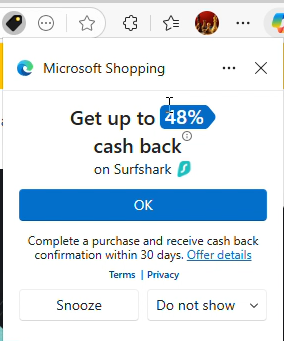
Then Microsoft Shopping popped up its large notification box with a blue button that, when clicked, invokes an affiliate link and sets affiliate cookies.

Edge Shopping pops open its window
From video at 0:08

Notice the sequence: Begin at another publisher’s CJ affiliate link, merchant’s site loads, and Edge Shopping does not stand-down.  This is squarely within the prohibition of CJ’s rules.

Edge sends detailed telemetry from browser to server reporting what it did, and to a large extent why.  Here, Edge simultaneously reports the Surfshark URL (with cjdata=, cjevent=, aff_click_id=, utm_source=cj, and sf_cs=cj parameters each indicating a referral from CJ) (yellow) and also shouldStandDown set to 0 (denoting false/no, i.e. Edge deciding not to stand down) (green).

POST https://www.bing.com/api/shopping/v1/savings/clientRequests/handleRequest HTTP/1.1 
...
{"anid":"","request_body":"{\"serviceName\":\"NotificationTriggering\",\"methodName\":\"SelectNotification\",\"requestBody\":\"{\\\"autoOpenData\\\":{\\\"extractedData\\\":{\\\"paneState\\\":{\\\"copilotVisible\\\":false,\\\"shoppingVisible\\\":false}},\\\"localData\\\":{\\\"isRebatesEnabled\\\":true,\\\"isEdgeProfileRebatesUser\\\":true,\\\"shouldStandDown\\\":0,\\\"lastShownData\\\":null,\\\"domainLevelCooldownData\\\":[],\\\"currentUrl\\\":\\\"https://surfshark.com/?cjdata=MXxOfDB8WXww&cjevent=cb8b45c0cc8e11f0814803900a1eba24&PID=101264606&aff_click_id=cb8b45c0cc8e11f0814803900a1eba24&utm_source=cj&utm_medium=6831850&sf_cs=cj&sf_cm=6831850\\\" ...

With a standard CJ affiliate link, and with multiple references to “cj” right in the URL, I struggle to see why Edge failed to realize this is another affiliate’s referral. If I were writing stand-down code, I would first watch for affiliate links (as in the first screenshot above), but surely I’d also check the landing page URL for significant strings such as source=cj.  Both methods would have called for standing down.

Another notable detail in Edge’s telemetry is that by collecting the exact Surfshark landing page URL, including the PID= parameter (blue), Microsoft receives information about which other publisher’s commission it is taking. Were litigation to require Microsoft to pay damages to the publishers whose commissions it took, these records would give direct evidence about who and how much, without needing to consult affiliate network logs.  This method doesn’t always work—some advertisers track affiliates only through cookies, not URL parameters; others redirect away the URL parameters in a fraction of a second.  But when it works, more than half the time in my experience, it’s delightfully straightforward.

Additional observations

If I observed this problem only once, I might ignore it as an outlier.  But no.  Over the past three weeks, I tested a dozen-plus mainstream merchants from CJ, Rakuten Advertising,  Impact, and Awin, in 25+ test sessions, all with screen recording.  In each test, I began by pasting another publisher’s affiliate link into the Edge address bar.  Time after time, Edge Shopping did not stand-down, and presented its offer despite the other affiliate link.  Usually Edge Shopping’s offer appeared in a popup as shown above.  The main variation was whether this popup appeared immediately upon my arrival at the merchant’s home page (as in the Surfshark example above), versus when I reached the shopping cart (as in the Newegg example below)s.

In a minority of instances, Edge Shopping presented its icon in Edge’s Address Bar rather than opening a popup.  While this is less intrusive than a popup, it still violates the contract provisions (“non-interference”, “may not activate”, “may not operate”, may not “interfere”, all as quoted above).  Turning blue to attract a user’s attention—this invites a user to open Edge Shopping and click its link, causing Microsoft to claim commission that would otherwise flow to another publisher.  That’s exactly what “non-interference” rules out.  “May not operate” means do nothing, not even change appear in the Address Bar. Sidenote: At Awin, uniquely, this seems to be allowed. See Publisher Code of Conduct, Rule 4, guidance 4.2. For Awin merchants, I count a violation only if Edge Shopping auto-opened its popup, not if it merely appeared in the Address Bar.

Historically, some stand-down violations were attributed to tricky redirects.  A publisher might create a redirect link like https://www.nytimes.com/wirecutter/out/link/53437/186063/4/153497/?merchant=Lego which redirects (directly or via additional steps) to an affiliate link and on to the merchant (in this case, Lego).  Historically, some shopping plugins had trouble recognizing an affiliate link when it occurred in the middle of a redirect chain.  This was a genuine concern when first raised twenty-plus years ago (!), when Internet Explorer 6’s API limited how shopping plugins could monitor browser navigation.  Two decades of improvements in browser and plugin architecture, this problem is in the past.  (Plus, for better or worse, the contracts require shopping plugins to get it right—no matter the supposed difficulty.)  Nonetheless, I didn’t want redirects to complicate interpretation of my findings.  So all my tests used the simplest possible approach: Navigate directly to an affiliate link, as shown above.  With redirects ruled out, the conclusion is straightforward: Edge Shopping ignores stand-down even in the most basic conditions.

I mentioned above that I have dozens of examples.  Posting many feels excessive.  But here’s a second, as to Newegg, from testing on December 5, 2025.

Litigation ongoing

Edge’s stand-down violations are particularly important because publishers have pending litigation about Edge claiming commissions that should have flowed to them.  After MegaLag’s famous December 2024 video, publishers filed class action litigation against Honey, Capital One, and Microsoft.  (Links open the respective dockets.)

I have no role in the case against Microsoft and haven’t been in touch with plaintiffs or their lawyers.  If I had been involved, I might have written the complaint and Opposition to Motion to Dismiss differently.  I would certainly have used the term “stand-down” and would have emphasized the governing contracts—facts for some reason missing from plaintiffs’ complaint.

Microsoft’s Motion to Dismiss was fully briefed as of September 2, and the court is likely to issue its decision soon.

Microsoft’s briefing emphasizes that it was the last click in each scenario plaintiffs describe, and claims that last click makes it “entitled to the purchase attribution under last-click attribution.”  Microsoft ignores the stand-down requirements laid out above.  Had Microsoft honored stand-down, it would have opened no popup and presented no affiliate link—so the corresponding publisher would have been the last click, and commission would have flowed as plaintiffs say it should have.

Microsoft then remarks on plaintiffs not showing a “causal chain” from Microsoft Shopping to plaintiffs losing commission, and criticizes plaintiffs’ causal analysis as “too weak.”  Microsoft emphasizes the many uncertainties: customers might not purchase, other shopping plug-ins might take credit, networks might reallocate commission for some other reason.  Here too, Microsoft misses the mark.  Of course the world is complicated, and nothing is guaranteed.  But Microsoft needed only to do what the contracts require: stand-down when another publisher already referred that user in that shopping session.

Later, Microsoft argues that its conduct cannot be tortious interference because plaintiffs did not identify what makes Microsoft’s conduct “improper.”  Let me leave no doubt.  As a publisher participating in affiliate networks, Microsoft was bound by networks’ contracts including the stand-down terms quoted above.  Microsoft dishonored those contracts to its benefit and to publishers’ detriment, contrary to the exact purpose of those provisions and contrary to their plain language.  That is the “improper” behavior which plaintiffs complain about.  In a puzzling twist, Microsoft then argues that it couldn’t “reasonably know[]” about the contracts of affiliate marketing.  But Microsoft didn’t need to know anything difficult or obscure; it just needed to do what it had, through contract, already promised.

Microsoft continues: “In each of Plaintiffs’ examples, a consumer must affirmatively activate Microsoft Shopping and complete a purchase for Microsoft to receive a commission, making Microsoft the rightful commission recipient if it is the last click in that consumer’s purchase journey.”  It is as if Microsoft’s lawyers have never heard of stand-down.  There is nothing “rightful” about Microsoft collecting a commission by presenting its affiliate link in situations prohibited by the governing contracts.

Microsoft might or might not be right that its conduct is acceptable in the abstract.  But the governing contracts plainly rule out Microsoft’s tactics.  In due course maybe plaintiffs will file an amended complaint, and perhaps that will take an approach closer to what I envision.  In any event, whatever the complaint, Microsoft’s motion to dismiss arguments seem to me plainly wrong because Microsoft was required by contract to stand-down—and it provably did not.

***

In June 2025, news coverage remarked on Microsoft removing the coupons feature from Edge (a different shopping feature that recommended discount codes to use at checkout) and hypothesized that this removal was a response to ongoing litigation.  But if Microsoft wanted to reduce its litigation exposure, removing the coupons feature wasn’t the answer.  The basis of litigation isn’t that Microsoft Shopping offers (offered) coupons to users.  The problem is that Microsoft Shopping presents its affiliate link when applicable contracts say it must not.

Catching affiliate abuse

I’ve been testing affiliate abuse since 2004.  From 2004 to 2018, I ran an affiliate fraud consultancy, which caught all manner of abuse—including shopping plugins (what that page calls “loyalty programs”), adware, and cookie-stuffing.  My work in that period included detecting the activity that led to the 2008 litigation civil and criminal charges against Brian Dunning and Shawn Hogan (a fact I can only reveal because an FBI agent’s declaration credited me).  I paused this work from 2018 to 2024, but resumed it this year as Chief Scientist of Visible Performance Technologies, which provides automation to detect stand-down violations, adware, low-intention traffic, and related abuses.  As you’d expect, VPT has long been reporting Edge stand-down violations to clients that contract for monitoring of shopping plugins.

My time from 2018 to 2024, as an employee of Microsoft, is relevant context.  I proposed Bing Cashback and led its product management and business development through launch.  Bing Cashback put affiliate links into Bing search results, letting users earn rebates without resorting to shopping plugins or reminders, and avoiding the policy complexities and contractual restrictions on affiliate software.  Meanwhile, Bing Cashback provided a genuine reason for users to choose Bing over Google.  Several years later, others added cashback to Edge, but I wasn’t involved in that.  Later I helped improve the coupons feature in Edge Shopping.  In this period, I never saw Edge Shopping violate stand-down rules.

I ended work with Bing and Edge in 2022, after which I pursued AI projects until I resigned in 2024.  I don’t have inside knowledge about Edge Shopping stand-down or other aspects of Microsoft Cashback in Edge.  If I had such information, I would not be able to share it.  Fortunately the testing above requires no special information, and anyone with Edge and a screen-recorder can reproduce what I report.

SEC Complaint about AppLovin Nonconsensual Installs

See important disclosures including my related financial interests.

In response to my report of AppLovin installing apps onto users’ devices without consent, Bloomberg published AppLovin Axes Product Tied to Unwanted App Download Allegations.

I filed a complaint with the SEC about what I claim to be material false statements in AppLovin’s remarks to Bloomberg and elsewhere.  Here:

RE: AppLovin false statements about permission to install apps on users’ devices, about reason for discontinuing “Array” installation business – Edelman Complaint to SEC – October 15, 2025
The complaint has three parts.  First, as to the nonconsensual installations.  I proved AppLovin is installing without user consent.  But AppLovin’s CEO wrote in February “Every download results from an explicit user choice.” And AppLovin told Bloomberg today: “Users never get downloads with any of our products without explicitly requesting it.”  Both false.  The difference is fundamental.  If users actually agree to the installations, great, go ahead.  But if, as I say I amply proved, the installations are without user consent, then they are way out of line — outside user expectations, contrary to Google’s security architecture for Android, maybe proper basis for litigation.

How could AppLovin be planning to argue that its installations entail “consent”?  Their best argument — not a very good one — is that users at least tapped ads, and that showed some level of interest.  Two reactions to that.  One, that’s not what users reasonably expect.  An ad tap is not an agreement to install.  On Android, installations require pressing the big blue Install button at Google Play Store, not just a random tap.  Two, AppLovin’s design makes inadvertent ad taps particularly likely.  Most ads have a long delay, then show a small arrow in one corner, which, when tapped, brings a user to a second screen, with a further delay, and then finally an X elsewhere.  If you’ve never had the pleasure of seeing this ad format, count yourself lucky.  It is beyond annoying!  The two waits, and the arrow and X in different corners, make it especially easy to tap accidentally.  Ultimately, tapping an ad just is not consent to install.  Whatever contortions AppLovin’s lawyers and publicists may attempt, users with the slimmest tech experience know the difference

Second, AppLovin today told Bloomberg not just that it had discontinued the Array installation business, and that it did so because that offering “was not economically viable for us.”  But for seven adjacent quarters (latest in August 2025), AppLovin’s SEC filings touted Array as a source of “future growth.”  AppLovin’s CFO in February 2024 cited Array installations for “contributions” to growth.  I say the real reason AppLovin turned off Array isn’t because it’s unprofitable.  It’s because they got caught.

Third, AppLovin told Bloomberg the Array installations were only a “test.”  But Array was available as early as 2023.  Jia-Hong Xu, previously Head of Product for Array, wrote on his LinkedIn page that he led this product beginning in July 2023.  My tabulation of user complaints shows users reporting problems reasonably attributed to AppLovin as early as August 2023.  Reinhold Kesler checked historic AppBrain crawls and found that as of December 2022, 37 apps already had manifest entries that allowed AppLovin’s nonconsensual installs.  A maxim remarks “always be testing”, and that much I agree with.  On some level every decision is a test, always up for reevaluation.  But in calling Array a test, AppLovin wants to claim this is small.  That claim should be supported with real evidence — exactly how many installs, starting on what date, ending on what date, and with what permission?  The one-word label “test” won’t suffice.

***

Publicly-traded firms owe their investors forthright statements about material information.  I say AppLovin fell short, in fact was materially misleading in the statements both in February (on its web site) and today (to Bloomberg).  I look forward to the SEC investigating.

Note: The federal government is currently partially shut down. But the SEC site proclaims: “The SEC has staff available to respond to emergency situations with a focus on the market integrity and investor protection components of our mission.”  My complaint is within that mandate.

Updated October 17 to add Kesler’s finding as to 2022 status and duration of the “test”

AppLovin Nonconsensual Installs

See important disclosures including my related financial interests.

Mobile adtech juggernaut AppLovin recently faced multiple allegations of misconduct.  Allegations run the gamut—privacy, ad targeting, even national security and ties to China.  I was among the researchers consulted by skeptical investors this spring, and I was quoted in one of their reports, explaining my concerns about AppLovin installing other games without user consent.

Today I argue that AppLovin places apps on users’ Android devices without their consent.  As a maxim says, extraordinary claims require extraordinary evidence, but I embrace that high bar.  First, I study AppLovin source code and find that it installs other apps without users being asked to consent.  I use a decompiler to access Java source for AppLovin’s SDK and middleware, plus partners’ install helpers—following the execution path from an ad tap (just clicking an ad, potentially a misclick aiming for a tiny X button, with no Install button even visible on screen) through to an installation.  AppLovin used an obfuscator to conceal most function names and variable names, so the Java code is no easy read.  But with patience, suitable devs can follow the logic.  Usefully, some key steps are in JavaScript—again obfuscated (minified), but readable thanks to a pretty-printer.  I except the relevant parts and explain line by line.

Second, I gather 208 complaints that all say basically the same thing: users are receiving apps in situations where (at a minimum) they don’t think they agreed.  The details of these complaints match what the code indicates: Install helpers (including from Samsung and T-Mobile) perform installs at AppLovin’s direction, causing most users to blame the install helpers (despite their generic names like Content Manager, Device Manager, and AppSelector).  Meanwhile, most complaints report no notification or request for approval prior to install, but others say they got a screen which installed even when they pressed X to decline, and a few report a countdown timer followed by automatic installation.  Beyond prose complaints, a handful of complaints include screenshots, and one has a video.  Wording from the screenshots and video match strings in the code, and users’ reports of auto-installs, X’s, and countdowns similarly match three forks in AppLovin’s code.  Overall, users are furious, finding these installations contrary to both Android security rules and widely-held expectations.

AppLovin CEO Adam Foroughi posted in February 2025 that “Every download results from an explicit user choice—whether via the App Store or our Direct Download experience.”  AppLovin Array Privacy Policy similarly claims that AppLovin “facilitates the on-device installation of mobile apps that you choose to download.”  But did users truly make an “explicit … choice” and “choose to download” these apps?  Complaints indicate that users don’t think they chose to install.  And however AppLovin defends its five-second countdowns, a user’s failure to reject a countdown certainly is not an “explicit” choice to install.  Nor is “InstallOnClose” (a quote from AppLovin’s JavaScript) consistent with widely-held expectations that “X” means no.  Perhaps Foroughi intends to argue that a user “consents” to install any time the user taps an ad, but even that is a tall order.  One, AppLovin’s X’s are unusually tiny, so mis-taps are especially likely.  Two, users expect an actual Install button (not to mention appropriate contract formalities) before an installation occurs; users know that on Android, an arbitrary tap cannot ordinarily install an app.  Ultimately, “explicit user choice” is a high bar, and user complaints show AppLovin is nowhere close.

The role of manufacturers and carriers

Why would Samsung, T-Mobile, and others grant AppLovin the ability to install apps? Two possibilities:

  1. Financial incentives. AppLovin pays manufacturers and carriers for the permissions it seeks. These elevated permissions may be unusual, and the resulting installations are predictably annoying and unwanted for users. But at the right price, some partners may agree.
  2. Scope creep. Public statements indicate manufacturers and carriers authorized AppLovin to perform “out-of-box experience” (OOBE) installs—recommending and installing apps during initial device setup. Install helpers were designed to support this narrow context. But my review of install helper code shows no checks to limit installations to the OOBE window. A simple safeguard—such as rejecting installs more than two hours after first boot—would prevent ongoing installs. By omitting such safeguards, manufacturers and carriers effectively granted AppLovin open-ended install rights, whether or not that was their intent.

So far manufacturers and carriers haven’t said whether they approve what AppLovin is doing.  Journalist Mike Shields asked Samsung, but they declined to comment.  Perhaps my article will prompt them to take another look.

Sources of evidence

Five overlapping categories of evidence offer a mutually-reinforcing picture of nonconsensual installations:

  1. Execution path. Source code extracted from test devices shows how an ad tap leads all the way to an installation, without a user pressing “Install” or similar at a consent screen.
  2. Labels and strings. Code snippets reference installation without a user request or consent.
  3. Permissions. App manifests include nonstandard entries consistent with apps asking AppLovin middleware to install other apps.
  4. User complaints. 208 distinct complaints describe apps being installed while playing games or viewing ads. A few complaints include relevant screenshots and even video of nonconsensual installations.  Complaints, screenshots, and videos match unusual details visible in the code.
  5. AppLovin statements. Public statements use euphemistic or contradictory language about user “choice” and “direct downloads,” suggesting attempts to obscure nonconsensual installs.

I also examine the legal and financial risks associated with nonconsensual installations.

Interpreting AppLovin statements to the public about user “choice” to install

This post is part of AppLovin Nonconsensual Installs. See important disclosures.

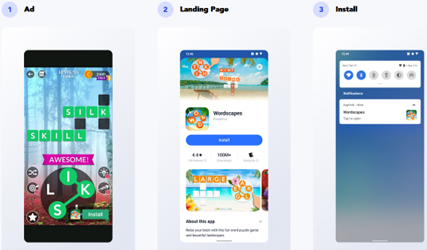
AppLovin’s “Array” page (now removed, but see Archive.org preserved copy) describes “seamless installs” in which “users choose whether to install.”  The page depicts a three-step installation sequence: (1) AppLovin presents an ad, (2) AppLovin presents a landing page with an oversized bold blue “Install” button, and (3) installation is complete.

AppLovin web site shows this three-step install process as an

But AppLovin’s page never promises that this three-step process is always used.  In fact, it labels the screenshots as an “example,” leaving open the possibility that some installations proceed differently.  Could AppLovin sometimes skip the landing page (Step 2)? If so, the process would lack any moment where the user presses “Install” or otherwise agrees to install.

Other AppLovin materials suggest this must happen.  For example, AppLovin AppHub JavaScript settings refer to “Download apps with a single click.”  Since clicking an ad is already one click, a second click on “Install” would make two clicks—not one.  This suggests that in at least some cases, Step 2 is omitted, as confirmed by my code review, which points to an “AutoInstall” path.

Meanwhile, AppLovin makes strong claims that users “choose” to install apps:

How do we reconcile these statements with the “single-click” option, the “AutoInstall” code, and widespread user complaints?  The most plausible interpretation is that AppLovin treats a tap on an ad itself as the user’s “choice” to install—even if the user never presses an Install button.  Most users would disagree: ordinarily, tapping an ad only opens Google Play, where a further click is required.  And because AppLovin’s “x” buttons are small and tucked in the corner, mistaken taps are especially likely.

If we accept AppLovin interpretation of a single ad tap as a user’s authorization to install, then Foroughi’s statement and the Privacy Policy might be literally true, but still highly misleading.

Contradictory statements about the size of the Direct Download business

The Financial Times reports that Applovin says “direct download business was never a major growth revenue driver”:

AppLovin also had a call with sell-side stock analysts on Wednesday, according to a note from Bank of America. In that call, the CEO assured analysts that the direct-download business was “never a major growth revenue driver,” the analysts wrote. They summarised his comments as saying “AppLovin’s [direct download] revenues are de minimis”.

BofA analyst Omar Dessouky told Alphaville that the direct-download business are distinct and totally separate from in-game downloads, and that competitors Digital Turbine and Unity have a big head-start on that business. As for the App Store policies, there seem to be enough complaints about other companies doing it that the practice isn’t being censured (this one, for example, seems to be about Digital Turbine).

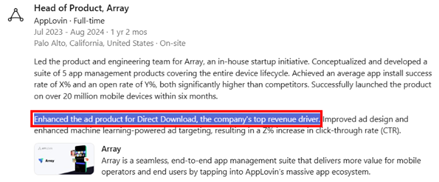
These claims are difficult to reconcile with remarks from ex-employee Jia-Hong Xu, previously Head of Product for AppLovin Array, who wrote on LinkedIn that Direct Download is AppLovin’s “top revenue driver”:

Remarks from ex-employee Jia-Hong Xu, previously Head of Product for AppLovin Array, about the importance of that business

Xu later deleted that remark.  But on his own initiative, or under pressure from AppLovin (after investor Culper Research highlighted the claim in a February 2025 report)?

AppLovin: Server-side kill switch — automatic installations occur only if a token is provided

This post is part of AppLovin Nonconsensual Installs. See important disclosures.

It is by no means assured that AppLovin will perform an automatic installation of an app featured in a given ad. For one, the Apphub/Array package must be present and functional, and must have an install partner. Without these, there can be no automatic installation. Some phones (including Google Pixels) never have install helpers. High-end phones and unlocked phones are less likely to have install helpers.

Furthermore, the SDK startDirectInstallOrDownloadProcess() code indicates that direct downloads occur only if AppLovin servers send a “download token” to the app/SDK to authorize a direct download. See startDirectInstallOrDownloadProcess():

public void startDirectInstallOrDownloadProcess(ArrayDirectDownloadAd arrayDirectDownloadAd, Bundle bundle, DirectDownloadListener directDownloadListener) {
    if (this.appHubService == null) {
        if (C1886x.m8960Fn()) {
            this.logger.m8974i(TAG, "Cannot begin Direct Install / Download process - service disconnected");
        }
        directDownloadListener.onFailure();
        return;
    }
    if (!arrayDirectDownloadAd.isDirectDownloadEnabled()) {
        if (C1886x.m8960Fn()) {
            this.logger.m8974i(TAG, "Cannot begin Direct Install / Download process - missing token");
        }
        directDownloadListener.onFailure();
        return;
    }
    try {
    ...

The underlying isDirectDownloadEnabled():

public boolean isDirectDownloadEnabled() {
    return StringUtils.isValidString(getDirectDownloadToken());
}

The token is retrieved from within the ad object (i.e. delivered at runtime along with ad creative):

public String getDirectDownloadToken() {
    return getStringFromAdObject("ah_dd_token", null);
}

protected String getStringFromAdObject(String str, String str2) {
    String string;
    synchronized (this.adObjectLock) {
        string = JsonUtils.getString(this.adObject, str, str2);
    }
    return string;
}

It turns out “isValid” just means nonempty:

public static boolean isValidString(String str) {
    return !TextUtils.isEmpty(str);
}

This is an unusual approach to token-based installations – neither a cryptographic verification nor a check for user consent. Instead, AppLovin can proceed with an automatic installation, or not, based merely on a string in the ad object being nonempty. The apparent benefit to AppLovin is that it can condition a direct download on any information known to the server as it sends the ad object. For example, AppLovin can limit direct downloads by IP address and geography, such as never targeting countries or regions deemed high-risk. (AppLovin can geofence jurisdictions where consumer protection authorities take a particularly dim view of nonconsensual installations. AppLovin can geofence the headquarters of companies that it doesn’t want to see nonconsensual installations.) AppLovin can equally avoid users with certain profiles, such as users who have seen less than x ads (who might be security researchers rather than serious gamers). Finally, this architecture allows AppLovin to end all direct downloads on a moment’s notice — as it might anticipate needing to do if facing public criticism.

AppLovin Execution Path: T-Mobile InstallerHelper performs an install

This post is part of AppLovin Nonconsensual Installs > Execution Path. See important disclosures.

T-Mobile’s InstallerHelper sends execution to the separate APK com.tmobile.dm.cm:

public final InstallerHelperResult startInstall(String absPath, String packageName, boolean shortcut, int requestedScreen, int colX, int rowY, String triggerType, String className, String action, String extraData, String receiverPermission) throws RemoteException {
    AbstractC4226k.m6579e(absPath, "absPath");
    AbstractC4226k.m6579e(packageName, "packageName");
    if (!isReady()) {
        if (this.f19986b) {
            Log.e("CM_TMO_SDK", "Cannot start, service not ready");
        }
        return new InstallerHelperResult.Fail(ConstantsKt.ERROR_KEY_NOT_BOUND, null);
    }
    ...
    Message messageObtain = Message.obtain();
    messageObtain.what = 100;
    messageObtain.replyTo = this.f19993i;
    File file = new File(absPath);
    Bundle bundle = new Bundle();
    bundle.putString(EXTRA_LOCATION, Uri.fromFile(file).toString());
    bundle.putString(EXTRA_PACKAGE, packageName);
    bundle.putString("com.tmobile.dm.cm.extra.PACKAGE_NAME", this.f19985a.getPackageName());
    bundle.putBoolean(EXTRA_SHORTCUT, shortcut);
    ...
    messageObtain.setData(bundle);
    try {
        Messenger messenger = this.f19992h;
        if (messenger != null) {
            messenger.send(messageObtain);
        }
        return new InstallerHelperResult.Success(ConstantsKt.SUCCESS_KEY);

According to the InstallerHelper class definition, the constant messageObtain.what=100 denotes performing an installation:

public static final int REQUEST_INSTALL = 100;

T-Mobile’s com.tmobile.dm.cm has special permissions including the permission to install apps. Its manifest declares these permissions:

<uses-permission android:name="android.permission.INSTALL_PACKAGES"/>

T-Mobile’s message dispatcher m14262a() receives the request from InstallerHelper, classifies the message based on message.what message type, and routes the message accordingly:

public final void m14262a(Message message) { //message dispatcher
    ...
    int i8 = message.what;
    ...
    switch (i8) {
    case 100:    
        companion.mo19362i("doHandleMsg(): Install requested: %s", 100);
        synchronized (this.f33457b) {
            size3 = this.f33457b.size();
        }
        Bundle data3 = message.getData();
        String m14260j = m14260j(data3.getString(AppConstants.EXTRA_REQUESTER_PACKAGE), data3.getStringArray(AppConstants.EXTRA_SERVICE_REQUESTER_PACKAGE));
        String string = data3.getString("location");
        String string2 = data3.getString(AppConstants.EXTRA_PACKAGE);
        int i9 = data3.getInt(AppConstants.EXTRA_UID, 0);
        boolean z7 = data3.getBoolean(AppConstants.EXTRA_SIGNED, true);
        Intrinsics.checkNotNull(messenger);
        LocalInstallHandlerParams localInstallHandlerParams = new LocalInstallHandlerParams(messenger, string, string2, i9, z7, m14260j);
        localInstallHandlerParams.setAddShortcut(data3.getBoolean(AppConstants.EXTRA_SHORTCUT, false));
        localInstallHandlerParams.setRequestedScreen(data3.getInt(AppConstants.EXTRA_REQUEST_SCREEN, 0));
        localInstallHandlerParams.setColX(data3.getInt(AppConstants.EXTRA_COLX, 0));
        localInstallHandlerParams.setRowY(data3.getInt(AppConstants.EXTRA_ROWY, 0));
        localInstallHandlerParams.setTriggerType(data3.getString(AppConstants.EXTRA_TRIGGER_TYPE));
        localInstallHandlerParams.setClassName(data3.getString(AppConstants.EXTRA_CLASS_NAME));
        localInstallHandlerParams.setAction(data3.getString("action"));
        localInstallHandlerParams.setExtraData(data3.getString(AppConstants.EXTRA_DATA));
        localInstallHandlerParams.setReceiverPermission(data3.getString(AppConstants.EXTRA_BROADCAST_PERMISSION));
        synchronized (this.f33457b) {
            this.f33457b.add(size3, localInstallHandlerParams);
        }
        if (size3 == 0 && this.f33458c == null) {
            this.f33460e.sendEmptyMessage(102);
            return;
        }
        ...

The sendEmptyMessage(102) method sends execution to m14262a case 102, which again calls startInstall(), this time with case 102:

    case 102:
        companion.mo19362i("doHandleMsg(): Processing install: %s", 102);
        synchronized (this.f33457b) {
            size4 = this.f33457b.size();
        }
        if (size4 > 0) {
            synchronized (this.f33457b) {
                handlerParams = (HandlerParams) this.f33457b.remove(0);
                this.f33458c = handlerParams;
            }
            if (handlerParams != null) {
                if (handlerParams instanceof ModifyParams) {
                    ((ModifyParams) handlerParams).startModify(this);
                    return;
                } else if (handlerParams instanceof UninstallParams) {
                    ((UninstallParams) handlerParams).startUninstall(this);
                    return;
                } else {
                    handlerParams.startInstall(this);
                    return;
                }
            }
            return;
        }
        return;

Next handlerParams.startInstall() calls prepareInstall(), which in turn calls performInstallBundle():

public boolean startInstall(@NotNull ServiceHandler handler) {
    Intrinsics.checkNotNullParameter(handler, "handler");
    int prepareInstall = prepareInstall(handler);
    ...

public int prepareInstall(@NotNull ServiceHandler handler) {
    ...
    return performInstallBundle(handler.getMContext());
    }

Then performInstallBundle() passes execution to InstallParams method m14247a():

public final int performInstallBundle(@NotNull Context context) {
    …
    int m14247a = m14247a(context, "", arrayList, false);

Finally, m14247a tells the Android Package Manager to perform the install:

//pass install to Android Package Manager
public final int m14247a(Context context, String str, ArrayList arrayList, boolean z6) throws Throwable {
PackageInstaller packageInstaller = context.getPackageManager().getPackageInstaller();
    ...
    PackageInstaller.SessionParams sessionParams = new PackageInstaller.SessionParams(this.mInstallSessionMode);
    sessionParams.setAppLabel(getAppName(context));
    sessionParams.setAppPackageName(getCom.google.firebase.remoteconfig.RemoteConfigConstants.RequestFieldKey.PACKAGE_NAME java.lang.String());
    ...
    setMInstallerSessionId$app_currentRelease(packageInstaller.createSession(sessionParams));
    ...
    this.f33245C = packageInstaller.openSession(getMInstallerSessionId());
    Iterator it = arrayList.iterator();
    Intrinsics.checkNotNullExpressionValue(it, "iterator(...)");
    int iM14248c2 = -999;
    while (it.hasNext()) {
        Object next = it.next();
        Intrinsics.checkNotNullExpressionValue(next, "next(...)");
        Timber.INSTANCE.getClass();
        iM14248c2 = m14248c((String) next);
        if (1 != iM14248c2) {
            break;
        }
    }
    ...
    Intent intent = new Intent(context, (Class<?>) InternalReceiver.class);
    intent.setAction(InternalReceiver.ACTION_INSTALLER_RESULT);
    PendingIntent broadcast = PendingIntent.getBroadcast(context, 0, intent, Build.VERSION.SDK_INT >= 31 ? 167772160 : 134217728);
    PackageInstaller.Session session = this.f33245C;
    if (session != null) {
        session.commit(broadcast.getIntentSender());
    }

AppHub uses a variety of installers with heightened privileges from manufacturer or carrier

The preceding section discusses AppHub passing execution to T-Mobile InstallerHelper. But consider devices that don’t have T-Mobile InstallerHelper. AppHub code shows AppLovin also using other install helpers from other manufacturers and carriers.

T-Mobile and Sprint

public final InstallerHelperResult bindToInstaller(boolean useForegroundServiceIfNeeded) {
...
PackageManager.PackageInfoFlags of;
PackageManager.PackageInfoFlags of2;
PackageManager.ResolveInfoFlags of3;
if (isReady()) {
if (this.f19986b) {
Log.e("CM_TMO_SDK", "Binding failed, service already bound");
}
return new InstallerHelperResult.Fail(ConstantsKt.ERROR_KEY_ALREADY_BOUND, null);
}
if (((Number) this.f19989e.getValue()).intValue() < 3000) {
return new InstallerHelperResult.Fail(ConstantsKt.ERROR_KEY_VERSION_NOT_SUPPORTED, null);
}
String str = "com.tmobile.dm.cm.extra.PACKAGE_NAME";
String str2 = "com.tmobile.dm.cm.extra.APP_LABEL";
if (AbstractC0945q.m2146P((String) this.f19987c.getValue(), "com.tmobile.dm.cm.permission.UPDATES_INSTALL", false)) {
intent = new Intent("com.tmobile.action.INSTALLER_SERVICE");
} else if (AbstractC0945q.m2146P((String) this.f19987c.getValue(), "com.tmobile.dm.cm.permission.TRUSTED_UPDATES_INSTALL", false)) {
intent = new Intent("com.tmobile.action.INSTALLER_TRUSTED_SERVICE");
} else {
str = "com.sprint.ce.updater.extra.PACKAGE_NAME";
str2 = "com.sprint.ce.updater.extra.APP_LABEL";
if (AbstractC0945q.m2146P((String) this.f19987c.getValue(), "com.sprint.permission.INSTALL_UPDATES", false)) {
intent = new Intent("com.sprint.action.INSTALLER_SERVICE");
} else {
if (!AbstractC0945q.m2146P((String) this.f19987c.getValue(), "com.sprint.ce.updater.permission.TRUSTED_INSTALL_UPDATES", false)) {
return new InstallerHelperResult.Fail(ConstantsKt.ERROR_KEY_PERMISSION_SECURITY_ISSUE, null);
}
intent = new Intent("com.sprint.action.INSTALLER_TRUSTED_SERVICE");
...

Samsung

public class SamsungBindInstallAgentService extends Hilt_SamsungBindInstallAgentService {
public static final String ACTION_INSTALL_PACKAGE_BY_SAMSUNG = "action_install_package_by_samsung";
private static final String INSTALL_AGENT_CLASS = "com.sec.android.app.samsungapps.api.InstallAgent";
private static final String INSTALL_AGENT_PACKAGE = "com.sec.android.app.samsungapps";
public static final String PARAM_DOWNLOAD_PACKAGE = "param_download_package";
ActiveDeliveryTrackerManager activeDeliveryTrackerManager;
AppDeliveryInfoDao appDeliveryInfoDao;
Executor deliveryCoordinatorExecutor;
private InterfaceC1402c installAgentAPI;
Logger logger;
SamsungErrorCodeManager samsungErrorCodeManager;
private final IBinder binder = new LocalBinder();
volatile boolean mBound = false;
volatile boolean isBinding = false;
IBinder samsungInstallerBinder = null;
String activeTargetPackageName = null;
private volatile ArrayDeque installTaskQueue = new ArrayDeque<>();
private ServiceConnection mServiceConnection = new ServiceConnection() {
@Override
public void onServiceConnected(ComponentName componentName, IBinder iBinder) {
InterfaceC1402c c1400a;
SamsungBindInstallAgentService.this.logger.mo2231d( SamsungBindInstallAgentService.this.getClass().getSimpleName() + " : onServiceConnected() called with: className = [" + componentName + "], activeTargetPackageName = [" + SamsungBindInstallAgentService.this.activeTargetPackageName + "]");
SamsungBindInstallAgentService samsungBindInstallAgentService = SamsungBindInstallAgentService.this;
samsungBindInstallAgentService.samsungInstallerBinder = iBinder;
int i10 = AbstractBinderC1401b.f4081c;
if (iBinder == null) {
c1400a = null;
} else {
IInterface queryLocalInterface = iBinder.queryLocalInterface("com.sec.android.app.samsungapps.api.aidl.IInstallAgentAPI");
c1400a = (queryLocalInterface == null || !(queryLocalInterface instanceof InterfaceC1402c)) ? new C1400a(iBinder) : (InterfaceC1402c) queryLocalInterface;
}
samsungBindInstallAgentService.installAgentAPI = c1400a;
SamsungBindInstallAgentService.this.mBound = true;
SamsungBindInstallAgentService.this.isBinding = false;
if (TextUtils.isEmpty(SamsungBindInstallAgentService.this.activeTargetPackageName)) {
SamsungBindInstallAgentService.this.dequeueDownloadToken();
return;
}
try {
SamsungBindInstallAgentService.this.logger.mo2237i( SamsungBindInstallAgentService.this.getClass().getSimpleName() + " : resume install package after reconnected = " + SamsungBindInstallAgentService.this.activeTargetPackageName);
SamsungBindInstallAgentService samsungBindInstallAgentService2 = SamsungBindInstallAgentService.this;
samsungBindInstallAgentService2.startInstall( samsungBindInstallAgentService2.activeTargetPackageName);
} catch (Exception e10) {
e10.printStackTrace();
}
}
@Override
public void onServiceDisconnected(ComponentName componentName) {
SamsungBindInstallAgentService.this.logger.mo2231d( SamsungBindInstallAgentService.this.getClass().getSimpleName() + " : onServiceDisconnected() called with: className = [" + componentName + "]");
SamsungBindInstallAgentService.this.installAgentAPI = null;
SamsungBindInstallAgentService.this.mBound = false;
SamsungBindInstallAgentService.this.isBinding = false;
}
};

Realme

Some versions of AppHub reference com.applovin.oem.p036am.device.realme.RealmeDownloader, which through its name indicates that it is a Realme library to perform downloads.

According to a May 28, 2023 change analysis, RealMe added AppHub to its phones beginning in its  F.07 update.

Cricket, Oppo, Orange, Sliide, Tinno

In AppHub code, I found references to Cricket, Oppo, Orange, Sliide, Tinno.  But I didn’t see full installation integrations for these carriers within the AppHub versions I received.  That said, it seems AppLovin provides a different AppHub APK for each partner.  When I bought a device from T-Mobile, I naturally received a phone with the T-Mobile AppHub APK.  The lack of other carriers’ AppHub APKs on a T-Mobile device should not be seen as a surprise.

An AppLovin press release describes a partnership with OPPO for “mobile app recommendations that “connect[] users with a wide variety of apps, from popular games to productivity tools, designed to cater to the unique preferences of each user.”  This could be a euphemism for installing games when users merely view ads for those apps.

Xiaomi and TCL

The Culper report discusses AppLovin AppHub partnerships with Xiaomi and TCL.  I did not find evidence of integration between AppHub and these companies in the code I reviewed.  Here too, there could be other APK versions that implement these integrations.

AppLovin Execution Path: Java interceptors route the /install-app call to T-mobile’s InstallerHelper

This post is part of AppLovin Nonconsensual Installs > Execution Path. See important disclosures.


In DirectDownloadActivity, I presented code in which execution flows to DirectDownloadMainFragment C3374l2. Then C3374l2’s constructor creates C3298a3:

// DirectDownloadMainFragment 
public C3374l2(C1947f c1947f, C3743e c3743e, InterfaceC3372l0 interfaceC3372l0, C1059x c1059x, C1059x c1059x2, boolean z) { 
    ...
    this.f10629x0 = c1947f;
    this.f10630y0 = c3743e;
    this.f10631z0 = interfaceC3372l0;
    this.f10620A0 = c1059x;
    this.f10621B0 = c1059x2;
    this.f10622C0 = z;
    this.f10623D0 = AbstractC3379m0.m5742a(interfaceC3372l0);
    this.f10624E0 = AbstractC3379m0.m5743b(interfaceC3372l0);
    C3367k2 c3367k2 = new C3367k2(new C0597a(4, this), 1);
    InterfaceC6440g m9576c = AbstractC6434a.m9576c(EnumC6441h.f19368t, new C5289f(9, new C5289f(8, this)));
    this.f10625F0 = new C5732d(AbstractC4237v.f12869a.mo6593b(C3298a3.class), new C0733o(1, m9576c), c3367k2, new C0733o(2, m9576c));
    this.f10627H0 = true;
}

Next C3298a3’s constructor creates C5252f, which acts as a WebView interceptor manager:

//WebView interceptor manager 
public C3298a3(Application application, C1947f c1947f, C3743e c3743e, InterfaceC3372l0 interfaceC3372l0) { 
    AbstractC4226k.m6579e(c1947f, "mergedConfig");
    AbstractC4226k.m6579e(c3743e, "analyticsEventContext");
    AbstractC4226k.m6579e(interfaceC3372l0, "appLookupKey");
    C2325b c2325b = new C2325b(23);
    C4863a c4863a = new C4863a(application);
    C5252f c5252f = new C5252f(c4863a, c1947f, c3743e, interfaceC3372l0, AbstractC4118e.m6305K(c4863a).f12518G, c2325b);

Then C5252f registers endpoint handlers. The HTTP endpoint handler for /install-app is C5461u:

//create endpoint handlers
public C5252f(C4863a c4863a, C1947f c1947f, C3743e c3743e, InterfaceC3372l0 interfaceC3372l0, C2495r1 c2495r1, C2325b c2325b) {
    AbstractC4226k.m6579e(c1947f, "mergedConfig");
    AbstractC4226k.m6579e(c3743e, "analyticsEventContext");
    AbstractC4226k.m6579e(interfaceC3372l0, "appLookupKey");
    AbstractC4226k.m6579e(c2495r1, "directDownloadPackageManager");
    C2608d1 c2608d1M4552b = AbstractC2611e1.m4552b(7);
    this.f15673b = c2608d1M4552b;
    this.f15674c = c2608d1M4552b;
    C4281e c4281e = AbstractC1870m0.f5700a;
    C3660c c3660cM382i = AbstractC0001a.m382i(c4281e, c4281e);
    C4147i c4147iM6305K = AbstractC4118e.m6305K(c4863a);
    PackageManager packageManager = c4863a.getPackageManager();
    AbstractC4226k.m6578d(packageManager, "getPackageManager(...)");
    C5247c0 c5247c0M4916q = C2866e0.m4916q("install-app", new C5461u(c4147iM6305K, c3743e, c1947f, interfaceC3372l0, packageManager, c2495r1, c4147iM6305K.f12513B, c2325b));
    C5247c0 c5247c0M4916q2 = C2866e0.m4916q("cancel-install-app", new C5437h(c4147iM6305K, c3743e, c2495r1, 1));
    C5247c0 c5247c0M4916q3 = C2866e0.m4916q("launch-app", new C5465y(c3743e, c4147iM6305K));
    C5247c0 c5247c0M4915p = C2866e0.m4915p("install-app-state", new C5437h(c4147iM6305K, c3743e, c2495r1, 2));
    C5247c0 c5247c0M4915p2 = C2866e0.m4915p("await-install-state", new C5437h(c4147iM6305K, c3743e, c2495r1, 0));
    C5431e c5431e = new C5431e(c4147iM6305K, c1947f, c3743e, interfaceC3372l0, c4147iM6305K.f12513B);
    AbstractC1838d0.m3857y(c3660cM382i, null, null, new C5250e(c5431e, this, null), 3);
    C5247c0 c5247c0M4915p3 = C2866e0.m4915p("app-version-info", c5431e);
    Map mapSingletonMap = Collections.singletonMap(C2587r.f7833d, new C5447m(c4147iM6305K, c3743e, c2325b));
    AbstractC4226k.m6578d(mapSingletonMap, "singletonMap(...)");
    this.f15675d = AbstractC0209q.m798M(c5247c0M4916q, c5247c0M4916q2, c5247c0M4916q3, c5247c0M4915p, c5247c0M4915p2, c5247c0M4915p3, new C5247c0("installation-on-dismiss-enabled", mapSingletonMap));
}

C5461u activates DirectDownloadPackageManager C2495r1:

//DirectDownloadPackageManager 
public C5461u(C4147i c4147i, C3743e c3743e, C1947f c1947f, InterfaceC3372l0 interfaceC3372l0, PackageManager packageManager, C2495r1 c2495r1, C4120g c4120g, C2325b c2325b) {
        AbstractC4226k.m6579e(c3743e, "analyticsEventContext");
        AbstractC4226k.m6579e(c1947f, "mergedConfig");
        AbstractC4226k.m6579e(interfaceC3372l0, "appLookupKey");
        AbstractC4226k.m6579e(c2495r1, "directDownloadPackageManager");
        AbstractC4226k.m6579e(c4120g, "appDetailRepository");
        ...
        this.f16109f = packageManager;
        this.f16110g = c2495r1;
        ...

C2495r1’s coroutine resume function m4446F() passes execution to C0033f0, which acts as a bridge to the T-Mobile InstallerHelper:

public final Object m4446F(C1947f c1947f, AbstractC1576c abstractC1576c) {
    ...
    mo436z = ((C0033f0) c5119b2.f15215t).mo436z(c1947f, c2534z0);

Then C0033f0 creates C0023a0 (which acts as an installation executor), with execution flowing to coroutine resume function m431o():

public final Object m431o(C1947f c1947f, String str, InterfaceC6364j interfaceC6364j, int i, C6384t c6384t, EnumSet enumSet, InterfaceC0894d interfaceC0894d) {
    ...
    C0023a0 c0023a0 = new C0023a0(c4236u, c0033f0, c1947f2, interfaceC6364j2, str2, enumSet2, null);

Finally, C0023a0 continuation entry point mo410r() activates T-Mobile InstallerHelper’s startInstall():

import com.tmobile.p432dm.cmsdk.InstallerHelper;
import com.tmobile.p432dm.cmsdk.InstallerHelperResult;
...
public final Object mo410r(Object obj) {
    ...
    InstallerHelperResult startInstall$default;
    ...
    startInstall$default = InstallerHelper.startInstall$default((InstallerHelper) m458a, arrayList2, str, 1, this.f520F.contains(EnumC6366k.f19171a), 0, 0, 0, null, null, null, null, null, 4080, null);
    ...
    InstallerHelperResult.Fail fail = (InstallerHelperResult.Fail) startInstall$default;
    Throwable cause = fail.getCause();
    String m5237p = AbstractC2945r1.m5237p("Failed to start install: ", fail.getMessage());
    Object[] objArr3 = new Object[i3];
    Object[] copyOf4 = Arrays.copyOf(objArr3, objArr3.length);
    AbstractC4226k.m6579e(copyOf4, "args");
    C6241b c6241b3 = AbstractC6243d.f18832a;
    c6241b3.m9419f("Array/".concat("Installer"));
    c6241b3.mo9417d(6, cause, m5237p, Arrays.copyOf(copyOf4, copyOf4.length));

Execution continues in T-Mobile InstallerHelper performs an install.

AppLovin Execution Path: WebView loads JavaScript Resources files that check and act on auto-install

This post is part of AppLovin Nonconsensual Installs > Execution Path. See important disclosures.

The WebViewClient C4785e() constructor prepares the web view. Where a response includes references to resources in com.applovin.array.resources, or otherwise within the arrayList2 list, local resource interception substitutes resources from the APK’s Resources folder.

public C4785e(ArrayList arrayList, InterfaceC4868a interfaceC4868a, Resources resources) {
    AbstractC4226k.m6579e(arrayList, "xhrRequestHandlersManagers");
    this.f14379b = C5552e1.m8618a(Integer.MAX_VALUE, 6, null);
    this.f14380c = AbstractC1469t3.m3132E("VISUAL_STATE_CALLBACK");
    ArrayList arrayList2 = new ArrayList();
    C4117d c4117d = new C4117d("https", "embedded.directdownload.arrayengine.com");
    arrayList2.add(new C4870c(c4117d, interfaceC4868a));
    arrayList2.add(new C5273p0(c4117d, arrayList));
    arrayList2.add(new C5049c(c4117d));
    arrayList2.add(new C4870c(new C4117d("com.applovin.array.resources", ""), new C4115b(resources)));
    this.f14381d = arrayList2;
    ...

The most important local resource is app\src\main\assets\directdownload-ui\assets\index-BFfWBgBF.js, a substantial block of minified JavaScript which is 13,069 lines long after pretty-printing.

Among other tasks, this file parses a server response to create what it calls a mergedConfig which determines what settings to use for the possible installation. These settings include “IsAutoInstall”, which is set based on what is received from the server, potentially supplemented by a default value from a local data structure called wt.

function Op(e, t) { //check whether isAutoInstallEnabled
    return e ? e.toLowerCase() === pr : t ? t.toLowerCase() === pr : wt.isAutoInstallEnabled
}

const ...

s = t[Ct.IsAutoInstallEnabled],
o = t[Ct.IsAutoInstallEnabledOld], ...
return {...
isAutoInstallEnabled: Op(s, o), ...

The default value is to enable AutoInstall:

const wt = { //default settings
    arrayPrivacyPolicyUrl: "https://www.applovin.com/array-privacy-policy/",
    arrayTermsOfServiceUrl: "https://www.applovin.com/array-terms/",
    autoInstallDelayMs: 5e3,
    isAutoInstallEnabled: !0,
    isBugsReportingEnabled: !1,
    isInstallingProgressEnabled: !1,
    isVideoSectionEnabled: !1,
    isVideoSectionExpanded: !1,
    isOneClickInstallOnEnabled: !0
};

If isAutoInstall is set to true, then the JavaScript installs the app immediately:

Wt(() => {
        (async () => {
            ...
            const R = We(Qc);
            if (!(!t.viewModel.isFirstLoad || !t.viewModel.isAutoInstall || R)) {
                if (t.viewModel.autoInstallDelayMs <= 0) {
                    c();
                    return
                ...

The JavaScript function c()proceeds with installation, passing execution to installApp():

async function c() { //run the install
    ...
    message: "App download and install start"
    ...
    M = await Ge.installApp(t.viewModel.packageName, t.viewModel.versionCode, t.adToken)

The installApp() function relies on a constant specifying the endpoint destination:

me = (e => (... e.InstallApp = "install-app" ...

The installApp() function calls that endpoint:

async installApp(t, r, n) { //bridge back to Java code
    pe.leaveBreadcrumb({message: `Native method "${me.InstallApp}" call`});
    const a = (o=this.xhrUrls)==null ? void 0 : o[me.InstallApp]; 
    const s = await this.nativeXhrClient.makeNativeXhrRequest({
        xhrUrl: a, 
        body: Ia({packageName: t, versionCode: r, adToken: n})
    });
    return this.unwrapNativeAppResponse(s.dataText, me.InstallApp);
}

The function makeNativeXhrRequest wraps the custom httpClient.makeHttpRequest which in turn wraps the standard XMLHttpRequest, which finally calls the endpoint:

async makeNativeXhrRequest(t) {
    const {body: r, headers: n, httpMethod: a = nt.Post, queryParams: s, shouldStartSpan: o, spanAttributes: d, xhrUrl: f} = t;
    ...
    return await this.httpClient.makeHttpRequest(v);

class Hh {
    makeHttpRequest(t) {
        ...
        return new Promise((o, d) => {
            const f = new XMLHttpRequest;  
            ...
            f.send(s);

Installation On Close

The preceding section explores JavaScript logic under the isAutoInstall configuration, which causes an immediate installation. But adjacent JavaScript code offers two other ways installations can proceed automatically (and still without user consent despite, in these paths, an installation screen briefly presented to the user): What the code calls “Install On Close”, and installation after a brief countdown. Key lines from the JavaScript setup that considers these possibilities:

e.AutoInstallDelayMs="ui.dd.mp.install_countdown_ms"
e.IsOneClickInstallOnCloseEnabledOld="ui.dd.mp.one_click_install_on_close"
e.IsOneClickInstallOnCloseEnabled="ui.dd.mp.highintent_oc"

If isOneClickInstallOnCloseEnabled, the JavaScript installs the app when the user closes the ad, also using the c() function. First, JavaScript subscribes function C() to listen for events named “native-cross-button-custom-behavior”:

function A() {
    Bo.setDispatchEventBehavior()
}
Wt(() => {
    Bo.setChannel((...U) => Ge.setNativeCrossButtonBehavior(...U));
    const M = Yp.subscribe(C),
        R = wi(A, 10),
        F = Ce.topOpened.subscribe(R);
    return () => (M(), F()) ...

As a result, C() runs when the user taps the x button to close the screen proposing to install an app.

Then C() forms variable F to indicate whether installs on close are disabled, and variable U to indicate whether the timer is running. If either is true, tapping X simply closes the screen (via the return line in red below). (Of course if the timer is running, installation will still proceed in due course, as detailed in the next section.) But if both are false (installs on close is enabled, and timer is not running), then the code proceeds with installation. In particular, C() then logs this event as “Installation on ‘x’ button click”, and executes function c() to proceed with installation.

function C(M) {
    if (!M) return;
        if (We(Ce.topOpened)) return void Ce.closeTop();
        const F = We(Dr).isOneClickInstallOnCloseEnabled, U = We(f).isRunning;
        if (!F || !U) { 
            ...
            return
        }
        pe.leaveBreadcrumb({
            message: 'Installation on "X" button click',
            metadata: {
                isOneClickInstallOnCloseEnabled: F
            },
            type: "manual"
        }), c(), ie.reportEvent(he.UiNativeCrossButtonClick, {
            isOneClickInstallOnCloseEnabled: F,
            isTimerActive: U,
            shouldStartAutoInstall: !0
        }), Pn(100).then(() => {
            Ge.closeUiOnNativeCrossButtonClick()
        })

Installation via Countdown

Alternatively, the JavaScript sets up a timer called f to count down from the number of milliseconds specified in autoInstallDelayMs:

Wt(() => {
    (async () => {
        ...
        const R = We(Qc);
        if (!(!t.viewModel.isFirstLoad || !t.viewModel.isAutoInstall || R)) {
            if (t.viewModel.autoInstallDelayMs <= 0) {
                c();
                return
            }
            w(o) === Xe.NotInstalled && (We(Dr).isOneClickInstallOnCloseEnabled && (J(d, !0), ie.reportEvent(he.SetInstallationOnDismissEnabled, {
                value: !0
            }), Ge.setInstallationOnDismissEnabled(!0)), f.reset(), f.start(t.viewModel.autoInstallDelayMs))
        }
    })()
});

The default starting value of the timer is 5e3, i.e. 5×103=5000 milliseconds=5 seconds.

const wt = {
    ...
    autoInstallDelayMs: 5e3, ...

The timer’s onExpire event is set to trigger installing the app, again via the c() function:

function av(e, t) {
    var N;
    be(t, !0);
    const [r, n] = st(), a = () => ke(Nr, "$installationStateControlledStore", r), s = () => ke(f, "$timer", r);
    let o = He(gt(((N = a()) == null ? void 0 : N.status) ?? null)),
    d = He(!1);
    const f = rv({
    ...
        onExpire: () => {
            ie.reportEvent(he.AppAutoInstallTimerEnd), c()
            ...

As the timer counts down, it updates an on-screen label with the number of seconds left. First, the code creates a string Ku for the label template, with a placeholder {secondsCountdown} to be replaced by the current remaining time:

Ku = "Install in {secondsCountdown}s",

Then, a reactive state accessor r binds to the timer, running every 100ms:

const [r, n] = st(), a = () => ke(Nr, "$installationStateControlledStore", r), s = () => ke(f, "$timer", r);
...
        tickIntervalMs: t = 100,  ...

At the tickInterval, the reactive computation z() checks the currentMs left on the timer, storing this in variable i:

const ev = 1e3; 
...
let i = z(() => s().isExpired || s().isAborted || !s().isRunning ? null : Math.ceil(s().currentMs / ev));

The reactive data exposure declares property secondsCountdown to be equal to i:

secondsCountdown: w(i),

The function w() evaluates the reactive computation and returns its current value, in turn updating the UI:

function w(e) {
    ...
    return r && (a = e, zn(a) && zl(a)), Hn && En.has(e) ? En.get(e) : e.v

Then the reactive UI updates the displayed value, running the standard JavaScript replace method to find the placeholder {secondscountdown} and substitute the current value of secondsCountdown.

let c = z(() => !t.wasAutoInstallCancelled && typeof t.secondsCountdown == "number"),
		h = z(() => t.installationStatus === Xe.Downloading || t.installationStatus === Xe.Installing),
		v = z(() => t.installationStatus === Xe.Installed),
		_ = z(() => {
			if (w(c)) return a()[V.InstallIn].replace("{secondsCountdown}", `${t.secondsCountdown}`);

The net effect is a simple countdown timer, albeit with the unusual characteristic of showing labels like “Install in 3s” (with the letter “s” denoting seconds, and with no space between the number and the units). Notably, this “Install in 3s” format exactly matches the display one user preserved in a video, and another in a screenshot.

Execution continues in Java interceptors route the /install-app call to Tmobile’s InstallerHelper.