It is extraordinarily rare for a company of AppLovin’s size to be caught placing software on users’ devices without their consent. The closest parallel is the 2005 revelation of Sony installing DRM software onto users’ computers without notice, without a EULA, and even when users pressed Cancel. That misconduct triggered enforcement by multiple state attorneys general, private lawsuits, seven-figure settlements, recall of affected CDs, and lasting reputational damage for Sony.
A similar trajectory is plausible for AppLovin. If others come to share my view that AppLovin installed apps without user permission, the company will be a pariah in online advertising. Trust in AppLovin’s auctions, privacy practices, and overall integrity would collapse. Some advertisers currently pay AppLovin both to sell them ad placements and to measure the effectiveness of those ads—which would suddenly seem ill-advised. Allegations in investors’ spring 2025 critiques—previously dismissed as speculation—would become more credible. If critics were right about AppLovin’s install practices, allegations about misbehavior in ad targeting, bid handling, and auction integrity are plausible too.
Google may also react strongly. AppLovin’s tactics circumvent Android security and Play Store protections—similar to other abuses Google previously punished (e.g. its 2018 removal of Cheetah Mobile apps). Google could respond by disabling or removing apps that connect to AppHub, by disabling or removing apps that were installed by AppHub, or by alerting users. Imagine a pop-up: “Your carrier preloaded your device with an install helper that lets third parties install apps without your consent. Google has detected 7 such apps on your device. Would you like to disable the helper and remove those apps?” The impact on AppLovin would be severe. In fact user complaints specifically ask Google to take action: “I believe this is illegal and am going to report it to Google as well.” (Rachel H), “This is nefarious and should be deplatformed by Google” (Colleen Ember), “Google needs to know about this” (Johnson David), “This should be banned from the Google Play store!” (Philip Mecham). With AppLovin intruding onto users’ devices—not “just” draining advertisers’ budgets—there is a strong case for Google to act.
Reading a draft of this article, some people asked about the revenue and profit implications. Rough calculations say the numbers are material:
Android holds >70% global market share, but high-value users skew toward iPhone. Suppose Android accounts for ~40% of value-weighted usage.
Of Android devices, AppLovin’s manufacturer and carrier deals may cover ~40%, giving ~16% of devices where installs could occur without consent.
AppLovin claims an audience >1 billion devices. If AppLovin placed just two unwanted apps on each device each year, that would be ~300 million installs per year.
At $1 per install (a fraction of AppLovin’s estimated average), that’s $300 million of revenue annually. With no payment to carriers, manufactures, or source apps, this revenue drops straight to the bottom line, yielding about 20% of AppLovin’s 2024 net profit.
The true impact could be larger. Legal fees, settlements, and regulatory penalties will weigh on earnings. Distrust among advertisers and partners could impede future business. Device manufacturers and carriers may have been prepared to look the other way, but are unlikely to let AppLovin continue once these problems come to the fore. And if Google disables AppHub or warns users, AppLovin risks losing not just future revenue but also its installed base.
I gathered 208 distinct complaints centered around the same problem: while a user played one game, another game was installed without consent. Representative examples:
“Instead of giving people the option to download the games when tapping on advertisements, the games automatically download to the device when the ads are tapped.” (PanPizz, October 31, 2023, emphasis added)
“I was watching ads on the webtoons app and it seems that rather than prompting a download through the play store. The advertisements for wordscape and tower war are basically auto downloading themselves to my phone. (Merlin2v, January 23, 2024, emphasis added)
“whenever I get an advertisement on IbisPaint, that app automatically downloads onto my phone” (BlackberriedGoat, September 4, 2023, emphasis added)
“you click anywhere and it automatically installs, doesn’t go through Google Play” (Punkminkis, January 5, 2024, emphasis added)
“I accidentally click on an ad when trying to click the x or skip button and the next thing I know I’m getting a notification that says tap to launch game.” (Disastrous-Jury4328, January 16, 2024, emphasis added)
“Multiple times after watching an ad in Hero wars: Alliance I’ve found a new game installed on my phone when I DID NOT touch anything to download and install.” (GreggAlan, March 16, 2024, emphasis added)
“Accidentally touch the screen during ad play and the game being advertised will be automatically installed without your consent.” (Lukas Landing, December 19, 2023, emphasis added)
“Optional ads also install other games WITHOUT PERMISSION. I’ve had to uninstall spam games over and over.” (Graham Curnew, August 9, 2024, emphasis added)
“Three times now I’ve gotten that ad for Tower War and any 30 seconds after the ad is over I get a push notification that Tower War has finished installing and is ready to play.” (JetJaguardYouthClub, August 24, 2023, emphasis added)
Some complaints specifically attribute unwanted installations to AppLovin or AppHub:
“It somehow installed apps from AppHub. How do I access AppHub to remove unwanted apps?” (Pomonian, May 25, 2025)
“Partnered with AppLovin, which if you misclick on their ads it automatically installs the game for you unless you notice and manually stop it” (Doom Clasher, July 3, 2024)
“Try deleting the app “apphub” … I noticed a notification saying it automatically downloaded apps” (Fadelsart, December 23, 2023)
Others users attribute the installs to install helpers such as Content Manager, Device Manager, or AppSelector that device manufacturers and carriers allow AppLovin to use for installs. (Details from code analysis.) It is logical that users attribute the installations to install helpers. For one, Android notifications routinely announce that an app has been installed, and give the name of the responsible install helper. Two, if a user checks Android Settings > Apps, the section “App details” will reference the name of the install helper. Three, the app that triggers the install helper is present neither in the notification nor in Settings > Apps > … > App details, making it less likely that users will reference AppHub except on those devices where AppHub itself has installation permissions and does not use a separate install helper.
Credibility of user complaints
The user complaints are credible based on both consistency and level of detail. A few users might be mistaken—for example, by tapping “install” and later forgetting. But the volume and similarity of complaints, from hundreds of independent users, reveals a broader pattern.
More than merely discuss unwanted installations, many of the complaints give details consistent with my code analysis. For example, users overwhelmingly report that installations occur when they receive ads (see the top bulleted list above), which exactly matches what my code analysis indicates.
Some complaints address alternative explanations such as a user accidentally approving an installation. Complaints deny that with specific details that make their denials credible:
“Happened to me with royal match. I clicked the x. Yet it downloaded the game. Yes I would know if I clicked install or not.” (Sunfish1988, February 13, 2024, emphasis added)
“I sorted thru my apps shortly before downloading Wordscapes last month, so I know I had no unwanted games on my phone at that time. Since then I’ve deleted 4 new games that I did not consent to download or even realize were downloaded.” (Jadiegirl, January 24, 2024, emphasis added)
“I noticed that whenever the game had a trial and I touched the screen it would slash to the screen that looked like Google Play and the Install Button would have the word “Cancel” on it as though I’d initiated the download (which I didn’t).” (Thotiana777, April 25, 2024, emphasis added)
“the ads for other games are very predatory and self install without permission if you miss the ‘x’ to close them by a milimeter” (Thin Richard, April 23, 2025, emphasis added)
Complaint with screenshot attributing installations to AppHub
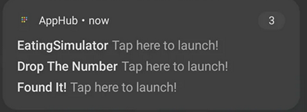
A few complaints are include screenshots showing the problem. For example, Reddit user Guilty_Astronaut5344 preserved a post-install notification attributing three unwanted installs to AppHub.
Complaints reporting countdown timer, and showing the countdown in video and screenshot
Other complaints are particularly credible because they match even more specific details from the AppLovin code. For example, three users reported countdowns leading to automatic install:
“Just today I’ve seen them implement a 5-second “countdown” to the program installing the game, but stopping the countdown STILL INSTALLS THE GAME WITHOUT YOUR CONSENT.” (PanPizz, October 31, 2023)
“I’ve come across some really shitty ad tactics that will auto install the app they’re pushing if you click anywhere on the screen before the timeout. Even if you just back out, if you don’t actually hit cancel install then you’ll get some stupid questionable games installed …” (dontthink19, January 7, 2024)
“Mobile game ads can now just install themselves without you tapping Install, wish is now replaced by ‘Install now’ if you want the game 5 seconds sooner. Hitting the X instead of Cancel still installs the game” (nascarsteve, December 10, 2023)
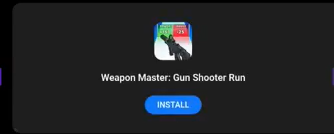
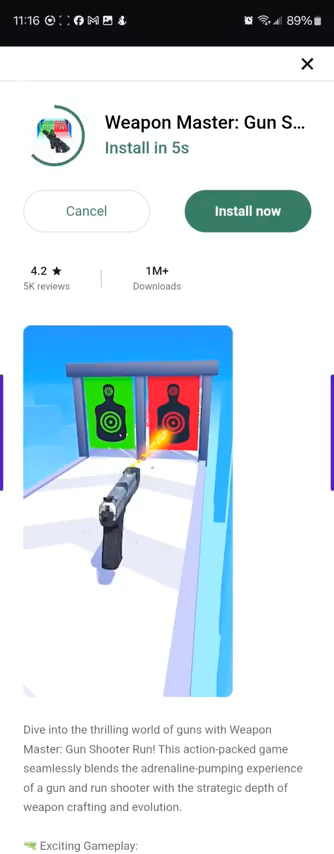
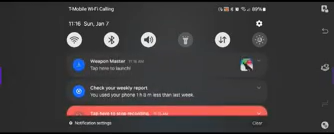
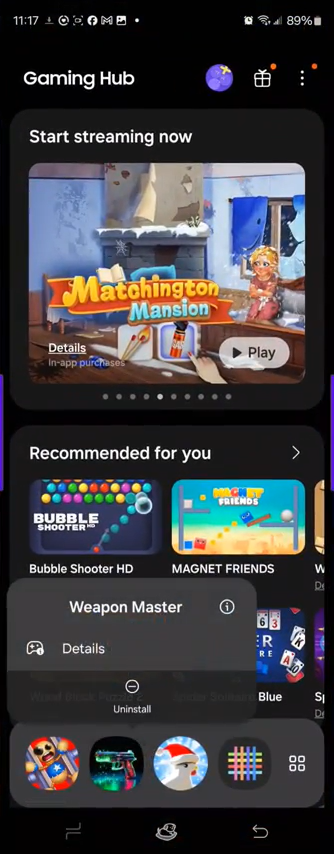
Not only does the general concept of a countdown-to-install match what I found in AppLovin code, the first and third comments also mention the duration of the countdown, from 5 seconds. This matches the “AutoInstallDelay” default countdown duration listed in AppLovin code. (The code sets a duration of 5e3, meaning 5×103=5000 milliseconds, matching the complaints.) Remarkably, user dontthink19 faced the countdown-to-install ads often enough, and predictably enough, that he was able to capture one such installation on video – showing an ad, then the countdown to install, then the app installed, then him uninstalling it, all in a single continuous video file. Key screenshots from dontthink19’s video:
0:03 Start of advertisement promoting Weapon Master0:19 Conclusion of advertisement promoting Weapon Master0:20 “X Install Screen” for Weapon Master, which opened automatically, and says it will “Install in 5s”0:31 Confirmation of Weapon Master installed. Small text at center reads “Weapon Master” “Tap now here to launch!”0:39 Weapon Master is indeed installed, albeit available for uninstall
The countdown videos and screenshots also match yet other details from AppLovin code. In the countdown-to-install screen, notice the unusual label “Install in 5s” (using the abbreviation “s” for seconds, with no space between the number and the letter s). This exactly matches the pattern in AppLovin code I found—further confirming that AppLovin is responsible for this installation.
Complaints about installation upon clicking x
Numerous users report that clicking an x, or trying to click an x, nonetheless causes an app to install. Combining source code and user complaints, two types of complaints are at risk of being combined:
Users who received what I call the X Install Screen (step 3 in the Weapon Master sequence above), and who tapped the X in that screen (which is an installation pathway in the IsOneClickInstallOnCloseEnabled JavaScript logic).
“Mobile game ads can now just install themselves without you tapping Install, wish is now replaced by ‘Install now’ if you want the game 5 seconds sooner. Hitting the X instead of Cancel still installs the game” (nascarstevebob – December 10, 2023, emphasis added)
“Even if you just back out, if you don’t actually hit cancel install then you’ll get some stupid questionable games installed …” (dontthink19, January 7, 2024, emphasis added)
“It definitely auto-installs. I’ve tested it because I was wondering where tf all these random shitty game apps were coming from in my phone. I don’t click anything, and if you don’t select “cancel” when it starts installing, the game will install. If you try to exit out, it does not count and will still install the game.” ([deleted] – January 22, 2024, emphasis added)
Many others, such as the following, could be either type 1 or type 2 above—but either way, indicate users’ dissatisfaction at installations occurring when users try to exit and decline.
“There are now ads that autoinstall other apps on your phone! They look like interactive/minigame ads, but touching ANYTHING – the close button, trying to pull up the phone navigation bar to exit WS – will trigger these apps to start installing.” (Star Donovan – February 2, 2024 on Google Play, emphasis added)
“the straw that broke the camel’s back was how exiting the ads forces you to download them. I’ve deleted 5 apps I did mot want to download.” (Casey Kristin Frye – December 23, 2023 on Google Play, emphasis added)
“They run adds on other games, you click to close out the automatic install, surprise you’ve downloaded the game for the 59th time!” (Luke Williams – September 17, 2024 on Google Play, emphasis added)
“Game installed itself by me trying to exit an add on another game” (Ian Kelley – June 23, 2024 on Google Play, emphasis added)
“It installed itself into my phone when I tried to exit an app that was showing an ad for this. This is super shady on their part and should be looked into” (Parker Abegg – December 14, 2023 on Google Play, emphasis added)
Scores of similar complaints
The following list presents 208 relevant complaints from Play Store, Reddit, and other online discussions. Some complaints are excerpted to the relevant section, but spelling and punctuation are unchanged.
I had this problem too and managed to Google some suggestions that seem to have prevented this from happening again. I don’t recall the instructions exactly but the short version is that my phone manufacturer (in my case, Motorola) had some pre-installed app(s) that allow auto installation from ads. I couldn’t uninstall the apps but I disabled all the suspicious ones/likely suspects based on my Google-fu, and that seems to have done the trick.
I was playing a game when an ad popped up and it showed one of those scam “free” money ads and it somehow installed itself without me pressing anything. I didnt accidentally click on the ad or anything, it just automatically installed when the ad started playing.
I’ve had that happen and I’m sure I didn’t install it by mistake. I checked the app that installed the adware and it was my Telco provider app that installed the ads, and they installed all at the same time, it’s annoying as shit.
I was having the similar problem with ads showing Klondike Farm Adventures. Without even touching the screen it would automatically download and it was downloading not through Google Play Store but through Samsung game store.
This game (or its ads) can illegally download and install games onto your device without your consent or knowledge. These games (all from different developers) suddenly appear on my phone on the very last screen. They’re nothing I’d ever play. I’ve never even heard of “Tiledom” or “2248 Numbers Merge,” by Funvent Studios or Play Simple Games. This is the 3rd time this game has done this. I don’t know how, but I’m sure it’s this game.
Recent update just pumped it onto my phone and without me allowing it, it’s going through and installing dozens of pos mobile games. It’s invisible to the user and cannot be disabled or uninstalled.
Ads pop up and install games without being prompted. Pop up ads are frustrating. They open without being clicked and navigate away from the game. Sometimes installing new games without being prompted…very frustrating
My phone just started installing random apps to my secure folder. It is called ‘AppHub’ but I can not see the any app called ‘AppHub’ both main stetting -> App and secure folder setting app. Do anyone facing the same problem? I m sure these app were malicious and asked the root permission :/
My phone just started installing random apps to my secure folder. It is called ‘AppHub’ but I can not see the any app called ‘AppHub’ both main setting -> App and secure folder setting app.
It installs other apps from the ads it shows you. AUTOMATICALLY WITHOUT MY PERMISSION!
Note: Game developer did not deny forced installations: “Hey! We’re not huge fans of ads either, but we can’t keep our game free without them. They help us develop new features, maintain the app, and release updates. We’d love it if you changed your mind. Come back soon!”
Wrong. It definitely auto-installs. The little “X” pops up, but when you click it – you just clicked on the ad (NOT an “install” button) and it installs. I’ve just now had to uninstall two crappy games from my phone, Merge Mansion and some other crap. This is infuriating and should not be legal as it is bypassing my security settings and installing things without my permission.
Your ads are auto installing apps in the background… You stopped it for a while now it started again. This needs to stop!!! update, ads are getting worse.. false X seem to be the standard..
BEWARE OF OTHER APPS BEING INSTALLED WITHOUT YOUR PERMISSION… written by people who use full screen ads to install various other apps [MOB CONTROL game app] ****** when you try to click the [x] button to close the pop up ad it vanishes (w/ split second timing) and is replaced by an OK button
i keep getting ads for this game with a fake x. When i click the x, it automatically installs this game without my permission. I’ve had to uninstal it 5 times now
Caution: this game’s ads will automatically download games without your permission. It did this to me with 4 apps that played as ads. I had to manually go in and uninstall.
somehow the games in the ads install themselves. When I try to click on “x” to close the add, it connects to a website or play store and even before I can close them, voila, those games are installed on your phone. Be very careful!!
Partnered with AppLovin, which if you misclick on their ads it automatically installs the game for you unless you notice and manually stop it, inflating their download count. I did not knowingly download this “game.” I did not click “install.” How is this even legal?
Careful with this game. If you even try to stop an ad between gameplay, it will automatically install other games on your phone without asking. I had about a dozen games in my phone without even realizing it. I uninstalled those as well as this game. Never again.
I get this a lot. If I don’t click anything, the app installs itself on my phone. If I click the ‘x’, the app auto installs on my phone. The only way I can make it stop is to press the cancel button.
this application have so much control on device that it automatically installs other games on device without permission. This is sheer violation of privacy and recommended not to be installed.
Help! Device Manager is auto-iinstalling apps from ads. Some games from google play have ads that auto download applications. I traced it back toT-Mobile’s Device Manager allowing malicious ads to auto install applications. That’s right, just watching the ad downloads an app. T-mobile has made it impossible to disable this app. I am fearful of this massive security hole. I am scared of malicious apps being downloaded. I have seen other complaints over the last few months. What can I do fix this major security hole? … All I know is that the malware ads come from something called applovin. … It is just too much of a security risk that that T-Mobile has created with their Device Manager allowing allowing 3rd parties to automatically download and install of potential malware.
Then I noticed that whenever the game had a trial and I touched the screen it would slash to the screen that looked like Google Play and the Install Button would have the word “Cancel” on it as though I’d initiated the download (which I didn’t). When I tried to hit cancel it would go back to the trial play thing and back and forth until I just X’ed out of it.
They utilize ads in other games to AUTOMATICALLY INSTALL this trash on your phone. Absolute slimiest tactic to get me to play your garbage game I’ve ever seen.
If you accidentally touch an ad, it automatically installs an app on your phone.
Note: Game developer did not deny forced installations: “Thank you for reporting this problem with our tower war tactical game. We will try to fix it as soon as possible so that you can continue to enjoy it.”
I can’t leave reviews of the apps that are auto download in fact when I look at app info they say the apps are downloaded by device manager and not google play.
I found an app called Content Manager on my Samsung S24 that I bought through T-Mobile. There was an option there that says “Allow Install of New Apps” and I turned it off, and the ad installs stopped. I think it’s seriously f-ed up that things like this are allowed.
I accidentally downloaded this just by clicking on an AD. JUST BY CLICKING ON IT. Not to be confused with accidentally pressing the download button on the AD. These advertisements are getting scummier and shadier by the day. What’s next? Are you going to turn wordscapes into a self reinstalling virus? We live in the lamest dystopia possible.
I watched an ad for Wordscapes for a different game I play and they INSTALLED this app WITHOUT my PERMISSION!! I didn’t click on anything and even if I accidentally did (I didn’t), Wordscapes doesn’t have the right to download their app onto my phone without my permission!!! I believe this is illegal and am going to report it to Google as well. **I deleted it when I saw it was downloaded onto my phone, but had to reinstall it to make this review**
Multiple times after watching an ad in Hero wars: Alliance I’ve found a new game installed on my phone when I DID NOT touch anything to download and install.
It’s been happening to me constantly and I’m so tired of it. Can’t figure out how to kill that function or at least make the damn thing wait for a prompt so I can say no. I’m on a Samsung Android with all of my security settings as recommended (apps only from Play or Samsung Store, ask permission before downloading or updating apps on any network, etc.). I’ve filed a few customer support requests with Snowprint, who have always been helpful and offer apologies but don’t seem to have solved the issue. Block Blast, Merge Mansion, Overmortal, Wordscapes… The list goes on.
It’s not coool, nor should it be legal for your ads to automatically install games on my phone.
Note: Game developer did not deny forced installations: “Thank you for reporting this problem with our tower war tactical game. We will try to fix it as soon as possible so that you can continue to enjoy it.”
I freaking hate this BS. I have searched every setting possible and can not figure out how to turn it off or prevent it. I have noticed that it only does it through Galaxy Store. Not Play. If anyone has figured out how to stop it, lmk.
An ad played for this game and without any input on my end, INSTALLED ITSELF ON MY PHONE. This is ridiculous how dare you install your product on my phone without my permission. The ad played. I did not touch it didn’t even touch my phone screen and still it’s on my phone. This is neither legal nor ethical and it is extremely concerning as to what this game is. If this happens again I will be seeking legal action against your company. Absolutely ridiculous.
I get this app as an ad, and when I try to close the ad and I fail, it doesn’t just take me to the play store to download it, it actually force installs on my phone without me giving permission to download app or install. I don’t like the fact this app is force installing on my phone from ads and not from the play store. I would give this game a try if it didn’t force me to install it and actually gave me a choice instead. Absolutely unacceptable, acting like a virus rather than an app.
One of many games that have taken the ad program where it will install itself on your device when you close the ad. If it weren’t for that it would be a good game. But just auto installing itself on your device is something that defines what a Virus is.
This ap has installed itself without my permission after seeing an ad in another game. This is nefarious and should be deplatformed by Google for this behavior.
Installed without my consent. It was installed during an ad from another app with no way to cancel or even see it installing. I didn’t even notice until my phone said, “Moving to game hub.” If their ads install the app without consent, what else will this completely untrustworthy company will install while app is installed? No thank you.
YES. I sorted thru my apps shortly before downloading Wordscapes last month, so I know I had no unwanted games on my phone at that time. Since then I’ve deleted 4 new games that I did not consent to download or even realize were downloaded. Very sketchy. I’ll be watching my apps closely from now on. I obviously like Wordscapes, but if this continues to happen, I’ll probably delete it.
Disappointed has started those auto install adds where it starts installing and you have to cancel and ended up with 2 unwanted games so just Uninstalled this app after playing for a long time.
Hello, so I was watching ads on the webtoons app and it seems that rather than prompting a download through the play store. The advertisements for wordscape and tower war are basically auto downloading themselves to my phone. When I checked to see what store installed it, it says it was installed by Device manager.
Does anyone else seem to have apps downloaded to their device after playing Wordscapes? I seem to have some of the apps on my phone now that appear in the ads, but did not download them.
It happens to me on the mobile games I play. I accidentally click on an ad when trying to click the x or skip button and the next thing I know I’m getting a notification that says tap to launch game. I get it so many times with fishdom and I just got it with tile match.
WARNING THIS APP IS MALWARE IT AUTO-INSTALLED ON MY DEVICE THEY USE A SPECIFIC AD THAT AUTO-INSTALLS ON YOUR DEVICE IT IS NOT AN ACCIDENT AVOID THIS APP
I’ve come across some really shitty ad tactics that will auto install the app they’re pushing if you click anywhere on the screen before the timeout. Even if you just back out, if you don’t actually hit cancel install then you’ll get some stupid questionable games installed … It’s happened to me 3 times now. I’m looking for new games to play and when ads are served in that manner, I’ve had to go back and uninstall them. They don’t magically install themselves. You misclick on the ad and it opens up to a timer you have to cancel or it’ll get installed
Note: With video at https://imgur.com/a/YzXCWzV showing 5-second countdown followed by auto-install. Countdown narrative and 5 second threshold match AutoInstallDelay in code.
Game is decent. However, last night one of the adds turned out to be self installing malware. It took me 20 mins to remove the malware and everything it installed.
I’ve seen the ads OP is talking about. It’s got a quick download or something, you click anywhere and it automatically installs, doesn’t go through Google Play.
One of your ads was installing this game without my permission, and when it was done, it booted up in front of my phone game. Stop doing this. This is outrightfully idiotic.
Ads that download an app on to my device if I click anywhere are offensive and dangerous. Having 30+ second, phased, unskippable ads, that download apps on to my device is downright insulting.
Wordscapes currently has an AD going around on other apps that will FORCE INSTALL THE GAME DURING THE AD AND IT CANNOT BE CANCELLED. These predatory ADs were found in a game called Water Sort. Wordscapes forced installed their app on my device without permission multiple times and they should be FINED.
I was playing another game and this ad showed up i tried to click the x it took me to the download and started it automatically I then hit cancel thinking nothing of it then later check my phone and it was installed against my consent
I’ve had this happen to me with the tower war playable ad about a dozen times. They updated their ad a couple weeks ago and it stopped, but a couple days ago they changed the ad back and it is happening again.
Installed itself. While playing a different game, I got an ad for this game and thought I closed it. A couple minutes later I got a notification that it was done installing.
I got an ad for it and then a long lasting black screen with an install button. The x mark is so small that you are likely to miss it. Turns out the WHOLE SCREEN is an install button and it automatically installs, even if you hit cancel. Very shady.
Try deleting the app “apphub” (i had to search it in the settings of the phone to actually find the app) I noticed a notification saying it automatically downloaded apps (this was a notification from the phone itself on the day of purchase) and saw this “apphub” app that says it “provides a friction free download service for in-game ad choices” and it immediately set off a red flag for this issue we’ve been having. So far it seems to have worked but I will update if it happens again. The worst part about it is that I have parental controls set up on my child’s phone and it was bypassing them to auto-download these ads despite my approval being necessary to download anything.
DONT HAVE YOUR GARBAGE “GAME” 1-TAP INSTALL WHEN ALL I’M TRYING TO DO IS X PAST YOUR AD. I DONT WANT YOUR GARBAGE, STOP INSTALLING YOUR TRASH ON MY PHONE.
This thing keeps getting installed on my phone without my knowledge. I have to uninstall it regularly. It’s got ads on my other apps and somehow gets installed by itself! Google needs to know about this.
He’s right, I’ve had three games auto install. It happens on the ads that play extra long credits. Typically, you won’t be awarded for the completion of the add and another add will play. This literally happened to me today for the third time.
Yeah this is a thing I’ve been having happen recently. The apps install themselves. Even if you don’t click the X to end the ad, the still install themselves. … they fully go and install themselves at the end of the video. It’ll show the download bar at the top and the app will be with all the other apps.
Mobile game ads can now just install themselves without you tapping Install, wish is now replaced by ‘Install now’ if you want the game 5 seconds sooner. Hitting the X instead of Cancel still installs the game
I’ve had idk how many game ads lately send me to the app store when I tried closing them. In fact, I KNOW I didn’t download anything, and recently found 2 apps on my phone that had gotten downloaded. Had to have happened in the past couple days. Never opened them, promptly deleted them. Just annoyances. Especially when they’re things I’d NEVER use like insta or tiktok.
Instead of giving people the option to download the games when tapping on advertisements, the games automatically download to the device when the ads are tapped. No consent is given to the users when it comes to when they want to download the games or not, as soon as you tap on the ad it downloads for you. … AppLovin are now essentially baiting you with a demo and then forcing the full game down your throats. Just today I’ve seen them implement a 5-second “countdown” to the program installing the game, but stopping the countdown STILL INSTALLS THE GAME WITHOUT YOUR CONSENT. …
Security threat! Automatically installs from ads without permission or consent, then starts sending push notifications. uninxstalled immediately without launching. No means no!
Game was good and fun for a while until I noticed that if you clicked the ad accidentally, you run the risk of having some of the apps automatically installed. Ended up with 2 games that I did not want on my phone. BS practice.
Why does the game download apps whenever I watch an ad?” “This only started to happen recently. I would have my phone on the side and watch the dragon TV ads and whenever I was done, there would be an app installed.
this stupid game keeps getting automatically installed by ads in other games. I do not want to play this game and your disgusting tactics of forcing a download that I DO NOT WANT ON MY PHONE border on criminal.
An ad for this app keeps popping up on my phone. When I try to close it, the app installs. Please do something about this glitch. No that doesn’t help. If I don’t want an app and I’m trying to close an ad, I would expect that it not automatically download on my phone regardless.
This app keeps installing itself every time I watch an ad for it. Even if I do not touch my screen at all throughout the whole ad, it still installs itself after playing. I’ve deleted this app both too many and not enough times. I will continue deleting it.
I will never use this app. The developers push deceptive ads in other applications that automatically install Wordscapes on your phone when you try to close the ad. This is deceptive behavior and I’ve reported this to the Play store.
Ad automatically installed an app? … So it’s as the title says. I played an ad in the game, and it automatically installed an app (It was bricks and balls) I never left the AR app and I only realized it happened because I got a notification that said “click to launch the bricks and balls app. … So I went and checked and…yep it had been installed.
Ad for this game appeared and while trying to x out of it, accidentally clicked the ad. A minute later i receive a notification that Wordscapes installed. Never clicked on an install button. Shady practices.
This game literally installed itself while I was trying to make an ad go away in Brotato. No redirect to the play store. No confirmation on the install. you miss the x on the corner and now you have a new game installed that you never asked for. absolute scumbag design. 0 out of 10.
Game itself is fun, you ruin it with ads for apps that auto install on your device. I can deal with ads you can close but not ones that install themselves and you have to close your game to go uninstall the unwanted app.
The problem that I am seeing now is that when you encounter an ad, it automatically installs the game listed in the ad. This is happening every time I play the game. I am ready to delete the game at this point. The frustration of having to uninxstall the latest game you force download is too much.
Disabled on both our phones the day we got home with them. But woke up a few days ago with screen like OP posted (both phones). Somehow the app selector got turned back on without our knowledge.
You can disable AppSelector and you’ll never see those again (at least I’ve been through a few updates now and I haven’t seen it). I always recommend people uninstall or disable AppHub and AppSelector. One of those apps will also just straight up install apps on your behalf without your knowledge, so if you don’t get rid of those two apps and you see random apps mysteriously appear, that’s why. They’re T-Mobile malware that gets preinstalled on carrier versions of android devices that T-Mobile sells. AT&T and Verizon do the same thing unfortunately.
Hello, for the past two or three days, whenever I get an advertisement on IbisPaint, that app automatically downloads onto my phone. Does anyone have this issue / know how to fix this?
Three times now I’ve gotten that ad for Tower War and any 30 seconds after the ad is over I get a push notification that Tower War has finished installing and is ready to play. Sure enough, there’s the game, loaded onto my phone without my permission. The only thing I clicked on was the “x” to close the ad once it was done. Kinda creeps me out that an ad can bypass the store and just install unwanted crap on your phone
several Game ads will auto-install the games, no input or knowledge of it happening from you, you simply have several new “games” in you menu. Spyware/virus/predatory behavior.
Nope, T-Mobile does for a fact install it automatically as does every other carrier with their own version. I set up my own S23 Ultra. I’m always very careful with every prompt that pops up, I read it carefully, uncheck anything opting me into spying or other malware features, etc. Yet after setup I was finding random apps being installed on my device and the App Hub, AppSelector, and AppManager were all culprits that I did NOT opt in to.
HATE THE AUTO INSTALL ADS! YOU DO NOT HAVE PERMISSION TO INSTALL APPS ON MY PHONE! AS I TRY TO CLOSE THE ADS, IT WILL AUTO INSTALL APPS TO MY PHONE. GET RID OF THOSE ADS!
Every time an ad plays for this game, while I’m playing a game that I enjoy, it is automatically installed on my device. If this continues, I am willing to start a class action lawsuit. It isn’t legal to use these practices, and I consider it harassment
This ad if accidentally clicked doesn’t even take you to the store to ask if you wanted to download. It just installs. That’s crazy invasive to your device, like a bug. Or a parasite. Once again, marketing work being done by ignorant sales kids who don’t understand law.
Fun game but ads are extremely intrusive. If you try to exit the ad, other games are autoinstalled which can open your device to viruses or other bad actors.
They use other apps to install RM without permission to boost their numbers. I now uninstalled this app at least 7 times – all ads from other apps that unethically installed without permission.
There are now ads that autoinstall other apps on your phone! They look like interactive/minigame ads, but touching ANYTHING – the close button, trying to pull up the phone navigation bar to exit WS – will trigger these apps to start installing. Sometimes you can cancel w/i 1 second, other times there is no cancel so you have to remove these malicious installations later.
I did not choose to install this on my device. The mobile ad for this would not allow me to exit and then this installed without my permission. I understand advertising is important but do not trust an app this invasive.
It definitely auto-installs. I’ve tested it because I was wondering where tf all these random shitty game apps were coming from in my phone. I don’t click anything, and if you don’t select “cancel” when it starts installing, the game will install. If you try to exit out, it does not count and will still install the game.
Ads, I understand. I draw the line at forced installations. I had this app for so long and it was one of the more peaceful ones. They sadly introduced ads, which is annoying but understandable. Now the ads have gotten so intrusive I get more ads than game time. However the straw that broke the camel’s back was how exiting the ads forces you to download them. I’ve deleted 5 apps I did mot want to download.
Note: Game developer did not deny forced installations: “Our team hears you and we’re working to improve the ad experience for you. For now, you may consider getting the premium version to enjoy an ad-free version of the game.”
It installed itself into my phone when I tried to exit an app that was showing an ad for this. This is super shady on their part and should be looked into
Had an advertisment of wordscapes and after it finished it installed itself when I was trying to exit the advertisment. Very sketchy that it installed itself this way
Everytime one of their Royal Match advertisements come up while I’m playing a different game, it force-installs Royal Match game app on my Samsung phone without my consent! I don’t know how to block it from installing! Negative 5 stars! This should be banned from the Google Play store!
Royal Match keeps downloading itself to my phone – without my permission. I play Uno and they have ads for it. And for the past week, it has been automatically downloading itself to my phone.
Keeps installing on my phone every time I see an ad for it. I’ve never wanted this game and I’ve never played it. Just sick as hell of deleting it from my phone.
DO NOT INSTALL- Lately it has become difficult to exit out of the ads, which I had no problems with before. The issue now is that when I exit the ads, it begins to install the app for those ads immediately instead of simply bringing up the playstore where I have the OPTION to install. Frankly these ads that automatically download different apps make me feel that this game is UNSAFE to continue playing. What a dissapointment. This isn’t a fluke either as many friends of mine faced the same issue.
Somehow ended up on my phone,so I thought I’d leave a little insight as to how predatory the way-too-long ads are for this game. I believe it installed itself after a misclick on the ‘X’ to close the ad. A bit scary.
Culper 1 also presents correlation between AppLovin deals with OEMs and carriers in certain regions, spikes in installs in these regions, and spikes in user complaints. The most natural explanation is that the OEM and carrier relationships made it possible for AppLovin to install numerous apps onto users’ phones in affected regions – causing both a spike in installations, and a spike in user complaints. Notably the OEM and carrier deals pertained to Android only, not iPhone, and the installation spike similarly appeared for Android only.
Ordinarily, if app A wants to install app B, it must send the user to Google Play—where installation only proceeds if the user taps the prominent green Install button. At Google Play, accidental installs are rare, and nonconsensual installs are effectively unheard of.
If installations occur outside Google Play, the first question is technical feasibility. It is not enough that source code appears to support this behavior (as shown in my execution path analysis); the Android security model must also allow it. A close review of security settings in the relevant manifests shows that such installs are indeed possible—and in fact, the unusual settings documented on this page are difficult to explain any other way.
Save The Girl manifest indicates authorization to invoke AppHub
The Android game “Save The Girl” includes the following entry in its manifest:
Ordinarily, apps do not need this line to receive ads from AppLovin. So why does this game—and dozens of others—request permission to invoke AppHub? What legitimate purpose does this serve?
AppHub manifest indicates authorization to invoke T-Mobile packages with elevated permissions
The AppHub manifest includes permission to interact with a T-mobile installer helper:
One plausible explanation is that AppHub uses a T-Mobile install helper to complete out-of-box (OOBE) installations. But that only raises a further question: Why would third-party games need to connect to the same privileged middleware?
Com.tmobile.dm.cm has elevated permissions including installing other apps
The com.tmobile.dm.cm package has the critical permission necessary to install other apps.
Some AppLovin APKs seek permission to install apps themselves, without a manufacturer/carrier install helper
In some cases, AppHub does not rely on a manufacturer or carrier install helper. Certain AppLovin APKs instead request install permissions directly. For example, the Adapt v3.40.2 manifest includes:
AppLovin’s public statements are consistent with AppLovin sometimes receiving this permission. From AppLovin’s Array Terms:
To provide the Array Services to you, we may need access to the “INSTALL_PACKAGES” and “QUERY_ALL_PACKAGES” Android device permissions. We receive these permissions through your carrier or mobile phone original equipment manufacturer, and we use them to provide you with the Array Services, including presenting Direct Download screen to you and facilitating the on-device installation of mobile applications at your election (where Array acts as the technical installer, not your carrier).
This paragraph — including phone manufacturer or carrier preinstalling AppLovin code and presetting these permissions — matches what I observed. Of course the “at your election” claim is contrary to my analysis of the execution path, and my tabulation of user complaints, indicating nonconsensual installations.
Flipping through AppLovin APKs, it is easy to find labels and strings that appear to indicate nonconsensual installations. Examples are below.
These labels must be interpreted with care. Ultimately these are labels, not directly indicating actual application functionality. Anyone could name a function FlyToMoon(), but that doesn’t mean he has a rocket or a launchpad.
Furthermore, there could be proper reasons for certain silent installs. Consider the out-of-box experience, when it is routine for manufacturers and carriers to place apps on a user’s device. Consider installations in which user consent is obtained in some earlier part of the process.
Overall, I consider the execution path a more reliable method of determining what AppLovin’s code does. On the other hand, the execution path is complicated—requiring parsing thousands of lines of code to follow the flow, and requiring substantial technical skills to understand the code. In contrast, reviewing strings can be as easy as Edit-Find and dictionary meaning.
Labels and strings in Java code
AppLovin’s code includes various labels that indicate or reference nonconsensual installations. A representative example: com.applovin.array.apphub.tmobile includes a class called TmobileSilentInstallManager. The literal meaning of a “silent install” is one without user consent.
Elsewhere in AppLovin code, there are hundreds of references to “Install”, “Installer”, “installing”, “startInstall”, and the like, including more precise labels such as “andr_app_installing_start”, “an.ui.ntfn.installing_progress.enabled”, and “package_installing_successfully_finished_notification_id”. AppLovin logging also includes status messages like “Failed to start install”, “Failed to start installing”. These labels and strings leave no doubt that AppLovin can install apps—but they do not prove that installations are silent, automatic, or nonconsensual. Other labels, like “DirectInstallOrDownload”, indicate a nonstandard installation (not via Google Play) and suggest the install has few steps (calling into question what disclosure is provided and what consent obtained), but again are less than complete proof.
Labels in JavaScript code
The AppHub APK embeds a resource file, index-BFfWBgBF.js, which contains labels indicating non-consensual “auto” installations. The file merits close examination (see my execution path analysis), but even its labels reveal its purpose. For example:
A JavaScript “Breadcrumb” message logger even records a possible event, “Installation on ‘X’ button click”. Yet clicking an X is ordinarily understood as rejection, not consent. Similarly, an error handler describes “Failed to set installation on dismiss enabled”—implying that, when working correctly, the code can indeed install on dismiss. But what user thinks “dismiss[ing]” an ad is basis for an installation? Code snippets below.
catch(a => {
    pe.reportError(new Error("Failed to set installation on dismiss enabled", {
pe.leaveBreadcrumb({
    message: 'Installation on "X" button click', ...
Taken together, these labels describe scenarios where installations proceed without a user being asked to install or without the user agreeing to install.
Possible settings screen entries consistent with automatic installations
The resource file index-BFfWBgBF.js also includes a potential settings screen with the following labels:
zu = "Enable Direct Download",
Gu = "Download apps with a single click", ...
Ra = { EnableDirectDownload: zu,
EnableDirectDownload_Description: Gu, ...
From the resource file alone, it is unclear whether this screen is ever presented to users, and if so, under what conditions or with what default setting. Yet users consistently report unexpected app installations, suggesting that the option may be enabled by default—or hidden in a screen users do not ordinarily open.
My personal experience reinforces doubt about such a screen being shown to users. In spring 2025, I purchased a new T-Mobile phone directly from the carrier. On first boot, the out-of-box setup prominently displayed AppLovin screens urging me to download apps. At no point did I see any option to “Enable Direct Download” or to “Download apps with a single click.”
User complaints confirm that no such screen is shown. In reviewing complaints, I found no screenshots of such a screen being proactively shown. One user noted:
I found an app called Content Manager on my Samsung S24 that I bought through T-Mobile. There was an option there that says “Allow Install of New Apps” and I turned it off, and the ad installs stopped. (Skybreak, April 6, 2024)
This complaint reinforces the problem: a user would have no reason to hunt through a Content Manager settings screen to disable unwanted installs. Nor does failing to disable a buried option constitute consent for arbitrary app installations.
A reliable way to understand what software does is to examine its source code and trace the execution path. This is rarely possible for compiled code, but AppLovin is largely Java, which can be decompiled using tools such as JADX. I reviewed decompiled source code alongside the full app manifests and relevant resource files embedded within APKs. Together, these materials reveal both what the apps are permitted to do (via permissions), how execution proceeds from function to function, and, ultimately, what occurs.
Let me remark on three key challenges in interpreting the decompiled code. First, length. After decompilation using JADX, the AppHub APK totals a remarkable 626,053 lines of code. Then there’s more in the AppLovin SDK, in install helpers, in manifests, and in JavaScript. Of course most of the code is irrelevant to app installs. In the excerpts linked below, I focus on what I found to be relevant. But the execution path remains lengthy even after excerpting.
Second, both decompilation and deliberate obfuscation by AppLovin make parts of the code difficult to read. Decompilation recovers some labels (function names and variable names), but others are lost and must be generated by JADX – yielding labels that are difficult to interpret (such as AbstractC1838d0) and not the labels actually used in AppLovin’s source code. Meanwhile, AppLovin intentionally obfuscated (minified) its JavaScript—not unexpected, because they have no reason to help anyone read it, but still an impediment to understanding.
Third, Android’s architecture—including coroutine continuation functions for multithreading—adds further complexity. This code is not the simple a() calls b() calls c() taught in introductory programming classes.
Nonetheless, with knowledge of Java syntax and Android architecture, and with determination and grit, the execution flow is apparent. I worked on understanding this code on-and-off from February to September 2025, and I now feel I have a good understanding. My remarks below are my best effort under important constraints, including both the size of the task and AppLovin’s intentional obfuscation. I cannot guarantee perfection. See my disclosures.
In the index below, I present code in the sequence in which it operates. Where a function name is less than self-explanatory, I remark on its purpose. In the linked pages, I introduce each block of code with a short narrative about key steps, and I use red text to mark the flow from one step to the next. Occasional comments, marked with the prefix // , are added by me to explain selected areas.
showDirectDownloadAppDetailsWithExtra() with service method AbstractC1838d0.m3826C(),delegate C2823r(), and Kotlin coroutine continuation with entry point mo410()
setupAppDetailsFragment() and coroutine continuation class C3359j1 with continuation entry point mo410r()
DirectDownloadMainFragment C3374l2 and onViewCreated mo1147B() with coroutines C3339g2, C3332f2, and C3325e2, plus coroutine continuation orchestrator M5734P and URL builder m5748L
AbstractC3404p4.mo1147B() with C3334f4 and C3320d4 (WebView loader)
DirectDownloadMainFragment continuation entry point mo410r()
My work follows six prior critiques in which others questioned AppLovin practices, both as to app installations and beyond. I organize those critiques here, in chronological order, to assist those who wish to reread them. I emphasize those reports and sections that, like my post today, consider nonconsensual installations.
Compared with prior reports, I provide a more detailed technical analysis. For example Solon’s report of SEC inquiry does not provide any source code, screenshots, packet logs, or other direct evidence of data collection violations. I also provide greater proof relative to prior reports of nonconsensual installations. For example, the prior reports about nonconsensual installs present snippets of code, whereas I trace the full execution chain from ad delivery all the way to installation. Similarly, prior reports offer a few complaints about nonconsensual installations, but I offer hundreds, plus I explore patterns of complaints across devices and situations, and I cross-check complaints against details in decompiled AppLovin code.
In January 2025, I was engaged by an investment firm that was skeptical of AppLovin. They asked me to investigate a range of concerns, including installation practices. That engagement continued until June 2025. My agreement with that firm disallows me from revealing its name, but allows me to share all information I figured out from public sources. Since then, I have had no paid relationship with that firm—or any other investment firm—regarding AppLovin.
As part of my research for this post, I spoke with a range of experts concerned about AppLovin’s practices, including security researchers, journalists, industry analysts, attorneys, and competing adtech firms. No money changed hands in any of these discussions. As my post indicates, my primary methodology was forensic: I reviewed AppLovin source code and tested the product first-hand, plus examined user complaints.
From my extended analysis, I became convinced that AppLovin engaged in serious misconduct. The accompanying report details the methods and evidence supporting this conclusion.
Consistent with my practice whenever contractually permitted, I am releasing this report publicly for anyone to use. To the best of my knowledge, the information herein is accurate and based on sources and methods I consider reliable. Nonetheless, all content is provided strictly “as is,” without any warranty—express or implied. I make no representations as to the accuracy, timeliness, completeness, or likely results of using this information. My research necessarily contains inferences, estimates, and opinions which may prove inaccurate and are subject to risks and uncertainties beyond my control.
This report is not investment advice. I make no representation or warranty regarding its completeness or the future performance of AppLovin’s securities. Readers must conduct their own research and due diligence, including consulting with financial advisors, before making investment decisions.
I hold a financial interest in which I profit if AppLovin’s stock price declines. I opened this financial interest after completing research, based on my serious concern at what I found. I may change, reduce, or close this position at any time, without notice. I do not undertake to update this report to reflect changes in my views or positions. However, if I conclude that I am mistaken about AppLovin’s technology, I will correct the record publicly.
***
Update, October 16, 2025: I no longer have a financial interest relating to AppLovin.
In an article originally posted to VPT’s blog, I explain how adware claims commission on sales a merchant would have made on its own — and how automation can catch, process, and even tabulate these violations. Details: How Adware Manipulates Attribution to Monetize a Merchant’s Own Traffic.
***
Updated text adapted from the archive:
When adware programs and their partners want to drain advertisers’ budgets, they have an oddly well-established path to do so: Wait for the user to browse an advertiser’s site, then invoke an advertiser’s own affiliate link. Users will typically not notice anything amiss; at most they get a second window showing the advertiser’s web site, but that is easily ignored as a small glitch. Meanwhile, the advertiser will see genuine purchases and quite logically assume the affiliate must have added value – must have done something to get the user to buy. So the advertiser will pay a commission according to its standard fee schedule. These commissions can be sizable – often, 10% or more of the user’s purchase price. Meanwhile all the affiliate had to do was get adware (or a browser plugin) onto a user’s computer, or buy clicks from some other adware already installed.
Automation can catch this problem. When I think affiliate, I often jump straight to Amazon – the advertiser that took affiliate marketing mainstream when countless publisher sites began promoting Amazon for books, later music, and now almost anything. So I searched automation records for adware targeting Amazon. A representative example is below. Quoting verbatim from the automated report summarizing what our automation did and what it found:
We tested on a computer with the adware 3D Earth Maps. When the user navigated to https://www.amazon.com/, the adware invoked an affiliate link with parameters as shown below.
…
tag=namespacebran37-20
The report provides two screenshots of what was observed.
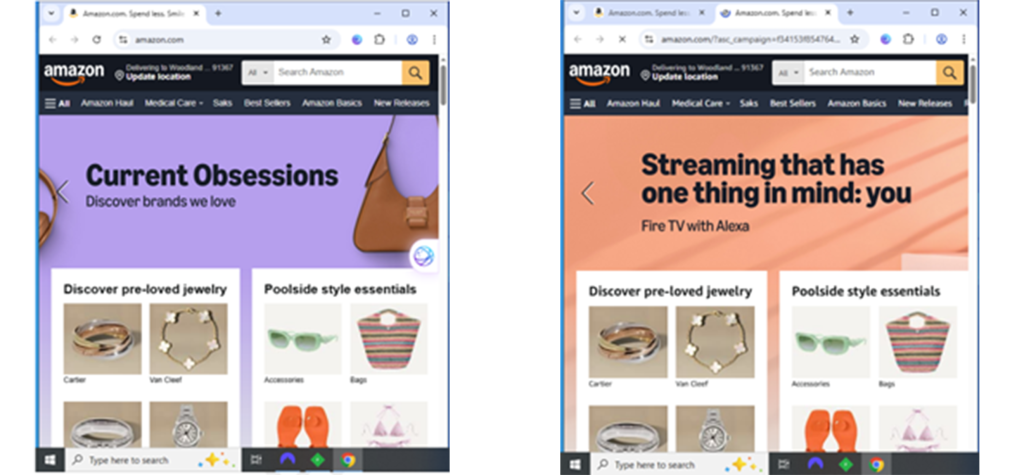
First automation loaded Amazon.com, just as a user would. This is shown in the left screenshot below.
83 seconds later, the adware opened a second tab that loaded an affiliate link for Amazon. This second request sets the affiliate’s cookie, positioning the affiliate to claim commissions on subsequent sales. See the right screenshot below, showing both tabs visible.
Automation also made a video showing exactly what occurred. But if there’s any doubt, the packet log shows all communications between the browser, the adware, and Amazon’s site. (Automation can even decode HTTPS encryption.) Sure enough the adware told its controlling server, v2i8b.com (yellow highlighting below), that the user was at amazon.com (blue), to which the server instructed opening the new tab loading Amazon with the specified affiliate ID (green). Here’s the relevant HTTP transaction from the packet log:
Nothing in the packet log reveals how much Amazon paid this affiliate. I think highly of Amazon’s sophistication, so I expect that Amazon catches many such affiliates before they paid any of the wrongfully-claimed commissions. Furthermore, Amazon’s Associates program policies are well-written and appropriately prohibit this type of abuse. But in just six days of testing, automation saw this affiliate’s links appear 37 times. The affiliate probably had to pay the adware for each (fake) click, suggesting that the affiliate expects to get paid.
Honey claims affiliate commission if a user presses “Got it” to acknowledge no deal found
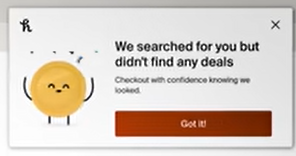
Honey takes payments that would otherwise go to influencers who recommended products users buy. (video at 2:50) MegaLag shows Honey claiming payments in four scenarios: i) if a user activates a function to search for coupons (even if none are found), ii) if a user activates a function to claim Honey Gold (no matter how meager the rebate), iii) if the user gets the message “We searched for you but didn’t find any deals” and merely presses the button “Got it”, and iv) If Honey shows the message “Get Rewarded with PayPal” “Shop eligible items to earn cash off future purchases” and the user presses “checkout”.
Honey doesn’t actually get the best deals for users. If a merchant joins Honey (and begins to pay Honey affiliate commissions), Honey allows the merchant to limit which coupons Honey shows to users. MegaLag points out that letting merchants remove discounts from Honey is squarely contrary to Honey’s promise to users that it will find “the Internet’s best discount codes” and “find every working promo code on the Internet.” (video at 16:20)
I’m a big fan of MegaLag. I watched most of his other videos, and they’re both informative and useful—for example, testing Apple AirTags by intentionally leaving items to be taken; exploring false claims by DHL about both package status and their supposed investigations. Meanwhile, nothing in MegaLag’s online profile indicates prior experience in affiliate marketing. But for a first investigation on this subject, he gets most things right, and he uses many appropriate methods including browser dev tools and screen-capture video. Based on its size and its practice, Honey absolutely deserves the scrutiny it’s now getting. Kudos to MegaLag.
Nonetheless there’s a lot MegaLag doesn’t say. Most notably, he doesn’t mention contracts—the legal infrastructure that both authorizes Honey to get paid and sets constraints on when and how it may operate. Furthermore, he doesn’t even consider whether merchants get good value for the fees they pay Honey. In this piece, I explore where I see Honey most vulnerable—both under contract and for merchants looking to spend their marketing funds optimally.
The contracts that bind Honey
Affiliate marketing comprises a web of contracts. Most affiliate merchants hire a network to track which affiliate sent which traffic, to provide reports to both merchant and publishers, and to handle payments. For a single affiliate-merchant relationship, an affiliate ends up subject to at least two separate contracts: the network’s standard rules, and any merchant-specific rules. Of course there are tens of thousands of affiliate merchants, and multiple big networks. So it’s impossible to make a blanket statement about how all contracts treat Honey’s conduct. Nonetheless, we can look at some big ones. Numbering added for subsequent reference.
C1 “You must promote Advertisers such that You do not mislead the Visitor”
C2 “the Links deliver bona fide Transactions by the Visitor to Advertiser from the Link”
C3 “You must accurately, clearly and completely describe all promotional methods by selecting the appropriate descriptions and providing additional information when necessary.”
C4 “You agree to: (i) use ethical and legal business practices”
C5 “Software-based activity must honor the CJ Affiliate Software Publishers Policy requirements (as such requirements may be modified from time to time), including but not limited to: (i) installation requirements, (ii) enduser agreement requirements, (iii) afsrc=1 requirements, (iv) requirements prohibiting usurpation of a Transaction that might otherwise result in a Payout to another Publisher (e.g. by purposefully detecting and forcing a subsequent click-through on a link of the same Advertiser) and (v) non-interference with competing advertiser/ publisher referrals.”
R1 “Your DSA should become inactive on the sites of any advertisers who opt-out or stand down on those that do not want you to redirect their traffic. Publishers who fail to comply with this rule will jeopardize their relationship with advertisers as well as with Rakuten Advertising.”
R2 “[W]e expect your DSA to: Stand down when it recognizes any publisher links”
R3 “[A]ll software must recognize Supplier domains and the linksynergy tracking links. When a Supplier domain or the linksynergy code is detected, the software may not operate or redirect the consumer to the advertiser site using the Software Publisher tracking ID (also known as Supplier Affiliate ID or Encrypted ID). We do not allow any DSA software that interferes with or deters from any Publisher or Advertiser website.”
R4 “The DSA must stand-down and not display any forms of sliders or pop-ups to prompt activation if another publisher has already referred an end user.”
R5 “The DSA must not force clicks or “cookie stuff”. The DSA must not insert a cookie onto the user’s computer without the user knowingly taking an action that results in the cookie being placed.”
R6 “The end user must click through the offer that is presented. Placing the mouse over an offer, only viewing it or viewing all offers is not a click through.”
R7 “The DSA must not automatically drop a cookie when the end user is only viewing offers. The cookie should only be dropped once the end user clicks on a specific offer.”
A1 “’Click’ means the intentional and voluntary following of a Link by a Visitor as part of marketing services as reported by the Tracking Code only;”
A2 “Publishers only initiate tracking via a tracking link used for click tracking if the user voluntarily and intentionally interacted with the Ad Media or Tracking link.”
A3 Publishers only initiate tracking for a specific advertiser if the consumer interacted directly with ad media for this advertiser.”
A4 ”do not mislead consumers”
A5 “transparency about traffic sources and the environment that ads are displayed in”
In addition, all networks indicate that publishers must disclose their practices to both networks and merchants. Awin Code of Conduct is representative: “Publishers proactively disclose all promotional activities and obtain advertiser approval for their activities.” Rakuten’s Testing Process is even more prescriptive, requiring an affiliate both to submit a first version and to notify Rakuten about any changes so it can retest; plus requiring publishers to answer 16 questions about their software including technical details such as DOM ID and Xpath of key functions.
Honey violates network policies
MegaLag’s video show violations of these network policies. I see three clusters of violations.
(1) Honey invokes its affiliate links although users did not fairly request any such thing. Consider “We searched for you but didn’t find any deals” with button labeled “Got it” (MegaLag scenario iii above). “Got it” doesn’t indicate that the user wants, expects, or agrees that Honey will invoke its affiliate link. That’s certainly misleading (contrary to rule C1). Nor can Honey claim that a user who clicks “Got it” is “knowingly taking an action that results in the cookie being placed” (R5) because clicking “Got it” isn’t the kind of action that rule contemplates. Rakuten rules R6 and R7 are equally on point, disallowing invoking an affiliate link based on an activity that doesn’t indicate intent (such as a mouseover), and requiring that an affiliate link only be invoked “once the end user clicks on a specific offer.” “Got it” isn’t an offer, so under R7, that’s not grounds for invoking a Rakuten link. So too for Awin, where A1 defines “click” to include only links that are “part of marketing services” (but “Got it” is not marketing service). See also A2 and A3 (allowing links only as part of “ad media”, but “Got it” is not ad media); and of course A4 (“do not mislead consumers”).
Honey’s invocation of affiliate links upon a “Get rewarded with PayPal” message (MegaLag scenario iv above) is on similarly shaky ground. For example, responding to a PayPal offer is not “knowingly taking an action that results in the cookie being placed” (R5) – the user knows only that he’s closing the message, not that he’s requesting an affiliate referral back to the merchant. Similarly, a PayPal offer is not “marketing services” or “ad media” for an Awin merchant (rules A1-A3).
The rule to invoke affiliate links only when a user so requests is no mere technicality. In affiliate marketing, an affiliate may be paid if 1) the user sees a link, 2) the user clicks the link, and 3) the user buys from the specified merchant. Skipping step 2 sharply increases the circumstances in which a merchant has to pay commission—not a term a merchant would agree to. When an affiliate skips step 2, it’s cookie-stuffing. Publishers have gone to jail for this (and had to pay back commissions received). Honey didn’t quite stuff cookies as that term is usually used—the user did click something. But when nothing on the button (not its label, not the surrounding message, not any principle of logic or engineering) indicates or even suggests the button will activate an affiliate link—that’s terrible value for the merchant.
(2) Honey presents its affiliate links although a user recently clicked through another publisher’s offer. (MegaLag at 2:50) But networks’ rules require Honey to stand down if another publisher has made a referral. See rule C5.v (“non-interference with competing advertiser/ publisher referrals”) and R2 (“Stand down when it recognizes any publisher links”). Rakuten even makes explicit that the stand-down obligation applies not just to automatic clicks (which, uh, aren’t permitted in any event) but also to sliders and popups: “The DSA must stand-down and not display any forms of sliders or pop-ups to prompt activation if another publisher has already referred an end user.” (R4)
Here too, this is no technical violation. Other publishers need “stand down” rules so they have a fair chance to earn commission for their work promoting a given merchant. Standing down from another affiliate’s click is the most fundamental affiliate network rule for downloadable software and browser plug-ins.
(3) Honey falls short of disclosure obligations. “You must accurately, clearly and completely describe all promotional methods by selecting the appropriate descriptions and providing additional information when necessary” (C3). Publishers must provide “transparency about traffic sources and the environment that ads are displayed in” (A5). I’m open to being convinced that Honey told networks and merchants it would invoke affiliate links with buttons as weakly labeled as “Got it.” I don’t buy it. Merchants have a clear contractual basis to expect complete and forthright disclosures—it is literally their money being paid out. And merchants authorized networks to collect and evaluate these disclosures for them. No shortcuts.
One might object that networks can waive rules or create exceptions for key partners. Not so fast! Merchants and publishers rely on networks to enforce their published rules exactly as promised. In fact, in 2007, both merchants and publishers sued ValueClick to allege that it had been less than diligent in enforcing its rules. ValueClick’s Motion to Dismiss argued that it could do what it wanted, that it had disclaimed all warranties, and that it made no promises that merchants or publishers were entitled to rely on. But the court denied ValueClick’s motion, eventually yielding a settlement requiring both improved efforts to detect affiliate fraud as well as certain refunds to merchants and payments to publishers. There’s room to disagree about how much benefit the settlement delivered. (Maybe the settlement promised changes that ValueClick was going to do anyway. Maybe the monetary payments were a small fraction of the amount lost by merchants and publishers.) But the fundamental principle was clear: Networks must follow their contractual representations including policies about prohibited behaviors. And while networks may try to disavow quality responsibilities, for example via disclaimers in contracts, courts are skeptical of the unfettered discretion these provisions purport to create. A network that promises to track affiliate transactions ultimately ought to do so accurately, and should neither grant arbitrary waivers nor look the other way about serious misconduct.
How did we get here?
Honey’s one-sentence response to MegaLag was “Honey follows industry rules and practices, including last-click attribution.” It’s no surprise that Honey claims compliance. But I was surprised to see affiliate thought-leaders agree. For example, long-time affiliate expert Brook Schaaf remarked “Honey appears to be in compliance with network standards.” Awin CEO Adam Ross says MegaLag’s video “portray[s] performance marketing attribution as a form of theft or scam”—suggesting that he too thinks Honey did nothing wrong.
I’ll update this piece with when others dig into the contracts and compare Honey’s practices with the governing requirements. But after more than 20 years working on affiliate fraud—my first piece on this subject was, wow, 2004—let me offer four observations.
One, it’s easy to get complacent. Much of what Honey does is distressingly normal among browser extensions. Test the Rakuten Cashback app and you’ll find much the same thing. Above, I linked to litigation against Honey, but there’s also now similar litigation against Capital One, alleging that its Capital One Shopping browser extension is out of line the same way as Honey. Brook and Adam are right that Honey’s tactics aren’t a surprise to anyone who’s been in the industry for decades. Many people have come to accept behaviors that don’t follow the literal meaning of stated policies. Some would say the policy is out of date. I’d say, instead, that key decision-makers have been asleep at the switch.
Two, networks’ incentives are mixed. On one hand, networks want affiliate marketing to be seen as trusted and trustworthy, which requires eliminating practices widely seen as unfair. At the same time, affiliate networks typically charge a commission on every dollar of commission paid. As a result, networks directly benefit from anything that increases the number of dollars of commission paid—such as allowing browser plug-ins to change non-commissionable traffic into commissionable traffic. Merchants should be skeptical of networks too quickly declaring traffic compliant when networks literally get paid for that finding. With Rakuten operating both a cashback service (with browser plugin) and an affiliate network, their incentives are particularly muddy: If Rakuten Advertising declares a given browser plugin tactic to be permitted, Rakuten Cashback can then use that tactic, increasing both Cashback fees (the Cashback margin on each dollar of rebate) and Advertising fees (the network margin on each dollar of affiliate activity). I like and respect Rakuten and its leaders, but their complicated incentives mean serious people should give their pronouncements a second look.
Three, most people read the governing contracts hastily if at all. I’m proud to have pulled out the 17 rules above, and I encourage readers to follow my links to see these and other rules in the larger policy documents. Fact is, there’s lots of material to digest. I’ve found that networks’ compliance teams often build rules of thumb that diverge from what the rules actually say, and ignore rules that are in some way seen as inconvenient or overly restrictive. That’s a mistake. The rules may not be holy, but they have the force of contract, and there’s real money at issue. Importantly, networks are spending other people’s money—making sure normal publishers get every dollar they fairly earned; and making sure merchants pay the correct amount, but not a penny more. This calls for a high level of care. We’re two weeks into the response to MegaLag. How many people posted video-responses, blogs, or other remarks without finding, reading, and applying the governing policies?
Four, personalities and work styles invite even merchant staff to accept what Honey is doing. Representative short-hand: “Go along to get along.” Most marketers chose this line of work to make connections, not to play policeman. Attend an affiliate marketing conference and you’re a lot more likely to see DJs and beer (party!) than network sniffers and virtual machines (forensic tools). Meanwhile, it’s awfully easy for an affiliate manager to tell a boss “we’re working with Honey, the billion-dollar product from PayPal”—then head to the Honey gala at an industry conference. Conversely, consider the affiliate manager who has to explain “we wasted $50k on Honey last month.” People have been fired for less. Ultimately, online marketing plays a procurement function—trying to spend an employer or client’s money as skillfully as possible, to get as much benefit as possible for as little expense as possible. That’s hard work, and I don’t fault those who want an easier path. I also don’t fault those who prefer the networking and gala side of marketing over the software forensics. Nonetheless, collective focus on the fun stuff goes a long way towards explaining how problems can linger (and grow).
Is Honey profitable for merchants?
For a merchant evaluating Honey, the fundamental question is pretty simple: Does Honey bring the merchant incremental sales and positive ROI? Clearly Honey’s browser extension positions it to claim credit on purchases users were already going to make, but incremental sales are what matter to merchants—purchases made only thanks to Honey.
My hypothesis is that Honey is ROI negative for most merchants. If a user goes to (say) dell.com, the user is already interested in Dell. Why should Dell let Honey’s browser plug-in jump in and claim a commission on that user’s purchase? Maybe Honey will increase the user’s conversion rate from 5% to 5.1% (by proclaiming what a good deal the user has found, or by touting a Honey Gold sweetener). But with payment to Honey, Dell’s margin will drop from (say) 7% to 5%. Would Dell prefer 7% profit on 500 sales, or 5% profit on 510? That math is pretty easy.
Of course the numbers in the preceding paragraph are just hypotheticals. If users sufficiently trust Honey (whether correctly or otherwise), their conversion rate might increase enough to justify Honey’s fees to merchants. If Honey could somehow persuade users to spend more—“add one more item to your cart, and you can get this $10 coupon”—that could increase value to merchants too (though I’ve never seen Honey deliver such a message). Some merchant advisors think this is plausible. I have my doubts.
Alarmingly, many merchants decide to work with Honey (and other “loyalty” software) without rigorously measuring incrementality (or even trying). Most merchants take some steps to measure the ROI of search and display ads. For years, affiliate ROI has been more challenging. But I recently devised a rigorous method that’s doable for most merchants. I’d enjoy discussing with anyone interested. When I have findings from a few merchants, with their permission I’ll share aggregate results.
Looking ahead
It’s easy to watch MegaLag’s piece and come out sour on affiliate marketing. (“What a mess!”) For that matter, the affiliate marketing section of my site has 28 articles over 20+ years, almost all about some violation or abuse.
Yet I am fundamentally a fan of affiliate marketing. Incentives aren’t perfectly aligned between affiliate, network, and merchant, but they’re a whole lot closer than in other kinds of online advertising. One twist in affiliate is that when a rogue affiliate finds a loophole, they can often exploit it at scale—by some indications, even more so than in other kinds of online advertising. Hence the special importance of networks and merchants both providing fairness and being perceived as providing fairness. MegaLag’s critique of Honey shows there’s no shortage of work to do.
Imagine you run a retail store and hire a leafleteer to distribute handbills to attract new customers. You might assess her effectiveness by counting the number of customers who arrived carrying her handbill and, perhaps, presenting it for a discount. But suppose you realized the leafleteer was standing just outside your store’s front door, giving handbills to everyone on their way in. The measured “effectiveness” would be a ruse, merely counting customers who would have come in anyway. You’d be furious and would fire her in an instant. Fortunately, that wouldn’t actually be needed: anticipating being found out, few leafleteers would attempt such a scheme.
In online advertising, a variety of equally brazen ruses drain advertisers’ budgets — but usually it’s more difficult for advertisers to notice them. I’ve been writing about this problem since 2004, and doing my best to help advertisers avoid it.
In this piece for HBR Online, I survey these problems in a variety of types of online advertising — then try to offer solutions.