Honey’s Dieselgate: Detecting and Tricking Testers

MegaLag’s December 2024 video introduced 18 million viewers to serious questions about Honey, the widely-used browser shopping plug-in—in particular, whether Honey abides by the rules set by affiliate networks and merchants, and whether Honey takes commissions that should flow to other affiliates.  I wrote in January that I thought Honey was out of line.  In particular, I pointed out the contracts that limit when and how Honey may present affiliate links, and I applied those contracts to the behavior MegaLag documented.  Honey was plainly breaking the rules.

As it turns out, Honey’s misconduct is considerably worse than MegaLag, I, or others knew.  When Honey is concerned that a user may be a tester—a “network quality” employee, a merchant’s affiliate manager, an affiliate, or an enthusiast—Honey designs its software to honor stand down in full.  But when Honey feels confident that it’s being used by an ordinary user, Honey defies stand down rules.  Multiple methods support these conclusions: I extracted source code from Honey’s browser plugin and studied it at length, plus I ran Honey through a packet sniffer to collect its config files, and I cross-checked all of this with actual app behavior.  Details below.  MegaLag tested too, and has a new video with his updated assessment.

(A note on our relationship: MegaLag figured out most of this, but asked me to check every bit from first principles, which I did.   I added my own findings and methods, and cross-checked with VPT records of prior observations as well as historic Honey config files.  More on that below, too.)

Behaving better when it thinks it’s being tested, Honey follows in Volkswagen’s “Dieselgate” footsteps.  Like Volkswagen, the cover-up is arguably worse than the underlying conduct.  Facing the allegations MegaLag presented last year, Honey could try to defend presenting its affiliate links willy-nilly—argue users want this, claim to be saving users money, suggest that network rules don’t apply or don’t mean what they say.  But these new allegations are more difficult to defend.  Designing its software to perform differently when under test, Honey reveals knowing what the rules require and knowing they’d be in trouble if caught.  Hiding from testers reveals that Honey wanted to present affiliate links as widely as possible, despite the rules, so long as it doesn’t get caught.  It’s not a good look.  Affiliates, merchants, and networks should be furious.

What the rules require

The basic bargain of affiliate marketing is that a publisher presents a link to a user, who clicks, browses, and buys.  If the user makes a purchase, commission flows to the publisher whose link was last clicked.

Shopping plugins and other client-side software undermine the basic bargain of affiliate marketing.  If a publisher puts software on a user’s computer, that software can monitor where the user browses, present its affiliate link, and always (appear to) be “last”—even if it had minimal role in influencing the customer’s purchase decision.

Affiliate networks and merchants established rules to restore and preserve the bargain between what we might call “web affiliates” versus software affiliates.  One, a user has to actually click a software affiliate’s link; decades ago, auto-clicks were common, but that’s long-since banned (yet nonetheless routine from “adware”-style browser plugins—example).  Two, software must “stand down”—must not even show its link to users—when some prior web affiliate P has already referred a user to a given merchant.  This reflects a balancing of interests: P wants a reasonable opportunity for the user to make a purchase, so P can get paid.  If a shopping plugin could always present its offer, the shopping plugin would claim the commission that P had fairly earned.  Meanwhile P wouldn’t get sufficient payment for its effort—and might switch to promoting some other merchant with rules P sees as more favorable.  Merchants and networks need to maintain a balance in order to attract and retain web affiliates, which are understood to send traffic that’s substantially incremental (customers who wouldn’t have purchased anyway), whereas shopping plugins often take credit for nonincremental purchases.  So if a merchant is unsure, it has good reason to err on the side of web affiliates.

All of this was known and understood literally decades ago.  Stand-down rules were first established in 2002.  Since then, they’ve been increasingly routine, and overall have become clearer and better enforced.  Crucially, merchants and networks include stand-down rules in their contracts, making this not just a principle and a norm, but a binding contractual obligation.

Detecting testers

How can Honey tell when a user may be a tester?  Honey’s code and config files show that they’re using four criteria:

  • New accounts. If an account is less than 30 days old, Honey concludes the user might be a tester, so it disables its prohibited behavior.
  • Low earnings-to-date. In general, under Honey’s current rules, if an account has less than 65,000 points of Honey earning, Honey concludes the user might be a tester, so it disables its prohibited behavior.  Since 1,000 points can be redeemed for $10 of gift cards, this threshold requires having earned $650 worth of points.  That sounds like a high requirement, and it is.  But it’s actually relatively new: As of June 2022, there was no points requirement for most merchants, and for merchants in Rakuten Advertising, the requirement was just 501 points (about $5 of points).  (Details below.)
  • Honey periodically checks a server-side blacklist.  The server can condition its decision on any factor known to the server, including the user’s Honey ID and cookie, or IP address inside a geofence or on a ban list.  Suppose the user has submitted prior complaints about Honey, as professional testers frequently do.  Honey can blacklist the user ID, cookie, and IP or IP range.  Then any further requests from that user, cookie, or IP will be treated as high-risk, and Honey disables its prohibited behavior.
  • Affiliate industry cookies. Honey checks whether a user has cookies indicating having logged into key affiliate industry tools, including the CJ, Rakuten Advertising, and Awin dashboards.  If the user has such a cookie, the user is particularly likely to be a tester, so Honey disables its prohibited behavior.

If even one of these factors indicates a user is high-risk, Honey honors stand-down.  But if all four pass, then Honey ignores stand-down rules and presents its affiliate links regardless of a prior web publisher’s role and regardless of stand-down rules.  This isn’t a probabilistic or uncertain dishonoring of stand-down (as plaintiffs posited in litigation against Honey).  Rather, Honey’s actions are deterministic: If a high-risk factor hits, Honey will completely and in every instance honor stand-down; and if no such factor hits, then Honey will completely and in every instance dishonor stand-down (meaning, present its link despite networks’ rules).

These criteria indicate Honey’s attempt to obstruct and frankly frustrate testers.  In my experience from two decades of testing affiliate misconduct, it is routine for a tester to install a new shopping plugin on a new PC, create a new account, and check for immediate wrongdoing.  By always standing down on new accounts (<30 days), Honey prevents this common test scenario from catching its stand-down violations.  Of course diligent testers will check way past 30 days, but a tester on a short-term contract will perceive nothing amiss.  Some clients may not pay for testers to stick with the task.  And a client for some reason needing an immediate finding—perhaps to dispute Honey’s recent earnings—can’t get it.

The requirement of achieving sufficiently many points similarly stymies many testers.  Over the years, a handful of my clients granted a budget for test purchases.  But most did not.  If I wanted to perform test purchases, I would have needed to spend my own money.  Meanwhile, there’s no proper reason why a shopping app should stand down differently for users with points versus new users, so if testers assumed good faith by Honey, they’d have no reason to build up a points history.  This criteria certainly prevented testers from uncovering what Honey was doing.

The interaction of account age, points history, and blacklist further stymies testing.  Once a tester reports a specific observation of misconduct, Honey can blacklist the tester’s account—which will still do most things normally, but will begin to stand down even though unbanned accounts don’t stand down in the same circumstances.  A tester who suspected this, would have to create a new account, wait 30 days, and build up a sizable points balance to see what Honey is actually doing for other users.  That’s a genuine barrier, impeding even a tester who correctly proposes this hypothesis.

Honey’s detection of affiliate industry cookies is particularly revealing and, in my view, devastatingly incriminating.  Maybe Honey could concoct a story about why it stands down less for established accounts and for high-points-earners.  It would be a tall tale, but maybe Honey could convince some people.  In contrast, it is inconceivable why a shopping plugin should care whether a user previously logged into an affiliate dashboard.  There’s  only one reason to check: to hide from testers.  But that reveals Honey’s intent and Honey’s knowledge that its conduct is prohibited.

Evidence from hands-on testing

Multiple forms of evidence support my finding of Honey detecting testers.  First, consider hands-on testing.  With a standard test account with few or no points, Honey honored stand-down.  See video 1.  But when I tricked the Honey plugin into thinking I had tens of thousands of points (details below about how I did this), Honey popped up despite stand-down rules.  See video 2.  I repeated this test over multiple days, as to multiple merchants.  The finding was the same every time.  The only thing I changed between the “video 1” tests and “video 2” tests was the number of points supposedly associated with my account.

To demonstrate Honey checking for affiliate industry cookies, I added a step to my test scenario. With Honey tricked into thinking I had ample points, same as video 2, I began a test run by logging into a CJ portal used by affiliates.  In all other respects, my test run was the same as video 2.  Seeing the CJ portal cookie, Honey stood down.  See video 3.

Evidence from technical analysis

Some might ask whether the findings in the prior section could be coincidence.  Maybe Honey just happened to open in some scenarios and not others.  Maybe I’m ascribing intentionality to acts that are just coincidence.  Let me offer two responses to this hypothesis.  One, my findings are repeatable, countering any claim of coincidence.  Second, separate from hands-on testing, three separate types of technical analysis—config files, telemetry, and source code—all confirm the accuracy of the prior section.

Evidence from configuration files

Honey retrieves its configuration settings from JSON files on a Honey server. Honey’s core stand-down configuration is in standdown-rules.json, while the selective stand-down—declining to stand down according to the criteria described above—is in the separate config file ssd.json.  Here’s the contents of ssd.json as of October 22, 2025, with // comments added by me

{"ssd": {
"base": {
	"gca": 1, //enable affiliate console cookie check
	"bl": 1,  //enable blacklist check
   "uP": 65000, //min points to disable standdown
  	"adb": 26298469858850
	},
	"affiliates": ["https://www.cj.com", "https://www.linkshare", "https://www.rakuten.com", "https://ui.awin.com", "https://www.swagbucks.com"], //affiliate console cookie domains to check
	"LS": { //override points threshold for LinkShare merchants
		"uP": 5001
	},
	"PAYPAL": {
		"uL": 1,
		"uP": 5000001,
		"adb": 26298469858850
	}
   },
	"ex": { //ssd exceptions
		"7555272277853494990": {  //TJ Maxx
			"uP": 5001
		},
		"7394089402903213168": { //booking.com
			"uL": 1,
			"adb": 120000,
			"uP": 1001
		},
		"243862338372998182": { //kayosports
			"uL": 0,
			"uP": 100000
		},
		"314435911263430900": {
			"adb": 26298469858850
		},
		"315283433846717691": {
			"adb": 26298469858850
		},
		"GA": ["CONTID", "s_vi", "_ga", "networkGroup", "_gid"] //which cookies to check on affiliate console cookie domains
	}
}

On its own, the ssd config file is not a model of clarity.  But source code (discussed below) reveals the meaning of abbreviations in ssd.  uP (yellow) refers to user points—the minimum number of points a user must have in order for Honey to dishonor stand-down.  Note the current base (default) requirement of uP user points at least 65,000 (green), though the subsequent section LS sets a lower threshold of just 5001 for merchants on the Rakuten Advertising (LinkShare) network.  bl set to 1 instructs the Honey plugin to stand down if the server-side blacklist so instructs.

Meanwhile, the affiliates and ex GA data structures (blue), establish the affiliate industry cookie checks mentioned above.  The “affiliates” entry lists domain where cookies are to be checked.  The ex GA data structure lists which cookie is to be checked for each domain.  Though these are presented as two one-dimensional lists, Honey’s code actually checks them in conjunction – checks the first-listed affiliate network domain for the first-listed cookie, then the second, and so forth.  One might ask why Honey stored the domain names and cookie names in two separate one-dimensional lists, rather than in a two-dimensional list, name-value pair, or similar.  The obvious answer is that Honey’s approach kept the domain names more distant from the cookies on those domains, making its actions that much harder for testers to notice even if they got as far as this config file.

The rest of ex (red) sets exceptions to the standard (“base”) ssd.  This lists five specific ecommerce sites (each referenced with an 18-digit ID number previously assigned by Honey) with adjusted ssd settings.  For Booking.com and Kayosports, the ssd exceptions set even higher points requirements to cancel standdown (120,000 and 100,000 points, respectively), which I interpret as response to complaints from those sites.

Evidence from telemetry

Honey’s telemetry is delightfully verbose and, frankly, easy to understand, including English explanations of what data is being collected and why.  Perhaps Google demanded improvements as part of approving Honey’s submission to Chrome Web Store.  (Google enforces what it calls “strict guidelines” for collecting user data.  Rule 12: data collection must be “necessary for a user-facing feature.”  The English explanations are most consistent with seeking to show Google that Honey’s data collection is proper and arguably necessary.)  Meanwhile, Honey submitted much the same code to Apple as an iPhone app, and Apple is known to be quite strict in its app review.  Whatever the reason, Honey telemetry reveals some important aspects of what it is doing and why.

When a user with few points gets a stand-down, Honey reports that in telemetry with the JSON data structure “method”:”suspend”.  Meanwhile, the nearby JSON variable state gives the specific ssd requirement that the user didn’t satisfy—in my video 1: “state”:”uP:5001” reporting that, in this test run, my Honey app had less than 5001 points, and the ssd logic therefore decided to stand down.  See video 1 at 0:37-0:41, or screenshots below for convenience.  (My network tracing tool converted the telemetry from plaintext to a JSON tree for readability.)

Fiddler reference to Honey telemetry transmission

Fiddler decodes Honey JSON telemetry reporting standdown ("method=suspend")

Fiddler decodes Honey JSON telemetry reporting the reason for stand-down, namely insufficient points ("uP"), less than the 5001 threshold applicable for this network

When I gave myself more points (video 2), state instead reported ssd—indicating that all ssd criteria were satisfied, and Honey presented its offer and did not stand down.  See video 2 at 0:32.

Fiddler decodes Honey JSON telemetry reporting the decision not to stand down ("state=ssd")

Finally, when I browsed an affiliate network console and allowed its cookie to be placed on my PC, Honey telemetry reported “state”:“gca”.  Like video 1, the state value reports that ssd criteria were not satisfied, in this case because the gca (affiliate dashboard cookie) requirement was triggered, causing ssd to decide to stand down.  See video 3 at 1:04-1:14.

Fiddler decodes Honey JSON telemetry reporting gca=1, meaning that an affiliate network console cookie was detected.

In each instance, the telemetry matched identifiers from the config file (ssd, uP, gca).  And as I changed from one test run to another, the telemetry transmissions tracked my understanding of Honey’s operation.  Readers can check this in my videos: After Honey does or doesn’t stand down, I opened Fiddler to show what Honey reported in telemetry, in each instance in one continuous video take.

Evidence from code

As a browser extension, Honey provides client-side code in JavaScript.  Google’s Code Readability Requirements allow minification—removing whitespace, shortening variable and function names.  Honey’s code is substantial—after deminification, more than 1.5 million lines.  But a diligent analyst can still find what’s relevant.  In fact the relevant parts are clustered together, and easily found via searches for obvious string such as “ssd”.

In a surprising twist, Honey in one instance released something approaching original code to Apple as  an iPhone app.  In particular, Honey included sourceMappingURL metadata that allows an analyst to recover original function names and variable names.  (Instructions.)  That release was from a moment in time, and Honey subsequently made revisions.  But where that code is substantially the same as the code currently in use, I present the unobfuscated version for readers’ convenience.  Here’s how it works:

First, there’s setup, including periodically checking the Honey killswitch URL /ck/alive:

return e.next = 7, fetch("".concat("https://s.joinhoney.com", "/ck/alive"));

If the killswitch returns “alive”, Honey sets the bl value to 0:

c = S().then((function(e) {
    e && "alive" === e.is && (o.bl = 0)
}))

The ssd logic later checks this variable bl, among others, to decide whether to cancel standdown.

The core ssd logic is in a long function called R() which runs an infinite loop with a switch syntax to proceed through a series of numbered cases.

function(e) {
for (;;) switch (e.prev = e.next) {

Focusing on the sections relevant to the behavior described above: Honey makes sure the user’s email address doesn’t include the string “test”, and checks whether the user is on the killswitch blacklist.

if (r.email && r.email.match("test") && (o.bl = 0), !r.isLoggedIn || t) {
  e.next = 7;
  break

Honey computes the age of the user’s account by subtracting the account creation date (r.created) from the current time:

case 8:
  o.uL = r.isLoggedIn ? 1 : 0, o.uA = Date.now() - r.created;

Honey checks for the most recent time a resource was blocked by an ad blocker:

case 20:
  return p = e.sent, l && a.A.getAdbTab(l) ? o.adb = a.A.getAdbTab(l) : a.A.getState().resourceLastBlockedAt > 0 ? o.adb = a.A.getState().resourceLastBlockedAt : o.adb = 0

Honey checks whether any of the affiliate domains listed in the ssd affiliates data structure has the console cookie named in the GA data structure.

m = p.ex && p.ex.GA || []
g = i().map(p.ssd && p.ssd.affiliates, (function(e) {
            return f += 1, u.A.get({
                name: m[f], //cookie name from GA array
                url: e  //domain to be checked
            }).then((function(e) {
                e && (o.gca = 0) //if cookie found, set gca to 0
            }))

Then the comparison function P() compares each retrieved or calculated value to the threshold from ssd.json.  The fundamental logic is that if any retrieved or calculated value (received in variable e below) is less than the threshold t from ssd, the ssd logic will honor standdown.  In contrast, if all four values exceed the threshold, ssd will cancel the standdown.  If this function elects to honor standdown, the return value gives the name of the rule (a) and the threshold (s) that caused the decision (yellow highlighting).  If this function elects to dishonor standdown, it returns “ssd” (red) (which is the function’s default if not overridden by the logic that folllows).  This yields the state= values I showed in telemetry and presented in screenshots and videos above.

function P(e, t) {
    var r = "ssd";
    return Object.entries(t).forEach((function(t) {
        var n, o, i = (o = 2, _(n = t) || b(n, o) || y(n, o) || g()),
            a = i[0],  // field name (e.g., uP, gca, adb)
            s = i[1];  // threshold value from ssd.json
        "adb" === a && (s = s > Date.now() ? s : Date.now() - s),  // special handling for adb timestamps
        void 0 !== e[a] && e[a] < s && (r = "".concat(a, ":").concat(s))  
    })), r
}

Special treatment of eBay

Reviewing both config files and code, I was intrigued to see eBay called out for greater protections than others.  Where Honey stands down for other merchant and networks for 3,600 seconds (one hour), eBay gets 86,400 seconds (24 hours).

"regex": "^https?\\:\\/\\/rover\\.ebay((?![\\?\\&]pub=5575133559).)*$",
"provider": "LS",
"overrideBl": true,
"ttl": 86400

Furthermore, Honey’s code includes an additional eBay backstop.  No matter what any config file might stay, Honey’s ssd selective stand-down logic will always stand down on ebay.com, even if standard ssd logic and config files would otherwise decide to disable stand-down.  See this hard-coded eBay stand-down code:

...
const r = e.determineSsdState ? await e.determineSsdState(_.provider, v.id, i).catch() : null,
a = "ssd" === r && !/ebay/.test(p);
...

Why such favorable treatment of eBay?  Affiliate experts may remember the 2008 litigation in which eBay and the United States brought civil and criminal charges against Brian Dunning and Shawn Hogan, who were previously eBay’s two largest affiliates—jointly paid more than $20 million in just 18 months.  I was proud to have caught them—a fact I can only reveal because an FBI agent’s declaration credited me.  After putting its two largest affiliates in jail and demanding repayment of all the money they hadn’t spent or lost, eBay got a well-deserved reputation for being smart and tough at affiliate compliance.  Honey is right to want to stay on eBay’s good side.  At the same time, it’s glaring to see Honey treat eBay so much better than other merchants and networks.  Large merchants on other networks could look at this and ask: If eBay get a 24 hour stand-down and a hard-coded ssd exception, why are they treated worse?

Change over time

I mentioned above that I have historic config files.  First, VPT (the affiliate marketing compliance company where I am Chief Scientist) preserved a ssd.json from June 2022.  As of that date, Honey ssd had no points requirement for most networks.  See yellow “base” below, notably in this version including a uP section.  For LinkShare (Rakuten Advertising), the June 2022 ssd file required 501 points (green), equal to about $5 of earning to date.

{"ssd": {
	"base": {"gca": 1, "bl": 1},
	"affiliates": ["https://www.cj.com", "https://www.linkshare", "https://www.rakuten.com", "https://ui.awin.com", "https://www.swagbucks.com"],
	"LS": {"uL": 1, "uA": 2592000, "uP": 501, "SF": {"uP": 200} }, ...

In April 2023, Archive.org preserved ssd.json, with the same settings.

Notice the changes from 2022-2023 to the present—most notably, a huge increase in points required for Honey to not stand-down.  The obvious explanation for the change is MegaLag’s December 2024 video, and resulting litigation, which brought new scrutiny to whether Honey honors stand-down.

A second relevant change is that, as of 2022-2023, the ssd.json included a uA setting for LinkShare, requiring an account age of at least 2,592,000 seconds (30 days).  But the current version of ssd.json has no uA setting, not for LinkShare merchants nor for any other merchants.  Perhaps Honey thinks the high points requirement (65,000) now obviates the need for a 30-day account age.

In litigation, plaintiffs should be able to obtain copies of Honey config files indicating when the points requirement increased, and for that matter management discussions about whether and why to make this change.  If the config files show ssd in similar configuration from 2022 through to fall 2024, but cutoffs increased shortly after MegaLag’s video, it will be easy to infer that Honey reduced ssd, and increased standdown, after getting caught.

Despite Honey’s recently narrowing ssd to more often honor stand-down, this still isn’t what the rules require.  Rather than comply in full, Honey continued not to comply for the highest-spending users, those with >65k points—who Honey seems to figure must be genuine users, not testers or industry insiders.

Tensions between Honey and LinkShare (Rakuten Advertising)

Honey’s LinkShare exception presents a puzzle.  In 2022 and 2023, Honey was stricter for LinkShare merchants—more often honoring stand-down, and dishonoring stand-down only for users with at least 501 points.  But in the current configuration, Honey applies a looser standard for LinkShare merchants: Honey now dishonors LinkShare stand-down once a user has 5,001 points, compared to the much higher 65,000-point requirement for merchants on other networks.  What explains this reversal?  Honey previously wanted to be extra careful for LinkShare merchants—so why now be less careful?

The best interpretation is a two-step sequence.  First, at some point Honey raised the LinkShare threshold from 501 to 5,001 points—likely in response to a merchant complaint or LinkShare network quality concerns.  Second, when placing that LinkShare-specific override into ssd.json, Honey staff didn’t consider how it would interact with later global rules—especially since the overall points requirement (base uA) didn’t yet exist.  Later, MegaLag’s video pushed Honey to impose a 65,000-point threshold for dishonoring stand-down across all merchants—and when Honey staff imposed that new rule, they overlooked the lingering LinkShare override. A rule intended to be stricter for LinkShare now inadvertently makes LinkShare more permissive.

Reflections on hiding from testers

In a broad sense, the closest analogue to Honey’s tactics is Volkswagen Dieselgate  Recall the 2015 discovery that Volkswagen programmed certain diesel engines to activate their emission controls only during laboratory testing, but not in real-world driving.  Revelation of Volkswagen’s misconduct led to the resignation of Volkswagen’s CEO.  Fines, penalties, settlements, and buyback costs exceeded $33 billion.

In affiliate marketing, numbers are smaller, but defeating testing is, regrettably, more common.  For decades I’ve been tracking cookie-stuffers, which routinely use tiny web elements (1×1 IFRAMEs and IMG tags) to load affiliate cookies, and sometimes further conceal those elements using CSS such as visibility:none.  Invisibility quite literally conceals what occurs.  In parallel, affiliates also deployed additional concealment methods.  Above, I mentioned Dunning and Hogan, who concealed their miscondudct in two additional ways.  First, they stuffed each IP address at most once.  Consider a researcher who suspected a problem, but didn’t catch it the first time.  (Perhaps the screen-recorder and packet sniffer weren’t running.  Or maybe this happened on a tester’s personal machine, not a dedicated test device.)  With a once-per-IP-address rule, the researcher couldn’t easily get the problem to recur.  (Source: eBay complaint, paragraph 27: “… only on those computers that had not been previously stuffed…”)  Second, they geofenced eBay and CJ headquarters. (Source.)  Shawn Hogan even admitted intentionally not targeting the geographic areas where he thought I might go.  Honey’s use of a server-side blacklist allows similar IP filtering and geofencing, as well as more targeted filtering such as always standing down for the specific IPs, cookies, and accounts that previously submitted complaints.

A 2010 blog from affiliate trademark testers BrandVerity uncovered an anti-test strategy arguably even closer to what Honey is doing.  In this period, history sniffing vulnerabilities let web sites see what other pages a user had visited: Set visited versus unvisited links to different colors, link to a variety of pages, and check the color of each link.  BV’s perpetrator used this tactic to see whether a user had visited tools used by affiliate compliance staff (BV’s own login page, LinkShare’s dashboard and internal corporate email, and ad-buying dashboards for Google and Microsoft search ads).  If a user had visited any of these tools, the perpetrator would not invoke its affiliate link—thereby avoiding revealing its prohibited behavior (trademark bidding) to users who were plainly affiliate marketing professionals.  For other users, the affiliate bid on prohibited trademark terms and invoked affiliate links.  Like Honey, this affiliate distinguished normal users from industry insiders based on prior URL visits.  Of course Honey’s superior position, as a browser plugin, lets it directly read cookies without resorting to CSS history.  But that only makes Honey worse.  No one defended the affiliate BV caught, and I can’t envision anyone defending Honey’s tactic here.

In a slightly different world, it might be considered part of the rough-and-tumble world of commerce that Honey sometimes takes credit for referrals that others think should accrue to them.  (In fact, that’s an argument Honey recently made in litigation: “any harm [plaintiffs] may have experienced is traceable not to Honey but to the industry standard ‘last-click’ attribution rules.”)  There, Honey squarely ignores network rules, which require Honey to stand down although MegaLag showed Honey does not.  But if Honey just ignored network stand-down rules, brazenly, it could push the narrative that networks and merchants agreed since, admittedly, they didn’t stop Honey.  By hiding, Honey instead reveals that they know their conduct is prohibited.  When we see networks and merchants that didn’t ban Honey, the best interpretation (in light of Honey’s trickery) is not that they approved of Honey’s tactics, but rather that Honey’s concealment prevented them from figuring out what Honey was doing.  And the effort Honey expended, to conceal its behavior from industry insiders, makes it particularly clear that Honey knew it would be in trouble if it was caught.  Honey’s knowledge of misconduct is precisely opposite to its media response to MegaLag’s video, and equally opposite to its position in litigation.

Five years ago Amazon warned shoppers that Honey was a “security risk.”  At the time, I wrote this off as sour grapes—a business dispute between two goliaths.  I agreed with Amazon’s bottom line that Honey was up to no good, but I thought the real problems with Honey were harm to other affiliates and harm to merchants’ marketing programs, not harms to security.  With the passage of time, and revelation of Honey’s tactics including checking other companies’ cookies and hiding from testers, Amazon is vindicated.  Notice Honey’s excessive permission—which includes letting Honey read users’ cookies at all sites.  That’s well beyond what a shopping assistant truly needs, and it allows all manner of misconduct including, unfortunately, what I explain above.  Security risk, indeed.  Kudos to Amazon for getting this right from the outset.

At VPT, the ad-fraud consultancy, we monitor shopping plugins for abusive behavior.  We hope shopping plugins will behave forthrightly—doing the same thing in our test lab that they do for users.  But we don’t assume it, and we have multiple strategies to circumvent the techniques that bad actors use to trick those monitoring their methods.  We constantly iterate on these approaches as we find new ways of concealment.  And when we catch a shopping plugin hiding from us, we alert our clients not just to their misconduct but also to their concealment—an affirmative indication that this plugin can’t be trusted.  We have scores of historic test runs showing misconduct by Honey in a variety of configurations, targeting dozens of merchants on all the big networks, including both low points and high points, with both screen-cap video and packet log evidence of Honey’s actions.  We’re proud that we’ve been testing Honey’s misconduct for years.

What comes next

I’m looking forward to Honey’s response.  Can Honey leaders offer a proper reason why their product behaves differently when under test, versus when used by normal users?  I’m all ears.

Honey should expect skepticism from Google, operator of the Chrome Web Store.  Google is likely to take a dim view of a Chrome plugin hiding from testers.  Chrome Web Store requires “developer transparency” and specifically bans “dishonest behavior.”  Consider also Google’s prohibition on “conceal[ing] functionality”.  Here, Honey was hiding not from Google staff but from merchants and networks, but this still violates the plain language of Google’s policy as written.

Honey also distributes its Safari extension through the Apple App Store, requiring compliance with Apple Developer Program policies.  Apple’s extension policies are less developed, yet Apple’s broader app review process is notoriously strict.  Meanwhile Apple operates an affiliate marketing program, making it particularly natural for Apple to step into the shoes of merchants who were tricked by Honey’s concealment.  I expect a tough sanction from Apple too.

Meanwhile, class action litigation is ongoing on behalf of publishers who lose marketing commissions when Honey didn’t stand down.  Nothing in the docket indicates that Plaintiff’s counsel know the depths of Honey’s efforts to conceal its stand-down violations.  With evidence that Honey was intentionally hiding from testers, Plaintiffs should be able to strengthen their allegations of both the underlying misconduct and Honey’s knowledge of wrongdoing.  My analysis also promises to simplify other factual aspects of the litigation.  The consolidated class action complaint discusses unpredictability of Honey’s standdown but doesn’t identify the factors that make Honey seem unpredictable—by all indications because plaintiffs (quite understandably) don’t know.  Faced with unpredictability, plaintiffs resorted to monte carlo simulation to analyze the probability that Honey harmed a given publisher in a series of affiliate referrals.  But with clarity on what’s really going on, there’s no need for statistical analysis, and the case gets correspondingly simpler.  The court recently instructed plaintiffs to amend their complaint, and surely counsel will emphasize Honey’s concealment in their next filing.

See also my narrated explainer video.

Notes on hands-on testing methods

Hands-on testing of the relevant scenarios presented immediate challenges.  Most obviously, I needed to test what Honey would do if it had tens of thousands of points, valued at hundreds of dollars.  But I didn’t want to make hundreds or thousands of dollars of test purchases through Honey.

To change the Honey client’s understanding of my points earned to date, I used Fiddler, a standard network forensics tool.  I wrote a few lines of FiddlerScript to intercept messages between the Honey plug-in and the Honey server to report that I had however many points I wanted for a given test.  Here’s my code, in case others want to test themselves:

//buffer responses for communications to/from joinhoney.com
//buffer allows response revisions by Fiddler
static function OnBeforeRequest(oSession: Session) {
  if (oSession.fullUrl.Contains("joinhoney.com"))	{
    oSession.bBufferResponse = true;
  }
}

//rewrite Honey points response to indicate high values 
static function OnBeforeResponse(oSession: Session) {
  if (oSession.HostnameIs("d.joinhoney.com") && oSession.PathAndQuery.Contains("ext_getUserPoints")){
	s = '{"data":{"getUsersPointsByUserId":{"pointsPendingDeposit":67667,"pointsAvailable":98765,"pointsPendingWithdrawal":11111,"pointsRedeemed":22222}}}';
    oSession.utilSetResponseBody(s);
  }
}

This fall, VPT added this method, and variants of it, to our automated monitoring of shopping plugins.

Update (January 6, 2025): VPT announced today that it has 401 videos on file showing Honey stand-down violations as to 119 merchants on a dozen-plus networks.
Edge Shopping Stand-Down Violations

Affiliate network requirements require shopping plugins to “stand-down”—not present their affiliate links, not even highlight their buttons—when another publisher has already referred a user to a given merchant.  Inexplicably, Microsoft Shopping often does no such thing.

The basic bargain of affiliate marketing is that a publisher presents a link to a user, who (the publisher hopes) clicks, browses, and buys.  But if a publisher can put reminder software on a user’s computer or otherwise present messages within a user’s browser, it gets an extraordinary opportunity for its link to be clicked last, even if another publisher actually referred the user.  To preserve balance and give regular publishers a fair shot, affiliate networks imposed a stand-down rule: If another publisher already referred the user, a publisher with software must not show its notification.  This isn’t just an industry norm; it is embodied in contracts between publishers, networks, and merchants.  (Terms and links below.)

In 2021, Microsoft added shopping features to its Edge web browser.  If a user browses an ecommerce site participating in Microsoft Cashback, Edge Shopping open a notification, encouraging a user to click.  Under affiliate network stand-down rules, this notification must not be shown if another publisher already referred that user to that merchant.  Inexplicably, in dozens of tests over two months, I found the stand-down logic just isn’t working.  Edge Shopping systematically ignores stand-down.  It pops open.  Time.  After.  Time.

This is a blatant violation of affiliate network rules.  From a $3 trillion company, with ample developers, product managers, and lawyers to get it right.  As to a product users didn’t even ask for.  (Edge Shopping is preinstalled in Edge which is of course preinstalled in Windows.)  Edge Shopping used to stand down when required, and that’s what I saw in testing several years ago.  But later, something went terribly wrong.  At best, a dev changed a setting and no one noticed.  Even then, where are the testers?  As a sometimes-fanboy (my first long-distance call was reporting a bug to Microsoft tech support!) and from 2018 to 2024 an employee (details below), I want better.  The publishers whose commissions were taken—their earnings hang in the balance, and not only do they want better, they are suing to try to get it.  (Again, more below.)

Contract provisions require stand-down

Above, I mentioned that stand-down rules are embodied in contract.  I wrote up some of these contract terms in January (there, remarking on Honey violations from a much-watched video by MegaLag).  Restating with a focus on what’s most relevant here (with emphasis added):

Commission Junction Publisher Service Agreement: “Software-based activity must honor the CJ Affiliate Software Publishers Policy requirements… including … (iv) requirements prohibiting usurpation of a Transaction that might otherwise result in a Payout to another Publisher… and (v) non-interference with competing advertiser/ publisher referrals.”

Rakuten Advertising Policies: “Software Publishers must recognize and Stand-down on publisher-driven traffic… ‘Stand-down’ means the software may not activate and redirect the end user to the advertiser site with their Supplier Affiliate link for the duration of the browser session.  … The [software] must stand-down and not display any forms of sliders or pop-ups to prompt activation if another publisher has already referred an end user.”  Stand down must be complete: In a stand-down situation, the publisher’s software “may not operate.”

Impact “Stand-Down Policy Explained”: Prohibits publishers “using browser extensions, toolbars, or in-cart solutions … from interfering with the shopping experience if another click has already been recorded from another partner.”  These rules appear within an advertiser’s “Contracts” “General Terms”, affirming that they are contractual in nature.  Impact’s Master Program Agreement is also on point, prohibiting any effort to “interfere with referrals of End Users by another Partner.”

Awin Publisher Code of Conduct: “Publishers only utilise browser extensions, adware and toolbars that meet applicable standards and must follow “stand-down” rules. … must recognise instances of activities by other Awin Publishers and “stand-down” if the user was referred to the Advertiser site by another Awin Publisher. By standing-down, the Publisher agrees that the browser extension, adware or toolbar will not display any form of overlays or pop-ups or attempt to overwrite the original affiliate tracking while on the Advertiser website.”

Edge does not stand-down

In test after test, I found that Edge Shopping does not stand-down.

In a representative video, from testing on November 28, 2025, I requested the VPN and security site surfshark.com via a standard CJ affiliate link.

Address bar showing affiliate link as start of navigation
From video at 0:01

CJ redirected me to Surfshark with a URL referencing cjdata, cjevent, aff_click_id, utm_source=cj, and sf+cs=cj.  Each of those parameters indicated that this was, yes, an affiliate redirect from CJ to Surfshark .

Arriving at surfshark.com
From video at 0:04

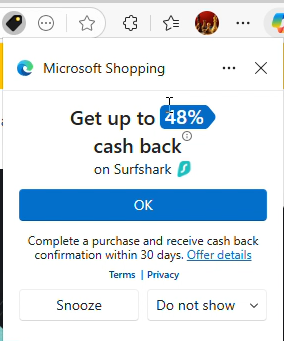
Then Microsoft Shopping popped up its large notification box with a blue button that, when clicked, invokes an affiliate link and sets affiliate cookies.

Edge Shopping pops open its window
From video at 0:08

Notice the sequence: Begin at another publisher’s CJ affiliate link, merchant’s site loads, and Edge Shopping does not stand-down.  This is squarely within the prohibition of CJ’s rules.

Edge sends detailed telemetry from browser to server reporting what it did, and to a large extent why.  Here, Edge simultaneously reports the Surfshark URL (with cjdata=, cjevent=, aff_click_id=, utm_source=cj, and sf_cs=cj parameters each indicating a referral from CJ) (yellow) and also shouldStandDown set to 0 (denoting false/no, i.e. Edge deciding not to stand down) (green).

POST https://www.bing.com/api/shopping/v1/savings/clientRequests/handleRequest HTTP/1.1 
...
{"anid":"","request_body":"{\"serviceName\":\"NotificationTriggering\",\"methodName\":\"SelectNotification\",\"requestBody\":\"{\\\"autoOpenData\\\":{\\\"extractedData\\\":{\\\"paneState\\\":{\\\"copilotVisible\\\":false,\\\"shoppingVisible\\\":false}},\\\"localData\\\":{\\\"isRebatesEnabled\\\":true,\\\"isEdgeProfileRebatesUser\\\":true,\\\"shouldStandDown\\\":0,\\\"lastShownData\\\":null,\\\"domainLevelCooldownData\\\":[],\\\"currentUrl\\\":\\\"https://surfshark.com/?cjdata=MXxOfDB8WXww&cjevent=cb8b45c0cc8e11f0814803900a1eba24&PID=101264606&aff_click_id=cb8b45c0cc8e11f0814803900a1eba24&utm_source=cj&utm_medium=6831850&sf_cs=cj&sf_cm=6831850\\\" ...

With a standard CJ affiliate link, and with multiple references to “cj” right in the URL, I struggle to see why Edge failed to realize this is another affiliate’s referral. If I were writing stand-down code, I would first watch for affiliate links (as in the first screenshot above), but surely I’d also check the landing page URL for significant strings such as source=cj.  Both methods would have called for standing down.

Another notable detail in Edge’s telemetry is that by collecting the exact Surfshark landing page URL, including the PID= parameter (blue), Microsoft receives information about which other publisher’s commission it is taking. Were litigation to require Microsoft to pay damages to the publishers whose commissions it took, these records would give direct evidence about who and how much, without needing to consult affiliate network logs.  This method doesn’t always work—some advertisers track affiliates only through cookies, not URL parameters; others redirect away the URL parameters in a fraction of a second.  But when it works, more than half the time in my experience, it’s delightfully straightforward.

Additional observations

If I observed this problem only once, I might ignore it as an outlier.  But no.  Over the past three weeks, I tested a dozen-plus mainstream merchants from CJ, Rakuten Advertising,  Impact, and Awin, in 25+ test sessions, all with screen recording.  In each test, I began by pasting another publisher’s affiliate link into the Edge address bar.  Time after time, Edge Shopping did not stand-down, and presented its offer despite the other affiliate link.  Usually Edge Shopping’s offer appeared in a popup as shown above.  The main variation was whether this popup appeared immediately upon my arrival at the merchant’s home page (as in the Surfshark example above), versus when I reached the shopping cart (as in the Newegg example below)s.

In a minority of instances, Edge Shopping presented its icon in Edge’s Address Bar rather than opening a popup.  While this is less intrusive than a popup, it still violates the contract provisions (“non-interference”, “may not activate”, “may not operate”, may not “interfere”, all as quoted above).  Turning blue to attract a user’s attention—this invites a user to open Edge Shopping and click its link, causing Microsoft to claim commission that would otherwise flow to another publisher.  That’s exactly what “non-interference” rules out.  “May not operate” means do nothing, not even change appear in the Address Bar. Sidenote: At Awin, uniquely, this seems to be allowed. See Publisher Code of Conduct, Rule 4, guidance 4.2. For Awin merchants, I count a violation only if Edge Shopping auto-opened its popup, not if it merely appeared in the Address Bar.

Historically, some stand-down violations were attributed to tricky redirects.  A publisher might create a redirect link like https://www.nytimes.com/wirecutter/out/link/53437/186063/4/153497/?merchant=Lego which redirects (directly or via additional steps) to an affiliate link and on to the merchant (in this case, Lego).  Historically, some shopping plugins had trouble recognizing an affiliate link when it occurred in the middle of a redirect chain.  This was a genuine concern when first raised twenty-plus years ago (!), when Internet Explorer 6’s API limited how shopping plugins could monitor browser navigation.  Two decades of improvements in browser and plugin architecture, this problem is in the past.  (Plus, for better or worse, the contracts require shopping plugins to get it right—no matter the supposed difficulty.)  Nonetheless, I didn’t want redirects to complicate interpretation of my findings.  So all my tests used the simplest possible approach: Navigate directly to an affiliate link, as shown above.  With redirects ruled out, the conclusion is straightforward: Edge Shopping ignores stand-down even in the most basic conditions.

I mentioned above that I have dozens of examples.  Posting many feels excessive.  But here’s a second, as to Newegg, from testing on December 5, 2025.

Litigation ongoing

Edge’s stand-down violations are particularly important because publishers have pending litigation about Edge claiming commissions that should have flowed to them.  After MegaLag’s famous December 2024 video, publishers filed class action litigation against Honey, Capital One, and Microsoft.  (Links open the respective dockets.)

I have no role in the case against Microsoft and haven’t been in touch with plaintiffs or their lawyers.  If I had been involved, I might have written the complaint and Opposition to Motion to Dismiss differently.  I would certainly have used the term “stand-down” and would have emphasized the governing contracts—facts for some reason missing from plaintiffs’ complaint.

Microsoft’s Motion to Dismiss was fully briefed as of September 2, and the court is likely to issue its decision soon.

Microsoft’s briefing emphasizes that it was the last click in each scenario plaintiffs describe, and claims that last click makes it “entitled to the purchase attribution under last-click attribution.”  Microsoft ignores the stand-down requirements laid out above.  Had Microsoft honored stand-down, it would have opened no popup and presented no affiliate link—so the corresponding publisher would have been the last click, and commission would have flowed as plaintiffs say it should have.

Microsoft then remarks on plaintiffs not showing a “causal chain” from Microsoft Shopping to plaintiffs losing commission, and criticizes plaintiffs’ causal analysis as “too weak.”  Microsoft emphasizes the many uncertainties: customers might not purchase, other shopping plug-ins might take credit, networks might reallocate commission for some other reason.  Here too, Microsoft misses the mark.  Of course the world is complicated, and nothing is guaranteed.  But Microsoft needed only to do what the contracts require: stand-down when another publisher already referred that user in that shopping session.

Later, Microsoft argues that its conduct cannot be tortious interference because plaintiffs did not identify what makes Microsoft’s conduct “improper.”  Let me leave no doubt.  As a publisher participating in affiliate networks, Microsoft was bound by networks’ contracts including the stand-down terms quoted above.  Microsoft dishonored those contracts to its benefit and to publishers’ detriment, contrary to the exact purpose of those provisions and contrary to their plain language.  That is the “improper” behavior which plaintiffs complain about.  In a puzzling twist, Microsoft then argues that it couldn’t “reasonably know[]” about the contracts of affiliate marketing.  But Microsoft didn’t need to know anything difficult or obscure; it just needed to do what it had, through contract, already promised.

Microsoft continues: “In each of Plaintiffs’ examples, a consumer must affirmatively activate Microsoft Shopping and complete a purchase for Microsoft to receive a commission, making Microsoft the rightful commission recipient if it is the last click in that consumer’s purchase journey.”  It is as if Microsoft’s lawyers have never heard of stand-down.  There is nothing “rightful” about Microsoft collecting a commission by presenting its affiliate link in situations prohibited by the governing contracts.

Microsoft might or might not be right that its conduct is acceptable in the abstract.  But the governing contracts plainly rule out Microsoft’s tactics.  In due course maybe plaintiffs will file an amended complaint, and perhaps that will take an approach closer to what I envision.  In any event, whatever the complaint, Microsoft’s motion to dismiss arguments seem to me plainly wrong because Microsoft was required by contract to stand-down—and it provably did not.

***

In June 2025, news coverage remarked on Microsoft removing the coupons feature from Edge (a different shopping feature that recommended discount codes to use at checkout) and hypothesized that this removal was a response to ongoing litigation.  But if Microsoft wanted to reduce its litigation exposure, removing the coupons feature wasn’t the answer.  The basis of litigation isn’t that Microsoft Shopping offers (offered) coupons to users.  The problem is that Microsoft Shopping presents its affiliate link when applicable contracts say it must not.

Catching affiliate abuse

I’ve been testing affiliate abuse since 2004.  From 2004 to 2018, I ran an affiliate fraud consultancy, which caught all manner of abuse—including shopping plugins (what that page calls “loyalty programs”), adware, and cookie-stuffing.  My work in that period included detecting the activity that led to the 2008 litigation civil and criminal charges against Brian Dunning and Shawn Hogan (a fact I can only reveal because an FBI agent’s declaration credited me).  I paused this work from 2018 to 2024, but resumed it this year as Chief Scientist of Visible Performance Technologies, which provides automation to detect stand-down violations, adware, low-intention traffic, and related abuses.  As you’d expect, VPT has long been reporting Edge stand-down violations to clients that contract for monitoring of shopping plugins.

My time from 2018 to 2024, as an employee of Microsoft, is relevant context.  I proposed Bing Cashback and led its product management and business development through launch.  Bing Cashback put affiliate links into Bing search results, letting users earn rebates without resorting to shopping plugins or reminders, and avoiding the policy complexities and contractual restrictions on affiliate software.  Meanwhile, Bing Cashback provided a genuine reason for users to choose Bing over Google.  Several years later, others added cashback to Edge, but I wasn’t involved in that.  Later I helped improve the coupons feature in Edge Shopping.  In this period, I never saw Edge Shopping violate stand-down rules.

I ended work with Bing and Edge in 2022, after which I pursued AI projects until I resigned in 2024.  I don’t have inside knowledge about Edge Shopping stand-down or other aspects of Microsoft Cashback in Edge.  If I had such information, I would not be able to share it.  Fortunately the testing above requires no special information, and anyone with Edge and a screen-recorder can reproduce what I report.

SEC Complaint about AppLovin Nonconsensual Installs

See important disclosures including my related financial interests.

In response to my report of AppLovin installing apps onto users’ devices without consent, Bloomberg published AppLovin Axes Product Tied to Unwanted App Download Allegations.

I filed a complaint with the SEC about what I claim to be material false statements in AppLovin’s remarks to Bloomberg and elsewhere.  Here:

RE: AppLovin false statements about permission to install apps on users’ devices, about reason for discontinuing “Array” installation business – Edelman Complaint to SEC – October 15, 2025
The complaint has three parts.  First, as to the nonconsensual installations.  I proved AppLovin is installing without user consent.  But AppLovin’s CEO wrote in February “Every download results from an explicit user choice.” And AppLovin told Bloomberg today: “Users never get downloads with any of our products without explicitly requesting it.”  Both false.  The difference is fundamental.  If users actually agree to the installations, great, go ahead.  But if, as I say I amply proved, the installations are without user consent, then they are way out of line — outside user expectations, contrary to Google’s security architecture for Android, maybe proper basis for litigation.

How could AppLovin be planning to argue that its installations entail “consent”?  Their best argument — not a very good one — is that users at least tapped ads, and that showed some level of interest.  Two reactions to that.  One, that’s not what users reasonably expect.  An ad tap is not an agreement to install.  On Android, installations require pressing the big blue Install button at Google Play Store, not just a random tap.  Two, AppLovin’s design makes inadvertent ad taps particularly likely.  Most ads have a long delay, then show a small arrow in one corner, which, when tapped, brings a user to a second screen, with a further delay, and then finally an X elsewhere.  If you’ve never had the pleasure of seeing this ad format, count yourself lucky.  It is beyond annoying!  The two waits, and the arrow and X in different corners, make it especially easy to tap accidentally.  Ultimately, tapping an ad just is not consent to install.  Whatever contortions AppLovin’s lawyers and publicists may attempt, users with the slimmest tech experience know the difference

Second, AppLovin today told Bloomberg not just that it had discontinued the Array installation business, and that it did so because that offering “was not economically viable for us.”  But for seven adjacent quarters (latest in August 2025), AppLovin’s SEC filings touted Array as a source of “future growth.”  AppLovin’s CFO in February 2024 cited Array installations for “contributions” to growth.  I say the real reason AppLovin turned off Array isn’t because it’s unprofitable.  It’s because they got caught.

Third, AppLovin told Bloomberg the Array installations were only a “test.”  But Array was available as early as 2023.  Jia-Hong Xu, previously Head of Product for Array, wrote on his LinkedIn page that he led this product beginning in July 2023.  My tabulation of user complaints shows users reporting problems reasonably attributed to AppLovin as early as August 2023.  Reinhold Kesler checked historic AppBrain crawls and found that as of December 2022, 37 apps already had manifest entries that allowed AppLovin’s nonconsensual installs.  A maxim remarks “always be testing”, and that much I agree with.  On some level every decision is a test, always up for reevaluation.  But in calling Array a test, AppLovin wants to claim this is small.  That claim should be supported with real evidence — exactly how many installs, starting on what date, ending on what date, and with what permission?  The one-word label “test” won’t suffice.

***

Publicly-traded firms owe their investors forthright statements about material information.  I say AppLovin fell short, in fact was materially misleading in the statements both in February (on its web site) and today (to Bloomberg).  I look forward to the SEC investigating.

Note: The federal government is currently partially shut down. But the SEC site proclaims: “The SEC has staff available to respond to emergency situations with a focus on the market integrity and investor protection components of our mission.”  My complaint is within that mandate.

Updated October 17 to add Kesler’s finding as to 2022 status and duration of the “test”

AppLovin Nonconsensual Installs

See important disclosures including my related financial interests.

Mobile adtech juggernaut AppLovin recently faced multiple allegations of misconduct.  Allegations run the gamut—privacy, ad targeting, even national security and ties to China.  I was among the researchers consulted by skeptical investors this spring, and I was quoted in one of their reports, explaining my concerns about AppLovin installing other games without user consent.

Today I argue that AppLovin places apps on users’ Android devices without their consent.  As a maxim says, extraordinary claims require extraordinary evidence, but I embrace that high bar.  First, I study AppLovin source code and find that it installs other apps without users being asked to consent.  I use a decompiler to access Java source for AppLovin’s SDK and middleware, plus partners’ install helpers—following the execution path from an ad tap (just clicking an ad, potentially a misclick aiming for a tiny X button, with no Install button even visible on screen) through to an installation.  AppLovin used an obfuscator to conceal most function names and variable names, so the Java code is no easy read.  But with patience, suitable devs can follow the logic.  Usefully, some key steps are in JavaScript—again obfuscated (minified), but readable thanks to a pretty-printer.  I except the relevant parts and explain line by line.

Second, I gather 208 complaints that all say basically the same thing: users are receiving apps in situations where (at a minimum) they don’t think they agreed.  The details of these complaints match what the code indicates: Install helpers (including from Samsung and T-Mobile) perform installs at AppLovin’s direction, causing most users to blame the install helpers (despite their generic names like Content Manager, Device Manager, and AppSelector).  Meanwhile, most complaints report no notification or request for approval prior to install, but others say they got a screen which installed even when they pressed X to decline, and a few report a countdown timer followed by automatic installation.  Beyond prose complaints, a handful of complaints include screenshots, and one has a video.  Wording from the screenshots and video match strings in the code, and users’ reports of auto-installs, X’s, and countdowns similarly match three forks in AppLovin’s code.  Overall, users are furious, finding these installations contrary to both Android security rules and widely-held expectations.

AppLovin CEO Adam Foroughi posted in February 2025 that “Every download results from an explicit user choice—whether via the App Store or our Direct Download experience.”  AppLovin Array Privacy Policy similarly claims that AppLovin “facilitates the on-device installation of mobile apps that you choose to download.”  But did users truly make an “explicit … choice” and “choose to download” these apps?  Complaints indicate that users don’t think they chose to install.  And however AppLovin defends its five-second countdowns, a user’s failure to reject a countdown certainly is not an “explicit” choice to install.  Nor is “InstallOnClose” (a quote from AppLovin’s JavaScript) consistent with widely-held expectations that “X” means no.  Perhaps Foroughi intends to argue that a user “consents” to install any time the user taps an ad, but even that is a tall order.  One, AppLovin’s X’s are unusually tiny, so mis-taps are especially likely.  Two, users expect an actual Install button (not to mention appropriate contract formalities) before an installation occurs; users know that on Android, an arbitrary tap cannot ordinarily install an app.  Ultimately, “explicit user choice” is a high bar, and user complaints show AppLovin is nowhere close.

The role of manufacturers and carriers

Why would Samsung, T-Mobile, and others grant AppLovin the ability to install apps? Two possibilities:

  1. Financial incentives. AppLovin pays manufacturers and carriers for the permissions it seeks. These elevated permissions may be unusual, and the resulting installations are predictably annoying and unwanted for users. But at the right price, some partners may agree.
  2. Scope creep. Public statements indicate manufacturers and carriers authorized AppLovin to perform “out-of-box experience” (OOBE) installs—recommending and installing apps during initial device setup. Install helpers were designed to support this narrow context. But my review of install helper code shows no checks to limit installations to the OOBE window. A simple safeguard—such as rejecting installs more than two hours after first boot—would prevent ongoing installs. By omitting such safeguards, manufacturers and carriers effectively granted AppLovin open-ended install rights, whether or not that was their intent.

So far manufacturers and carriers haven’t said whether they approve what AppLovin is doing.  Journalist Mike Shields asked Samsung, but they declined to comment.  Perhaps my article will prompt them to take another look.

Sources of evidence

Five overlapping categories of evidence offer a mutually-reinforcing picture of nonconsensual installations:

  1. Execution path. Source code extracted from test devices shows how an ad tap leads all the way to an installation, without a user pressing “Install” or similar at a consent screen.
  2. Labels and strings. Code snippets reference installation without a user request or consent.
  3. Permissions. App manifests include nonstandard entries consistent with apps asking AppLovin middleware to install other apps.
  4. User complaints. 208 distinct complaints describe apps being installed while playing games or viewing ads. A few complaints include relevant screenshots and even video of nonconsensual installations.  Complaints, screenshots, and videos match unusual details visible in the code.
  5. AppLovin statements. Public statements use euphemistic or contradictory language about user “choice” and “direct downloads,” suggesting attempts to obscure nonconsensual installs.

I also examine the legal and financial risks associated with nonconsensual installations.

Interpreting AppLovin statements to the public about user “choice” to install

This post is part of AppLovin Nonconsensual Installs. See important disclosures.

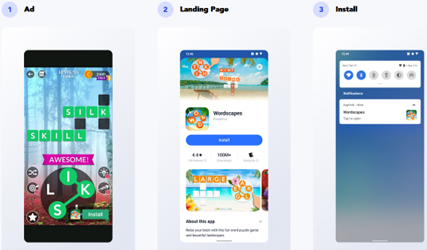
AppLovin’s “Array” page (now removed, but see Archive.org preserved copy) describes “seamless installs” in which “users choose whether to install.”  The page depicts a three-step installation sequence: (1) AppLovin presents an ad, (2) AppLovin presents a landing page with an oversized bold blue “Install” button, and (3) installation is complete.

AppLovin web site shows this three-step install process as an

But AppLovin’s page never promises that this three-step process is always used.  In fact, it labels the screenshots as an “example,” leaving open the possibility that some installations proceed differently.  Could AppLovin sometimes skip the landing page (Step 2)? If so, the process would lack any moment where the user presses “Install” or otherwise agrees to install.

Other AppLovin materials suggest this must happen.  For example, AppLovin AppHub JavaScript settings refer to “Download apps with a single click.”  Since clicking an ad is already one click, a second click on “Install” would make two clicks—not one.  This suggests that in at least some cases, Step 2 is omitted, as confirmed by my code review, which points to an “AutoInstall” path.

Meanwhile, AppLovin makes strong claims that users “choose” to install apps:

How do we reconcile these statements with the “single-click” option, the “AutoInstall” code, and widespread user complaints?  The most plausible interpretation is that AppLovin treats a tap on an ad itself as the user’s “choice” to install—even if the user never presses an Install button.  Most users would disagree: ordinarily, tapping an ad only opens Google Play, where a further click is required.  And because AppLovin’s “x” buttons are small and tucked in the corner, mistaken taps are especially likely.

If we accept AppLovin interpretation of a single ad tap as a user’s authorization to install, then Foroughi’s statement and the Privacy Policy might be literally true, but still highly misleading.

Contradictory statements about the size of the Direct Download business

The Financial Times reports that Applovin says “direct download business was never a major growth revenue driver”:

AppLovin also had a call with sell-side stock analysts on Wednesday, according to a note from Bank of America. In that call, the CEO assured analysts that the direct-download business was “never a major growth revenue driver,” the analysts wrote. They summarised his comments as saying “AppLovin’s [direct download] revenues are de minimis”.

BofA analyst Omar Dessouky told Alphaville that the direct-download business are distinct and totally separate from in-game downloads, and that competitors Digital Turbine and Unity have a big head-start on that business. As for the App Store policies, there seem to be enough complaints about other companies doing it that the practice isn’t being censured (this one, for example, seems to be about Digital Turbine).

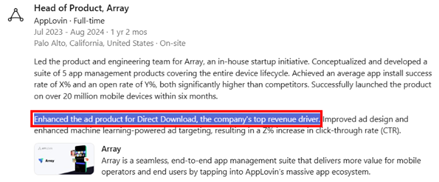
These claims are difficult to reconcile with remarks from ex-employee Jia-Hong Xu, previously Head of Product for AppLovin Array, who wrote on LinkedIn that Direct Download is AppLovin’s “top revenue driver”:

Remarks from ex-employee Jia-Hong Xu, previously Head of Product for AppLovin Array, about the importance of that business

Xu later deleted that remark.  But on his own initiative, or under pressure from AppLovin (after investor Culper Research highlighted the claim in a February 2025 report)?

Legal and Financial Implications of AppLovin Nonconsensual Installations

This post is part of AppLovin Nonconsensual Installs. See important disclosures.

It is extraordinarily rare for a company of AppLovin’s size to be caught placing software on users’ devices without their consent. The closest parallel is the 2005 revelation of Sony installing DRM software onto users’ computers without notice, without a EULA, and even when users pressed Cancel. That misconduct triggered enforcement by multiple state attorneys general, private lawsuits, seven-figure settlements, recall of affected CDs, and lasting reputational damage for Sony.

A similar trajectory is plausible for AppLovin. If others come to share my view that AppLovin installed apps without user permission, the company will be a pariah in online advertising. Trust in AppLovin’s auctions, privacy practices, and overall integrity would collapse. Some advertisers currently pay AppLovin both to sell them ad placements and to measure the effectiveness of those ads—which would suddenly seem ill-advised. Allegations in investors’ spring 2025 critiques—previously dismissed as speculation—would become more credible. If critics were right about AppLovin’s install practices, allegations about misbehavior in ad targeting, bid handling, and auction integrity are plausible too.

Google may also react strongly. AppLovin’s tactics circumvent Android security and Play Store protections—similar to other abuses Google previously punished (e.g. its 2018 removal of Cheetah Mobile apps). Google could respond by disabling or removing apps that connect to AppHub, by disabling or removing apps that were installed by AppHub, or by alerting users. Imagine a pop-up: “Your carrier preloaded your device with an install helper that lets third parties install apps without your consent. Google has detected 7 such apps on your device. Would you like to disable the helper and remove those apps?” The impact on AppLovin would be severe.  In fact user complaints specifically ask Google to take action: “I believe this is illegal and am going to report it to Google as well.” (Rachel H), “This is nefarious and should be deplatformed by Google” (Colleen Ember), “Google needs to know about this” (Johnson David), “This should be banned from the Google Play store!” (Philip Mecham). With AppLovin intruding onto users’ devices—not “just” draining advertisers’ budgets—there is a strong case for Google to act.

Reading a draft of this article, some people asked about the revenue and profit implications.  Rough calculations say the numbers are material:

  • Android holds >70% global market share, but high-value users skew toward iPhone. Suppose Android accounts for ~40% of value-weighted usage.
  • Of Android devices, AppLovin’s manufacturer and carrier deals may cover ~40%, giving ~16% of devices where installs could occur without consent.
  • AppLovin claims an audience >1 billion devices. If AppLovin placed just two unwanted apps on each device each year, that would be ~300 million installs per year.
  • At $1 per install (a fraction of AppLovin’s estimated average), that’s $300 million of revenue annually. With no payment to carriers, manufactures, or source apps, this revenue drops straight to the bottom line, yielding about 20% of AppLovin’s 2024 net profit.

The true impact could be larger. Legal fees, settlements, and regulatory penalties will weigh on earnings. Distrust among advertisers and partners could impede future business. Device manufacturers and carriers may have been prepared to look the other way, but are unlikely to let AppLovin continue once these problems come to the fore. And if Google disables AppHub or warns users, AppLovin risks losing not just future revenue but also its installed base.

Trust, once broken, can disappear overnight.

Voluminous user complaints match key details from AppLovin code analysis

This post is part of AppLovin Nonconsensual Installs. See important disclosures.

I gathered 208 distinct complaints centered around the same problem: while a user played one game, another game was installed without consent. Representative examples:

  • “Instead of giving people the option to download the games when tapping on advertisements, the games automatically download to the device when the ads are tapped.” (PanPizz, October 31, 2023, emphasis added)
  • “I was watching ads on the webtoons app and it seems that rather than prompting a download through the play store. The advertisements for wordscape and tower war are basically auto downloading themselves to my phone. (Merlin2v, January 23, 2024, emphasis added)
  • whenever I get an advertisement on IbisPaint, that app automatically downloads onto my phone” (BlackberriedGoat, September 4, 2023, emphasis added)
  • Ads that download an app on to my device if I click anywhere” (Some1withguns, January 3, 2024, emphasis added)
  • you click anywhere and it automatically installs, doesn’t go through Google Play” (Punkminkis, January 5, 2024, emphasis added)
  • “I accidentally click on an ad when trying to click the x or skip button and the next thing I know I’m getting a notification that says tap to launch game.” (Disastrous-Jury4328, January 16, 2024, emphasis added)
  • “Multiple times after watching an ad in Hero wars: Alliance I’ve found a new game installed on my phone when I DID NOT touch anything to download and install.” (GreggAlan, March 16, 2024, emphasis added)
  • “Accidentally touch the screen during ad play and the game being advertised will be automatically installed without your consent.” (Lukas Landing, December 19, 2023, emphasis added)
  • “Optional ads also install other games WITHOUT PERMISSION. I’ve had to uninstall spam games over and over.” (Graham Curnew, August 9, 2024, emphasis added)
  • “Three times now I’ve gotten that ad for Tower War and any 30 seconds after the ad is over I get a push notification that Tower War has finished installing and is ready to play.” (JetJaguardYouthClub, August 24, 2023, emphasis added)

Some complaints specifically attribute unwanted installations to AppLovin or AppHub:

Others users attribute the installs to install helpers such as Content Manager, Device Manager, or AppSelector that device manufacturers and carriers allow AppLovin to use for installs.  (Details from code analysis.)  It is logical that users attribute the installations to install helpers.  For one, Android notifications routinely announce that an app has been installed, and give the name of the responsible install helper.  Two, if a user checks Android Settings > Apps, the section “App details”  will reference the name of the install helper.  Three, the app that triggers the install helper is present neither in the notification nor in Settings > Apps > … > App details, making it less likely that users will reference AppHub except on those devices where AppHub itself has installation permissions and does not use a separate install helper.

Credibility of user complaints

The user complaints are credible based on both consistency and level of detail. A few users might be mistaken—for example, by tapping “install” and later forgetting.  But the volume and similarity of complaints, from hundreds of independent users, reveals a broader pattern.

More than merely discuss unwanted installations, many of the complaints give details consistent with my code analysis.  For example, users overwhelmingly report that installations occur when they receive ads (see the top bulleted list above), which exactly matches what my code analysis indicates.

Some complaints address alternative explanations such as a user accidentally approving an installation.  Complaints deny that with specific details that make their denials credible:

  • “Happened to me with royal match. I clicked the x. Yet it downloaded the game. Yes I would know if I clicked install or not.” (Sunfish1988, February 13, 2024, emphasis added)
  • “I sorted thru my apps shortly before downloading Wordscapes last month, so I know I had no unwanted games on my phone at that time. Since then I’ve deleted 4 new games that I did not consent to download or even realize were downloaded.” (Jadiegirl, January 24, 2024, emphasis added)
  • “I noticed that whenever the game had a trial and I touched the screen it would slash to the screen that looked like Google Play and the Install Button would have the word “Cancel” on it as though I’d initiated the download (which I didn’t).” (Thotiana777, April 25, 2024, emphasis added)
  • “the ads for other games are very predatory and self install without permission if you miss the ‘x’ to close them by a milimeter” (Thin Richard, April 23, 2025, emphasis added)

Complaint with screenshot attributing installations to AppHub

A few complaints are include screenshots showing the problem.  For example, Reddit user Guilty_Astronaut5344 preserved a post-install notification attributing three unwanted installs to AppHub.

Android notifications shown after an AppLovin AppHub install

Complaints reporting countdown timer, and showing the countdown in video and screenshot

Other complaints are particularly credible because they match even more specific details from the AppLovin code.  For example, three users reported countdowns leading to automatic install:

  • “Just today I’ve seen them implement a 5-second “countdown” to the program installing the game, but stopping the countdown STILL INSTALLS THE GAME WITHOUT YOUR CONSENT.” (PanPizz, October 31, 2023)
  • “I’ve come across some really shitty ad tactics that will auto install the app they’re pushing if you click anywhere on the screen before the timeout. Even if you just back out, if you don’t actually hit cancel install then you’ll get some stupid questionable games installed …” (dontthink19, January 7, 2024)
  • “Mobile game ads can now just install themselves without you tapping Install, wish is now replaced by ‘Install now’ if you want the game 5 seconds sooner. Hitting the X instead of Cancel still installs the game” (nascarsteve, December 10, 2023)

Not only does the general concept of a countdown-to-install match what I found in AppLovin code, the first and third comments also mention the duration of the countdown, from 5 seconds.  This matches the “AutoInstallDelay” default countdown duration listed in AppLovin code.  (The code sets a duration of 5e3, meaning 5×103=5000 milliseconds, matching the complaints.)  Remarkably, user dontthink19 faced the countdown-to-install ads often enough, and predictably enough, that he was able to capture one such installation on video – showing an ad, then the countdown to install, then the app installed, then him uninstalling it, all in a single continuous video file.  Key screenshots from dontthink19’s video:

Start of advertisement promoting Weapon Master
0:03 Start of advertisement promoting Weapon Master
Conclusion of advertisement promoting Weapon Master
0:19 Conclusion of advertisement promoting Weapon Master
0:20 “X Install Screen” for Weapon Master, which opened automatically, and says it will “Install in 5s”
0:31 Confirmation of Weapon Master installed.  Small text at center reads “Weapon Master” “Tap now here to launch!”
0:39 Weapon Master is indeed installed, albeit available for uninstall

The countdown videos and screenshots also match yet other details from AppLovin code.  In the countdown-to-install screen, notice the unusual label “Install in 5s” (using the abbreviation “s” for seconds, with no space between the number and the letter s).  This exactly matches the pattern in AppLovin code I found—further confirming that AppLovin is responsible for this installation.

Complaints about installation upon clicking x

Numerous users report that clicking an x, or trying to click an x, nonetheless causes an app to install.  Combining source code and user complaints, two types of complaints are at risk of being combined:

  1. Users who clicked (or tried to click) an x on an ad, which was counted as a tap which then prompted an automatic immediate install (via the isAutoInstall pathway in the JavaScript logic).
  2. Users who received what I call the X Install Screen (step 3 in the Weapon Master sequence above), and who tapped the X in that screen (which is an installation pathway in the IsOneClickInstallOnCloseEnabled JavaScript logic).

For many complaints, it is difficult to tell whether the user faced problem 1 versus problem 2.  But for the following complaints, the complaint indicates that the problem was the second – consistent with what the IsOneClickInstallOnCloseEnabled JavaScript code indicates about installation logic.

  • “Mobile game ads can now just install themselves without you tapping Install, wish is now replaced by ‘Install now’ if you want the game 5 seconds sooner. Hitting the X instead of Cancel still installs the game” (nascarstevebob – December 10, 2023, emphasis added)
  • Even if you just back out, if you don’t actually hit cancel install then you’ll get some stupid questionable games installed …” (dontthink19, January 7, 2024, emphasis added)
  • “It definitely auto-installs. I’ve tested it because I was wondering where tf all these random shitty game apps were coming from in my phone. I don’t click anything, and if you don’t select “cancel” when it starts installing, the game will install. If you try to exit out, it does not count and will still install the game.” ([deleted] – January 22, 2024, emphasis added)

Many others, such as the following, could be either type 1 or type 2 above—but either way, indicate users’ dissatisfaction at installations occurring when users try to exit and decline.

Scores of similar complaints

The following list presents 208 relevant complaints from Play Store, Reddit, and other online discussions. Some complaints are excerpted to the relevant section, but spelling and punctuation are unchanged.

william huynh – August 26, 2025 – Google Play

installed game on my phone without permission

Jim M – August 5, 2025 – Google Play

UPDATE! SOME OF THE ADS IN THIS GAME INSTANTLY SIDE LOAD AND INSTALL APPS BYPASSING THE GOOGLE PLAY STORE!!!!

SkepticalShrink – June 19, 2025 – Reddit

I had this problem too and managed to Google some suggestions that seem to have prevented this from happening again. I don’t recall the instructions exactly but the short version is that my phone manufacturer (in my case, Motorola) had some pre-installed app(s) that allow auto installation from ads. I couldn’t uninstall the apps but I disabled all the suspicious ones/likely suspects based on my Google-fu, and that seems to have done the trick.

hewill09 – June 18, 2025 – Reddit

I was playing a game when an ad popped up and it showed one of those scam “free” money ads and it somehow installed itself without me pressing anything. I didnt accidentally click on the ad or anything, it just automatically installed when the ad started playing.

isssma – June 18, 2025 – Reddit

I’ve had that happen and I’m sure I didn’t install it by mistake. I checked the app that installed the adware and it was my Telco provider app that installed the ads, and they installed all at the same time, it’s annoying as shit.

Player – June 18, 2025 – Reddit

Xiaomi and Huawei seems to do that nowdays, it makes me so mad that they can do whatever they want with “MY” phone.

OlorX1 – June 18, 2025 – Reddit

Yeah, I have a few ads of few apps that install automatically, so annoying

Big-Understanding-30 – June 18, 2025 – Reddit

I’ve seen this happen on Oppo and Oneplus phones

E_Farseer – June 11, 2025 – Reddit

I just found this game on my phone and have no idea how it got there. Googled it and found this post. So it’s still happening. What the f***.

Pomonian – May 25, 2025 – Reddit

Galaxy S20FE from Tmo. It somehow installed apps from AppHub. How do I access AppHub to remove unwanted apps?

Thin Richard – April 23, 2025 – Google Play

the ads for other games are very predatory and self install without permission if you miss the ‘x’ to close them by a milimeter

Wade Goodman – April 16, 2025 – Google Play

I really loved the game, it just kept installing other games without permission. I had to uninstall it.

[deleted] – April 8, 2025 – Reddit

I was having the similar problem with ads showing Klondike Farm Adventures. Without even touching the screen it would automatically download and it was downloading not through Google Play Store but through Samsung game store.

Autumn Again – March 18, 2025 – Google Play

This game (or its ads) can illegally download and install games onto your device without your consent or knowledge. These games (all from different developers) suddenly appear on my phone on the very last screen. They’re nothing I’d ever play. I’ve never even heard of “Tiledom” or “2248 Numbers Merge,” by Funvent Studios or Play Simple Games. This is the 3rd time this game has done this. I don’t know how, but I’m sure it’s this game.

Earwax – March 15, 2025 – Google Play

thos game appeared in an add on a game. I exited the add 3 times in 30 seconds only to find the game had installed it’s self on my device. not happy

Bone_Anger – March 5, 2025 – Reddit

Recent update just pumped it onto my phone and without me allowing it, it’s going through and installing dozens of pos mobile games. It’s invisible to the user and cannot be disabled or uninstalled.

David Adams – February 5, 2025 – Google Play

The ads automatically open browser tabs and install apps without your consent or authorization.

[deleted] – February 4, 2025 – Reddit

the app installs from an ad that randomly plays in other video games. You don’t have to touch the screen. The ad plays and downloads itself.

Suz Anne – January 18, 2025 – Google Play

Ads pop up and install games without being prompted. Pop up ads are frustrating. They open without being clicked and navigate away from the game. Sometimes installing new games without being prompted…very frustrating

Holiday-Temporary507 – January 15, 2025 – Reddit

My phone just started installing random apps to my secure folder. It is called ‘AppHub’ but I can not see the any app called ‘AppHub’ both main stetting -> App and secure folder setting app. Do anyone facing the same problem? I m sure these app were malicious and asked the root permission :/

PanPizzTemporary507 – January 15, 2025 – Reddit

My phone just started installing random apps to my secure folder. It is called ‘AppHub’ but I can not see the any app called ‘AppHub’ both main setting -> App and secure folder setting app.

Sakaixjin – October 31, 2024 – Reddit

Just happened to me with Warhammer Tacticus. I did not install it myself and I just googled the issue and got to this post, wow.

Ishmael – October 28, 2024 – Google Play

It installs other apps from the ads it shows you. AUTOMATICALLY WITHOUT MY PERMISSION!

Note: Game developer did not deny forced installations: “Hey! We’re not huge fans of ads either, but we can’t keep our game free without them. They help us develop new features, maintain the app, and release updates. We’d love it if you changed your mind. Come back soon!”

Pistol – October 18, 2024 – Google Play

Infested with ads and even forced an app install away from google play store, uninstalling this malware

-GTC- – September 17, 2024 – Reddit

Wrong. It definitely auto-installs. The little “X” pops up, but when you click it – you just clicked on the ad (NOT an “install” button) and it installs. I’ve just now had to uninstall two crappy games from my phone, Merge Mansion and some other crap. This is infuriating and should not be legal as it is bypassing my security settings and installing things without my permission.

D berry – September 11, 2024 – Google Play

Your ads are auto installing apps in the background… You stopped it for a while now it started again. This needs to stop!!! update, ads are getting worse.. false X seem to be the standard..

Michelle Clarkson – September 10, 2024 – Google Play

STOP AUTOINSTALLING ON DEVICES! IT HAS DOWNLOADED WITHOUT MY INPUT 7 TIMES TOO MANY NOW! STOP IT! I WILL NEVER DOWNLOAF BECAUSE OF THIS!

Ed L – September 3, 2024 – Google Play

BEWARE OF OTHER APPS BEING INSTALLED WITHOUT YOUR PERMISSION… written by people who use full screen ads to install various other apps [MOB CONTROL game app] ****** when you try to click the [x] button to close the pop up ad it vanishes (w/ split second timing) and is replaced by an OK button

Ani Cz – August 15, 2024 – Google Play

i keep getting ads for this game with a fake x. When i click the x, it automatically installs this game without my permission. I’ve had to uninstal it 5 times now

Franco Hernandez – August 10, 2024 – Google Play

Caution: this game’s ads will automatically download games without your permission. It did this to me with 4 apps that played as ads. I had to manually go in and uninstall.

Graham Curnew – August 9, 2024 – Google Play

Optional ads also install other games WITHOUT PERMISSION. I’ve had to uninstall spam games over and over.

Anıl Avcı – August 9, 2024 – Google Play

somehow the games in the ads install themselves. When I try to click on “x” to close the add, it connects to a website or play store and even before I can close them, voila, those games are installed on your phone. Be very careful!!

Manniaks – August 6, 2024 – Google Play

1 star for automatic installation without ever hitting an install button.

Dustin Kortz – July 30, 2024 – Google Play

Ads constantly which some try to download games automatically

Doom Clasher – July 3, 2024 – Google Play

Partnered with AppLovin, which if you misclick on their ads it automatically installs the game for you unless you notice and manually stop it, inflating their download count. I did not knowingly download this “game.” I did not click “install.” How is this even legal?

J K – July 1, 2024 – Google Play

This has gone downhill. Now runs ads for apps and then automatically installs that app on my phone. Deleted

edward vincent ancheta – June 26, 2024 – Google Play

i dont like this app auto-installing another app

Nunya B. Znis – June 24, 2024 – Google Play

Way too many adds. Worse adds that self-install games.

Hunter Steiner – June 24, 2024 – Google Play

Forced install from an ad

JP Ski – June 21, 2024 – Google Play

Careful with this game. If you even try to stop an ad between gameplay, it will automatically install other games on your phone without asking. I had about a dozen games in my phone without even realizing it. I uninstalled those as well as this game. Never again.

Wonderful_Cable_6774 – June 9, 2024 – Reddit

I get this a lot. If I don’t click anything, the app installs itself on my phone. If I click the ‘x’, the app auto installs on my phone. The only way I can make it stop is to press the cancel button.

Garrett Southmayd – June 5, 2024 – Google Play

THIS APP FORCE INSTALLS GAMES IT ADVERTISES. WILL BE REPORTED.

Devin Datus – May 27, 2024 – Google Play

Has auto installed 6 apps on my phone in 1 hour today. Some ads have forced installation of other apps during ads.

Waqar Hassan – May 17, 2024 – Google Play

this application have so much control on device that it automatically installs other games on device without permission. This is sheer violation of privacy and recommended not to be installed.

J P – May 13, 2024 – Google Play

This app has installed itself on my phone twice now through an ad during another game.

Stephen Mckelroy – May 12, 2024 – Google Play

Forced install from an ad, so for me, bad game if you have to sneak your game on my phone your a bad game

Terrence Foley – May 2, 2024 – Google Play

BEWARE!! INSTALLS APPS WITHOUT PERMISSION FROM ADS!!!!

Terabyte950 – April 26, 2024 – T-Mobile Community

Help! Device Manager is auto-iinstalling apps from ads. Some games from google play have ads that auto download applications. I traced it back toT-Mobile’s Device Manager allowing malicious ads to auto install applications. That’s right, just watching the ad downloads an app. T-mobile has made it impossible to disable this app. I am fearful of this massive security hole. I am scared of malicious apps being downloaded. I have seen other complaints over the last few months. What can I do fix this major security hole? … All I know is that the malware ads come from something called applovin. … It is just too much of a security risk that that T-Mobile has created with their Device Manager allowing allowing 3rd parties to automatically download and install of potential malware.

Thotiana777 – April 25, 2024 – Reddit

Then I noticed that whenever the game had a trial and I touched the screen it would slash to the screen that looked like Google Play and the Install Button would have the word “Cancel” on it as though I’d initiated the download (which I didn’t). When I tried to hit cancel it would go back to the trial play thing and back and forth until I just X’ed out of it.

Extension_Repair1349 – April 21, 2024 – Reddit

I removed app hub .  It seemed to use that in my T-Mobile TCL phone

Daniel House – April 17, 2024 – Google Play

They utilize ads in other games to AUTOMATICALLY INSTALL this trash on your phone. Absolute slimiest tactic to get me to play your garbage game I’ve ever seen.

A Google User – April 15, 2024 – Google Play

If you accidentally touch an ad, it automatically installs an app on your phone.

Note: Game developer did not deny forced installations: “Thank you for reporting this problem with our tower war tactical game. We will try to fix it as soon as possible so that you can continue to enjoy it.”

James Spencer – April 14, 2024 – Google Play

Be prepared for ads that try to force install

ZiggyReadz – April 12, 2024 – Reddit

I can’t leave reviews of the apps that are auto download in fact when I look at app info they say the apps are downloaded by device manager and not google play.

Skybreak – April 6, 2024 – Reddit

I found an app called Content Manager on my Samsung S24 that I bought through T-Mobile. There was an option there that says “Allow Install of New Apps” and I turned it off, and the ad installs stopped. I think it’s seriously f-ed up that things like this are allowed.

Sly Noodle – March 30, 2024 – Google Play

I am terribly unhappy with ads that install things without my permission. Makes me never use the apps that the ads install. Do better.

Ethan – March 29, 2024 – Google Play

I accidentally downloaded this just by clicking on an AD. JUST BY CLICKING ON IT. Not to be confused with accidentally pressing the download button on the AD. These advertisements are getting scummier and shadier by the day. What’s next? Are you going to turn wordscapes into a self reinstalling virus? We live in the lamest dystopia possible.

Bigchriswolf – March 28, 2024 – Reddit

This happened to me with talkie and wordscapes and I feel like this is illegal but I will look into the laws of this

Rachel H – March 26, 2024 – Google Play

I watched an ad for Wordscapes for a different game I play and they INSTALLED this app WITHOUT my PERMISSION!! I didn’t click on anything and even if I accidentally did (I didn’t), Wordscapes doesn’t have the right to download their app onto my phone without my permission!!! I believe this is illegal and am going to report it to Google as well. **I deleted it when I saw it was downloaded onto my phone, but had to reinstall it to make this review**

leonardo buzzard – March 18, 2024 – Google Play

Tempted to sue the developers since it automatically installed itself onto my device for simply not closing an ad

Eagermcbeaverii – March 17, 2024 – Reddit

This happened to me today!!!! No idea how to stop it but I will no longer watch ads to get an extra chapter.

GreggAlan – March 16, 2024 – Reddit

Multiple times after watching an ad in Hero wars: Alliance I’ve found a new game installed on my phone when I DID NOT touch anything to download and install.

Rotheer – March 15, 2024 – Reddit

It’s been happening to me constantly and I’m so tired of it. Can’t figure out how to kill that function or at least make the damn thing wait for a prompt so I can say no. I’m on a Samsung Android with all of my security settings as recommended (apps only from Play or Samsung Store, ask permission before downloading or updating apps on any network, etc.). I’ve filed a few customer support requests with Snowprint, who have always been helpful and offer apologies but don’t seem to have solved the issue. Block Blast, Merge Mansion, Overmortal, Wordscapes… The list goes on.

Sarah – March 15, 2024 – Google Play

your ad decided to install it onto my phone automatically

Abysmal Entropy – March 12, 2024 – Google Play

It’s not coool, nor should it be legal for your ads to automatically install games on my phone.

Note: Game developer did not deny forced installations: “Thank you for reporting this problem with our tower war tactical game. We will try to fix it as soon as possible so that you can continue to enjoy it.”

Kevin Carrithers – March 11, 2024 – Google Play

seems to force install from their ads

Luke Williams – September 17, 2024 – Google Play

They run adds on other games, you click to close out the automatic install, surprise you’ve downloaded the game for the 59th time!

LibertyR1sk – March 1, 2024 – Reddit

I freaking hate this BS. I have searched every setting possible and can not figure out how to turn it off or prevent it. I have noticed that it only does it through Galaxy Store. Not Play. If anyone has figured out how to stop it, lmk.

James McIntyre – February 27, 2024 – Google Play

ads auto download and install on your device. Could not find a way to stop auto downloads from ads.

Kyle Dozier – February 26, 2024 – Google Play

Auto installs apps from ads. I was fine with the ads but now they’re auto installing the games? No thanks.

Jays24u – February 24, 2024 – Android Central Forums

I need to figure out how to stop from apphub, I don’t even know where that came from, it must be something hidden

Gavin Hayes – February 17, 2024 – Google Play

An ad played for this game and without any input on my end, INSTALLED ITSELF ON MY PHONE. This is ridiculous how dare you install your product on my phone without my permission. The ad played. I did not touch it didn’t even touch my phone screen and still it’s on my phone. This is neither legal nor ethical and it is extremely concerning as to what this game is. If this happens again I will be seeking legal action against your company. Absolutely ridiculous.

Jerri Tanner – September 7, 2024 – Google Play

It’s also VERY INVASIVE because it auto installs during ads while playing other games.

David Gunter – February 15, 2024 – Google Play

This app installs other apps in the background while you play.

Sunfish1988 – February 13, 2024 – Reddit

Happened to me with royal match. I clicked the x. Yet it downloaded the game. Yes I would know if I clicked install or not.

Jon B – February 13, 2024 – Google Play

horrible installed automatically through an ad, will be reporting to the BBB

Colleen Ruggelo-Sage – February 10, 2024 – Google Play

it started running ads that automatically downloaded apps onto my phone without permission – like Fishdom

Wolfie a – February 9, 2024 – Google Play

Their ad keeps auto installing the game on my phone. I’ve had to uninxstall it 3 times now…

L S – February 7, 2024 – Google Play

I get this app as an ad, and when I try to close the ad and I fail, it doesn’t just take me to the play store to download it, it actually force installs on my phone without me giving permission to download app or install. I don’t like the fact this app is force installing on my phone from ads and not from the play store. I would give this game a try if it didn’t force me to install it and actually gave me a choice instead. Absolutely unacceptable, acting like a virus rather than an app.

Brian Copeland – February 7, 2024 – Google Play

One of many games that have taken the ad program where it will install itself on your device when you close the ad. If it weren’t for that it would be a good game. But just auto installing itself on your device is something that defines what a Virus is.

Marcia Suhoversnik – February 5, 2024 – Google Play

Hate aps that force other game installs

Sivanesan Vetrivelan – February 4, 2024 – Google Play

if you like watching ADS install this game

Steve Jaeger – February 4, 2024 – Google Play

Scumbags! This game has self-installed twice now in ads from other games.

Colleen Ember – September 2, 2024 – Google Play

This ap has installed itself without my permission after seeing an ad in another game. This is nefarious and should be deplatformed by Google for this behavior.

Fake_ Justinscarred – August 21, 2024 – Google Play

The sneaky scheme of installing an app just because your commercial played on my phone was inappropriate!

Eric Reed – January 30, 2024 – Google Play

An ad for this game autoinstalled the game on my phone

cc – January 30, 2024 – Google Play

thank you for forcefully installing on my phone after accidentally clicking on an ad but nowhere near the actual install button on said ad.

DcGamer – January 26, 2024 – Google Play

Stealth installed itself onto my phone from an ad. Not cool

noxvita83 – January 25, 2024 – Google Play

Installed without my consent. It was installed during an ad from another app with no way to cancel or even see it installing. I didn’t even notice until my phone said, “Moving to game hub.” If their ads install the app without consent, what else will this completely untrustworthy company will install while app is installed? No thank you.

Jadiegirl – January 24, 2024 – Reddit

YES. I sorted thru my apps shortly before downloading Wordscapes last month, so I know I had no unwanted games on my phone at that time. Since then I’ve deleted 4 new games that I did not consent to download or even realize were downloaded. Very sketchy. I’ll be watching my apps closely from now on. I obviously like Wordscapes, but if this continues to happen, I’ll probably delete it.

Lisa – January 23, 2024 – Google Play

Disappointed has started those auto install adds where it starts installing and you have to cancel and ended up with 2 unwanted games so just Uninstalled this app after playing for a long time.

Lisa – January 23, 2024 – Google Play

Disappointed has started those auto install adds where it starts installing and you have to cancel and ended up with 2 unwanted games

Merlin2v – January 23, 2024 – Reddit

Hello, so I was watching ads on the webtoons app and it seems that rather than prompting a download through the play store. The advertisements for wordscape and tower war are basically auto downloading themselves to my phone. When I checked to see what store installed it, it says it was installed by Device manager.

Siegel – January 23, 2024 – Reddit

Does anyone else seem to have apps downloaded to their device after playing Wordscapes? I seem to have some of the apps on my phone now that appear in the ads, but did not download them.

Puzzled-Mess6705 – January 23, 2024 – Reddit

Noticed that, too. it’s very annoying to uninstall some random apps after accidentally tapping or missing the x. I’m watching fewer ads now.

rashida jones – August 19, 2024 – Google Play

I was watching a and it just installed

Michelle Chang – January 19, 2024 – Google Play

I keep getting an ad for this game in my other apps. The ad will AUTOMATICALLY install this app. Please STOP!!!

Disastrous-Jury4328 – January 16, 2024 – Reddit

It happens to me on the mobile games I play. I accidentally click on an ad when trying to click the x or skip button and the next thing I know I’m getting a notification that says tap to launch game. I get it so many times with fishdom and I just got it with tile match.

Connor G – January 15, 2024 – Google Play

Game ads force you to install their game.

marijean conci – January 15, 2024 – Google Play

This game automatically installs games shown through the ads! Unacceptable!!!

EllJay Sr. – January 15, 2024 – Google Play

WARNING THIS APP IS MALWARE IT AUTO-INSTALLED ON MY DEVICE THEY USE A SPECIFIC AD THAT AUTO-INSTALLS ON YOUR DEVICE IT IS NOT AN ACCIDENT AVOID THIS APP

Charles Downs – January 11, 2024 – Google Play

The app installed itself from an advertisement without me clicking on the install button at all.

Warren McDonald – January 10, 2024 – Google Play

The advertisements secretly install to device during breaks. Had to uninstall approximately 7-10 apps all from the advertisements during the breaks.

dontthink19 – January 7, 2024 – Reddit

I’ve come across some really shitty ad tactics that will auto install the app they’re pushing if you click anywhere on the screen before the timeout. Even if you just back out, if you don’t actually hit cancel install then you’ll get some stupid questionable games installed … It’s happened to me 3 times now. I’m looking for new games to play and when ads are served in that manner, I’ve had to go back and uninstall them. They don’t magically install themselves. You misclick on the ad and it opens up to a timer you have to cancel or it’ll get installed

Note: With video at https://imgur.com/a/YzXCWzV showing 5-second countdown followed by auto-install. Countdown narrative and 5 second threshold match AutoInstallDelay in code.

Anthony Bille – January 7, 2024 – Google Play

INTRUSIVE!!!! Forcing you to watch an ad and then forcing you to install said game while doing it sneakily is terrible.

Mike Chech – January 7, 2024 – Google Play

This game contains misleading ads that automatically install apps.

Competitive_Swan_805 – January 6, 2024 – Reddit

I’ve been seeing this too.. I’m considering deleting the app. This is malware level of intrusion.

Joe M – January 6, 2024 – Google Play

Game is decent. However, last night one of the adds turned out to be self installing malware. It took me 20 mins to remove the malware and everything it installed.

Punkminkis – January 5, 2024 – Reddit

I’ve seen the ads OP is talking about. It’s got a quick download or something, you click anywhere and it automatically installs, doesn’t go through Google Play.

Bee Dub – January 5, 2024 – Google Play

it installed one of the ad “games” on my device without my knowledge simply because i didnt accurately click the tiny little x hidden in the top right

SCP RAZ0R1O1 – January 5, 2024 – Google Play

One of your ads was installing this game without my permission, and when it was done, it booted up in front of my phone game. Stop doing this. This is outrightfully idiotic.

Dina Washington – January 4, 2024 – Google Play

I’ve had to uninxstall this game many times because it keeps automatically installing when the ad runs

Some1withguns – January 3, 2024 – Reddit

Ads that download an app on to my device if I click anywhere are offensive and dangerous. Having 30+ second, phased, unskippable ads, that download apps on to my device is downright insulting.

Eneshi2071 – January 3, 2024 – Google Play

Accidentally missed the “X” button to close the ad by nanometers, app IMMEDIATELY installed to my phone.

Precious J – January 3, 2024 – Google Play

Wordscapes currently has an AD going around on other apps that will FORCE INSTALL THE GAME DURING THE AD AND IT CANNOT BE CANCELLED. These predatory ADs were found in a game called Water Sort. Wordscapes forced installed their app on my device without permission multiple times and they should be FINED.

NotDcman – January 2, 2024 – Google Play

I was playing another game and this ad showed up i tried to click the x it took me to the download and started it automatically I then hit cancel thinking nothing of it then later check my phone and it was installed against my consent

Glysterine – January 1, 2024 – Reddit

I’ve had this happen to me with the tower war playable ad about a dozen times. They updated their ad a couple weeks ago and it stopped, but a couple days ago they changed the ad back and it is happening again.

KC Penwell – January 1, 2024 – Google Play

Constantly installed new games without my permission

Trai S – December 30, 2023 – Google Play

They use forced installs where if you accidentally touch the ad the game installs. Shady tactics refuse to even try the game

Trai S – December 30, 2023 – Google Play

They use forced installs where if you accidentally touch the ad the game installs.

Jesse R – December 29, 2023 – Google Play

This game automatically installed on my phone after an ad I got from another game

Nic Rodriguez – December 29, 2023 – Google Play

Automatic click and install from an ad.

Jakob Vetter – December 28, 2023 – Google Play

Has ads that auto install.

Kai Jamison – December 26, 2023 – Google Play

an ad for this game bypassed the play store and automatically installed the game

Nina Blalack – December 25, 2023 – Google Play

Installed itself. While playing a different game, I got an ad for this game and thought I closed it. A couple minutes later I got a notification that it was done installing.

Rose (Rose) – December 24, 2023 – Google Play

LITERALLY ACCIDENTALLY CLICKED ON A AD FOR THIS GAME WHILE PLAYING BITLIFE AND IT INSTALLED ITSELF. THIS IS THE WORST GAME EVER. FIX YOUR ADVERTISING.

Dredjir Pariah – August 18, 2024 – Google Play

I got an ad for it and then a long lasting black screen with an install button. The x mark is so small that you are likely to miss it. Turns out the WHOLE SCREEN is an install button and it automatically installs, even if you hit cancel. Very shady.

Fadelsart – December 23, 2023 – Reddit

Try deleting the app “apphub” (i had to search it in the settings of the phone to actually find the app) I noticed a notification saying it automatically downloaded apps (this was a notification from the phone itself on the day of purchase) and saw this “apphub” app that says it “provides a friction free download service for in-game ad choices” and it immediately set off a red flag for this issue we’ve been having. So far it seems to have worked but I will update if it happens again. The worst part about it is that I have parental controls set up on my child’s phone and it was bypassing them to auto-download these ads despite my approval being necessary to download anything.

Ronald Gerwien – December 22, 2023 – Google Play

DONT HAVE YOUR GARBAGE “GAME” 1-TAP INSTALL WHEN ALL I’M TRYING TO DO IS X PAST YOUR AD. I DONT WANT YOUR GARBAGE, STOP INSTALLING YOUR TRASH ON MY PHONE.

Gabriel Ross – December 21, 2023 – Google Play

This app installed itself on my phone after an ad, such scummy advertising practices are unacceptable.

Audrey – December 20, 2023 – Google Play

Was fun until other games from ads started randomly installing.

Lukas Landing – December 19, 2023 – Google Play

Accidentally touch the screen during ad play and the game being advertised will be automatically installed without your consent.

Johnson David – December 18, 2023 – Google Play

This thing keeps getting installed on my phone without my knowledge. I have to uninstall it regularly. It’s got ads on my other apps and somehow gets installed by itself! Google needs to know about this.

Comrade Everclear – December 17, 2023 – Google Play

The ads are ridiculous, and even if you skip them it just installs them on your phone anyway.

Throwyourgame – December 15, 2023 – Reddit

He’s right, I’ve had three games auto install. It happens on the ads that play extra long credits. Typically, you won’t be awarded for the completion of the add and another add will play. This literally happened to me today for the third time.

Particular-Cry-778 – December 10, 2023 – Reddit

Yeah this is a thing I’ve been having happen recently. The apps install themselves. Even if you don’t click the X to end the ad, the still install themselves. … they fully go and install themselves at the end of the video. It’ll show the download bar at the top and the app will be with all the other apps.

nascarstevebob – December 10, 2023 – Reddit

Mobile game ads can now just install themselves without you tapping Install, wish is now replaced by ‘Install now’ if you want the game 5 seconds sooner. Hitting the X instead of Cancel still installs the game

Note: With screenshot showing countdown in progress. Screenshot, countdown narrative, and 5 second countdown start all match AutoInstallDelay in JavaScript. Installation when the user taps X matches InstallOnClose in JavaScript.

Larry Eissler – December 9, 2023 – Google Play

Installed games without permission whenever I’d play the game. Didn’t notice at first, but it installed 5 games after skipping the ads for

Alexander Dauman – December 7, 2023 – Google Play

Will install other games when you close the ads

Ken M – November 30, 2023 – Google Play

Virus like ad for this game installed it without my permission, if the ads do this what horrible things will the app do?

Todd Douglas – November 28, 2023 – Google Play

Installed two other advertised games, somehow, without permission.

Thomas Walters – November 26, 2023 – Google Play

Installed itself off an ad, absolutely unwanted nonsense app 0/5

Stephanie – November 9, 2023 – Google Play

If you need your app to instant-install from an ad we’re just trying to close, ask yourself why. Maybe it’s not such a great app.

Jesse W – November 7, 2023 – Google Play

The ads allow 3rd party apps to install their apps on your phone. Would not recommend to anyone to install this game.

Evelin Farias – November 4, 2023 – Google Play

Ads install immediately upon watching. Waiting for x button does nothing.

DragonessGamer – November 3, 2023 – Reddit

I’ve had idk how many game ads lately send me to the app store when I tried closing them. In fact, I KNOW I didn’t download anything, and recently found 2 apps on my phone that had gotten downloaded. Had to have happened in the past couple days. Never opened them, promptly deleted them. Just annoyances. Especially when they’re things I’d NEVER use like insta or tiktok.

Crissy Moss – November 3, 2023 – Google Play

The ads for this game are now forcing installs, and I am so tired of having to uninstall it again.

Philip Mccurrie – November 2, 2023 – Google Play

Ads are way too often, and trying to close them often installs them instead.

PanPizz – October 31, 2023 – Reddit

Instead of giving people the option to download the games when tapping on advertisements, the games automatically download to the device when the ads are tapped. No consent is given to the users when it comes to when they want to download the games or not, as soon as you tap on the ad it downloads for you. … AppLovin are now essentially baiting you with a demo and then forcing the full game down your throats. Just today I’ve seen them implement a 5-second “countdown” to the program installing the game, but stopping the countdown STILL INSTALLS THE GAME WITHOUT YOUR CONSENT. …

Note: Countdown narrative and 5 second threshold match AutoInstallDelay in JavaScript.

Danna Nunya – October 28, 2023 – Google Play

Security threat! Automatically installs from ads without permission or consent, then starts sending push notifications. uninxstalled immediately without launching. No means no!

Thomas Hamer – October 28, 2023 – Google Play

Tries to auto install on ads. Obviously can’t be trusted.

Jason Chotikul – October 28, 2023 – Google Play

Game was good and fun for a while until I noticed that if you clicked the ad accidentally, you run the risk of having some of the apps automatically installed. Ended up with 2 games that I did not want on my phone. BS practice.

Chris Moore – October 26, 2023 – Google Play

So many ads, including an ad that auto installed another game ( Eatventure), is enough for me to uninsall by itself.

Alexander0202 – October 24, 2023 – Reddit

Why does the game download apps whenever I watch an ad?” “This only started to happen recently. I would have my phone on the side and watch the dragon TV ads and whenever I was done, there would be an app installed.

Jeff Bennett – October 24, 2023 – Google Play

this stupid game keeps getting automatically installed by ads in other games. I do not want to play this game and your disgusting tactics of forcing a download that I DO NOT WANT ON MY PHONE border on criminal.

Tiffany Mosley-Shelton – October 18, 2023 – Google Play

An ad for this app keeps popping up on my phone. When I try to close it, the app installs. Please do something about this glitch. No that doesn’t help. If I don’t want an app and I’m trying to close an ad, I would expect that it not automatically download on my phone regardless.

M. – October 17, 2023 – Google Play

This app keeps installing itself every time I watch an ad for it. Even if I do not touch my screen at all throughout the whole ad, it still installs itself after playing. I’ve deleted this app both too many and not enough times. I will continue deleting it.

Burke – October 16, 2023 – Google Play

I will never use this app. The developers push deceptive ads in other applications that automatically install Wordscapes on your phone when you try to close the ad. This is deceptive behavior and I’ve reported this to the Play store.

StonedAndParanoid – October 13, 2023 – Reddit

Ad automatically installed an app? … So it’s as the title says. I played an ad in the game, and it automatically installed an app (It was bricks and balls) I never left the AR app and I only realized it happened because I got a notification that said “click to launch the bricks and balls app. … So I went and checked and…yep it had been installed.

Mike Collins – October 13, 2023 – Google Play

The ad trick installed this. Whatever interest I might have had is spoiled by that behavior.

Eric Martino – October 12, 2023 – Google Play

Malware. Has installed Royal Match 3 times now through an ad. I have not tapped install once, it just happens.

Jennifer M – October 11, 2023 – Google Play

Ad for this game appeared and while trying to x out of it, accidentally clicked the ad. A minute later i receive a notification that Wordscapes installed. Never clicked on an install button. Shady practices.

Dril Wint – October 7, 2023 – Google Play

This game uses ads that automatically install this app upon clicking the ad(as opposed to an install button).

Matt Richter – October 7, 2023 – Google Play

Now it is installing apps from ads without permission.

Keith Phillips – July 1, 2024 – Google Play

This game literally installed itself while I was trying to make an ad go away in Brotato. No redirect to the play store. No confirmation on the install. you miss the x on the corner and now you have a new game installed that you never asked for. absolute scumbag design. 0 out of 10.

Dana Fahey – October 3, 2023 – Google Play

Automatically installs other games by itself.

Ray B – October 3, 2023 – Google Play

Since recent updates, some ads will try to install other apps, such as Royal Match and Monopoly Go.

Coachmike 63 – October 1, 2023 – Google Play

Game itself is fun, you ruin it with ads for apps that auto install on your device. I can deal with ads you can close but not ones that install themselves and you have to close your game to go uninstall the unwanted app.

Eric Brunswick – September 27, 2023 – Google Play

The problem that I am seeing now is that when you encounter an ad, it automatically installs the game listed in the ad. This is happening every time I play the game. I am ready to delete the game at this point. The frustration of having to uninxstall the latest game you force download is too much.

Crazyman9112 – September 25, 2023 – Reddit

AppHub installs games without permission How do you stop apphub from installing apps in my phone without my permission?

Fubduk – September 16, 2023 – Reddit

Disabled on both our phones the day we got home with them. But woke up a few days ago with screen like OP posted (both phones). Somehow the app selector got turned back on without our knowledge.

TheOGDoomer – September 15, 2023 – Reddit

You can disable AppSelector and you’ll never see those again (at least I’ve been through a few updates now and I haven’t seen it). I always recommend people uninstall or disable AppHub and AppSelector. One of those apps will also just straight up install apps on your behalf without your knowledge, so if you don’t get rid of those two apps and you see random apps mysteriously appear, that’s why. They’re T-Mobile malware that gets preinstalled on carrier versions of android devices that T-Mobile sells. AT&T and Verizon do the same thing unfortunately.

FamiliarAverage3171 – September 15, 2023 – Reddit

Yes and auto installs games by itself it piss me off

BlackberriedGoat – September 4, 2023 – Reddit

Hello, for the past two or three days, whenever I get an advertisement on IbisPaint, that app automatically downloads onto my phone. Does anyone have this issue / know how to fix this?

Leah Lor – August 25, 2023 – Google Play

Don’t install. This app downloads other apps from the ads even though you don’t touch the ad.

Ian Kelley – June 23, 2024 – Google Play

Game installed itself by me trying to exit an add on another game

JetJaguardYouthClub – August 24, 2023 – Reddit

Three times now I’ve gotten that ad for Tower War and any 30 seconds after the ad is over I get a push notification that Tower War has finished installing and is ready to play. Sure enough, there’s the game, loaded onto my phone without my permission. The only thing I clicked on was the “x” to close the ad once it was done. Kinda creeps me out that an ad can bypass the store and just install unwanted crap on your phone

A C – August 19, 2023 – Google Play

New ads auto install. This is becoming a malware app.

Kevin Smith – August 17, 2023 – Google Play

Good game, but I had to give 1 star because it installed 2 apps from ads without my permission.

feedtherightwolf – August 11, 2023 – Google Play

several Game ads will auto-install the games, no input or knowledge of it happening from you, you simply have several new “games” in you menu. Spyware/virus/predatory behavior.

TheOGDoomer – July 29, 2023 – Reddit

Nope, T-Mobile does for a fact install it automatically as does every other carrier with their own version. I set up my own S23 Ultra. I’m always very careful with every prompt that pops up, I read it carefully, uncheck anything opting me into spying or other malware features, etc. Yet after setup I was finding random apps being installed on my device and the App Hub, AppSelector, and AppManager were all culprits that I did NOT opt in to.

Guilty_Astronaut5344 – July 27, 2023 – Reddit

Can anyone help me? My phone is randomly installing apps from this AppHub which I can’t find in the settings

Note: With screenshot indicating installations performed by AppHub.

Nick & Jenna Poyant – June 17, 2023 – Google Play

Ads auto installing other apps

Mitch McDonald – March 9, 2023 – Google Play

HATE THE AUTO INSTALL ADS! YOU DO NOT HAVE PERMISSION TO INSTALL APPS ON MY PHONE! AS I TRY TO CLOSE THE ADS, IT WILL AUTO INSTALL APPS TO MY PHONE. GET RID OF THOSE ADS!

Rusty Shackleford – February 25, 2023 – Google Play

One of the ads auto installed an app

Jacob Craft – April 23, 2024 – Google Play

Every time an ad plays for this game, while I’m playing a game that I enjoy, it is automatically installed on my device. If this continues, I am willing to start a class action lawsuit. It isn’t legal to use these practices, and I consider it harassment

Aaron Baker – March 22, 2024 – Google Play

this game installed itself without my permission after watching the ad!!!

voltage DX – March 19, 2024 – Google Play

Ad forced insalled this game.

Rob Smith – March 13, 2024 – Google Play

Installed itself through an add without my permission

Gwen S – March 11, 2024 – Google Play

The app keeps installing itself when I try to exit the ads for it. It doesn’t even ask for my consent. This is messed up and feels illegal.

llofland – February 19, 2024 – Google Play

This ad if accidentally clicked doesn’t even take you to the store to ask if you wanted to download. It just installs. That’s crazy invasive to your device, like a bug. Or a parasite. Once again, marketing work being done by ignorant sales kids who don’t understand law.

Cheryl S – February 17, 2024 – Google Play

Fun game but ads are extremely intrusive. If you try to exit the ad, other games are autoinstalled which can open your device to viruses or other bad actors.

Aneet Kumar – February 8, 2024 – Google Play

They use other apps to install RM without permission to boost their numbers. I now uninstalled this app at least 7 times – all ads from other apps that unethically installed without permission.

Star Donovan – February 2, 2024 – Google Play

There are now ads that autoinstall other apps on your phone! They look like interactive/minigame ads, but touching ANYTHING – the close button, trying to pull up the phone navigation bar to exit WS – will trigger these apps to start installing. Sometimes you can cancel w/i 1 second, other times there is no cancel so you have to remove these malicious installations later.

Savannah Bulman – January 30, 2024 – Google Play

I did not choose to install this on my device. The mobile ad for this would not allow me to exit and then this installed without my permission. I understand advertising is important but do not trust an app this invasive.

[deleted] – January 22, 2024 – Reddit

It definitely auto-installs. I’ve tested it because I was wondering where tf all these random shitty game apps were coming from in my phone. I don’t click anything, and if you don’t select “cancel” when it starts installing, the game will install. If you try to exit out, it does not count and will still install the game.

Casey Kristin Frye – December 23, 2023 – Google Play

Ads, I understand. I draw the line at forced installations. I had this app for so long and it was one of the more peaceful ones. They sadly introduced ads, which is annoying but understandable. Now the ads have gotten so intrusive I get more ads than game time. However the straw that broke the camel’s back was how exiting the ads forces you to download them. I’ve deleted 5 apps I did mot want to download.

Note: Game developer did not deny forced installations: “Our team hears you and we’re working to improve the ad experience for you. For now, you may consider getting the premium version to enjoy an ad-free version of the game.”

Lane White – December 16, 2023 – Google Play

This game is auto-dowloading in other game apps. I will never install this app.

Parker Abegg – December 14, 2023 – Google Play

It installed itself into my phone when I tried to exit an app that was showing an ad for this. This is super shady on their part and should be looked into

Ryan G – December 6, 2023 – Google Play

Shady ads install the game without clicking

Mike T – November 27, 2023 – Google Play

This ad comes up and somehow gets installed automatically without my permission. One star

LunarCipher – October 5, 2023 – Google Play

Had an advertisment of wordscapes and after it finished it installed itself when I was trying to exit the advertisment. Very sketchy that it installed itself this way

Philip Mecham – September 23, 2023 – Google Play

Everytime one of their Royal Match advertisements come up while I’m playing a different game, it force-installs Royal Match game app on my Samsung phone without my consent! I don’t know how to block it from installing! Negative 5 stars! This should be banned from the Google Play store!

Jacob Gamboa – September 4, 2023 – Google Play

100% predatory. The app installs WITHOUT permission from ads.

S Mp – August 28, 2023 – Google Play

Royal Match keeps downloading itself to my phone – without my permission. I play Uno and they have ads for it. And for the past week, it has been automatically downloading itself to my phone.

Jennifer Bozman – August 26, 2023 – Google Play

Keeps installing on my phone every time I see an ad for it. I’ve never wanted this game and I’ve never played it. Just sick as hell of deleting it from my phone.

Mia Lor – August 25, 2023 – Google Play

DO NOT INSTALL- Lately it has become difficult to exit out of the ads, which I had no problems with before. The issue now is that when I exit the ads, it begins to install the app for those ads immediately instead of simply bringing up the playstore where I have the OPTION to install. Frankly these ads that automatically download different apps make me feel that this game is UNSAFE to continue playing. What a dissapointment. This isn’t a fluke either as many friends of mine faced the same issue.

TheAntiExMachina – August 19, 2023 – Google Play

Somehow ended up on my phone,so I thought I’d leave a little insight as to how predatory the way-too-long ads are for this game. I believe it installed itself after a misclick on the ‘X’ to close the ad. A bit scary.


Culper 1 also presents correlation between AppLovin deals with OEMs and carriers in certain regions, spikes in installs in these regions, and spikes in user complaints.  The most natural explanation is that the OEM and carrier relationships made it possible for AppLovin to install numerous apps onto users’ phones in affected regions – causing both a spike in installations, and a spike in user complaints.  Notably the OEM and carrier deals pertained to Android only, not iPhone, and the installation spike similarly appeared for Android only.

Permissions make it possible for AppLovin to do what the allegation claims

This post is part of AppLovin Nonconsensual Installs. See important disclosures.

Ordinarily, if app A wants to install app B, it must send the user to Google Play—where installation only proceeds if the user taps the prominent green Install button. At Google Play, accidental installs are rare, and nonconsensual installs are effectively unheard of.

If installations occur outside Google Play, the first question is technical feasibility. It is not enough that source code appears to support this behavior (as shown in my execution path analysis); the Android security model must also allow it. A close review of security settings in the relevant manifests shows that such installs are indeed possible—and in fact, the unusual settings documented on this page are difficult to explain any other way.

Save The Girl manifest indicates authorization to invoke AppHub

The Android game “Save The Girl” includes the following entry in its manifest:

<intent>
<action android:name="com.applovin.am.intent.action.APPHUB_SERVICE"/>
</intent>

Ordinarily, apps do not need this line to receive ads from AppLovin.  So why does this game—and dozens of others—request permission to invoke AppHub?  What legitimate purpose does this serve?

AppHub manifest indicates authorization to invoke T-Mobile packages with elevated permissions

The AppHub manifest includes permission to interact with a T-mobile installer helper:

<uses-permission android:name="com.tmobile.dm.cm.permission.UPDATES_INSTALL"/>
<uses-permission android:name="com.tmobile.dm.cm.permission.UPDATES_LOCAL_INSTALL"/>
<uses-permission android:name="com.sprint.permission.INSTALL_UPDATES"/>
<uses-permission android:name="com.sprint.permission.INSTALL_LOCAL_UPDATES"/>
<queries>
<package android:name="com.tmobile.pr.adapt"/>
<package android:name="com.sprint.ce.updater"/>
<package android:name="com.tmobile.dm.cm"/>
</queries>

One plausible explanation is that AppHub uses a T-Mobile install helper to complete out-of-box (OOBE) installations.  But that only raises a further question: Why would third-party games need to connect to the same privileged middleware?

Com.tmobile.dm.cm has elevated permissions including installing other apps

The com.tmobile.dm.cm package has the critical permission necessary to install other apps.

<uses-permission android:name="android.permission.INSTALL_PACKAGES"/>
<uses-permission android:name="com.android.permission.INSTALL_EXISTING_PACKAGES"/> ...

Reviewing code, I found that this is the package that ultimately installs promoted apps.  The combination of that code (which passes execution to the installer) and this permission (which grants the package the ability to do so) reinforce my conclusion.

Some AppLovin APKs seek permission to install apps themselves, without a manufacturer/carrier install helper

In some cases, AppHub does not rely on a manufacturer or carrier install helper.  Certain AppLovin APKs instead request install permissions directly. For example, the Adapt v3.40.2 manifest includes:

<manifest xmlns:android="http://schemas.android.com/apk/res/android"
android:versionCode="3400299"
android:versionName="3.40.2"
android:compileSdkVersion="34"
android:compileSdkVersionCodename="14"
package="com.tmobile.pr.adapt"
platformBuildVersionCode="34"
platformBuildVersionName="14">
<uses-sdk
android:minSdkVersion="23"
android:targetSdkVersion="34"/>
<uses-permission android:name="android.permission.INSTALL_PACKAGES"/>...

AppLovin’s public statements are consistent with AppLovin sometimes receiving this permission. From AppLovin’s Array Terms:

To provide the Array Services to you, we may need access to the “INSTALL_PACKAGES” and “QUERY_ALL_PACKAGES” Android device permissions. We receive these permissions through your carrier or mobile phone original equipment manufacturer, and we use them to provide you with the Array Services, including presenting Direct Download screen to you and facilitating the on-device installation of mobile applications at your election (where Array acts as the technical installer, not your carrier).

This paragraph — including phone manufacturer or carrier preinstalling AppLovin code and presetting these permissions — matches what I observed. Of course the “at your election” claim is contrary to my analysis of the execution path, and my tabulation of user complaints, indicating nonconsensual installations.

Labels and strings in AppLovin code

This post is part of AppLovin Nonconsensual Installs. See important disclosures.

Flipping through AppLovin APKs, it is easy to find labels and strings that appear to indicate nonconsensual installations. Examples are below.

These labels must be interpreted with care. Ultimately these are labels, not directly indicating actual application functionality. Anyone could name a function FlyToMoon(), but that doesn’t mean he has a rocket or a launchpad.

Furthermore, there could be proper reasons for certain silent installs. Consider the out-of-box experience, when it is routine for manufacturers and carriers to place apps on a user’s device. Consider installations in which user consent is obtained in some earlier part of the process.

Overall, I consider the execution path a more reliable method of determining what AppLovin’s code does. On the other hand, the execution path is complicated—requiring parsing thousands of lines of code to follow the flow, and requiring substantial technical skills to understand the code. In contrast, reviewing strings can be as easy as Edit-Find and dictionary meaning.

Labels and strings in Java code

AppLovin’s code includes various labels that indicate or reference nonconsensual installations. A representative example: com.applovin.array.apphub.tmobile includes a class called TmobileSilentInstallManager. The literal meaning of a “silent install” is one without user consent.

Elsewhere in AppLovin code, there are hundreds of references to “Install”, “Installer”, “installing”, “startInstall”, and the like, including more precise labels such as “andr_app_installing_start”, “an.ui.ntfn.installing_progress.enabled”, and “package_installing_successfully_finished_notification_id”. AppLovin logging also includes status messages like “Failed to start install”, “Failed to start installing”. These labels and strings leave no doubt that AppLovin can install apps—but they do not prove that installations are silent, automatic, or nonconsensual. Other labels, like “DirectInstallOrDownload”, indicate a nonstandard installation (not via Google Play) and suggest the install has few steps (calling into question what disclosure is provided and what consent obtained), but again are less than complete proof.

Labels in JavaScript code

The AppHub APK embeds a resource file, index-BFfWBgBF.js, which contains labels indicating non-consensual “auto” installations. The file merits close examination (see my execution path analysis), but even its labels reveal its purpose. For example:

e.IsAutoInstallEnabled="ui.dd.mp.installation_countdown"
e.AutoInstallDelayMs="ui.dd.mp.install_countdown_ms"
const wt = {
...
autoInstallDelayMs: 5e3,
isAutoInstallEnabled: !0,
...

shouldStartAutoInstall
SetInstallationOnDismissEnabled
isAutoInstall
AppAutoInstallTimerEnd

Other labels indicate that installation may occur simply when a user closes an ad:

e.IsOneClickInstallOnCloseEnabled
...
const wt = {
...
isOneClickInstallOnCloseEnabled: !0
...
SetInstallationOnDismissEnabled

A JavaScript “Breadcrumb” message logger even records a possible event, “Installation on ‘X’ button click”. Yet clicking an X is ordinarily understood as rejection, not consent. Similarly, an error handler describes “Failed to set installation on dismiss enabled”—implying that, when working correctly, the code can indeed install on dismiss. But what user thinks “dismiss[ing]” an ad is basis for an installation? Code snippets below.

catch(a => {
    pe.reportError(new Error("Failed to set installation on dismiss enabled", {
pe.leaveBreadcrumb({
    message: 'Installation on "X" button click', ...

Taken together, these labels describe scenarios where installations proceed without a user being asked to install or without the user agreeing to install.

Possible settings screen entries consistent with automatic installations

The resource file index-BFfWBgBF.js also includes a potential settings screen with the following labels:

zu = "Enable Direct Download",
Gu = "Download apps with a single click", ...
Ra = { EnableDirectDownload: zu,
EnableDirectDownload_Description: Gu, ...

From the resource file alone, it is unclear whether this screen is ever presented to users, and if so, under what conditions or with what default setting. Yet users consistently report unexpected app installations, suggesting that the option may be enabled by default—or hidden in a screen users do not ordinarily open.

My personal experience reinforces doubt about such a screen being shown to users. In spring 2025, I purchased a new T-Mobile phone directly from the carrier. On first boot, the out-of-box setup prominently displayed AppLovin screens urging me to download apps. At no point did I see any option to “Enable Direct Download” or to “Download apps with a single click.”

User complaints confirm that no such screen is shown. In reviewing complaints, I found no screenshots of such a screen being proactively shown. One user noted:

I found an app called Content Manager on my Samsung S24 that I bought through T-Mobile. There was an option there that says “Allow Install of New Apps” and I turned it off, and the ad installs stopped. (Skybreak, April 6, 2024)

This complaint reinforces the problem: a user would have no reason to hunt through a Content Manager settings screen to disable unwanted installs. Nor does failing to disable a buried option constitute consent for arbitrary app installations.

AppLovin Execution Path

This post is part of AppLovin Nonconsensual Installs. See important disclosures.

A reliable way to understand what software does is to examine its source code and trace the execution path.  This is rarely possible for compiled code, but AppLovin is largely Java, which can be decompiled using tools such as JADX.  I reviewed decompiled source code alongside the full app manifests and relevant resource files embedded within APKs.  Together, these materials reveal both what the apps are permitted to do (via permissions), how execution proceeds from function to function, and, ultimately, what occurs.

Let me remark on three key challenges in interpreting the decompiled code.  First, length.  After decompilation using JADX, the AppHub APK totals a remarkable 626,053 lines of code.  Then there’s more in the AppLovin SDK, in install helpers, in manifests, and in JavaScript.  Of course most of the code is irrelevant to app installs.  In the excerpts linked below, I focus on what I found to be relevant.  But the execution path remains lengthy even after excerpting.

Second, both decompilation and deliberate obfuscation by AppLovin make parts of the code difficult to read.  Decompilation recovers some labels (function names and variable names), but others are lost and must be generated by JADX – yielding labels that are difficult to interpret (such as AbstractC1838d0) and not the labels actually used in AppLovin’s source code.  Meanwhile, AppLovin intentionally obfuscated (minified) its JavaScript—not unexpected, because they have no reason to help anyone read it, but still an impediment to understanding.

Third, Android’s architecture—including coroutine continuation functions for multithreading—adds further complexity.  This code is not the simple a() calls b() calls c() taught in introductory programming classes.

Nonetheless, with knowledge of Java syntax and Android architecture, and with determination and grit, the execution flow is apparent.  I worked on understanding this code on-and-off from February to September 2025, and I now feel I have a good understanding.  My remarks below are my best effort under important constraints, including both the size of the task and AppLovin’s intentional obfuscation.  I cannot guarantee perfection.  See my disclosures.

In the index below, I present code in the sequence in which it operates.  Where a function name is less than self-explanatory, I remark on its purpose.  In the linked pages, I introduce each block of code with a short narrative about key steps, and I use red text to mark the flow from one step to the next.  Occasional comments, marked with the prefix // , are added by me to explain selected areas.

In the AppLovin SDK

trackAndLaunchClick()

startDirectInstallOrDownloadProcess()

showDirectDownloadAppDetailsWithExtra()

AppHub mRemote.transact()

In AppHub wrapper

onTransact()

showDirectDownloadAppDetailsWithExtra() with service method AbstractC1838d0.m3826C(),delegate C2823r(), and Kotlin coroutine continuation with entry point mo410()

BinderC2829u.m4811d() creates intent DirectDownloadActivity

c3429t1.m5750a()

C3394o1 with continuation entry point mo410(r)

In DirectDownloadActivity

onCreate()

onAppDetailsCreate()

setupAppDetailsFragment() and coroutine continuation class C3359j1 with continuation entry point mo410r()

DirectDownloadMainFragment C3374l2 and onViewCreated mo1147B() with coroutines C3339g2, C3332f2, and C3325e2, plus coroutine continuation orchestrator M5734P and URL builder m5748L

AbstractC3404p4.mo1147B() with C3334f4 and C3320d4 (WebView loader)

DirectDownloadMainFragment continuation entry point mo410r()

WebView loads JavaScript resources that implement auto-install

C4785e (WebView loader)

Variable wt (default configuration)

Wt() checks IsAutoInstall and installs if set

C() checks isOneClickInstallOnCloseEnabled and installs if set

Wt() checks if AutoInstallDelayMs is set, and if so uses av() to hook a timer’s onExpire event to the install function

c() install function

Ge.installApp() hooks /install-app endpoint

makeNativeXhrRequest()

makeHttpRequest() wraps browser-native XMLHttpRequest

Java URL interceptor prepares to run T-mobile InstallerHelper

DirectDownloadMainFragment C3374l2 creates C3298a3 which creates C5252f (WebView interception manager)

C5252f registers endpoint handler C5461u for /install-app

C5461u activates DirectDownloadPackageManager C2495r1 with coroutine resume function m4446F()

C0033f0 creates C0023a0 (installation executor) and coroutine resume function m431o() and continuation entry point mo410(r)

mo410(r) runs T-Mobile InstallerHelper startInstall()

In T-Mobile InstallerHelper

m14262a message dispatcher

sendEmptyMesage()

startInstall()

prepareInstall()

performInstallBundle()

m14247a (InstallParams method)

PackageInstaller (Android Package Manager from core Android)