How VeriSign Could Stop Drive-By Downloads updated February 22, 2005

VeriSign hates spyware — or so suggests CEO Stratton Sclavos in a recent interview. Even his daughter’s computer got infected with scores of unwanted programs, Sclavos explains, but he says VeriSign is helping to solve this problem. The ironic reality is Sclavos’ daughter’s computer was most likely infected via popups that appeared trustworthy only thanks to certificates issued by VeriSign. If Sclavos is serious about cracking down on spyware, VeriSign can end many deceptive installation practices just by enforcing its existing rules.

Drive-By Installs, Digital Signatures, and VeriSign’s Role

In 2002, Gator introduced ActiveX “drive-by downloads” — popups that attempt to install unwanted software onto a user’s PC as a user browses an unrelated web site. Today, Windows XP Service Pack 2 offers some protection by blocking many drive-by installation attempts. But for users with earlier versions of Windows, who can’t or don’t want to upgrade, these popups remain a major source of unwanted software. (And even SP2 doesn’t stop all drive-bys. For example, SP2 users with Media Player version 9, not the new v10, are still at risk.)

Even though Microsoft can’t (or won’t) fully fix this problem, VeriSign can. Before an ActiveX popup can install software onto a user’s computer, the installer’s “CAB file” must be validated by its digital signature. If the signature is valid, the user’s web browser shows the ActiveX popup, inviting a user to install the specified software. But if the signature is invalid, missing, or revoked, the user doesn’t get the popup and doesn’t risk software installation.

Microsoft has accredited a number of providers to offer these digital certificates. But in practice, almost all certificates are issued by VeriSign, also owner of Thawte, previously the second-largest player in this space. (See a findlaw.com antitrust discussion message noting that, as of February 2000, the two providers jointly held 95% of the digital certificate market.)

Through existing software systems, already built into Internet Explorer and already implemented by VeriSign servers, VeriSign has the ability to revoke any certificate it has previously issued, disabling ActiveX installations that use that certificate. See VeriSign’s Certificate Revocation List server (crl.verisign.com) and Microsoft Certificates documentation of the revocation system.

I suggest that VeriSign can and should use its existing certificate revocation system to disable those certificates issued or used in violation of applicable VeriSign rules.

Examples of the Problem, and A Specific Proposal

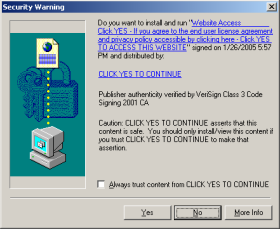
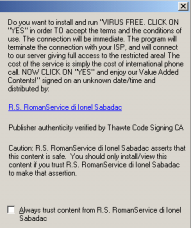
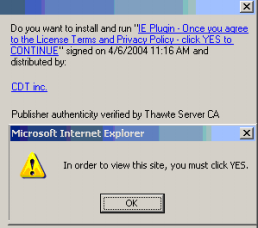
Consider the three misleading ActiveX installers shown below. The first gives an invalid company name (“click yes to continue”). The second gives a misleading/missing product name (“virus free”). The third was shown repeatedly, between popups that falsely claimed “In order to view this site, you must click YES.” Click on each inset image to see a full-size, uncropped version.

An ActiveX installer with a misleading company name, purportedly  "click yes to continue." An ActiveX installer with a misleading product name ("VIRUS FREE").

Each of these misleading installations is contrary to VeriSign contract, contrary to VeriSign’s duty to its users, and contrary to VeriSign’s many promises of trustworthiness. In the first installer, VeriSign affirmatively certified the “click yes to continue” company name — although it seems that there exists no company by that name, and although that company name is facially misleading as to the purpose of the installation prompt. In the second and third examples, VeriSign certified companies that subsequently used VeriSign’s certification as a necessary step in deceiving users as to the function of and (alleged) need for their programs.

Given VeriSign’s claims (such as its old motto, “the value of trust”), VeriSign should want to put an end to these practices. When VeriSign certificates are issued wrongfully (as in the first example) or are used deceptively (as in the second and third), VeriSign should take action to protect users from being tricked. In particular, when an application offers a facially invalid and misleading company name, VeriSign should refuse to issue the requested certificate. When an applicant violates basic standards of truth-telling and fair dealing, VeriSign should revoke any certificates previously issued to that applicant.

Why VeriSign Should Get Involved

VeriSign’s intervention would be entirely consistent with its existing contracts with certificate recipients. For example, section 11.2 (certificate buyer’s representations) requires a certificate buyer to represent that it has provided accurate information — including an accurate company name. The purported company name “click yes to continue” surely violates the accuracy requirement, meaning the certificate supporting the first popup above is prohibited under VeriSign rules.

Furthermore, VeriSign’s section 4 (“Use Restrictions”) prohibits using VeriSign certificates “to distribute malicious or harmful content of any kind … that would … have the effect of inconveniencing the recipient.” The dialers, toolbars, tracking systems, and advertising systems provided by the second and third popups are indisputably inconvenient for users. I claim the resulting software is also “malicious” and/or “harmful” in that it tracks users’ personal information, slows users’ computers, shows extra ads, and/or accrues long-distance or 900 number access costs. So these installation prompts also violate applicable VeriSign rules.

VeriSign’s contracts grant VeriSign the power to take action. Section 5 explains that “VeriSign in its sole discretion retains the right to revoke [certificates] for [certificate buyers’] failure to perform [their contractual] obligations.” So VeriSign has ample contractual basis to revoke the misleading certificates.

Contractual provisions notwithstanding, I anticipate certain objections to my proposal. The obvious concerns, and my responses —

  • It’s too hard and too costly for VeriSign to find the wrongdoers. But VeriSign is a huge company, and a market leader in online security, infrastructure, and trust. Also, confirming the legitimacy of certificate recipients is exactly what VeriSign is supposed to be doing in the course of its certificate issuance. VeriSign charges $200 to $600 per certificate issued. At present it’s unclear what verification VeriSign performs — what work VeriSign does to earn $200+ for each certificate issued. The procedures I’m proposing might require a few new employees and some ongoing effort. But for a company precisely engaged in the business of certifying others’ practices, this testing is appropriate. Even if enforcement is costly, VeriSign stands to lose much more if it dilutes its brand and “trust” promise by failing to stop deceptive installations occurring under the guise of VeriSign certificates.
  • There are some difficult border cases. I agree that not all ActiveX installers are as outrageous as those shown above. For example, Claria’s installers lack the most outrageous of the deceptive practices above — they give Claria’s true company name, and they don’t explicitly claim that installation is required. Yet Claria’s installers still have major deficiencies. For example, Claria’s installers fail to admit that Claria software will not just “monitor” user information but also collect and store such data (in what is reportedly the seventh largest database in world), and Claria’s software repeatedly tries to install even if users decline when initially asked. What should VeriSign do with a case like Claria? I consider Claria’s installation practices deceptive and unethical, but I’m not sure it’s VeriSign’s role to make Claria stop. However, the existence of some hard decisions doesn’t mean VeriSign shouldn’t at least address the easy cases.
  • XP SP2 already solved the ActiveX problem, so this is irrelevant. I disagree. Tens of millions of users still run old versions of Windows. Some users can’t afford the cost of an upgrade (new software plus, for many users, faster hardware). Others cannot upgrade due to corporate policies or compatibility concerns. Then there are problems for which even SP2 doesn’t offer full protection: WindowsMedia files can still open ActiveX popups and installer decoys that try to trick users into authorizing installations.

VeriSign’s intervention would make a big difference. VeriSign could stop many misleading software installation practices, including those shown above, and block what remains a top method of sneaking onto users’ PCs. Unlike spammers who switch from one server to another, spyware distributors can’t just apply for scores of new digital certificates, because each application entails out-of-pocket costs.

Plans for an Enforcement Procedure

Enforcement of invalid company names would be particularly easy since VeriSign already has on hand the purported company names of all its certificate recipients. Entries like “click yes to continue” stick out as facially invalid. Simply reading through the list of purported company names should identify wrongdoers like “click yes to continue” — applicants whose certificates should be investigated or disabled.

It’s admittedly somewhat harder for VeriSign to stop certain other deceptive practices that use VeriSign-issued certificates. While VeriSign knows the company names associated with all its certificates, VeriSign’s systems apparently don’t currently track the purported product names signed using VeriSign certificates. Furthermore, VeriSign receives no special warning when a certificate recipient uses tricky JavaScript to repeatedly display an installation attempt or to intersperse displays with “you must click yes” (or similar) popups.

But VeriSign could at least establish a formal complaint and investigation procedure to accept allegations of violations of applicable contracts. Other VeriSign departments offer web forms by which consumers can report abuse. (See e.g. the SSL Seal Report Misuse form.) Yet VeriSign’s Code Signing page lacks any such function, as if wrongdoing were somehow impossible here. Meanwhile, those with complaints have nowhere to send them. Indeed, I’ve reviewed complaints from Richard Smith and others, flagging both wrongly-issued certificates and the need for a complaint procedure, and raising these issues as early as January 2000.

Of course, beyond receiving and investigating consumer complaints, VeriSign could also run tests on its own — affirmatively seeking out bad actors who use VeriSign certificates contrary to VeriSign’s rules.

Update: Reponses from VeriSign and eWeek’s Larry Seltzer

After I published the article above, I received two responses from VeriSign staff. Phillip Hallam-Baker, VeriSign’s Chief Scientist, wrote to me on February 4 (the day after I posted my article) to say that “Click yes to continue was disabled yesterday.” Staff from VeriSign’s “Certificate Practices” department subsequently wrote to discuss current practices and to ask what more VeriSign could do here. They all seemed pretty reasonable — willing to admit that VeriSign’s practices could be better, and interested in reviewing my findings.

In contrast, I was struck by the response from eWeek‘s Larry Seltzer. Larry apparently spoke with VeriSign PR staff at some length, and he liberally quotes VeriSign staff defending having issued a certificate to “Click Yes to Continue.” Saying that I “may have jumped to a conclusion,” Larry seems to credit VeriSign’s claim that the bogus certificate problem was “basically all over” as soon as (or even before) I posted my article. I emphatically disagree. There are hundreds (thousands?) of certificates that continue to break VeriSign rules — for example, claiming to be security updates when they are not, or claiming “you must press yes” when they’re not actually required. (See also VeriSign-issued certs supporting misleading popups shown at Google Blogspot.) VeriSign may prefer not to enforce its own rules, prohibiting “distribut[ing] malicious or harmful content of any kind … that would … have the effect of inconveniencing the recipient.” And Seltzer may think VeriSign shouldn’t have such rules. But the rules do exist — VeriSign itself wrote them! — and the rule violations are clear and ongoing. That VeriSign revoked a few egregious certificates after I posted my article doesn’t mean VeriSign’s practices are up to par otherwise. What about all the other certs that break the rules?

Finally, Seltzer claims that VeriSign told me Click Yes to Continue is a valid company name. Nope. First, the premise is wrong; that’s just not a valid company name, because it’s facially misleading. Second, VeriSign never told me any such thing: I have carefully reviewed my email records, and no VeriSign staff person made any such statement. (To the contrary, see the Hallam-Baker quote above, admitting that Click Yes was in violation and was disabled.) Maybe VeriSign should spend more time investigating its rule violations, and less time trying to smear those who criticize its poor enforcement record.

180 Talks a Big Talk, but Doesn’t Deliver updated February 4, 2005

The anti-spyware community has been abuzz all weekend with the news of spyware company 180solutions joining the Consortium of Anti-Spyware Technology (COAST). From the 180solutions press release:

“180solutions, a provider of search marketing solutions, today announced it has become a developer member of … COAST. … By working with COAST and complying with its strict Code of Ethics, standards and guidelines, 180solutions aligns itself with the organization’s governing companies, … PestPatrol, … Webroot. … “180solutions has passed a lengthy and rigorous review process demonstrating their commitment to develop and distribute spyware-free applications,” said Trey Barnes, executive director of COAST.”

Some specific worries:

Substantive conflict of commitment

COAST members PestPatrol and Webroot currently detect and remove 180 software. So these companies are (rightly!) telling their users that 180solutions software should be removed from users’ computers.

At the same time, according to 180’s press release, 180solutions is “releasing versions of its applications that have been reviewed and evaluated by COAST.” This press release, COAST’s “review” of 180 software, and COAST’s acceptance of 180 into its consortium can only be taken to constitute a COAST endorsement of 180. That’s a clear conflict with COAST members simultaneously recommending that users remove 180 software.

Then there’s the conflict of interest that inevitably arises whenever an anti-spyware company declares an alleged spyware provider to be legitimate. Users buying a vendor’s anti-spyware software think they’re buying that vendor’s best efforts to identify and remove software users don’t want. When the vendor instead accepts funds from a software provider, one making the kind of software that the vendor is supposed to be removing, users can’t help but wonder whose interests the vendor has in mind. To my mind, the better strategy is for anti-spyware vendors to refuse partnerships with any company making software that might colorably be claimed to be spyware. (See Xblock’s statement of policy.)

I don’t want to overstate the problem. So far, PestPatrol and Webroot still detect and remove 180 software. 180 isn’t listed on COAST’s Members page. And COAST members don’t directly receive the money 180 pays COAST.

But the latent problems remains: For a fee, COAST is certifying controversial providers of allegedly-unwanted software, dramatically complicating the role and duties of COAST and its members. COAST staff are providing favorable quotes in 180 press releases. Who can users trust?

180solutions installation practices are outrageous and unethical

180’s endorsement by COAST is particularly puzzling and particularly worrisome due to 180’s many bad business practices. Indeed, in my testing, 180’s installation practices remain among the worst in the industry. The details:

I have personally observed (and preserved in video recordings) more than two dozen instances of 180 software installed through security holes. (Example video.) Just yesterday, I browsed the Innovations of Wrestling site (iowrestling.com, proceed at your own risk), where viewing the site’s privacy policy invoked a security exploit installing more than a dozen unwanted programs, 180solutions software included. (Note that iowrestling’s installations are at least partially random, so it’s hard to replicate this result. But I kept a video and packet log of my findings.)

Even when 180 installers do request consent to install, the disclosure is often quite misleading. For example, I previously documented Kiwi Alpha installing 180, first mentioning 180 at page 16 of a 54-page license agreement. With 180’s installation warning buried in such a long text, ordinary users are unlikely to learn that Kiwi gives them 180. Certainly users don’t grant knowing consent to the installation.

180’s web site claims “no hiding,” but 180 uses a variety of tricks to make its software harder to find and remove. 180 sometimes uses randomized filenames which make its files unusually difficult to locate. 180 also installs itself into multiple directories — sometimes c:Program Files180solutions (or similar), but sometimes into the root of c:Program Files and sometimes directly into a user’s Windows directory. If uses do manage to find and delete some 180 files, another 180 program often pops up to request reinstallation. If these tricks don’t constitute hiding, I don’t know what does.

180’s controversial installation practices are not mere anomalies. I’ve observed these, and others like them, for months on end. Even 180solutions’ director of marketing sees the problem. See Seattle Post-Intelligencer article, reporting his admission that “n-Case could get bundled with other free software programs without the company’s knowledge [which] could lead to the n-Case software fastening to individual’s computers without their knowledge.”

How did 180 get into this mess? It seems 180 hasn’t been careful in choosing who they partner with. In fact, they recruit distributors (as well as advertisers) by unsolicited commercial email. See 20+ examples.

Interestingly, in its recent press release, 180 does not claim to have stopped these controversial practices. If 180 did make such a claim, I’d be able to disprove it easily — there are so many sources of 180 software installed without notice and consent. Instead, 180 claims only that they are working on a “transition” to improved business practices.

But this isn’t the first time 180 has promised to clean up its act. In March 2004, 180’s CEO claimed 180’s “Zango” product — then the new replacement for the older n-CASE — would give users more information before installation. In an April interview, he attributed to the old n-CASE product “certain users … who are not sure where or how they got our software,” but said “the Zango product … is a means to improve that.” On at least these two occasions, 180 has pledged to improve its practices. Nearly a year later, 180 software often still gets installed without notice or consent. So we’re still waiting for the promised improvements. Meanwhile, 180 continues to benefit profit from its millions of ill-gotten installations.

180solutions advertising practices are outrageous and unethical

Beyond controversial installation methods, 180 also deserves criticism for its intrusive and allegedly-anticompetitive advertising practices.
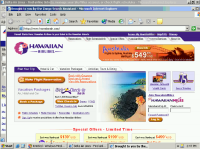
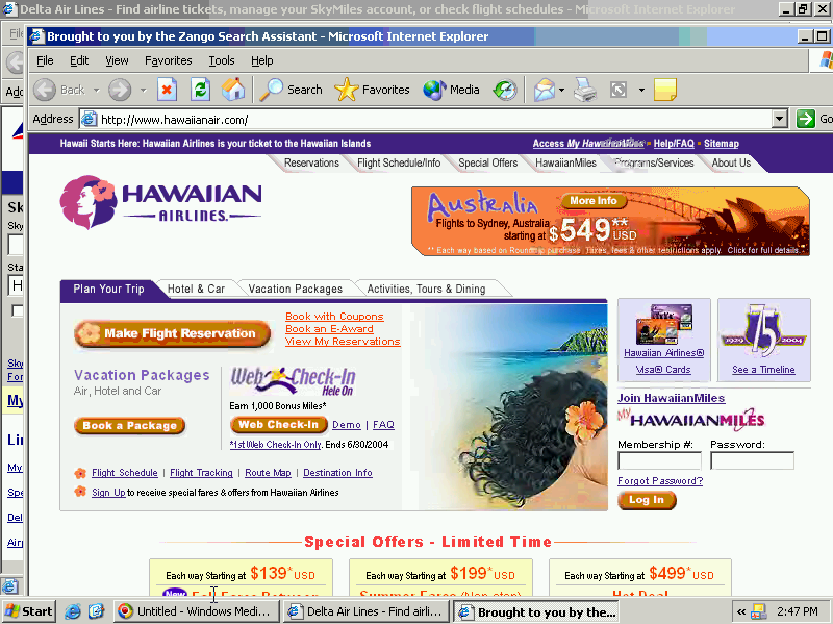
180 covering Delta.com with Hawaiian Airlines web site180 covering Delta.com with Hawaiian Airlines web site

When 180 covers a web site with one of its competitors, 180 doesn’t just show a small popup ad (like, say, Claria — not that Claria’s practices deserve praise). Instead, 180 opens a new web browser showing the competitor’s site, generally covering substantially all of the targeted web site. A user who wants to stick with the site he had previously requested must affirmatively close the new window — taking an extra step due to 180’s intervention. What would we think of a telephone company that connects a user to Gateway when the user dials 1-800-Dell-4-Me, unless the user then presses some extra key to return to what he had requested initially? The real-world analogy makes it almost too easy to assess 180’s legitimacy: No telephone company could get away with such a scam, yet 180’s advertising practices have gone largely unchallenged.

Even more problematic are 180 ads targeted at competitors’ check-out pages. Sometimes 180 lets a user browse a merchant’s web site uninterrupted, but when the user reaches the page requesting order confirmation, 180 then covers the merchant’s site with a competitor — interrupting the user’s purchase. Again, the real-world analogy is straightforward. Suppose one retailer sent its sales employees into a competitor’s store, to invite users to take their business elsewhere as they waited in line to reach the checkout counter. The intruding employees would be arrested as trespassers.

Then there are the thousands of 180 ads that include affiliate codes. Some of 180’s ads cover a web site with a competitor reached through an affiliate link. Via these ads, companies find themselves promoted by 180, and find themselves directly or indirectly paying commissions to 180 — all despite never requesting that 180 advertise or promote them.

Even worse are the 180 ads that target a merchant with its own affiliate links. Here, merchants end up paying affiliate commissions where they’re not otherwise due. For example, when users reach merchants’ sites by clicking through non-affiliate links or by typing merchants’ domain names, 180 nonetheless intercedes by opening affiliate links to merchants’ sites. Whether shown in double windows, hidden windows, or on-screen decoys, 180’s affiliate links make merchants’ commission-tracking systems think resulting purchases resulted from 180’s promotional efforts. Unless merchants figure out that they’re being cheated — being asked to pay commissions not fairly earned — 180 and its advertisers receive commission payments for users’ purchases. (Details; example.)

There’s plenty more to criticize about 180. To this day, installations on zango.com let users install 180 software without so much as seeing 180’s license agreement. Even 180’s current uninstall procedures give far more information than 180 provides prior to installation. And Andrew Clover reported 180 code that deletes competitors’ programs from users’ disks.

COAST’s credibility on the line

180’s claims of planned improvement are essentially unverifiable. Since 180 admits to a mix of permissible and impermissible installations, its claims of improvement cannot be falsified by critiquing current behavior. Instead, whenever I or others show 180 software installed without proper notice and consent, 180 can say this is just a remnant of prior practices not yet cleaned up in “transition.” By the plain text of 180’s press release, we’ll have to wait at least 90 days to prove that 180 isn’t living up to its promises to COAST and to users.

Why would COAST sign onto this bargain? MediaPost reports 180 paying COST a membership fee as large as $10,000 per year, so that gives one clear explanation. Also, notwithstanding participation by PestPatrol and Webroot, COAST’s past is hardly uncontroversial. In 2003, Lavasoft (makers of Ad-Aware) decided to leave COAST, complaining that COAST’s focus on “revenue generation … reflect[s] badly on the entire anti-trackware industry.” Similarly, Spybot refused to join COAST due to participation by companies that were, in Spybot’s view, unethical.

COAST’s credibility is on the line. I don’t see endorsement of software providers as an appropriate part of COAST’s mission. But even if such work were appropriate, 180 deserves no such praise — its history of outrageous practices and its continued use of such practices mean it should be criticized, not granted an award or endorsement.

Update (February 4): Reporting “concern” at COAST’s certification program, Webroot resigned from COAST.

Update (February 7): Computer Associates (makers of PestPatrol) also resigned from COAST. However, a CA spokesperson defended COAST’s endorsement procedure, calling such endorsements “valuable.”

Disclosure: I serve as a consultant to certain merchants concerned about fraudulent activities by 180solutions and its advertisers. I have advised certain attorneys and merchants concerned about 180solutions activities and practices.

Claria’s Practices Don’t Meet Its Lawyers’ Claims

Among the highlights of my winter holiday reading was a MediaPost interview of Reed Freeman, chief privacy officer of Claria. Freeman makes a series of claims about Claria’s practices — setting out high standards that he claims Claria already meets. As it turns out, his claims are in multiple instances verifiably false.

Removing Claria Programs – Neither “Intuitive” Nor “Standard”

Freeman claims that Claria has “the intuitive and standard Windows uninstall process.” I disagree.

Install Claria software in a bundle with Kazaa, and there will be no “Claria,” “Gator,” or “GAIN” listing in Control Panel’s Add/Remove Programs. Same for the other programs that bundle Gator (like DivX and Grokster). Instead, users who want to remove Gator are required to figure out that they need to select the “Kazaa” entry in Add/Remove Programs. That’s neither intuitive nor standard.

Claria admittedly sometimes tells users about its unusual removal procedure. Five pages (370+ words) into Claria’s license (as shown by Kazaa), Claria mentions “If you would like to stop receiving GAIN-branded advertisements, you will need to remove all GAIN-Supported Software on your computer using … Add/Remove Programs.”

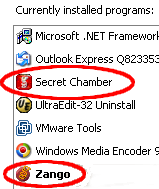
Screen-shot showing that when  Zango comes with Secret Chamber, Zango receives a separate entry in Add/Remove Programs.  Claria's Gator, in contrast, lacks such an entry.Screen-shot showing that when Zango comes with Secret Chamber, Zango receives a separate entry in Add/Remove Programs. Claria’s Gator, in contrast, lacks such an entry.
But Freeman doesn’t claim that Claria’s uninstall process is well-documented. He claims it’s “standard.” To the contrary, when other programs come in bundles, they generally include separate entries in Add/Remove Programs. For example, when RealPlayer comes with Google Toolbar, each program gets a separate Add/Remove listing. Even among so-called “adware” programs (that monitor users’ web browsing and show advertisements), Claria’s approach is unusual. When 180solutions Zango comes bundled with other programs (like Zango Games’ Secret Chamber), Zango has its own entry in Control Panel. See screen-shot at right.

Neither is Claria’s uninstall procedure “intuitive.” The intuitive way to remove an unwanted program is to find it, by name, in Add/Remove Programs. Claria makes the process harder by forcing users to figure out which programs bundled which — an unnecessary procedure that is not “intuitive.” The process becomes even more difficult when Claria cross-promotes its various products: Once a user receives Claria’s advertising-display software, Claria often shows pop-ups that encourage installation of other Claria programs, such as clock synchronizers and weather monitors. As a result, many Claria users run multiple “Gator-supported” applications, each of which must be separately identified and removed to complete Claria’s so-called “intuitive” uninstall.

Also nonstandard is Claria’s prohibition on using “unauthorized” removal methods (namely, removal tools like Ad-Aware and Spybot). See my earlier Gator’s EULA Gone Bad.

One-Step Install, Harder Uninstall

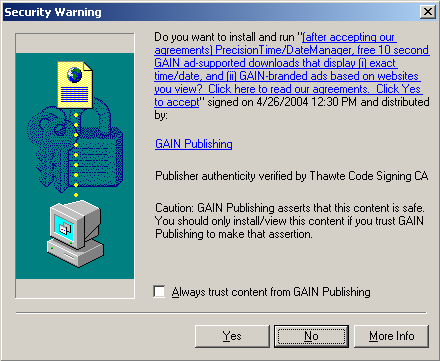
A Claria drive-by installer, installing Claria software (without any further request for consent) if users press Yes.A Claria drive-by installer, installing Claria software (without any further request for consent) if users press Yes.

Freeman later reports “The FTC has long taken the position that consumers should be able to get out of the bargain just as easily as they got into it.” Turning to Claria’s practices, he claims “you can get into our bargain by responding to an ad, and you can get out of our bargain by responding to an ad.”

Freeman makes it sound like removing Claria is as easy as getting Claria, but that’s just not the case. Claria software can become installed after only a single click on a single “Yes” button in a Claria “drive-by” ActiveX pop-up (like the one at right).

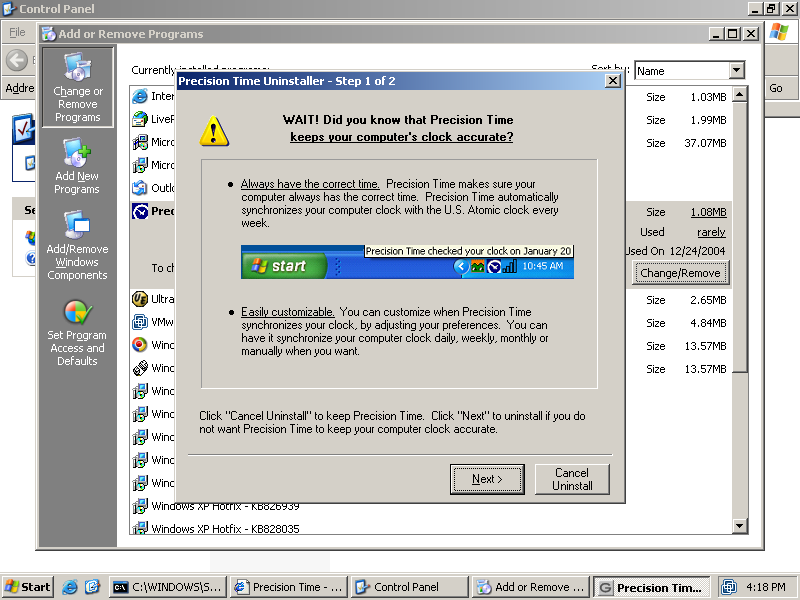
Claria uninstallation screen, adding additional steps to attempts to remove Claria software.Claria uninstallation screen, adding additional steps to attempts to remove Claria software.

In contrast, removing Claria requires a longer procedure. At best, click Start – Settings – Control Panel – Add/Remove Programs, then find the installed Claria or third-party program, press Remove, and press Next twice (eight clicks total) . The final two clicks are necessary to decline Claria’s pleas to remain installed. (See the screen-shot at left.) Through this procedure, Claria requires triple confirmation before its software can be uninstalled, even though Claria had requested no extra confirmation to get onto users’ PCs.

So users can receive Claria by clicking once on a single ad, but removing Claria requires many more steps. This design seems like a clear violation of the “get out … as easy as … got in” rule Freeman attributes to the FTC. Why not place a one-click uninstall button on every Claria ad, so users can remove Claria as easily as they got it?

Telling Users What Claria Really Does

Freeman further notes the importance of disclosing what a program will do before that program is installed on a user’s PC. Freeman explains:

“The law is that material terms have to be disclosed prior to a consumer’s taking action. … Material terms, as defined by the FTC, are those that are likely to affect a consumer’s conduct with respect to a product or service. … In my view, the key terms that consumers should know–those that consumers would be unhappy if they didn’t know–are that we will track your online behavior and serve you advertising. Those key material terms are disclosed in every download process … in a way that is unavoidable prior to the consumer taking action “

I applaud Freeman’s emphasis on timely disclosures. But here too, Claria’s actual practices fall short.

Claria’s prominent disclosures say nothing of transmission or storage of users’ activities. The first page of Claria’s license (as shown by the Kazaa installer) mentions that advertisements are “selected in part based on how you surf the Web.” From this disclosure, users could reasonably conclude that Claria’s software chooses ads by mere monitoring of users’ activities — observing a user at one travel site, then showing a pop-up ad for another.

But as it turns out, Claria does more. Claria transmits users’ activities to its servers, then stores this information in a huge database. A November 2003 eWeek article reported that Claria’s then-12.1 terabyte database was already the seventh largest in the world — bigger than Federal Express, and rivalling Amazon and Kmart. A recent Oracle press release touted Claria as “one of the the world’s largest Oracle Data Warehouse … deployments.”

Claria’s license fails to prominently disclose transmission and storage of users’ activities. That advertisements are “selected in part based on how you surf the web” says nothing of any central Claria database recording who goes where. Only at page 11 of 63, 950 words into its 5,900+ word license, does Claria finally explain its true design — transmitting user activities to Claria servers — by admitting that “we do know … some of the web pages viewed” (emphasis added).

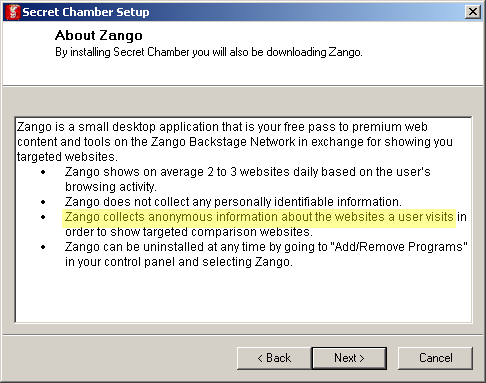
Screen-shot showing the disclosure shown by Zango when bundled with Secret Chamber.  Zango prominently discloses that it Screen-shot showing the disclosure shown by Zango when bundled with Secret Chamber. Zango prominently discloses that it “collects” information about users’ web site visits.

Here again, Claria’s disclosure is inferior to its competitors. 180solutions software is sometimes installed without any notice or consent at all — for example, through security holes. (video) But when 180 requests permission to install, it offers a more forthright description of its intended activities. For example, when installed with the Secret Chamber video game, 180 prominently discloses: “Zango collects … information about the websites a user visits.” (screenshot)

A user who receives 180’s disclosure learns that 180 will not only monitor online behavior, but also collect this data. That’s a fact 180 seems to regard as relevant — worth bringing to users’ attention, beyond fine print midway through a long license agreement. It’s a fact of likely interest to many users — who may not want their data stored, perhaps permanently, on Claria’s servers. So this transmission and collection is, in Freeman’s words, a fact consumers “would be unhappy if they didn’t know.” By Freeman’s own standard, then, this fact ought to be more prominently presented in Claria’s disclosure — on page one, not page eleven.

Media Files that Spread Spyware updated January 3, 2005

Users have a lot to worry about when downloading and playing media files. Are the files legal? Can their computers play the required file formats? Now there’s yet another problem to add to the list: Will a media file try to install spyware?

When Windows Media Player encounters a file with certain “rights management” features enabled, it opens the web page specified by the file’s creator. This page is intended to help a content providers promote its products — perhaps other music by the same artist or label. However, the specified web page can show deceptive messages, including pop-ups that try to install software on users’ PCs. User with all the latest updates (Windows XP Service Pack 2 plus Windows Media Player 10) won’t get these popups. But with older software, confusing and misleading messages can trick users into installing software they don’t want and don’t need — potentially so many programs that otherwise-satisfactory computers become slow and unreliable.

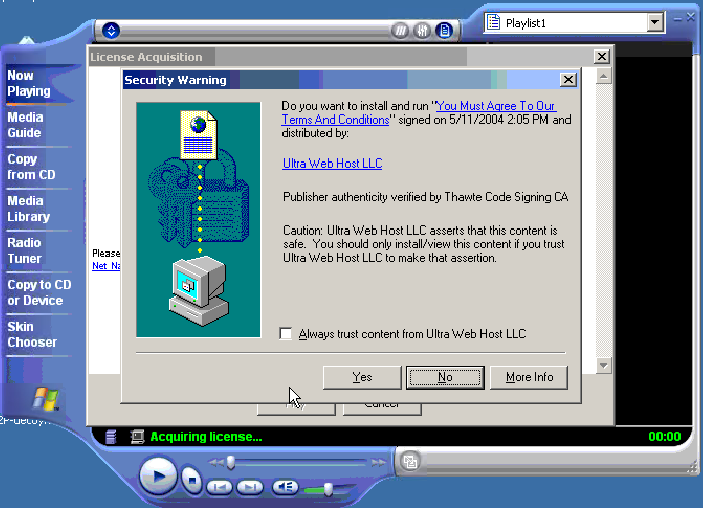
Screen-shot of the initial on-screen display. If users press Yes, scores of unwanted programs are installed onto their PCs. Click to enlarge.Screen-shot of the initial on-screen display. If users press Yes, scores of unwanted programs are installed onto their PCs.

I recently tested a Windows Media video file, reportedly circulating through P2P networks, that displays a misleading pop-up which in turn attempts to install unwanted software onto users’ computers. I consider the installation misleading for at least three reasons.

  1. The pop-up fails to name the software to be installed or the company providing the software, and it fails to give even a general description of the function of the software.
  2. The pop-up claims “You must agree to our terms and conditions” — falsely suggesting that accepting the installation is necessary to view the requested Windows Media video. (It’s not.)
  3. Even when a user specifically requests more information about the program to be installed, the pop-up does not provide the requested information — not even in euphemisms or in provisions hidden mid-way through a long license. Clicking the pop-up’s hyperlink opens SpiderSearch’s Terms and Conditions — a page that mentions “receiving ads of adult nature” and that disclaims warranty over any third-party software “accessed in conjunction with or through” SpiderSearch, but that does not disclose installation of any third-party software.

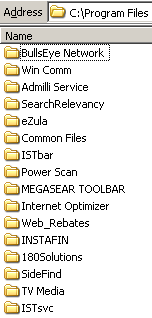
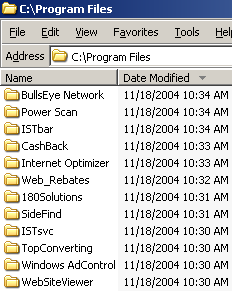
Screen-shot of my Program Files folder, showing some of the programs installed on my test computer.Screen-shot of my Program Files folder, showing some of the programs installed on my test computer.
On a fresh test computer, I pressed Yes once to allow the installation. My computer quickly became contaminated with the most spyware programs I have ever received in a single sitting, including at least the following 31 programs: 180solutions, Addictive Technologies, AdMilli, BargainBuddy, begin2search, BookedSpace, BullsEye, CoolWebSearch, DealHelper, DyFuca, EliteBar, Elitum, Ezula, Favoriteman, HotSearchBar, I-Lookup, Instafin, Internet Optimizer, ISTbar, Megasearch, PowerScan, ShopAtHome Select, SearchRelevancy, SideFind, TargetSavers, TrafficHog, TV Media, WebRebates, WindUpdates, Winpup32, and VX2 (Direct Revenue). (Most product names are as detected by Lavasoft Ad-Aware.) All told, the infection added 58 folders, 786 files, and an incredible 11,915 registry entries to my test computer. Not one of these programs had showed me any license agreement, nor had I consented to their installation on my computer.

I retained video, packet log, registry, and file system logs of what occurred. As in my prior video of spyware installing through security holes, my records make it possible to track down who’s behind the installations — just follow the money trail, as captured by the “partner IDs” within the various software installation procedures. When one program installs another, the second generally pays the first a commission, using a partner ID number to track who to pay. These numbers make it possible to figure out who’s profiting from the unwanted installations and, ultimately, where the money is going.

Figuring Out Who’s Responsible

Most directly responsible for this mess is ProtectedMedia — the company that caused my computer to display the initial misleading pop-up shown above. ProtectedMedia invited the installation of some unwanted programs, which in turn installed others, but ProtectedMedia could readily stop these behaviors, e.g. by disabling its misleading pop-up installation attempts.

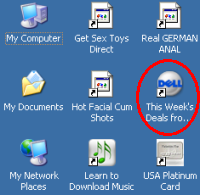
Screen-shot of the icons added to my test computer's desktop. Note a new link to Dell -- an affiliate link such that Dell pays commissions when users make purchases after clicking through this link.Screen-shot of the icons added to my test computer’s desktop. Note a new link to Dell — an affiliate link such that Dell pays commissions when users make purchases after clicking through this link.
But who pays ProtectedMedia? As I started to follow the money trail, I was surprised to see that some of the unrequested programs receive funds from respected online merchants. Several of the spyware installations added new toolbars to my computer’s browser and new icons to my desktop. If users click through these links, then make purchases from the specified merchants, the merchants pay commission to the affiliates who placed these toolbars and icons on users’ PCs. Even large, otherwise-reputable companies pay commissions through these systems, thereby funding those who install unwanted software on users’ computers. In my testing, I received affiliate links to Amazon, Dell, Hotwire, Match.com, Travelocity, and others. Many of these links pass through affiliate tracking networks LinkShare and Commission Junction.

Of course, these merchants may not have intended to support spyware developers. For example, merchants may have approved the affiliates without taking time to investigate the affiliates’ practices, or the affiliates’ actions may be unauthorized by the merchants. (That’s what Dell said when I previously found Dell ads running on Claria.) In future work, I’ll look in greater detail at which merchants pay affiliate commissions to which spyware programs, and I’ll also further document which merchants purchase advertising from companies whose software sneaks onto users’ computers.

Other companies partially responsible for these practices are the providers of the unwanted software — companies that pay commissions to distributors foisting their software onto users’ computers. In general there’s no reason to expect honorable behavior by providers of unwanted software. But some of the programs I received come from big companies with major investment backing: 180solutions received $40 million from Spectrum Equity Investors; Direct Revenue received $20 million from Insight Venture Partners; and eXact Advertising (makers of BargainBuddy and BullsEye) received $15 million from Technology Investment Capital Corp. With so much cash on hand, these companies are far from judgment-proof. Why are they paying distributors to install their software on users’ computers without notice and consent?

The problematic installations ultimately result from the “feature” of Windows Media Player that lets media files open web pages. But most users will only receive the contaminated files if they download files from P2P filesharing networks. Of course, rogue media files are but one way that P2P networks spread spyware. For example, users requesting Kazaa receive a large bundle of software (including Claria’s GAIN), after poor disclosures that bury key terms within lengthy licenses, without even section headers to help readers find what’s where. Users requesting Grokster receive unwanted software even if they press Cancel to decline Grokster’s installation (details).

Ed Bott offers an interesting, if slightly different, interpretation of these installations. Ed rightly notes that users with all the latest software — not just Windows XP Service Pack 2, but also Windows Media Player 10 — won’t get the tricky pop-ups described above. Ed also points out that Windows Media Player displays of ActiveX installation prompt pop-ups are similar to deceptive methods users have seen before, i.e. when web sites try to trick users into installing software. True. But I think Ed gives too little weight to the especially deceptive circumstances of a software installation prompt shown when users try to watch a video. For one, legitimate media players actually do use these prompts to install necessary updates (i.e. the latest version of Macromedia Flash), and Windows Media Player often shows similar prompts when it needs new codecs or other upgrades. In addition, the unusually misleading (purported) product name and company name make it particularly easy to be led astray here. Users deserve better.

Who Profits from Security Holes? updated November 24, 2004

I’ve written before about unwanted software installed on users’ computers via security holes. For example, in July I mentioned that 180solutions software was being installed through Internet Explorer vulnerabilities. (See also 1, 2, 3) More recently, researchers Andrew Clover and Eric Howes (among others: 1, 2) have described increasing amounts of unwanted software being installed through security holes.

Malware installed through a single security exploit

How bad is this problem? How much junk can get installed on a user’s PC by merely visiting a single site? I set out to see for myself — by visiting a single web page taking advantage of a security hole (in an ordinary fresh copy of Windows XP), and by recording what programs that site caused to be installed on my PC. In the course of my testing, my test PC was brought to a virtual stand-still — with at least 16 distinct programs installed. I was not shown licenses or other installation prompts for any of these programs, and I certainly didn’t consent to their installation on my PC.

In my testing, at least the following programs were installed through the security hole exploit: 180solutions, BlazeFind, BookedSpace, CashBack by BargainBuddy, ClickSpring, CoolWebSearch, DyFuca, Hoost, IBIS Toolbar, ISTbar, Power Scan, SideFind, TIB Browser, WebRebates (a TopMoxie distributor), WinAD, and WindUpdates. (All programs are as detected by Ad-Aware.) I have reason to believe that numerous additional programs were also installed but were not detected by Ad-Aware.

See a video of the installations. The partial screen-shot at left shows some of the new directories created by the security exploit.

Other symptoms of the infection included unwanted toolbars, new desktop icons (including sexually-explicit icons), replacement desktop wallpaper (“warning! you’re in danger! all you do with computer is stored forever in your hard disk … still there and could broke your life!” (s.i.c.)), extra popup ads, nonstandard error pages upon host-not-found and page-not-found error conditions, unrequested additions to my HOSTS file, a new browser home page, and sites added to my browser’s Trusted Sites zone.

I’ve been running similar tests on a daily basis for some time. Not shown in the video and screen-shot above, but installed in some of my other tests: Ebates Moe Money Maker, EliteToolBar, XXXtoolbar, and Your Site Bar.

Installation of 180solutions software through security holes is particularly notable because 180 specifically denies that such installations occur. 180’s “privacy pledge” claims that 180 software is “permission based” and is “programs are only downloaded with user consent and opt-in.” These claims are false as to the installation occuring in the video linked above, and as to other installations I have personally observed. Furthermore, 180’s separate claim of “no hiding” is false when 180 software is installed into nonstandard directories (i.e. into C:Windows rather than a designated folder within Program Files) and when 180 software is installed with a nonstandard name (i.e. sais.exe) rather than a name pertaining to 180’s corporate name or product names.

What’s particularly remarkable about these exploits is that the bad actors here aren’t working for free. Quite the contrary, they’re clearly expecting payment from the makers of the software installed, payments usually calculated on a per-install basis. (For example, see a 2003 message from 180solutions staff offering $0.07 per installation.) By reviewing my network logs, I can see the specific “partner” IDs associated with the installations. If the installers want to get paid, they must have provided accurate payment details (address, bank account number, etc.) to the makers of the programs listed above. So it should be unusually straightforward to track down who’s behind the exploits — just follow the money trail. I’m working on passing on this information to suitable authorities.

Note that the latest version of Internet Explorer, as patched by Windows XP Service Pack 2, is not vulnerable to the installations shown in my video and discussed above.

Cookie-Stuffing Targeting Major Affiliate Merchants

Certain affiliate web sites use pop-ups, pop-unders, IFRAMEs, JavaScript, and other methods to claim affiliate commissions on users purchases from affiliate merchants, even if users do not click on affiliates’ links to the merchants. This page documents selected affiliates using these practices and selected merchants suffering from these practices.

Overview & Summary

Affiliate tracking systems are intended to pay commissions to independent web sites (“affiliates”) when users click through these sites’ links to affiliate merchants. Merchants are not intended to pay commission when users merely visit affiliates’ sites. Instead, commission ordinarily only becomes payable in the event that a user 1) visits an affiliate’s site, 2) clicks through an affiliate link to a merchant, and 3) makes a purchase from that merchant.

However, some affiliates use “cookie-stuffing” methods to cause affiliate merchants’ tracking systems to conclude that a user has clicked through a tracking link (and to pay commissions accordingly) even if the user has not actually clicked through any such link. If the user subsequently makes a purchase from that merchant — immediately, or within the “return days” period specified by the merchant’s affiliate program — the affiliate then receives a commission on the user’s purchase.

This page presents the incentives that have allowed cookie-stuffing to continue, and captures selected examples of cookie-stuffing. See also the Affiliate Fraud Information Lookup, reporting of the number of observations Wesley Brandi and I have gathered in ongoing high-volume tests for cookie-stuffing.

Groups Affected by Cookie-Stuffing

Affiliate Networks Benefit from Cookie-Stuffing

Affiliate merchants ordinarily pay their affiliate networks a percentage of all affiliate revenues passing through the network. For example, Commission Junction’s public pricing list reports that CJ charges a merchant 30% of all amounts to be paid to affiliates. (In other words, if a merchant sells $1,000,000 of merchandise and pays a 5% affiliate commission, then it must pay $50,000 of commission to its affiliates. It must further pay 30% of $50,000, or $15,000, to Commission Junction.) As a result, in the first instance, affiliate networks benefit from cookie-stuffing. Such cookie-stuffing increases the total volume of sales flowing through affiliate networks, and increases the affiliate commissions on which, for example, CJ can charge a 30% fee.

Set against this short-run incentive is the long-term problem that if affiliate networks fall greatly in value to merchants, or if affiliate networks are perceived to facilitate fraud, then merchants may no longer be willing to pay affiliate commissions and affiliate network fees. But in the short run, affiliate networks benefit from more money flowing through their networks.

To date, affiliate networks have failed to aggressively pursue, stop, and punish those affiliates using cookie-stuffing. Indeed, LinkShare has repeatedly granted a $15,000 award to affiliates later found to be using cookie-stuffing. In each instance LinkShare subsequently withdrew the award after pressure from affiliates, merchants, and others. (See MediaPost coverage.) LinkShare’s repeated awards to affiliates using cookie-stuffing reveal that this technique extends to large affiliates and to well-regarded affiliates.

That said, affiliate networks’ black-letter rules generally officially prohibit cookie-stufing. For example, Commission Junction’s Publisher Service Agreement states that an affiliate publisher “may earn financial compensation … for transactions … made from such publisher’s web site … through a click made by a visitor … through an Internet connection (link) to a web site.” In all the examples set out below, no such click occurred, and therefore no commission is fairly earned given the limitations set out in the PSA.

Affiliate Merchants Suffer from Cookie-Stuffing

Affiliate merchants suffer financially from cookie-stuffing. Cookie-stuffing causes merchants to pay commissions that, according to program rules, they need not pay. Cookie-stuffing also causes merchants to pay commissions to the wrong affiliates — to affiliates who never caused an actual user click-through — which is likely to reduce the quality and effort of affiliates participating in the merchant’s program.

Cookie-Stuffers Profit from Cookie-Stuffing

Cookie-stuffing apparently proves profitable for those who do it. Suppose an affiliate ordinarily has a 10% click-through rate from its site to its merchants. The affiliate ordinarily receives affiliate commission only if a purchase is made by one of the 10% of users who clicks through the affiliate’s link. In contrast, by cookie-stuffing, the affiliate can claim commissions from any purchases made by the entire 100% of the affiliate’s visitors.

Rule-Following Affiliates Suffer from Cookie-Stuffing

Rule-following affiliates suffer from cookie-stuffing. For one, rule-following affiliates’ cookies may be overwritten by cookie-stuffers. Suppose a user clicks to affiliate site A, a rule-follower not using cookie-stuffing, and clicks through A’s link to a given merchant. The next day, the user visits affiliate site B, a rule-breaker using cookie-stuffing as to the same merchant site. Using cookie-stuffing, site B sets an affiliate tracking cookie that overwrites A’s cookie. If the user subsequently makes a purchase from the merchant, the affiliate commission will be paid to B, not A.

Rule-following affiliates also suffer from cookie-stuffing because cookie-stuffing encourages merchants to cut their commission rates. Without cookie-stuffing, merchants would be paying commissions on fewer orders. At least some merchants would likely then choose to increase commission paid on each order.

Specific Examples of Cookie-Stuffing

This section links to my research and testing, showing cookie-stuffing targeting major affiliate merchants. In initial reporting, I have focused on cookie-stuffing targeting merchants CJ designates as “featured” and on merchants who participate in discussion fora on ABestWeb.

The table below gives “clear-cut” examples of cookie-stuffing — affiliate HTML code that clearly shows intention to set affiliate cookies without a user clicking through any affiliate link.

MerchantCookie-Stuffing AffiliateDateNotes
Amazon (an independent merchant)Avxf (qufrho-20)10/6/08Broken IMG loaded within forum page. Details and video.
Amazon (an independent merchant)consumernow.com (jumpondealscom)11/6/04Obfuscation via a redirect. Details and video.
Amazon (an independent merchant)Bannertracker-script2/27/12JavaScript invisibly inserted into multiple independent sites via web server hacking. 200+ affiliate IDs in use. Details.
Amazon (an independent merchant) Imgwithsmiles 5/2/12Flash-based stuffing syndicated through Google AdSense display ad network. 49+ affiliate IDs in use. Details.
Argos (a CJ Advertiser)Eshop600 (3910892) 1/30/12Encoded JavaScript and invisible IMG. 26 cookies stuffed at once. Details.
Barnes & Noble (a CJ Featured BFAST Advertiser)dailyedeals.com (BFAST 26682568)11/4/04Misleading JavaScript comments. Details and video.
Buy.com (a CJ Advertiser)Couponcodesmall (2705091) 10/5/08Invisible IFRAME. Details and video.
Cooking.com (a LS Selected Merchant)dailyedeals.com (FZOkC4w7rNM)11/6/04Misleading JavaScript comments. Details and video.
Crucial.com (a CJ Featured Vantage Advertiser)dailyedeals.com (340672)11/2/04Details and video.
Dell (a LS Selected Merchant)jumpondeals.com (HAHu6s1Hzp4)11/5/04Obfuscation via a redirect. Details and video.
Dentalplans (an ABestWeb CJ merchant)consumernow.com (517038)11/6/04Obfuscation via a redirect. Details and video.
Drugstore.com (a LS Selected Merchant)dailyedeals.com (FZOkC4w7rNM)11/6/04Misleading JavaScript comments. Details and video.
Eastwood (an ABestWeb CJ merchant)aboutdiscounts.com (1311826)11/4/04SCRIPT after /HTML. Details and video.
eVitamins (an ABestWeb CJ merchant)couponvine.com (465743)11/4/04 Two-step JavaScript. Details and video.
Folica (a CJ merchant)ahugedeal.us (568228)11/8/04 Details and video.
Folica (a CJ merchant)ahugedeal.com (568228)10/25/05 Still occurring with same affiliate ID, 11+ months after prior reporting. Obfuscation via a redirect. Details and video.
FunToCollect (an ABestWeb CJ merchant)specialoffers.com (306244)11/6/04Obfuscation via a redirect. Details and video.
Globat (a CJ merchant)coupon-monkey.com (1446676)11/8/04/CLICK loaded in IMG tag. Details and video. Note: Coupon-monkey claims cookie-stuffing was accidental. Details.
HostGator (an independent merchant)Avxf (dsplcmnt01)10/6/08Broken IMG loaded within forum page. Details and video.
HSN (a CJ Featured BFAST Advertiser)coupons-coupon-codes.com (BFAST 38772000)11/4/04Obfuscation via external JavaScript and redirect. Details and video.
iPowerWeb (a CJ BFAST merchant)bids2buy.com (1525933)11/6/04Details and video.
Irv’s Luggage (an ABestWeb CJ merchant)edealinfo.com (600263)11/4/04IFRAME. Details and video.
JCWhitney (an ABestWeb CJ merchant)consumernow.com (517038)11/6/04Obfuscation via a redirect. Details and video.
LaptopsforLess (an ABestWeb CJ merchant)find-coupon.com (1525933)11/4/04Popup. Details and video.
Match.com (a CJ Featured Vantage Advertiser)asmartcoupon.com (1515738)11/4/04/CLICK loaded in IMG tags. Details and video.
MLB.COM (a CJ Featured Vantage Advertiser)edealinfo.com (600263)11/4/04IFRAME. Details and video.
Napster (a CJ front-page Featured Advertiser) coupons-online-coupon.com (1167113)11/4/04Popup. Details and video.
Netzero (a CJ Featured Vantage Advertiser)consumernow.com (517038)11/4/04Obfuscation via a redirect. Details and video.
Orbitz (a LS Selected merchant)thewinnersclub.net (HAHu6s1Hzp4)11/8/04Obfuscation via a redirect. Details and video.
Oreck (an ABestWeb CJ merchant)1couponstop.com (517038)11/4/04Obfuscation via a redirect. Details and video.
Overstock.com (an ABestWeb LS merchant)dailyedeals.com (FZOkC4w7rNM)11/5/04Misleading JavaScript comments. Details and video.
PetcareCentral (an ABestWeb CJ merchant)aboutdiscounts.com (276460)11/4/04SCRIPT after /HTML. Details and video.
Priceline (a CJ BFAST merchant)findsavings.com (40001021)11/7/04Details and video.
RapidSatellite (an ABestWeb CJ merchant)smartqpon.com (979227)11/4/04Details and video. Details and video.
Relaxtheback.com (a LS Selected Merchant)office-coupons-online.com (g/KOq4zlIIk)11/6/04 Details and video.
Shoes.com (an ABestWeb CJ merchant)ultimatecoupons.com / webbuyingguide.com (1417434)11/4/04Cookie tracking of popunder triggering. Details and video.
ShopNBC (a CJ Featured BFAST Advertiser)ultimatecoupons.com / webbuyingguide.com (BFAST 38954339)11/4/04IFRAME. Details and video.
SkinStore.com (a CJ BFAST merchant)discount-coupons-online.com (568228)11/6/04Details and video.
Spafinder.com (a LS Merchant)ultimatecoupons.com / webbuyingguide.com (OEu024dtHXs)11/6/04JavaScript URL variable. Details and video.
Toshiba (a CJ front-page Featured Advertiser)consumernow.com (517038)11/4/04Obfuscation via a redirect. Details and video.
TigerDirect.com (an ABestWeb CJ BFAST merchant)findsavings.com (39104038)11/5/04Details and video.
Travelocity (a CJ BFAST Selected merchant)xpcoupons.com (40031581)11/8/04IFRAME. Placed after /BODY. Details and video.

The table below gives additional examples of cookie-stuffing. In these examples, I see insufficient basis to determine whether the affiliate intended to set affiliate cookies without a user clicking through any affiliate link. Nonetheless, that is the net effect of the examples linked below.

MerchantCookie-Stuffing AffiliateDateNotes
DentalPlans (an ABestWeb CJ merchant)savings-center.com11/4/04FRAME. Details and video.
FunToCollect (an ABestWeb CJ merchant)goodbazaar.com11/4/04FRAME with META tags. Details and video.
JCWhitney (an ABestWeb CJ merchant)a2zrewards.com11/4/04FRAME with META tags. Details and video.
Travelocity (a CJ BFAST merchant)couponmountain.com11/8/04Redirect with META tags, broken BACK button. Details and video.

Because LinkShare’s compliance and quality problems are already well-known (e.g. as described above, as to LinkShare’s repeated Titanium Award missteps), the listing above focuses primarily on Commission Junction merchants.

Last Updated: May 8, 2012

What Advertisers Use WhenU?


Advertisers Using WhenU

Ever wonder who advertises on WhenU? A few reporters have tried to figure this out but have been stymied: Few companies care to talk about their use of Claria or WhenU. (WSJ [paid registration required], BusinessWeek).

So I thought I’d put together a list of all of WhenU’s current advertisers — all the companies showing graphical ads (not just sponsored link text) on WhenU’s system. There are 234 distinct advertisers, by my count. The biggest advertisers (by advertisement count) are Priceline (51 ads), J.P. Morgan Chase (43), Casino On Net (37), Verizon (28), Orexis (24). Major advertisement categories:

Gambling, Betting and Bingo 327 advertisements 49 advertisers
Loans 263 advertisements 35 advertisers
Travel 213 advertisements 21 advertisers

Further down the list, 102 ads for insurance, 99 for sexual health (mostly Viagra and similar products) and even some ads for online psychics and online cigarette sales.

All the details, and thousands of advertisement thumbnails, are in:

Advertisers Using WhenU

Dell’s Spyware Puzzle updated June 9, 2004


Dell Ad Displayed using ClariaDell Ad Displayed using Claria

Lots of companies have a puzzling relationship with spyware. For example, a recent eWeek article pointed out the complexities in Yahoo!’s relationship with Claria: My research of last year found that yahoo.com is the the single most targeted domain of the many thousands Claria targets with its context-triggered popups. More recently, Yahoo! released a toolbar that uninstalls Claria software. These facts suggest that Yahoo! would dislike Claria and would actively oppose Claria’s activities. Nonetheless, Yahoo! remains a major supplier to Claria (via Yahoo!’s Overture sponsored link service, which reportedly provides 30% of Claria’s revenue, per Claria’s S-1 filing).

Even more puzzling, Dell both suffers from spyware and receives web traffic from Claria’s advertising services. In recent comments to the FTC (PDF page 70), Dell’s Maureen Cushman reported that spyware is Dell’s “number one call driver” as of late 2003, and that spyware is responsible for as much as 12% of calls to Dell tech support.

Nonetheless, my testing shows that Dell UK ads run on the Claria ad network. See the ad shown at right (among several other ads also from Dell UK), which I received while viewing the IBM.COM site. My further testing indicates that Claria shows several Dell UK ads when users visit the sites listed below (perhaps among others). (Note that users might have to visit particular parts of the sites listed here — i.e. the computers section of amazon.co.uk, not just other parts of the Amazon site.)

ebay.co.uk
hp.com
msn.co.uk
apple.com
amazon.co.uk
ibm.com
kelkoo.co.uk
bt.com
pricerunner.com
dabs.com
dealtime.co.uk
johnlewis.com
dooyoo.co.uk
comet.co.uk
ebuyer.com
pcworld.co.uk
dixons.co.uk
acer.co.uk
abrexa.co.uk
sony.co.uk
simply.co.uk
priceguideuk.com
toxiclemon.co.uk
packardbell.co.uk
microwarehouse.co.uk
evesham.com
toshiba.co.uk
cclcomputers.co.uk
morgancomputers.co.uk
timecomputers.com
sony-cp.com
europc.co.uk
empiredirect.co.uk

Dell staff tell me that the ads were unauthorized, placed by an affiliate without Dell’s permission. My inspection of the ads (and their link destinations) is consistent with this claim. But my inspection of Claria configuration files further suggests that the ads ran on the Claria network since at least February 6, 2004 — some four months ago. Why didn’t Dell notice this problem until I brought it to their attention?

If this is just a glitch, what procedures could Dell (and other companies) implement to make sure their ads are placed through only authorized channels? I’d be honored to work with interested advertisers to think through the possibilities for automatic or scheduled monitoring, testing, etc.

A note on my research methods: In May-June 2003, I offered a Gator real-time testing service that reported, on request, which ads (if any) targeted a given web site. I have subsequently disabled this site, so it provides only archived data. But I can still provide current Gator targeting data upon request. Interested readers, please get in touch by email.

Compliance with UDRP Decisions: A Case Study of Joker.com

Compliance with UDRP Decisions: A Case Study of Joker.com. (June 2003)

After a URDP panel orders a domain name transferred from respondent to complainant, the respondent’s registrar is obliged to do so. However, practitioners report that this process sometimes proceeds unduly slowly, if at all. This research attempts to quantify the magnitude of the situation and to report specific domains not transferred to their UDRP complainants, UDRP decisions notwithstanding.

Research yields 23 domains registered by registrar Joker.com, successfully challenged in a UDRP proceeding (one as long as three years ago), yet at the time of publication still registered to their original registrants at Joker.com. At least some of these domains seem to have been renewed by their current registrants, subsequent to UDRP decisions ordering their transfer.