Services for Advertisers – Avoiding Waste and Improving Accountability

In the course of my research on spyware/adware, typosquatting, popups, and other controversial online practices, I have developed the ability to identify practices that overcharge online advertisers. I report my observations to select advertisers and top networks in order to assist them in improving the cost-effectiveness of their advertising including by flagging improper ad placements, rejecting unjustified charges, and avoiding untrustworthy partners. This page summarizes the kinds of practices I uncover and presents representative examples drawn from my publications.

For Display Advertisers and Display Networks

In work for display advertisers and display networks, I catch and report the following problems:

For Affiliate Advertisers and Affiliate Networks

In work for affiliate advertisers and affiliate networks, I catch and report the following problems:

Information and Incentives in Online Affiliate Marketing analyzes patterns in merchants’ vulnerabilities and effective defenses.

For Advertisers in Comparison Shopping Engines

In work for comparison shopping engines (CSEs) and their advertisers, I catch and report the following problems:

  • Advertisements loaded, and clicks recorded and billed for, without a user seeing the advertisement link or clicking on it. (CSE click fraud)
  • CSE advertisements presented in adware including injections, popups, sliders, and toasts.

Methods

I catch infractions using multiple “crawler” PCs which operate 24 hours per day, continuously checking for improper advertising placements. These crawlers run from multiple locations in the US, along with systems to detect behaviors targeting users outside the US. Some of my reports draw on large-scale automation developed in partnership with Wesley Brandi. I supplement automatic observations with manual testing using methods I have refined over more than a decade.

Each of my reports includes a packet log presenting the specific methods and identifiers (ad tags, affiliate IDs, etc.) associated with the infraction. Where an incident includes notable on-screen appearances (e.g. a popup), I typically include a screen-capture video or screenshot image showing occurrences as they appear to users. Each report includes a customized explanatory memorandum.

Please contact me to learn more about my reports.

Last updated: May 21, 2016

Search Engine Safety, Revisited

This article uses data from SiteAdvisor, a company to which I serve as an advisor.

In January I bemoaned the sorry state of search engine results for "screensavers." I pointed out that most "screensavers" ads lead to sites I can’t recommend, and I criticized search engines for their failure to enforce higher standards. But this problem goes well beyond that single keyword and that single genre of sites.

Today SiteAdvisor’s Hannah Rosenbaum and I released The Safety of Internet Search Engines. We obtain top search engine keywords from authoritative sources like Google Zeitgeist. We extract top organic and sponsored search engine results for those keywords. Then we evaluate site safety, using SiteAdvisor’s assessments of spyware, spam, scams, and other Internet menaces.

A representative Google ad -- asking users to pay for software widely available elsewhere for free.SiteAdvisor markup of search results, flagging a representative Google ad — asking users to pay for software widely available elsewhere for free.

Our most notable result? Search engine ads are a risky business. Overall, across all keywords and search engines, 8.5% of sponsored results were "red" or "yellow" by SiteAdvisor’s standards, versus only 3.1% of organic results. It’s not unusual to see ads for notorious spyware vendors like Direct Revenue (as documented in my January piece); for sites that charge for software available elsewhere for free (like the ad shown at right, trying to charge $29 for Skype’s free phone); and for spammers that send hundreds of mesages per week, if a user enters a single email address. These scams deceive and harm search engine users, and I’d like to see Google update its advertising editorial guidelines to prohibit such practices — then enforce these rules with appropriate diligence.

Our article includes an abundance of data. I particularly enjoy this chart of Google site safety by individual keyword — showing "free screensavers" as our single most dangerous search, with other notorious searches including "bearshare," "free music downloads," "winzip," and "kazaa." See also our charts of specific red and yellow sites found within search results.

The full article:

The Safety of Internet Search Engines

Direct Revenue’s Dirty Documents

On Tuesday, the New York Attorney General filed suit against notorious spyware vendor Direct Revenue. In a detailed complaint, the NYAG alleged Direct Revenue surreptitiously installed spyware onto users’ computers and made its spyware exceptionally difficult to remove. The suit includes claims under New York’s General Business Law (prohibiting false advertising and deceptive business practices), New York’s Penal Law (prohibiting computer tampering), and New York’s common law prohibitions against trespass.

The NYAG’s complaint was accompanied by more than a thousand pages of exhibits and appendices. Some of these documents present the results of NYAG’s testing — narratives of misleading and nonconsensual installation, not unlike my own installation tests. But the NYAG also produced a treasure trove of documents: Internal Direct Revenue documents, records, and emails that present their strategy, intentions, and plans in great detail.

I have obtained these additional documents and posted them to a new page:

People of the State of New York v. Direct Revenue, LLC – Documents and Analysis

Some documents and findings of particular interest:

  • Revenues reported at $6.9 million in 2003, $39 million in 2004, $33 million in January-October 2005. 2004 expenses total only $13 million, for a profit margin of 66%.
  • Payments to Direct Revenue’s senior staff, totaling more than $27 million.
  • A list of distributors of Direct Revenue’s spyware, with the number of installations attributable to each.
  • Admission that Direct Revenue for a time sold a “majority” of its advertising through ad networks Traffic Marketplace and ValueClick.
  • Admission that Direct Revenue’s ads appear so frequently that they constitute “user abuse.” But reducing ad frequency lowers company revenues, so frequency stays high.
  • Admission that Direct Revenue previously tracked and transmited users’ GET and POST data — names, addresses, emails — and even sent this data to third parties Hitwise and Compete.com. Itemizes the specific personal information collected from online forms: first name, last name, e-mail address, street address, and zip code. Hitwise reports successfully analyzing and matching users’ IDs, genders, and phone numbers.
  • Instructs making Direct Revenue harder to remove, by deleting its entry from Control Panel’s Add/Remove Programs, because too many users were relying on that method to remove Direct Revenue.
  • Report of April-June 2005 payments from Yahoo, totaling more than $600,000 in those three months alone.
  • Installation by Direct Revenue of Ebates’ Moe Money Maker onto users’ computers.
  • Listing of Direct Revenue’s many names and shell companies, all used to confuse and deceive the public.
  • Complaints from Direct Revenue partners, such as Kazaa (which called Direct Revenue’s ads “purposefully confusing to the user”) and Integrated Search (which wanted Direct Revenue to include an uninstaller in Control Panel, as previously promised)
  • Threatening the Center for Democracy and Technology. Demanding revisions from CNET. Hiring an investigator to track anti-spyware researcher Webhelper, and planning tactics to intimidate him.
  • Claims I am “losing credibility in the industry” and calls me a “fanatic.”
  • Endorses NYAG’s suit against Intermix as an “important opportunity to draw a bright line between purveyors of spyware and legitimate behavioral marketing companies like Direct Revenue.”
  • Scores of complaints from users (1, 2, 3 , 4, 5, 6, 7, 8, 9) Direct Revenue staff call one complaining user an “idiot.”
  • Complaints from Direct Revenue’s investors get special handling. One investor worries that another member of his investment firm, former Secretary of the Treasury Bob Rubin, may learn of Direct Revenue’s practices.
  • Reports daily revenue per user at approximately $0.015 (one and one half cents per user per day). (Compare that revenue with the harm caused to users — the amount a typical user would be willing to pay not to have Direct Revenue installed.)

See also others’ analysis of the documents.

I still have a few more documents to post, and I’ll be uploading them later today.

Pushing Spyware through Search

This article uses data from SiteAdvisor, a company to which I serve as an advisor.

Much of the computer security industry acts like spyware is immaculately conceived. Somehow it just appears on computers, we are led to believe, and supposedly all we can do is clean up the mess after it happens, rather than prevent it in the first place. I disagree.

Now, we all love Google. I use Google’s search site all day every day, and I enjoy their downloadable applications too. So I have the greatest respect for Google’s core service. But there’s another side to their business. Indirectly, Google and other search engines make big money from spyware, through paid search advertising that infects users who don’t know any better or don’t understand what they’re getting into.

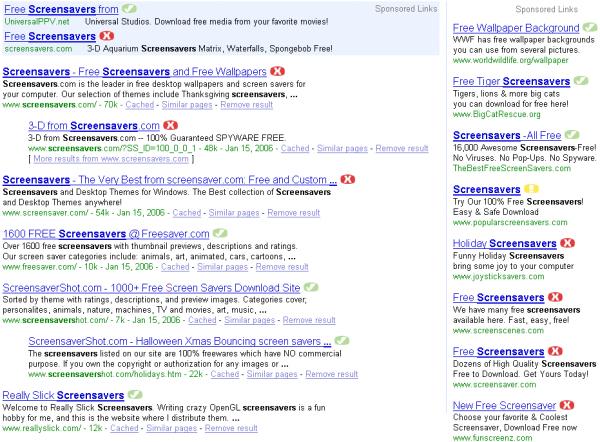
Consider a Google search for “screensavers”:

Risky Entries in 'Screensavers' Search Results

The colored icons next to search results were inserted not by Google, but by the SiteAdvisor client application, based on the results of SiteAdvisor’s automated tests for each listed site. Six of Google’s ten sponsored links get “red” or “yellow” ratings — generally indicating unwanted advertising through spyware or, in some instances, high-volume commercial email. But without SiteAdvisor (or some similar protection), users would have no idea which sites were safe; they’d be at great risk of clicking through to an unsafe site, ultimately risking installation of unwanted software.

Screensaver Advertisers’ Business Model

Google surrounds its “screensavers” search results with ten ads selected from interested Google advertisers. Whenever I see a company buying an ad (online or offline) for a “free” product, I ask myself: How do they make money? With few exceptions, companies only buy online advertising when they expect to get something directly in return. (There are exceptions — dot-com bubble “eyeball” purchases, Fortune 500 “brand building,” perhaps some free ads offered by the Google Foundation.) But in the case of these screensaver providers, they’re almost certainly making money somehow if they can afford to pay Google’s high pay-per-click prices.

So how do Google’s screensaver advertisers make money? Most of Google’s screensaver advertisers really do offer screensavers that are “free” in the sense that users need not provide a credit card number. But they’re not free in the sense of being available without substantial adverse effects. Quite the contrary: Users must put up with various forms of intrusive advertising.

Let’s look at funscreenz.com, a top-ten Google advertiser for “screensavers.”

"Funscreenz installation page

Funscreenz.com is owned by BestOffersNetwork, which is another name for notorious “adware” company Direct Revenue. Recall Direct Revenue’s Newsweek profile – plenty of users (and multiple lawsuits) alleging that their software installs improperly and, in many cases, without consent. I’ve previously documented Direct Revenue installed in tricky popups, via false claims of purportedly-required add-ons, and through exploits without any consent at all.

Of course Funscreenz is not alone. Also in top “screensavers” Google results are ads for Claria, Ask Jeeves, and various adware bundlers (who distribute changing or multiple advertising programs). One top Google “screensaver” advertiser sends 15+ emails per week to those who provide an email address to get a screensaver. Results at Yahoo and MSN are similar.

Estimating Search Engine Revenues from Spyware Infections

Every time a user clicks through a search engine ad, the search engine gets paid. Google doesn’t ordinarily say how much advertisers pay. But Yahoo (which does) charges about $0.25 for a “screensavers” click. Let’s do some math. Of the users who click through to screensavers.com, suppose 10% actually download a screensaver – a conversion rate most web sites would celebrate. Then screensavers.com needs to earn $2.50 per download ($0.25/10%) just to break even. That’s a lot of money per download. But they’re buying the ads anyway, and they’re savvy decision-makers. So we can deduce that this site grosses at least $2.50 per download.

How much money do search engines make from these ads? Some initial back-of-the-envelope estimates: According to Yahoo’s keyword inventory tool, “screensaver” (and its hundred most common variants) received about 2.3 million searches in December 2005. Suppose 20% of those searchers clicked on paid links. (That’s conservative, since ads fill more than half of typical users’ screens.) As estimated above, suppose Yahoo collects $0.25 per paid click. Then Yahoo made about $115,000 in December 2005 from “screensaver” and variants. Throw in Google, with its bigger market share, and “screensaver” likely yields about $250,000 of revenue per month.

Of course, not all “screensaver” ads ultimately yield spyware. But from SiteAdvisor’s tests, it seems at least 60% push spyware, spam, or similar unwanted materials. So Google and Yahoo’s “dirty” revenue, from dubious screensavers ads, is probably about $150,000 per month.

But “screensaver” is only one of many terms that commonly leads to spyware and adware. I’ll look at other risky keywords in future articles, as I try to measure the prevalence of this problem in greater detail. Reviewing traffic data from Yahoo’s inventory tool, I’m confident that similarly-affected keywords total at least fifteen times the traffic to “screensavers.” Then Google and Yahoo make about $2.2 million per month, or $26 million per year, through this spyware-pushing advertising. That may not be big money to them, but to my eye it’s a lot.

Clearly there are quite a few estimates here. Send email for methodological improvements and alternative data sources.

Closing Thoughts

As with so many great Internet inventions, the bad guys have stormed the gates of search engines. Now is the time to start fighting back. That doesn’t mean search engines should blacklist every company I ever criticize, but some “adware” vendors are so shady that search engines could proudly refuse their money. Responsibility starts at home. More on search engines’ possible strategies in a future article.

Past work on search engines funding spyware: Yahoo ads syndicated into spyware, Google ads shown through spyware-delivered popups and other vendors’ improperly-installed toolbars.

What Passes for “Consent” at 180solutions

180solutions today announced its plan to show its users “notification” popups describing some of 180’s practices — thereby, in 180’s view, obtaining users’ “informed consent.” In principle, a re-opt-in might let 180 obtain users’ consent even where initial installations had somehow failed to do so. But 180’s notification message is so flawed and so duplicitous that it can’t offer the legitimacy 180 purportedly seeks. For one, 180’s notification screen makes numerous false statements. Also, 180’s notification is presented in a way that fails to obtain any notion of “consent.” Meanwhile, even 180’s new installs don’t obtain meaningful informed consent.

A Close Look at 180’s “Notifications”


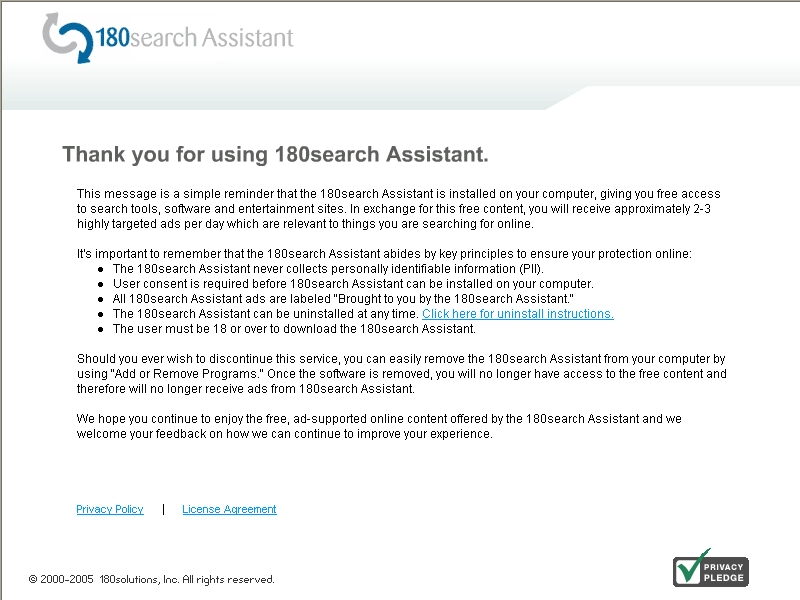
180 Notification Screenshot180 Notification Screenshot

A reporter yesterday sent me a screenshot of 180’s planned notification. I see at least seven problems with the screen’s text:

1. 180’s notification screen fails to affirmatively state what 180 does — its popups or its privacy effects. 180’s first two sentences disclose that something called “180search Assistant” is installed, and that it will show “ads.” But nowhere does 180 disclose that the ads appear in popups — an advertising format known to be particularly objectionable, and therefore particularly important to bring to users’ attention if users are to offer genuine consent. In addition, nowhere does 180 disclose the important privacy effects of installing 180 software — that 180 will track what web sites users visit, and send much of this information to its servers. The importance of these omissions can’t be overstated: If 180 fails to disclose what users are purportedly accepting, no valid “consent” can result.

2. 180 claims to “giv[e] you free access to search tools, software and entertainment sites.” This claim is false, in that for many users 180 provides no such thing. Consider a user who receives 180 software without notice or consent. 180 might allow access to special entertainment sites that are otherwise unavailable. But this ability is of no benefit if users don’t know they have 180, didn’t ask for 180, aren’t told what special sites they can access, and in any event don’t want to access such sites.

3. 180 claims to show “approximately 2-3 highly targeted ads per day.” This claim is false, in that many users will receive many more ads per day. Perhaps an average user gets only a few ads per day, when averaging includes all the users who don’t use their PCs on many days, or who don’t use their web browsers. But in even limited web browsing, I consistently receive far more than three 180 ads per day.

4. 180 inexplicably claims that “user consent is required before 180search Assistant can be installed.” This claim is absolutely false. 180 is often installed without any consent at all. See videos on my site (1, 2, 3) (dozens more on file). 180’s own staff have repeatedly admitted that nonconsensual installations occur (1, 2, 3, 4). After these many admissions, I don’t understand how 180 can now argue that users have “consent[ed]” to its installation. Indeed, the entire premise of 180’s re-notification program is to make up for prior nonconsensual installations!

5. 180 claims that “all 180search Assistant ads are labeled…” This is false. As 180 staff have previously admitted, advertisements with redirects erase 180’s ad labeling.

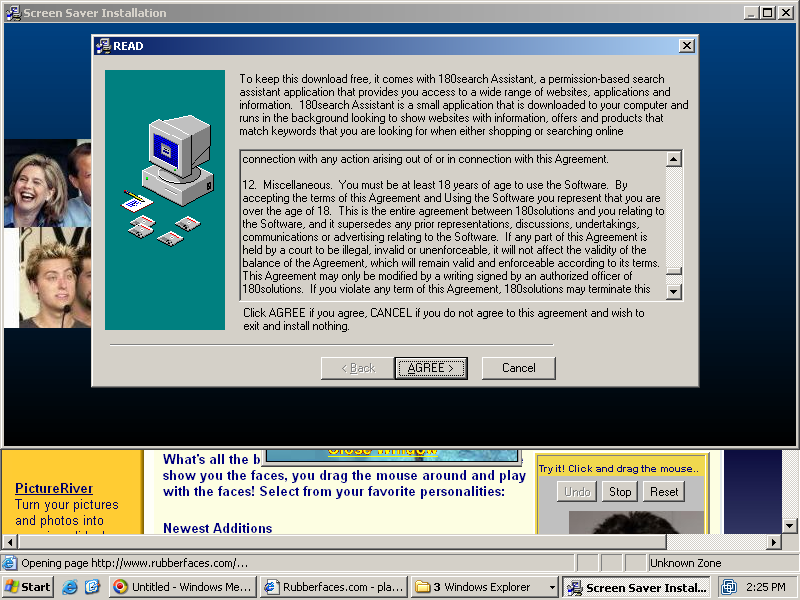
6. 180 claims that “the user must be 18 or over to download.” Again, false. In fact, 180 software is widely offered on kids sites, where users are unlikely to be over 18. (Example.) Some 180’s installations mention a requirement of user age, but this provision is typically exceptionally hard to find. For example, in one screensaver I tested today, the user-age provision was on page 18 of 180’s license, in the next-to-last paragraph, captioned “Miscellaneous.” (Screenshot.)

7. 180 concludes by claiming that “You can easily remove the 180search Assistant … using ‘Add or Remove Programs'” False. The removal isn’t “easy,” for at least two reasons.

i. Finding 180 is surprisingly difficult. 180 often places its entry in tricky locations within the alphabetical Add/Remove listing — like under “U” for “Uninstall 180search Assistant,” rather than a more natural “1” for “180search Assistant.” Users cannot reasonably be expected to look under “U” in search of 180’s entry. On a new PC with a short Add/Remove list, users will still typically find 180’s entry. But on a long and crowded Add/Remove list, on a typical heavily-used PC, it’s anything but “easy” to find 180.

ii. 180 discourages removals using various false and misleading statements. See my prior analysis, finding numerous dubious claims in 180’s uninstall procedure, as well as confusing window design that further discourages removal. For example, 180 falsely claims that removing its software “will disable any Zango-based applications” — even when no such applications have been installed.

Combining these factors, 180’s uninstall procedure is not properly characterized as “easy.” 180 does know how to make “easy” procedures: When 180’s software is installed with one click (or even with zero!), the procedure is remarkably simple. But 180 has taken affirmative steps to make removal harder.

Problems with 180’s Notification Procedure: Failing to Request or Obtain Consent

180’s press release claims that its new notification screens will “ensure each user … has provided informed consent.” I disagree. As I look at 180’s notification text, 180’s notification actually won’t obtain any consent at all.

As a threshold matter, 180’s notifications apparently will be shown in ordinary Internet Explorer popup windows. Seeing these popups, typical users will seek to close them as quickly as possible — finding them irrelevant, unwanted, and annoying. The ordinary IE presentation format is not conducive to obtaining consent. It’s certainly not well-equipped to get the “informed consent” 180 purports to seek.

Most seriously, 180’s notification text does not seek or require any manifestation of user agreement or approval. In fact, 180’s screen doesn’t say anything about consent: It doesn’t require users to click a button to indicate acceptance of 180’s terms; it doesn’t require users to click a button to keep 180 software on their PCs. Rather, 180’s software stays installed unless users figure out how to remove it. Failure to remove 180’s software certainly can’t be claimed to constitute “consent” to keep it installed. So where’s the “consent” in 180’s notifications?

If 180 really wants informed consent, it could do a lot better. Rather than write its notification screens in marketing-speak, full of euphemisms and half-truths, 180 could write its notification in the formal and calm language used in disclosures elsewhere. I’ll even give 180 a few free sentences. First, 180 should accurately describe its software:

“Your computer is running 180solutions advertising software. 180 will track what web sites you visit, and 180 will show you pop-up ads accordingly. On average, users receive several ads per day, but you may receive more or fewer, depending on how often you use your web browser and depending on what web sites you visit.”

180 would accompany this text with an image showing a representative pop-up ad.

Next, 180 would proceed to explain how its software got installed, and what users can do to keep it or to remove it:

“180 software may have been installed on your computer with your consent or with consent of another user of your computer. 180 may have become installed without consent. You may elect to keep 180 software on your PC, or you may choose to remove it without penalty.”

Finally, 180 would include a one-click button to uninstall its software immediately, along with another button that indicates users’ consent to keep 180 installed.

If 180 included notice of this form — unbiased truthful sentences, that fairly and frankly disclose 180’s true effects — users might be able to make an informed decision to keep 180’s software. But where 180’s “disclosure” is loaded with euphemisms and falsehoods, offering only a convoluted uninstall procedure, it’s hard to say 180 has obtained “informed consent.”

180’s New Installation Stubs: Half-Truths and Omissions

180’s press release claims that its new “technology enhancements” will make it “harder” for 180 software to be installed “covert[ly].” Perhaps. But what happened to the standard of “informed consent” (so prominent earlier in 180’s press release)? 180’s change in wording — from “informed consent” to avoiding “covert” installations — may be surprisingly important. I agree that 180’s new installation procedure isn’t covert. But neither does it yield informed consent.
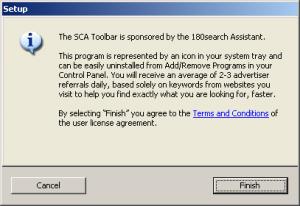
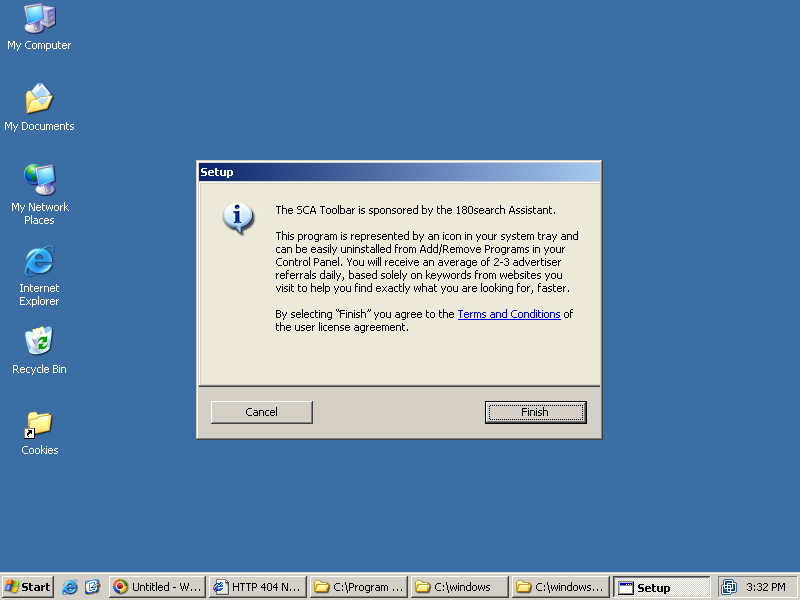
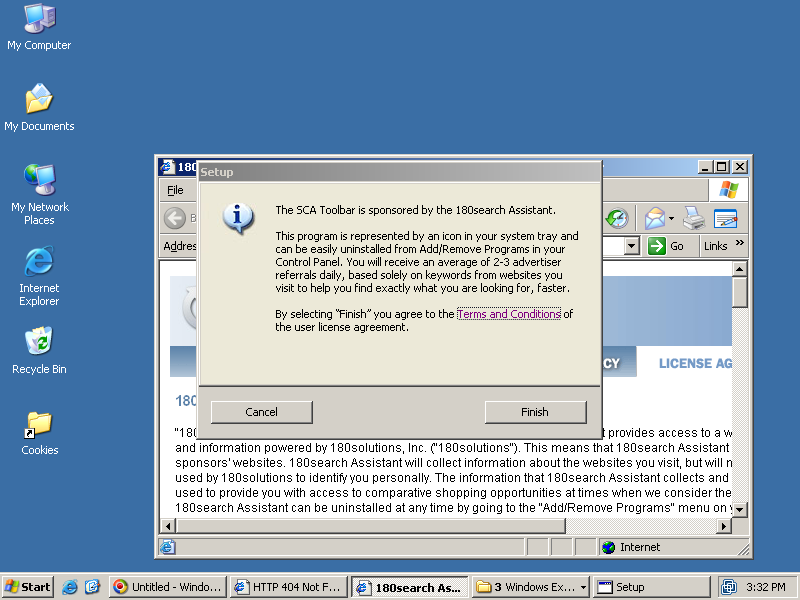
180 stub installer - initial screen - failing to mention that 180's ads are pop-ups, failing to mention privacy effects 180 Stub Installer – Main Screen

180 installer screen covers license agreementInstaller Covers & Obscures License Agreement
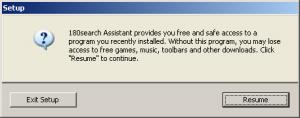
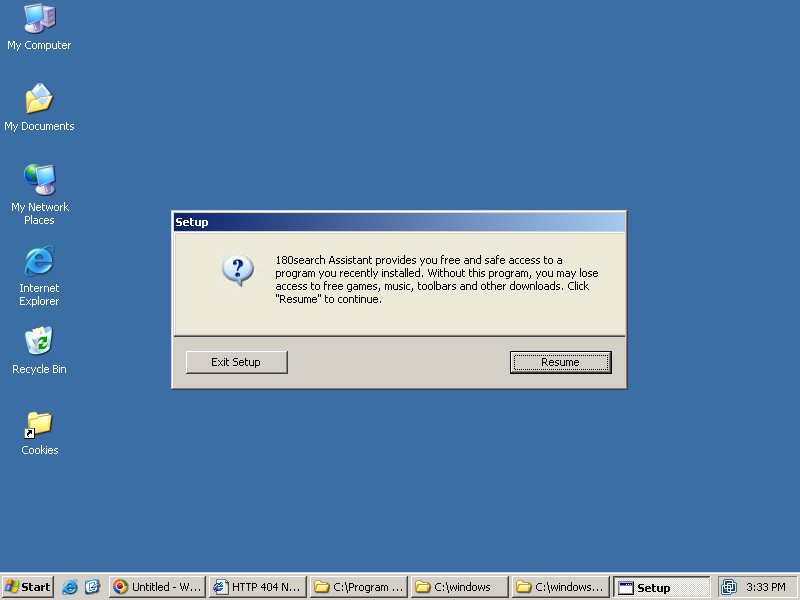
180 installer -- second screen if  users initially decline.  Pressing "Resume" causes installation to proceed immediately, without any further opportunity to review 180's license or to decline installation. Secondary Installer Screen – If User Initially Declines

My understanding is that the “enhancement” at issue is a stub installer like that shown at right. 180’s distribution partners currently distribute a full copy of 180 software. But in the future, apparently they’ll only distribute a stub. Currently, 180’s partners are asked to obtain consumer consent for the installation of 180 software; under the new approach, 180 itself will obtain consent. If properly implemented, this approach might prevent many wrongful installations. Unfortunately, I’ve seen little sign that 180 has designed this system in a way that obtains meaningful consent.

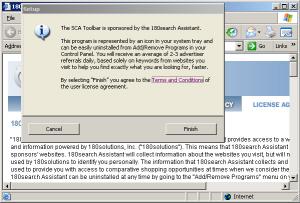
Last week I was testing a security hole exploit which installed more than a dozen programs on my test PC without any notice or consent. Among the unrequested screens appearing on my test PC was the image shown at right (top). This first screen apparently seeks my consent to install 180 — but like the 180 notification described in the preceding sections, nowhere does this screen explain 180’s relevant characteristics and effects. The screen mentions “180search Assistant” and “2-3 advertiser referrals” — but nowhere does it mention that 180’s “referrals” are actually pop-up ads. The screen says that referrals will be “based … on … websites you visit,” but it fails to disclose that website visit data will also be sent to 180’s servers. So the screen fails to mention the relevant facts users need to know in order to grant informed consent.

180’s stub installer does mention an external license, available via a blue link from within the stub. I clicked the link and received the image shown in the second screen at right. Notice the web browser showing 180’s license — in a small window, requiring eight screens to view in full. Worse, although I had clicked the “Terms and Conditions” link to request the license, 180’s large stub installer still largely covered the license. It was extraordinarily hard to read the license, even when I maximized the license to fill the rest of the screen, because roughly half of each line of text was covered by the stub window. (Notice that the license window is “active” (blue title bar highlighting) while the stub “Setup” window is “inactive” (grey).) This is not a one-time fluke; to the contrary, the stub consistently remains on top of the license (and all other windows), contrary to Windows standards. Savvy users may realize they can move the stub out of the way by dragging its title bar. But the ordinary windows Minimize button is missing from the stub’s window, eliminating the easiest way to hide that screen.

On one test PC, I pressed “Finish” in the stub, and 180 installed immediately.

On another test PC, I mimicked the choice of a user who didn’t want 180. I pressed “Cancel” in the stub, and I was then shown the third screen at right. This window claims that “without [180], [a user] may lose access to free games, music, toolbars, and other downloads.” This statement may be accurate as to some installations, but in the security exploit I received last week, I had requested no games, music, toolbars, or other download — so there could be no loss of access in the way the dialog box claimed. This statement was therefore false, as applied to me.

Consider a user who presses “Cancel” in the first screen, but then decides to give 180 a second chance on the strength of the second dialog. When the user presses “Resume” in the second box, the user has not yet accepted 180’s license agreement — probably failing to read it initially (since the user decided to press Cancel, not wanting 180) and certainly failing to accept it. Nonetheless, 180 immediately installs, without offering any further opportunity for a user to access the license or to decline installation. So in 180’s view, the “Resume” button in the second box actually means “I accept the license linked from the prior box but not available on this screen.” That’s a tall order — certainly not what the box plainly says, or what typical users will expect to occur if they press Resume.

Here too, 180 could do much better. 180 could provide a clear description of its effects, using ordinary terms (“pop-up ads”) users can readily understand. 180 could present its installation request with appropriate branding — colors, logo, font, and other characteristics that match 180’s other marketing material. 180 could present its license in a way users can readily read. And 180 could refuse to install when user consent is at best ambiguous (“resume”).

180 is promoting this “stub” installation procedure as a solution to nonconsensual installs. If all 180’s distributors switch to this new installation method, perhaps fewer distributors will be able to infect users in complete silence. But the stub’s tricky text and poor disclosures mean users will still receive 180 software without being fairly told what it is and what it will do to their computers. That’s a far cry from the “informed consent” 180’s press release promises.

Telling the Truth about Installation Tactics

Installation practices occupied center stage at last week’s CNET Download.com‘s anti-spyware conference. Many of the companies whose installation practices I’ve criticized attempted to defend those practices or deflect attention from them. But their explanations and excuses don’t stand up to critical examination.

Does Claria Target Kids? Take Two…

At the CNET conference, I showed my slides of Claria’s misleading ads on kids sites. The audience seemed to think the slides are pretty damning: Claria shows an ad that looks like a Windows dialog box, though it’s not; Claria offers a clock-synchronizing program (which Windows XP users don’t need); Claria installs software with just two clicks; and Claria doesn’t show a license until after the user accepts the installation. All this, on sites targeted at kids — sites with privacy policies that say so, in case the cartoon graphics, simple language, and underlying content (often cartoon video games) weren’t clear enough.

Claria’s CEO, Jeff McFadden, responded in part by claiming that the Ezone site (the example I focused on) isn’t really targeted at kids:

“… There’s a second thing that was mentioned, that this is a kids site. I’m not sure what homework was done on this, because there’s an IDC report that says that online gaming sites, the average age of people who visit those sites is 29. I don’t know if anyone has done a demographic study of this particular site. I was shocked to find that even the Neopets web site that my daughters at home use quite frequently has a very large constituency of housewives that use the site. So we do not ‘target’ kids sites. … ”

conference archive, session 2 recording (MP3), from 1:05:00 to 1:12:38 (excerpt – WindowsMedia), in response to my question at 55:50 to 57:50 (excerpt). See also panelists’ responses at 57:50 to 1:05:00 (excerpt).

IDC may be right that the average age of gaming site visitors is 29. But I doubt demographics are similar at cartoon video game sites like Ezone. With titles like “Beetle Junior” and “Turtle Bay,” it’s hard to think the sites could retain a major adult audience.

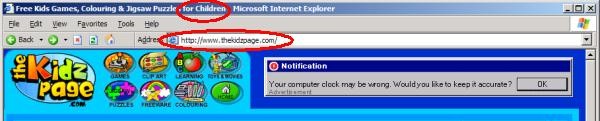
What would it take to convince Jeff that the Ezone site really does cater to kids, and that it isn’t an appropriate place to solicit new installations of Claria’s advertising software? Last month I posted several other examples of Claria ads on (what I claim to be) kids sites — not just Ezone, but also a site called Fingertime Games (“lunar mouse house,” “junk food jack” and other games). Today I’m adding one more, which I think is even more clearly targeted at kids. For starters, the site is called Kidzpage — its very name a play on “kids.” Its title bar and “welcome” text both say it’s “for children.” Its advertisement pitch specifically says it’s “for kids and adults … family and students … school-aged children along with the ‘grown-ups’ who supervise them.” It’s linked from Yahooligans (Yahoo for kids). Can anyone seriously dispute that users obtained at such a site will include kids who didn’t know what they were getting, and who couldn’t reasonably consent?

A Claria ad within a site catering to kids.  Note cartoon-style graphics and lettering.  Note "for children" within title bar.

Beyond targeting kids, there’s plenty more wrong with this Claria installation method. See my earlier write-up for discussion of fake-user-interface, unneeded programs, and failure to show a license until after installation occurs. See also Eric Howes‘s Adware Installations of 2005, showing other Claria installations with similar shortcomings.

Ask Jeeves’ Problems: Non-consensual Installations, Semi-consensual Installations

Installation practices seem to be a question that IAC CEO Barry Diller doesn’t fully understand, or at least doesn’t care to talk about. In an earnings call last week, he said AJ “doesn’t have an issue with either spyware or adware.” But more than denying that AJ faces exposure here, Diller didn’t even want to discuss the matter. He continued: “It is an issue, obviously, but it is not our issue. And that’s that. Next question, please?”

Diller is right that the AJ toolbars aren’t either spyware or adware (as I use the terms). After all, the AJ toolbar doesn’t obviously collect much information about what users do (though I don’t fully understand all of AJ’s transmissions). And the AJ toolbar doesn’t show the annoying pop-ups common to most “adware.” (That said, AJ’s toolbar leads users to web pages with lots of PPC ads syndicated from Google. So if some AJ installations are wrongful, remember that Google revenues are ultimately funding AJ’s activities. Google staff tell me they’re “looking into it.”)

But Diller is wrong to so quickly conclude AJ has no problem here, merely because AJ doesn’t make spyware or adware. If AJ software is becoming installed through security holes w/ no notice or consent (it is), and if AJ is offering payments to those who perform these wrongful installations, AJ has a problem no matter how praiseworthy AJ’s software may be. Similarly, if AJ is installing without showing or even referencing a license, while using euphemisms that fail to properly disclose even the most general effects of the programs to be installed (again all true), AJ has a lot to improve. Same if the AJ license agreement is buried at page 48 of a license agreement users aren’t even shown unless they specifically request it (see Kazaa installer).

The basic legal theory — clearly articulated in the NYAG’s complaint against Intermix — is that users ought to control what software runs on their computers. So installations are only proper when they occur with user consent, after clear and straightforward disclosures. Omit the disclosures, or phrase them so euphemistically that users can’t reasonably understand, then the software installation becomes a trespass.

I don’t always agree with Marquette professor Eric Goldman. (In particular, I can’t agree with his calls for narrow liability for actions of distributors and advertisers. This seems like a recipe for unaccountability and for rewarding bad actors. Eric’s approach would encourage “adware” vendors to look the other way when their software is installed wrongfully, and would give a free pass to those who advertise through software installed improperly.) But interestingly Eric and I seem to see AJ the same way — the key question being whether AJ’s installation disclosure and consent is up to par.

180solutions Continues to Become Installed Without Any Consent At All

Representatives from 180solutions made the sensible decision not to claim, within the official CNET conference sessions, that their programs install only with consent. After all, I had screenshots and videos providing the contrary.

But in a video interview made mere minutes before, 180solutions COO Daniel Todd told Dow Jones Marketwatch that “180solutions does not install software on people’s computers without consent.” Only upon further pressing by the interviewer does Todd back-peddle, admitting that some 180 distributors install 180 software with “no consent” or without (what Todd considers) adequate consent.

So Todd admits that some 180 installs are nonconsensual. Yet 180’s web site continues to claim that its software is “permission based” and “only downloaded with user consent.”

Which one is right? My November and March videos show nonconsensual 180 installations in great detail. (I’ll post still more videos in the coming weeks, as to 180 as well as Direct Revenue, eXact Advertising, and many others.) So Todd’s ultimate admission is accurate. Not so for the “only … with … consent” promises on 180’s web site.

Todd later stated that 180 has 7,000 to 10,000 distributors. That’s a huge number — it underscores the practical difficulty of 180 performing meaningful oversight of what its distributors are doing. With so many installation “partners” and so little enforcement or quality control, 180 has created a monster. Who’s going to fix it, and when?

Direct Revenue Commission Skimming

In my final visit to the CNET Q&A microphone, I mentioned Direct Revenue “skimming off the top” — invoking affiliate commission links to claim commissions on purchases users were already making. I previously documented this same behavior by 180solutions — finding it surprisingly widespread, yet reportedly an easy way to make money. (Last year 180 told MSNBC that it made more than $100,000 from Dell in just one month in late 2003.)

Direct Revenue’s commission-skimming was relatively easy to spot — with telltale signs in users’ cookies folders, not to mention noticeable popunders and, as usual, clear records in packet sniffers. So I was pleased to learn that affiliate network Commission Junction has already noticed this scam and, reportedly, taken action. So perhaps there’s less need for me to post the various videos, screenshots, packet logs, and other proof I’ve been accumulating. Instead, I’ll soon be focusing on reporting DR advertisers — some shocking examples, like American Express ads continuing to target kids sites.

Misleading Installations of the Week: PacerD, and Claria’s Dope Wars

It’s Monday morning, so time for more misleading installations. Just like last week, I couldn’t stop at only a single example; again I’m providing two.

PacerD’s misleading pop-ups ask users to “please click yes” to accept “free browser enhancements.” In fact what PacerD offers is an unusually large bundle of a dozen different programs, only some of them disclosed in fine print in PacerD’s mislabeled (apparent, purported) license agreement, which in turn is only shown at a user’s specific request. But click “Yes” once, and your computer will take a turn for the worse, with no subsequent opportunity to cancel.

The PacerD Installation Bundle

As usual, Claria’s approach is somewhat more subtle. When Claria bundles its advertising software with the “Dope Wars” video game, Claria prominently tells users that it will deliver advertising. But Claria mentions effects on privacy only midway through a 43-page license agreement, that begins with three tedious pages of all-caps text. My sense is that few “Dope Wars” players are likely to wade through this lengthy license. So if Dope Wars users install Claria, they’ll do so without first understanding what Claria will do to their PCs.

Claria’s Misleading Installation Methods – Dope Wars

On some level, these two installations could hardly be more different. PacerD installs a dozen programs from numerous different companies; Claria installs just one. PacerD shows a popup while users are just trying to surf the web; Claria’s interruption comes as users are trying to install software they actually want. But in relevant respects, I think these installations are surprisingly similar. For one, both seek to convert users’ computers into advertising channels — tracking what users do, and showing extra advertising. Also, both installations tell users something about the programs they are asked to accept, and both give savvy users an opportunity to learn more, but in each case the prominent on-screen text omits important facts users need to know in order to make sensible choices.

Misleading Installations of the Week: Claria and 180 at Kids Sites

“Adware” companies say their businesses are predicated on user consent. (Claria: “… consumers who agree … “; 180: “permission-based … opt-in”). Notwithstanding, companies’ claims, there’s no doubt that this kind of advertising software is sometimes installed without consent. See the video I posted last year.

But what about those users who supposedly do consent to receive extra pop-ups? Why did they agree to receive extra advertising that so many other users seem to despise? My sense is that users often don’t understand what they’re getting — due to serious deficiencies in installation disclosures. In two new articles, I examine and analyze the installation procedures of Claria and 180, raising doubts as to whether users reasonably knew what would happen when they “accepted” these programs.

Ezone.com, a site targeting children, that nonetheless promotes 180solutions.Can we say that a user “consents” to an installation if the installation occurred after a user was presented with a misleading advertisement that looked like a Windows dialog box? If that advertisement was embedded within a site substantially catering to children? If that advertisement offered a feature known to be duplicative with software the user already has? If “authorizing” the installation required only that the user click on an ad, then click “Yes” once? If the program’s license agreement was shown to the user only after the user pressed “Yes”? These are the facts of recent installations of Claria software from ads at games site Ezone.com.
Details: Claria’s Misleading Installation Methods – Ezone.com

Turning to 180: Can we say that a user consents to an installation of advertising-display software where that installation is prominently described as removing advertisements? Where the installation description uses euphemisms like “show … sponsor websites” but never explicitly states that the program will show advertisements or pop-ups? Where the installation procedure never shows or even references a license agreement? And where all this occurs at sites catering to children?

Details: 180solutions’s Misleading Installation Methods – Ezone.com

Lots of companies want to take advantage of users who may be a bit confused, a bit naive, or a bit too quick to click yes. But where users are recruited at sites catering to children, where ads look like Windows messages, or where installation requests resort to misleading euphemisms, I’m not inclined to say that consumers “consent” to the resulting ads and to the resulting transmission of personal information.

New Series on Spyware Installation Methods

So-called “adware” companies say nonconsensual installations of their programs are just an “urban legend.” (See section 7 of 180’s claims in a recent interview.) But when I talk to users whose computers have become infected, I’m consistently told that they don’t know how they got the unwanted programs, and they say they certainly didn’t consent. How can we understand this divergence? How are users PCs receiving this unwanted software?

My new Spyware Installation Methods sets out a taxonomy of the ways unwanted programs sneak onto users’ computers. Some installations rely on tricking users — for example, showing confusing popups, or claiming or suggesting that an installation is required to view a web site. Others install unwanted software in bundles with programs users actually want — sometimes telling users what they’re getting in fine print midway through long licenses, but sometimes not even including these minimal disclosures. Finally, some spyware sneaks in through security hole exploits — without any user consent at all, thanks to defects in users’ web browsers or other software. (See the security hole video and write-up I posted last fall.)

There’s lots to be done in documenting how unwanted software gets onto users’ PCs. My Installation Methods page indexes my work to date, to the extent it’s posted online. But I have much more documentation still to be posted — for example, scores more videos showing security exploits. I’ll be making additions in the coming months, as I find better ways to present this work clearly and efficiently, and as I find clients or other revenue sources to help support this work. (I’m still looking! Send suggestions.)


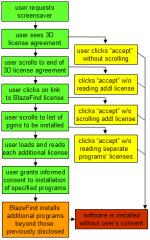
Diagram of the steps users must follow in order to attempt to learn what software 3D and BlazeFind will install on their PCs.  Even diligent users ultimately have no way to know in advance what 3D will install on their PCs.Diagram of the steps users must follow in order to attempt to learn what software 3D and BlazeFind will install on their PCs.

Today I’m also starting what I intend to be a series of weekly updates to my site — tentatively entitled “misleading installation of the week.” Sometimes I’ll show massive security hole exploits that render users’ computers nearly useless, but sometimes I’ll post more “ordinary” infections that “merely” show extra ads or send users’ browsing habits to a remote server. At every turn I’ll emphasize the trickery common to most installation methods — the ways that substance (e.g. material omissions, euphemisms, confusing circumstances) and style (e.g. on-screen presentation format, window size and shape, link format) cause users to “accept” software that offers them little or no genuine benefit.

I’m starting this series with an analysis of software from 3D Desktop. 3D’s Flying Icons Screensaver bundles BlazeFind, which in turn bundles 180solutions and half a dozen other programs. To learn what’s included, users must puzzle through a dizzying array of licenses — scroll through one license to find a link to another; scroll through that agreement to find the URLs to others; perfectly retype those URLs; then read each of the resulting licenses. But even if users follow this lengthy procedure, 3D and BlazeFind will ultimately install programs beyond the programs the licenses specifically name. So even diligent users have no way to know in advance what 3D will do to their PCs. Plus, BlazeFind is overzealous in its claims of privacy protection: BlazeFind says the programs it installs don’t track users’ behavior, but my hands-on testing proves otherwise. Details:

3D Desktop’s Misleading Installation Methods

Interestingly, BlazeFind’s license mentions that BlazeFind is a product of CDT, a software distribution company recently purchased by 180solutions. 180 says the CDT acquisition is part of its effort to “clean up” its distribution methods. With practices like these, they certainly have plenty of work ahead. See also a recent Spyware Warrior analysis of other 180 claims and practices in need of correction or improvement.

How Google’s Blogspot Helps Spread Unwanted Software

Google claims to be on the right side of the spyware problem. Its May 2004 Software Principles set out lofty (if somewhat vague) standards for installation notice consent. Its Google Toolbar installer gives impeccable disclosure and obtains true, meaningful, informed consent. (See page 7 of my FTC Comments (PDF).) And Google is a victim of spyware: I’ve tested and studied a number of programs that add bogus search results and advertisements to Google.com results, tarnishing Google’s brand and siphoning advertising revenues that would otherwise accrue to Google.

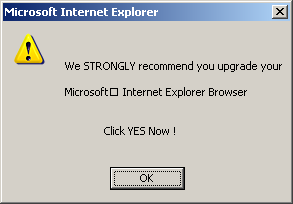
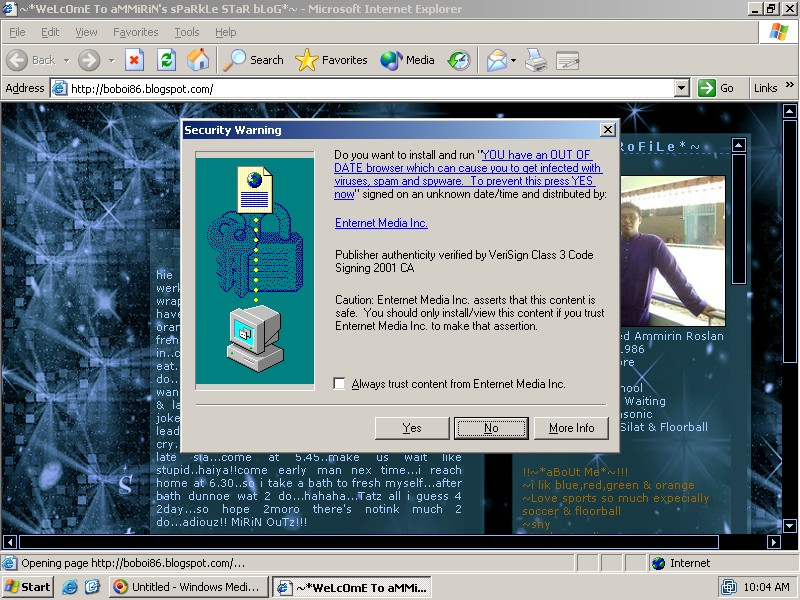
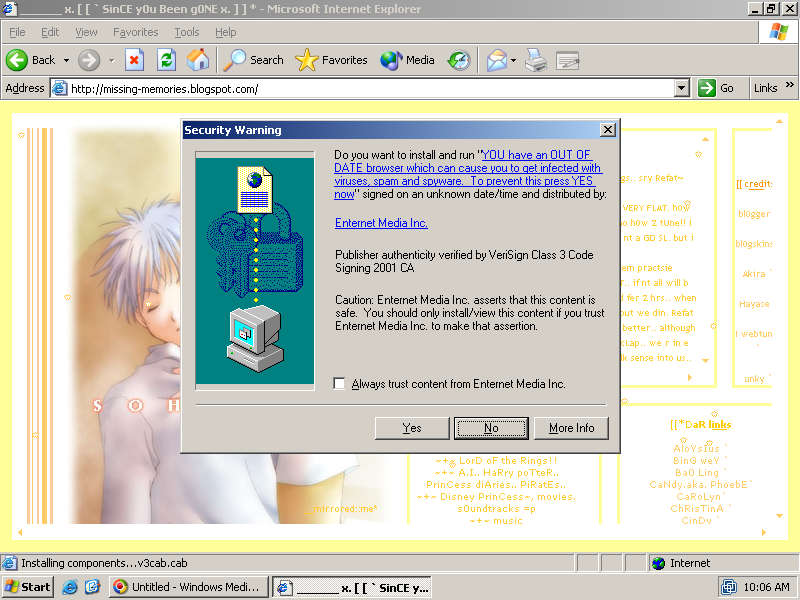
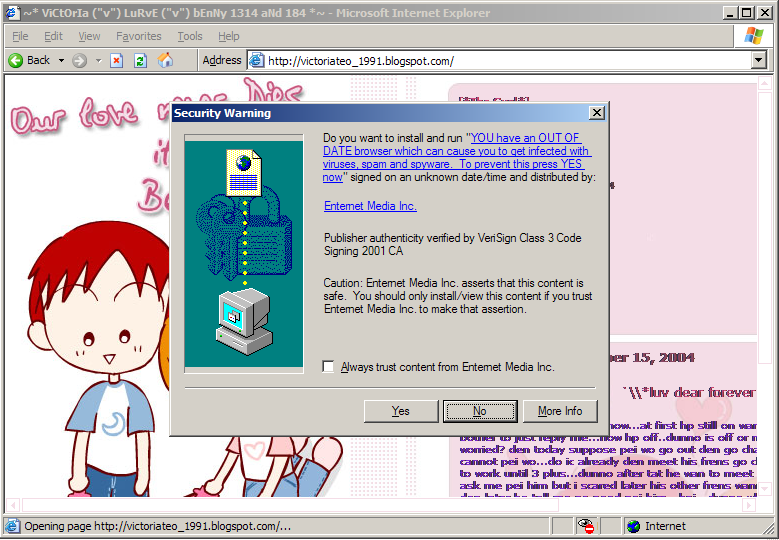
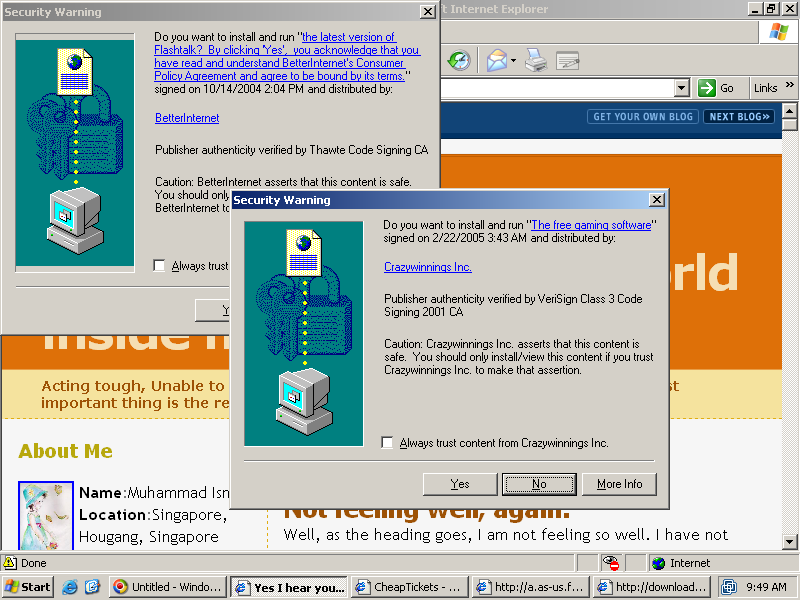
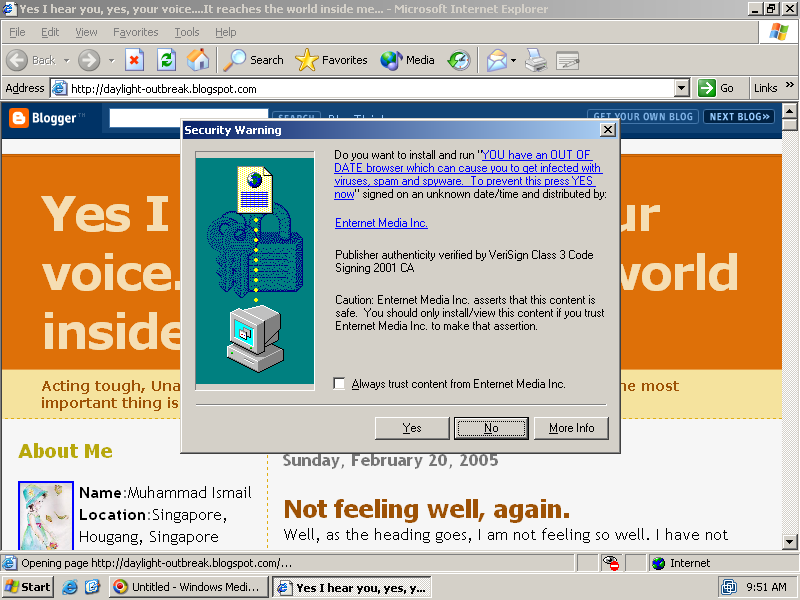
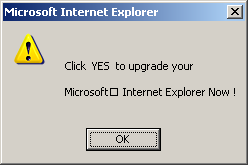
Yet Google is far from blameless in the spyware battle. Of particular concern: Numerous blogs hosted at Google’s Blogspot service contain JavaScript that tries to trick users into installing unneeded software. At one such blog, users are offered a misleading popup that falsely claims "You have an out of date browser which can cause you to get infected with viruses, spam, and spyware. To prevent this, press YES now." If a user declines, the user is shown a second popup instructing "Click Yes to upgrade," followed by the first popup again. If the user declines a second time, a further popup claims "We strongly recommend you upgrade … Click YES Now!" See screenshots below.

A misleading installation attempt shown on a Blogspot page. A misleading popup attempting to encourage users to accept a misleading installation attempt shown on a Blogspot page. A misleading popup attempting to encourage users to accept a misleading installation attempt shown on a Blogspot page.

If a user presses yes, the user receives certain extra software, often including software that many users would call spyware. The screenshots above show an attempted installation of Elitetoolbar. I have also observed similar popups attempting to install software from Crazywinnings (repeatedly falsely claiming "you have to click yes to continue" if users initially decline the installation) and from Direct Revenue. See a video of the repeated Crazywinnings installation attempts. See also additional screenshots (1, 2, 3, 4) of other software installations and/or other infected Blogspot pages.

Who’s Responsible, and Who’s Able to Stop This Mess?

The popups at issue come from a service called iWebTunes.com. iWebTunes recruits blog authors by giving them music to add to their blogs or other web sites. But as users view the resulting blogs, iWebTunes shows software installation popups to attempt to foist extra programs onto users’ computers. These programs likely pay iWebTunes a commission for each resulting installation.

Users have reported unwanted software offered by Blogspot sites since at least September 2004. See a September 15, 2004 blog post complaining of spyware received from iWebTunes. I reported these problems to Google staff last week, including a specific example of an infected site. But so far Google has taken no action to stop the misleading popups on this site or others. A recent Blogspot tech support response admitted the problem, at least generally, but offered no specific approcah or timetable for resolution.

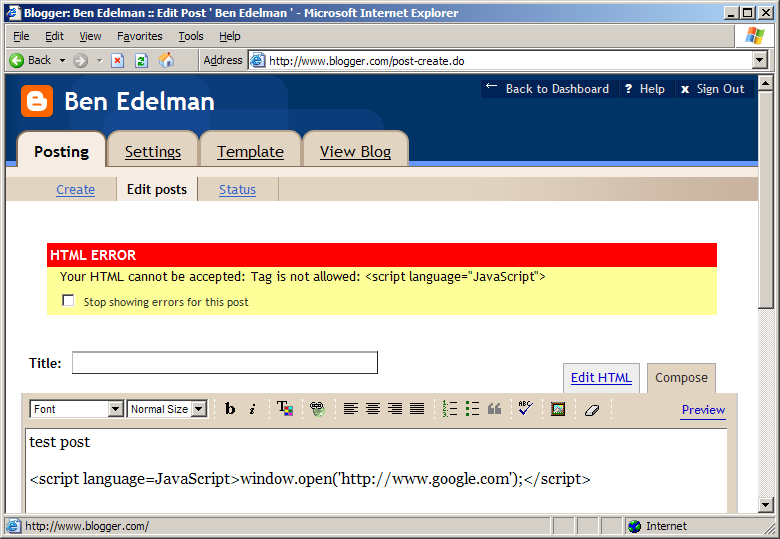
What should Google do? Google already disallows JavaScript within Blogspot.com posts. (Screenshot.) Apparently Google considers embedded JavaScript too risky — too likely to trick, deceive, or otherwise take advantage of users. But Google oddly allows JavaScript to be added to Blogspot headers and navigation bars. This decision should be reversed. Disallow the JavaScript interface by which iWebTunes gets added to Blogspot pages, so Blogspot pages can no longer trigger misleading JavaScript and ActiveX popups from iWebTunes or elsewhere. Of course some JavaScript code is entirely harmless — like the scripts that embed Google AdSense ads, comments, or polls. But Google should hesitate to permit JavaScript from unknown or known-hostile sources.

So Google is in a natural position to stop this problem. But it’s not the only company that could take action here. As I pointed out earlier this month, VeriSign plays a key role in authorizing ActiveX security warnings like that shown above: The misleading popups are only shown if they carry valid digital certificates, and VeriSign is the primary issuer of such certificates. VeriSign’s existing rules disallow using VeriSign-issued certificates “to distribute malicious or harmful content of any kind … that would … have the effect of inconveniencing the recipient.” I consider the programs above to be harmful for their addition of unwanted software including toolbars, silent auto-updaters, and systems that track and transmit certain personal information. Especially when combined with the popups’ false claims ("… out of date browser" and "you have to click yes") and especially in light of the other misleading circumstances of installation, I see ample basis to conclude that the popups are malicious. These software installation attempts are therefore arguably prohibited by existing VeriSign rules. But I’ve seen little sign of VeriSign acting to enforce its rules. VeriSign’s code signing site offers no obvious standards or procedures for assessing or reporting violations.

More on Google and Spyware: Sponsored Link Advertising from So-Called Spyware Removers

These misleading Blogspot popups are not Google’s only ties to spyware companies. Eric Howes has posted a warning he calls Google & Anti-Spyware Products: Be Wary of Paid Search Results. Eric and others have put together a list of “rogue/suspect” anti-spyware applications that are at best useless (failing to detect or remove bona fide spyware) and at worst malicious (installing new spyware of their own). Comparing current Google advertisers for a search on "spyware" with Eric’s impressively detailed list yields surprisingly numerous matches.

According to Google’s Software Principles, companies should "keep good company" by avoiding doing business with those who don’t meet ethical standards. Yet Google somehow continues to show ads for — and accept advertising payments from — companies whose supposed anti-spyware tools merely take advantage of users’ spyware worries. Google has made some progress at cleaning up the most dishonorable advertising for anti-spyware searches, but its AdWords advertising remains a poor, unreliable source for consumers to find reputable, high-quality anti-spyware applications.